<?xml version="1.0" encoding="utf-8"?><feed xmlns="http://www.w3.org/2005/Atom" xml:lang="en"><generator uri="https://jekyllrb.com/" version="3.10.0">Jekyll</generator><link href="https://akluev.github.io/feed.xml" rel="self" type="application/atom+xml" /><link href="https://akluev.github.io/" rel="alternate" type="text/html" hreflang="en" /><updated>2026-09-28T18:00:13+00:00</updated><id>https://akluev.github.io/feed.xml</id><title type="html">Alex on APEX</title><subtitle>Articles by Alexander Kluev about Oracle APEX, SQL, PL/SQL, SQLcl, Git, CI/CD, generative AI, and practical software development.</subtitle><author><name>Alexander Kluev</name></author><entry><title type="html">APEXlang vs SQL Deployment: The Network Path Determines the Winner</title><link href="https://akluev.github.io/blog/2026/09/18/apexlang-vs-sql-deployment-the-network-changes-the-winner/" rel="alternate" type="text/html" title="APEXlang vs SQL Deployment: The Network Path Determines the Winner" /><published>2026-09-18T00:00:00+00:00</published><updated>2026-09-18T00:00:00+00:00</updated><id>https://akluev.github.io/blog/2026/09/18/apexlang-vs-sql-deployment-the-network-changes-the-winner</id><content type="html" xml:base="https://akluev.github.io/blog/2026/09/18/apexlang-vs-sql-deployment-the-network-changes-the-winner/"><![CDATA[<p><img src="/assets/images/2026-09-18/two-cats-sleeping.jpg" alt="Two cats sleeping on different levels of a cat tree" /></p>

<blockquote class="callout callout-question">
  <p><strong>Two cats today</strong></p>

  <p>In my last post, I introduced a simple rule: every post gets a cat photo, and a particularly important post gets two cats. Both are here today, so you know how I feel about this one.</p>
</blockquote>

<p>That second cat points to a question I think matters: <strong>When deploying an APEX application, should we import APEXlang files or run the conventional SQL export?</strong> SQLcl Project 26.2.2 now gives us both options in a Project deployment. I call them the APEXlang import and the SQL import throughout this post. To find out what makes one faster, I timed the direct SQLcl import commands and wrote a <a href="https://github.com/akluev/realSQLclProject/blob/main/docs/APEXlang/17.-APEXlang-vs-SQL-Deployment-Performance.md" target="_blank" rel="noopener noreferrer">rather detailed technical article</a> about the tests.</p>

<p>I also installed Google Analytics on this site. Sorry if you did not want to be tracked, but it was for your own good, okay? It tells me the average engagement time on this blog is <strong>29 seconds</strong>. If that sounds like you, here is the short version.</p>

<h2 id="tldr">TL;DR</h2>

<ul>
  <li>
    <p>To find out what was going on, I traced both imports in the database and examined them with TKPROF. They create much the same APEX components, but APEXlang made about <strong>five times fewer trips between SQLcl and the database</strong> while making <strong>about three times as many database calls</strong> and spending <strong>about twice as much time on database SQL work</strong>. That made me suspect the network might decide which one was faster, while database load might matter for a very large or parallel deployment.</p>
  </li>
  <li>
    <p>It did. When I connected from my workstation over a VPN to an OCI database, <strong>APEXlang won at every application size I tested</strong>. When I ran SQLcl from an OCI compute node close to that <em>same database</em>, SQL was significantly faster for the larger applications. At 314 pages, the nearby SQL and APEXlang imports took <strong>5.5 and 14.5 seconds</strong>; over the VPN, they took <strong>56 and 35 seconds</strong>. The route from SQLcl to the database mattered more in these tests than the database’s size.</p>
  </li>
  <li>
    <p>I also checked whether SQLcl needs ORDS to import APEXlang. It does not: SQLcl includes the APEXlang compiler and imports over its database connection even when ORDS is stopped. SQLcl also appears to reuse APEXlang compiler work within the <strong>same SQLcl session</strong>. In a separate validation test, running smaller applications before larger ones saved <strong>22%</strong> against the reverse order. For SQLcl Project, I would put smaller applications first in <code class="language-plaintext highlighter-rouge">dist/releases/apex/apex.changelog.xml</code>, the file that controls their deployment order.</p>
  </li>
  <li>
    <p>I built a <a href="https://github.com/akluev/realSQLclProject/blob/main/apexlang-vs-sql-perftest/zip/apexlang-vs-sql-perftest.zip" target="_blank" rel="noopener noreferrer">downloadable test kit</a> with the scripts and logs, so you can try this in your own environment. I enjoyed building it almost as much as running the tests.</p>
  </li>
</ul>

<p>If you want to see how I arrived here, including the charts, tables, and a few surprises, stay with me. If you have only 29 seconds, jump to <a href="#conclusions-and-recommendations">Conclusions and recommendations</a> for the choices I would make from these tests.</p>

<h2 id="table-of-contents">Table of Contents</h2>

<ul>
  <li><a href="#the-small-toolkit-behind-the-numbers">The small toolkit behind the numbers</a>
    <ul>
      <li><a href="#one-timer-for-the-whole-import">One timer for the whole import</a></li>
      <li><a href="#changing-the-applications-size-in-both-directions">Changing the application’s size in both directions</a></li>
      <li><a href="#the-benchmark-runner">The benchmark runner</a></li>
      <li><a href="#the-trace-helper">The trace helper</a></li>
    </ul>
  </li>
  <li><a href="#looking-under-the-hood-what-the-database-trace-showed">Looking under the hood: what the database trace showed</a></li>
  <li><a href="#does-an-apexlang-import-need-ords">Does an APEXlang import need ORDS?</a></li>
  <li><a href="#when-the-network-changed-the-winner">When the network changed the winner</a>
    <ul>
      <li><a href="#how-i-ran-the-comparison">How I ran the comparison</a></li>
      <li><a href="#the-timing-results">The timing results</a></li>
      <li><a href="#what-changed-the-winner">What changed the winner</a></li>
    </ul>
  </li>
  <li><a href="#finding-the-price-of-apexlang-compilation">Finding the price of APEXlang compilation</a></li>
  <li><a href="#acknowledgements">Acknowledgements</a></li>
  <li><a href="#conclusions-and-recommendations">Conclusions and recommendations</a>
    <ul>
      <li><a href="#recommendations-based-on-the-tests">Recommendations based on the tests</a></li>
    </ul>
  </li>
  <li><a href="#sources">Sources</a></li>
</ul>

<h2 id="the-small-toolkit-behind-the-numbers">The small toolkit behind the numbers</h2>

<p>All the scripts below are in the <a href="https://github.com/akluev/realSQLclProject/tree/main/apexlang-vs-sql-perftest" target="_blank" rel="noopener noreferrer">APEXlang versus SQL test project</a>. Its <code class="language-plaintext highlighter-rouge">zip/</code> folder also contains a <a href="https://github.com/akluev/realSQLclProject/blob/main/apexlang-vs-sql-perftest/zip/apexlang-vs-sql-perftest.zip" target="_blank" rel="noopener noreferrer">complete ZIP to download</a> to your workstation.</p>

<p>Before I could compare imports, I needed two things: a way to time a <em>whole</em> import and a way to change the same application’s size without building or deleting hundreds of pages by hand. Both turned out to be more interesting than I expected.</p>

<h3 id="one-timer-for-the-whole-import">One timer for the whole import</h3>

<p>My first thought was <code class="language-plaintext highlighter-rouge">SET TIMING ON</code>. It was not quite the tool for this job. SQLcl printed no total time after <code class="language-plaintext highlighter-rouge">apex import</code>, and when I imported the SQL export file, it printed a separate time for each statement. That is useful when investigating one statement, but it does not answer, “How long did the application take to import?”</p>

<p>I wrote two SQLcl aliases instead: <code class="language-plaintext highlighter-rouge">test_al_load</code> for the APEXlang import and <code class="language-plaintext highlighter-rouge">test_sql_load</code> for the SQL import. Each asks the database for the time before and after the import and prints one elapsed time. The aliases also make the test script shorter: the runner can call the same named commands for every application size.</p>

<p>Here is the complete <code class="language-plaintext highlighter-rouge">test_al_load</code> definition from the alias file. The SQL import alias uses the same timing pattern around its <code class="language-plaintext highlighter-rouge">@</code> command:</p>

<div class="language-xml highlighter-rouge"><div class="highlight"><pre class="highlight"><code><span class="nt">&lt;alias</span> <span class="na">name=</span><span class="s">"test_al_load"</span><span class="nt">&gt;</span>
    <span class="nt">&lt;description&gt;</span>Import an APEXlang application folder and report elapsed time.<span class="nt">&lt;/description&gt;</span>
    <span class="nt">&lt;queries&gt;</span>
        <span class="nt">&lt;query</span> <span class="na">minversion=</span><span class="s">"19"</span><span class="nt">&gt;</span>
            <span class="nt">&lt;sql&gt;</span><span class="cp">&lt;![CDATA[set define on
set verify off
set timing off
column apexlang_path new_value apexlang_path noprint
select :apexlang_path apexlang_path from dual;
column started_at new_value started_at noprint
select (sysdate - date '2026-01-01') * 86400 as started_at from dual;
prompt Importing APEXlang application from &amp;apexlang_path. ...
apex import -input &amp;apexlang_path.
set verify off
set define on
select 'Elapsed time: ' || to_char(
                     (sysdate - date '2026-01-01') * 86400 - &amp;started_at
                 , 'FM999999990D000') || ' seconds' as elapsed_time
    from dual;
set define off
]]&gt;</span><span class="nt">&lt;/sql&gt;</span>
            <span class="nt">&lt;binds&gt;</span>
                <span class="nt">&lt;bind</span> <span class="na">id=</span><span class="s">"apexlang_path"</span><span class="nt">&gt;</span>
                    <span class="nt">&lt;tooltip&gt;</span><span class="cp">&lt;![CDATA[Path to the APEXlang application folder.]]&gt;</span><span class="nt">&lt;/tooltip&gt;</span>
                <span class="nt">&lt;/bind&gt;</span>
            <span class="nt">&lt;/binds&gt;</span>
        <span class="nt">&lt;/query&gt;</span>
    <span class="nt">&lt;/queries&gt;</span>
<span class="nt">&lt;/alias&gt;</span>
</code></pre></div></div>

<p>The path arrives as the bind variable <code class="language-plaintext highlighter-rouge">:apexlang_path</code>. The first <code class="language-plaintext highlighter-rouge">SELECT</code> copies it into SQLcl’s <code class="language-plaintext highlighter-rouge">&amp;apexlang_path</code> substitution variable, which the <code class="language-plaintext highlighter-rouge">apex import</code> command can use. The two <code class="language-plaintext highlighter-rouge">SYSDATE</code> queries then bracket the import.</p>

<p>From the extracted test kit, I loaded the aliases in a connected SQLcl session. Here is the APEXlang command with selected output; I have omitted SQLcl’s blank lines and row-count messages:</p>

<div class="language-text highlighter-rouge"><div class="highlight"><pre class="highlight"><code>SQL&gt; alias load scripts/xml/stel-timing-aliases.xml
Aliases Loaded
SQL&gt; test_al_load  src/database/demo1/apex_apps/f106/demo1
Importing APEXlang application from src/database/demo1/apex_apps/f106/demo1 ...
Importing application ID: 106 into workspace: DEMO1
Import successful.
ELAPSED_TIME
------------------------------------
Elapsed time: 2.000 seconds
</code></pre></div></div>

<p>The SQL import alias takes the exported script’s path with or without its <code class="language-plaintext highlighter-rouge">.sql</code> extension. Here is its command and selected output; I have omitted the middle application-component lines, plus SQLcl’s blank lines and row-count messages:</p>

<div class="language-text highlighter-rouge"><div class="highlight"><pre class="highlight"><code>SQL&gt; test_sql_load  src/database/demo1/apex_apps/f106/f106
Running SQL script src/database/demo1/apex_apps/f106/f106 ...
--application/set_environment
APPLICATION 106 - EMP &amp; DEPT Mini Hub
[application-component lines omitted]
--application/end_environment
...done
ELAPSED_TIME
------------------------------------
Elapsed time: 3.000 seconds
</code></pre></div></div>

<p>These timers include time spent in SQLcl and between SQLcl and the database, which is exactly the elapsed time I wanted to compare. They use <code class="language-plaintext highlighter-rouge">SYSDATE</code>, so the result is accurate only to whole seconds; the <code class="language-plaintext highlighter-rouge">.000</code> is formatting, not millisecond precision.</p>

<p>I also wanted to time <code class="language-plaintext highlighter-rouge">apex validate</code> while SQLcl was running as <code class="language-plaintext highlighter-rouge">sql -nolog</code>, with no database connection. That ruled out the import aliases.</p>

<blockquote class="callout callout-issue">
  <p><strong>No database, no timing alias</strong></p>

  <p>SQLcl passes a parameterized alias argument as a bind variable. My alias needs <code class="language-plaintext highlighter-rouge">SELECT ... FROM dual</code> to copy that bind into a defined substitution variable (<code class="language-plaintext highlighter-rouge">&amp;apexlang_path</code>) that the <code class="language-plaintext highlighter-rouge">apex</code> command can use. With no database connection, I cannot run that <code class="language-plaintext highlighter-rouge">SELECT</code> or ask the database for a timestamp. So I cannot use these timing aliases here, although <code class="language-plaintext highlighter-rouge">apex validate</code> itself still works.</p>
</blockquote>

<p>Instead, I used a SQL script with a positional <code class="language-plaintext highlighter-rouge">&amp;1</code> argument for the path and operating-system commands for the clock. This is the timing fragment from the step script; the page-count adjustment runs before the first timestamp and appears in the next section:</p>

<div class="language-sql highlighter-rouge"><div class="highlight"><pre class="highlight"><code><span class="n">define</span> <span class="n">apexlang_path</span><span class="o">=&amp;</span><span class="mi">1</span>
<span class="o">!</span> <span class="n">bash</span> <span class="o">-</span><span class="k">c</span> <span class="nv">"date +%s &gt;/tmp/start_time"</span>
<span class="n">apex</span> <span class="n">validate</span> <span class="o">-</span><span class="k">input</span> <span class="o">&amp;</span><span class="n">apexlang_path</span><span class="p">.</span>
<span class="o">!</span> <span class="n">bash</span> <span class="o">-</span><span class="k">c</span> <span class="nv">"echo </span><span class="se">\"</span><span class="nv">Elapsed $(($(date +%s) - $(cat /tmp/start_time))) seconds</span><span class="se">\"</span><span class="nv">; rm /tmp/start_time"</span>
</code></pre></div></div>

<p>From the extracted test kit, I ran the validation runner with 0, 300, and 600 extra pages. This is its command and selected output from the first validation; the page-file messages and blank lines are omitted:</p>

<div class="language-text highlighter-rouge"><div class="highlight"><pre class="highlight"><code>$ scripts/run_apex_validate_nolog.sh 0 300 600
Validation 3 times for 0 pages
Validating APEXlang application from src/database/demo1/apex_apps/f106/demo1 ...
Validation successful.
Elapsed 12 seconds
</code></pre></div></div>

<p>The shell commands surround only <code class="language-plaintext highlighter-rouge">apex validate</code>; page cloning happens before the first timestamp. Like the alias, this timer counts whole seconds. It let me measure part of SQLcl’s local APEXlang work separately from a complete import.</p>

<h3 id="changing-the-applications-size-in-both-directions">Changing the application’s size in both directions</h3>

<p>The starting application had 14 pages. To find out whether the answer changed with page count, I wrote a Python script with help from my AI coding assistant. It copies one APEXlang page, giving each copy a new page number, alias, and report ID. Here is the command for keeping ten generated copies of page 6, followed by selected output; the middle file lines are omitted:</p>

<div class="language-text highlighter-rouge"><div class="highlight"><pre class="highlight"><code>$ python scripts/apex/clone_apex_page.py 6 10
Created demo1\pages\p02001-departments-2001.apx
Created demo1\pages\p02002-departments-2002.apx
[seven file lines omitted]
Created demo1\pages\p02010-departments-2010.apx
</code></pre></div></div>

<p>That <code class="language-plaintext highlighter-rouge">10</code> is the number of copies to <em>keep</em>, not ten more copies every time the command runs. If I already have 300 generated pages and run it with <code class="language-plaintext highlighter-rouge">10</code>, the script removes 290 of those page files from disk; the application goes from 314 pages back to 24. I could move in either direction, testing 14, 24, 64, 114, 214, and 314 pages without rebuilding the application by hand. I have to admit, directly editing APEXlang files with a script was part of the fun.</p>

<blockquote class="callout callout-question">
  <p><strong>A bigger win than the stopwatch</strong></p>

  <p>Editable APEXlang pages make tests like this practical. A small script can clone a page, update its identifiers, and grow or shrink an application whenever I need another size to test. I can extend the script for more involved pages, too. That gives me an easy way to automate repeatable scalability tests that I could not manage nearly as easily with a generated SQL export. It is a valuable APEXlang feature regardless of which deployment format imports faster.</p>
</blockquote>

<h3 id="the-benchmark-runner">The benchmark runner</h3>

<p>I did not want to repeat the same sequence by hand at six application sizes. The Bash runner starts SQLcl, connects to a saved connection, selects the APEX workspace, loads the timing aliases, and starts the SQL test script. This is the part that ties those pieces together:</p>

<div class="language-bash highlighter-rouge"><div class="highlight"><pre class="highlight"><code>sql <span class="nt">-nolog</span> 2&gt;&amp;1 <span class="o">&lt;&lt;</span><span class="no">EOF</span><span class="sh"> | tee "</span><span class="nv">$log_file</span><span class="sh">"
conn -n </span><span class="nv">$conn_name</span><span class="sh">
exec apex_application_install.set_workspace('</span><span class="nv">$workspace</span><span class="sh">');
alias load scripts/xml/stel-timing-aliases.xml
@scripts/sql/apex_timing_test.sql
exit
</span><span class="no">EOF
</span></code></pre></div></div>

<p>The SQL test script asks for 0, 10, 50, 100, 200, and 300 extra pages. At each size, its step script warms up the APEXlang import, exports the installed application as SQL so both formats have the same pages, warms up the SQL import, and then measures both methods twice in reversed order. I average those two measured runs. You may wonder why I did not just use SQLcl’s <code class="language-plaintext highlighter-rouge">spool</code> command. It misses output from OS commands called through <code class="language-plaintext highlighter-rouge">!</code> or <code class="language-plaintext highlighter-rouge">host</code>, including the Python page-cloning command. To preserve that output alongside SQLcl’s, the runner redirects the whole process through <code class="language-plaintext highlighter-rouge">tee</code> into a log file.</p>

<p>From the extracted project’s root, I ran the local VM test with a saved connection named <code class="language-plaintext highlighter-rouge">demo_vm26</code> and workspace <code class="language-plaintext highlighter-rouge">demo1</code>. Here is its command and selected opening output; I have omitted the banner, blank lines, and other variable lines:</p>

<div class="language-text highlighter-rouge"><div class="highlight"><pre class="highlight"><code>$ scripts/run_apex_timing_test.sh demo_vm26 demo1
SQLcl: Release 26.2 Production on Thu Sep 10 22:01:48 2026
Connected.
Aliases Loaded
Confirming test variables
test_app_id    = 106
test_al_dir    = src/database/demo1/apex_apps/f106/demo1
</code></pre></div></div>

<p>The runner repeatedly replaces application 106. It also runs <code class="language-plaintext highlighter-rouge">git clean -fd</code> in the generated APEX paths before starting, so I use an isolated copy of the test project rather than a working tree with changes I want to keep.</p>

<h3 id="the-trace-helper">The trace helper</h3>

<p>Timing told me which import finished first. I also wanted to see what each method asked the database to do. The trace helper accepts <code class="language-plaintext highlighter-rouge">APEXLANG</code> or <code class="language-plaintext highlighter-rouge">SQL</code>, chooses the matching timing alias, enables session tracing, imports the application, disables tracing, and prints the trace-file path. These are the important lines from <code class="language-plaintext highlighter-rouge">scripts/sql/apex_import_trace.sql</code>; the variable setup and command selection are above this excerpt in the full script:</p>

<div class="language-sql highlighter-rouge"><div class="highlight"><pre class="highlight"><code><span class="k">alter</span> <span class="k">session</span> <span class="k">set</span> <span class="n">tracefile_identifier</span> <span class="o">=</span> <span class="s1">'&amp;trace_identifier'</span><span class="p">;</span>

<span class="k">begin</span>
    <span class="n">dbms_monitor</span><span class="p">.</span><span class="n">session_trace_enable</span><span class="p">(</span>
        <span class="n">waits</span> <span class="o">=&gt;</span> <span class="k">true</span><span class="p">,</span>
        <span class="n">binds</span> <span class="o">=&gt;</span> <span class="k">false</span>
    <span class="p">);</span>
<span class="k">end</span><span class="p">;</span>
<span class="o">/</span>

<span class="o">&amp;</span><span class="n">import_command</span>

<span class="k">set</span> <span class="n">define</span> <span class="k">on</span>
<span class="k">begin</span>
    <span class="n">dbms_monitor</span><span class="p">.</span><span class="n">session_trace_disable</span><span class="p">;</span>
<span class="k">end</span><span class="p">;</span>
<span class="o">/</span>

<span class="k">select</span> <span class="n">value</span> <span class="k">as</span> <span class="n">trace_file</span>
  <span class="k">from</span> <span class="n">v</span><span class="err">$</span><span class="n">diag_info</span>
 <span class="k">where</span> <span class="n">name</span> <span class="o">=</span> <span class="s1">'Default Trace File'</span><span class="p">;</span>
</code></pre></div></div>

<p>The account running that script needs permission to call <code class="language-plaintext highlighter-rouge">DBMS_MONITOR</code>. I connected as <code class="language-plaintext highlighter-rouge">DEMO1</code>; for this test, a DBA granted it access:</p>

<div class="language-sql highlighter-rouge"><div class="highlight"><pre class="highlight"><code><span class="k">grant</span> <span class="k">execute</span> <span class="k">on</span> <span class="n">dbms_monitor</span> <span class="k">to</span> <span class="n">demo1</span><span class="p">;</span>
</code></pre></div></div>

<p>I ran the APEXlang trace from a connected SQLcl session after loading the timing aliases. This is the command and selected output from a later 214-page run; SQLcl’s blank lines and row-count messages are omitted:</p>

<div class="language-text highlighter-rouge"><div class="highlight"><pre class="highlight"><code>SQL&gt; @scripts/sql/apex_import_trace.sql APEXLANG
Trace identifier: APEX106_APEXLANG_214P_20260917_150317
Session altered.
PL/SQL procedure successfully completed.
Importing APEXlang application from src/database/demo1/apex_apps/f106/demo1 ...
Importing application ID: 106 into workspace: DEMO1
Import successful.
ELAPSED_TIME
------------------------------------
Elapsed time: 8.000 seconds
PL/SQL procedure successfully completed.
TRACE_FILE
----------------------------------------------------------------------------------------------------------------------------------------------------------------
/opt/oracle/diag/rdbms/free/FREE/trace/FREE_ora_51445_APEX106_APEXLANG_214P_20260917_150317.trc
</code></pre></div></div>

<p>The path is on the <strong>database host</strong>, where I used TKPROF to turn the trace into a readable report. I reconnected before tracing the SQL import so each method had its own database session. The 8-second run above illustrates the helper; the comparison in the next section uses a different pair of trace reports.</p>

<blockquote class="callout callout-question">
  <p><strong>Run the tests yourself</strong></p>

  <p>The repository linked at the start of this section has the scripts, logs, and a complete ZIP. On Windows, I used Git Bash; the tools also ran on Oracle Linux 9. You will need Git, Bash, Python 3.9 or later, and SQLcl 26.2. Import tests need a saved SQLcl connection, APEX 26.1 or later installed in a compatible database, and access to the test workspace. For APEX 26.1, <a href="https://docs.oracle.com/en/database/oracle/apex/26.1/htmig/apex-installation-requirements.html" target="_blank" rel="noopener noreferrer">Oracle specifies</a> Database 19c with release update 19.18 or later, or Oracle AI Database 26ai version 23.26.0 or later. To repeat the trace test, you also need TKPROF and access to the database host’s trace files. Run the import tests in an isolated copy: they replace the test application and clean generated files.</p>
</blockquote>

<p>With the kit ready, I could compare what the two imports actually did in the database.</p>

<h2 id="looking-under-the-hood-what-the-database-trace-showed">Looking under the hood: what the database trace showed</h2>

<p>This is probably the most interesting finding in the article, and it was the hardest test to run. I needed access to the database server <strong>and its trace files</strong>. Most developers do not have that access, often for very good reasons. 😊 My local VM is perfect for this sort of experiment: it gives me a database and the access I need without asking anyone for the keys to a shared server.</p>

<p>I started with the 14-page application and used the page-cloning script to add 200 copies of page 6. From the test project’s root, the command and selected output looked like this (middle file lines omitted):</p>

<div class="language-text highlighter-rouge"><div class="highlight"><pre class="highlight"><code>$ python scripts/apex/clone_apex_page.py 6 200
Created demo1\pages\p02001-departments-2001.apx
Created demo1\pages\p02002-departments-2002.apx
[196 file lines omitted]
Created demo1\pages\p02199-departments-2199.apx
Created demo1\pages\p02200-departments-2200.apx
</code></pre></div></div>

<p>That gave me <strong>214 pages</strong>. I traced the APEXlang import first, exported the installed application as SQL so the SQL file contained those same pages, then reconnected and traced the SQL import in a fresh database session. The SQLcl sequence was:</p>

<div class="language-sql highlighter-rouge"><div class="highlight"><pre class="highlight"><code><span class="k">alias</span> <span class="k">load</span> <span class="n">scripts</span><span class="o">/</span><span class="n">xml</span><span class="o">/</span><span class="n">stel</span><span class="o">-</span><span class="n">timing</span><span class="o">-</span><span class="n">aliases</span><span class="p">.</span><span class="n">xml</span>
<span class="n">conn</span> <span class="o">-</span><span class="n">n</span> <span class="n">demo_vm26</span>
<span class="o">@</span><span class="n">scripts</span><span class="o">/</span><span class="k">sql</span><span class="o">/</span><span class="n">apex_import_trace</span><span class="p">.</span><span class="k">sql</span> <span class="n">APEXLANG</span>
<span class="n">apex</span> <span class="n">export</span> <span class="o">-</span><span class="n">applicationid</span> <span class="mi">106</span> <span class="o">-</span><span class="n">exptype</span> <span class="k">SQL</span> <span class="o">-</span><span class="n">dir</span> <span class="n">src</span><span class="o">/</span><span class="k">database</span><span class="o">/</span><span class="n">demo1</span><span class="o">/</span><span class="n">apex_apps</span><span class="o">/</span><span class="n">f106</span> <span class="o">-</span><span class="n">overwrite</span><span class="o">-</span><span class="n">files</span> <span class="o">-</span><span class="k">force</span>
<span class="k">disconnect</span>
<span class="n">conn</span> <span class="o">-</span><span class="n">n</span> <span class="n">demo_vm26</span>
<span class="o">@</span><span class="n">scripts</span><span class="o">/</span><span class="k">sql</span><span class="o">/</span><span class="n">apex_import_trace</span><span class="p">.</span><span class="k">sql</span> <span class="k">SQL</span>
</code></pre></div></div>

<blockquote class="callout callout-question">
  <p><strong>A piece of advice from an Oracle 7.3-certified DBA</strong></p>

  <p>There are other ways to investigate performance and look under the hood of an Oracle session, but I still reach for TKPROF. We have been working together since my Oracle 7.3 certification days, nearly 30 years ago. 🙂</p>
</blockquote>

<p>The trace helper printed the path to each trace file on the <strong>database host</strong>, under <code class="language-plaintext highlighter-rouge">/opt/oracle/diag/rdbms/free/FREE/trace/</code> in my VM. Oracle can split a trace into multiple files; this APEXlang trace came in two pieces. The <code class="language-plaintext highlighter-rouge">_1.trc</code> file was written first, so I combined the pieces in that order with <code class="language-plaintext highlighter-rouge">cat</code> before running TKPROF:</p>

<div class="language-text highlighter-rouge"><div class="highlight"><pre class="highlight"><code>[oracle@vbox ~]$ cd /opt/oracle/diag/rdbms/free/FREE/trace/
[oracle@vbox trace]$ cat FREE_ora_6727_APEX106_APEXLANG_600P_20260914_1.trc FREE_ora_6727_APEX106_APEXLANG_600P_20260914.trc &gt; APEX106_APEXLANG_COMPLETE.trc
[oracle@vbox trace]$ tkprof APEX106_APEXLANG_COMPLETE.trc apex106_apexlang_complete.prf sys=no aggregate=yes waits=yes
TKPROF: Release 23.0.0.0.0 - Development on Thu Sep 17 15:45:37 2026
[oracle@vbox trace]$ ls -lt apex106_apexlang_complete.prf
-rw-rw-r--. 1 oracle oracle 4611424 Sep 17 15:45 apex106_apexlang_complete.prf
</code></pre></div></div>

<p><code class="language-plaintext highlighter-rouge">aggregate=yes</code> groups repeated executions of the same statement, and <code class="language-plaintext highlighter-rouge">waits=yes</code> retains wait information. The generated <code class="language-plaintext highlighter-rouge">.prf</code> file is much easier to read than the raw trace. You can inspect the saved <a href="https://github.com/akluev/realSQLclProject/blob/main/apexlang-vs-sql-perftest/var/trace/apex106_apexlang.prf" target="_blank" rel="noopener noreferrer">APEXlang TKPROF report</a> and <a href="https://github.com/akluev/realSQLclProject/blob/main/apexlang-vs-sql-perftest/var/trace/apex106_sql.prf" target="_blank" rel="noopener noreferrer">SQL TKPROF report</a> yourself; the <a href="https://github.com/akluev/realSQLclProject/blob/main/apexlang-vs-sql-perftest/var/apex_timing_test/apex-import-timing-local-vm.log" target="_blank" rel="noopener noreferrer">local VM import log</a> shows the broader timing runs. The full technical article has longer report excerpts.</p>

<p>One naming wrinkle: the saved trace filenames contain a <code class="language-plaintext highlighter-rouge">600P</code> label, but I counted <strong>214 page-creation statements</strong> in each report. The comparison below uses the contents of those reports, not the old filename label.</p>

<p>TKPROF separates the commands SQLcl sent to the database from the extra SQL the database ran while handling them. I call the first group <strong>foreground</strong> and the second <strong>recursive</strong> in this shortened comparison of the 214-page traces:</p>

<table>
  <thead>
    <tr>
      <th>TKPROF metric, 214-page import</th>
      <th style="text-align: right">APEXlang import</th>
      <th style="text-align: right">SQL import</th>
    </tr>
  </thead>
  <tbody>
    <tr>
      <td>Foreground parse calls</td>
      <td style="text-align: right">51</td>
      <td style="text-align: right">265</td>
    </tr>
    <tr>
      <td>Foreground execute calls</td>
      <td style="text-align: right">52</td>
      <td style="text-align: right">266</td>
    </tr>
    <tr>
      <td>Foreground fetch calls</td>
      <td style="text-align: right">8</td>
      <td style="text-align: right">3</td>
    </tr>
    <tr>
      <td><strong>All foreground calls</strong></td>
      <td style="text-align: right"><strong>111</strong></td>
      <td style="text-align: right"><strong>534</strong></td>
    </tr>
    <tr>
      <td><code class="language-plaintext highlighter-rouge">SQL*Net message to client</code> events</td>
      <td style="text-align: right">52</td>
      <td style="text-align: right">265</td>
    </tr>
    <tr>
      <td><code class="language-plaintext highlighter-rouge">SQL*Net message from client</code> events</td>
      <td style="text-align: right">52</td>
      <td style="text-align: right">265</td>
    </tr>
    <tr>
      <td>Foreground CPU</td>
      <td style="text-align: right">1.35 s</td>
      <td style="text-align: right">2.24 s</td>
    </tr>
    <tr>
      <td>Foreground elapsed</td>
      <td style="text-align: right">1.96 s</td>
      <td style="text-align: right">5.88 s</td>
    </tr>
    <tr>
      <td>Recursive parse calls</td>
      <td style="text-align: right">4,879</td>
      <td style="text-align: right">626</td>
    </tr>
    <tr>
      <td>Recursive execute calls</td>
      <td style="text-align: right">15,097</td>
      <td style="text-align: right">6,466</td>
    </tr>
    <tr>
      <td>Recursive fetch calls</td>
      <td style="text-align: right">9,297</td>
      <td style="text-align: right">1,448</td>
    </tr>
    <tr>
      <td><strong>All recursive calls</strong></td>
      <td style="text-align: right"><strong>29,273</strong></td>
      <td style="text-align: right"><strong>8,540</strong></td>
    </tr>
    <tr>
      <td><strong>All foreground and recursive calls</strong></td>
      <td style="text-align: right"><strong>29,384</strong></td>
      <td style="text-align: right"><strong>9,074</strong></td>
    </tr>
    <tr>
      <td>Recursive CPU</td>
      <td style="text-align: right">9.46 s</td>
      <td style="text-align: right">1.05 s</td>
    </tr>
    <tr>
      <td>Recursive elapsed</td>
      <td style="text-align: right">14.00 s</td>
      <td style="text-align: right">1.99 s</td>
    </tr>
    <tr>
      <td><strong>Approximate database-accounted SQL elapsed</strong></td>
      <td style="text-align: right"><strong>15.96 s</strong></td>
      <td style="text-align: right"><strong>7.87 s</strong></td>
    </tr>
  </tbody>
</table>

<p>The first contrast is on the wire. During the SQL import, SQLcl runs the exported file’s application-component statements one by one. For the APEXlang import, SQLcl compiles APEXlang source into larger SQL statements and sends fewer, larger pieces of work. The trace recorded <strong>52 versus 265</strong> server-to-client message events: about <strong>5.1 times fewer</strong> for APEXlang. That gives network delay fewer chances to add to the total. It is a strong clue, although this local trace alone cannot tell us how much time a particular VPN adds.</p>

<p>The second contrast is inside the database. Both imports call familiar proprietary APEX routines that create pages and components. APEXlang also has to create component IDs and resolve references that the generated SQL export already contains. In its TKPROF report, I found <code class="language-plaintext highlighter-rouge">wwv_imp_util.create_id</code> <strong>2,225 times</strong> and <code class="language-plaintext highlighter-rouge">wwv_imp_util.get_reference_id</code> <strong>3,966 times</strong>; neither appears in the SQL import report. That helps explain the many extra recursive calls. The overall database call total was about <strong>3.2 times higher</strong> for APEXlang.</p>

<p>That extra work matters when SQLcl is close to the database and network trips are relatively cheap. In these traces, APEXlang used about <strong>3.3 times the database SQL CPU</strong> and roughly <strong>twice the database-accounted SQL elapsed time</strong>. The complete traced imports took <strong>37 seconds for APEXlang and 12 for SQL</strong> on my local VM. Those are single traced runs, separate from the repeated benchmarks later in this post; TKPROF’s SQL elapsed totals are also not whole-import times. Still, the load profiles explain why SQL can win locally even though APEXlang sends fewer requests.</p>

<h2 id="does-an-apexlang-import-need-ords">Does an APEXlang import need ORDS?</h2>

<p>A little deployment urban legend came up with colleagues: because ORDS handles APEXlang in App Builder, SQLcl must need ORDS for an APEXlang import too. The <a href="https://docs.oracle.com/en/database/oracle/sql-developer-command-line/26.1/sqcug/commands-overview-apexlang.html" target="_blank" rel="noopener noreferrer">SQLcl documentation</a> says that <code class="language-plaintext highlighter-rouge">apex import</code> compiles APEXlang input and executes the resulting PL/SQL through the current database connection. ORDS is not in that path. But with all this going on, who can trust documentation alone? 😊</p>

<p>So I checked on my local VM. I imported the same 214-page application once with ORDS running and once with it stopped. <strong>Both imports succeeded.</strong> The database traces showed the same 69 top-level PL/SQL blocks and the same 2,225 appearances of <code class="language-plaintext highlighter-rouge">wwv_imp_util.create_id</code>. The import work visible in those traces looked much the same with ORDS on or off.</p>

<blockquote>
  <p><strong>Deployment note:</strong> If you want to be sure nobody can access an application through ORDS while it is changing, you can stop the ORDS service that serves it and still import its APEXlang files with SQLcl. Keep the database connection available to SQLcl, and handle any other access paths separately.</p>
</blockquote>

<h2 id="when-the-network-changed-the-winner">When the network changed the winner</h2>

<p>The database trace was probably the most interesting test for me. This one is the most practical: it brings the pieces together and tells me which import I would try for a real deployment. I ran both imports as the application grew, first near a database and then across a VPN. The answer changed.</p>

<h3 id="how-i-ran-the-comparison">How I ran the comparison</h3>

<p>I used three paths from SQLcl to a database:</p>

<table>
  <thead>
    <tr>
      <th>Where SQLcl ran</th>
      <th>Where it imported the application</th>
    </tr>
  </thead>
  <tbody>
    <tr>
      <td>My Windows workstation</td>
      <td>Database in a local VM on that workstation</td>
    </tr>
    <tr>
      <td>My Windows workstation</td>
      <td>OCI database reached through a VPN</td>
    </tr>
    <tr>
      <td>An Oracle Linux workstation in OCI</td>
      <td>The <strong>same OCI database</strong>, with SQLcl much closer to it</td>
    </tr>
  </tbody>
</table>

<p>That last pair is especially useful: I could change where SQLcl ran while keeping the destination database the same. The local VM gave me another point of comparison. It had two CPUs and 3.82 GiB of memory, while the OCI database had four CPUs and 31.06 GiB. Those resource figures describe the systems; I did not measure their resource use during each import.</p>

<p>I started with the same 14-page application for every path. My page-cloning script then set the number of extra copies of page 6 to <strong>0, 10, 50, 100, 200, or 300</strong>, giving me applications of <strong>14, 24, 64, 114, 214, and 314 pages</strong>. At each size, the runner imported APEXlang once to warm it up, then exported the installed application as a SQL file so the two formats contained the same pages. It warmed up the SQL import as well. Each import replaced the same application in the workspace; pages did not pile up in the database from one run to the next.</p>

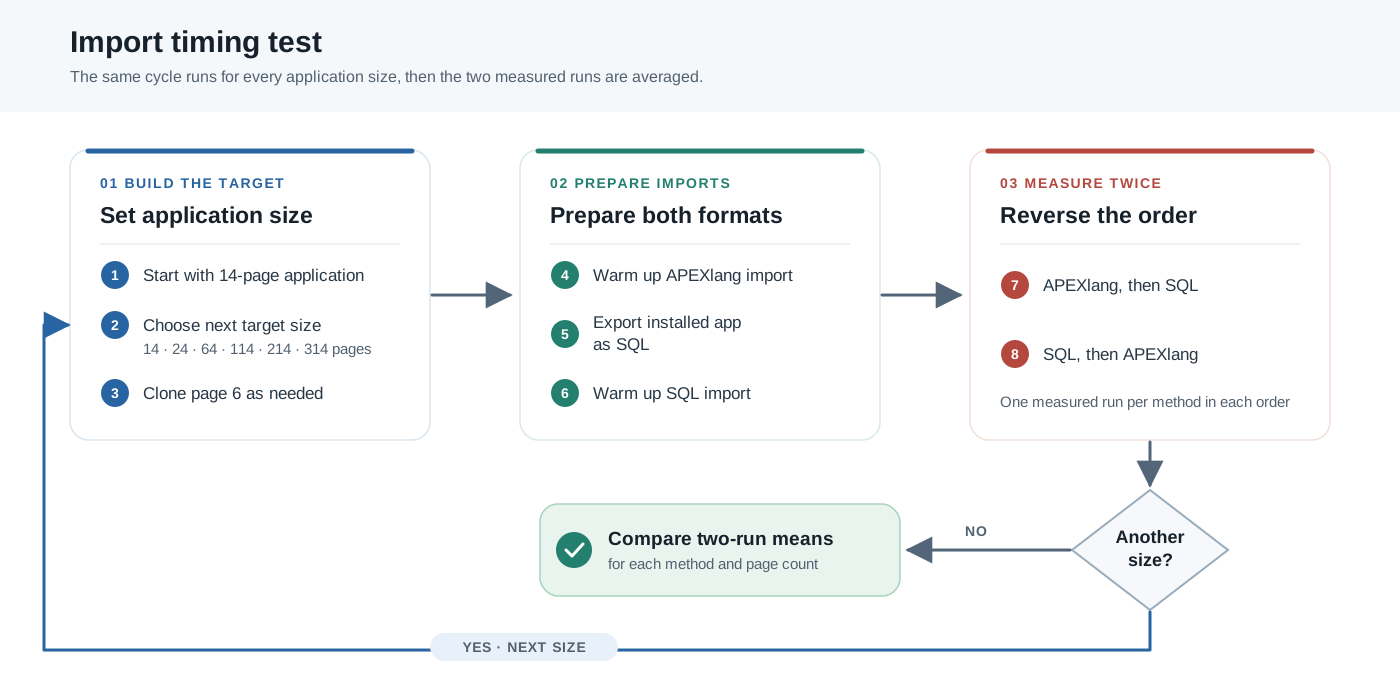
<p>After those warm-ups, I measured APEXlang then SQL, and then reversed the order: SQL then APEXlang. I averaged those <strong>two measured imports</strong> for each method and page count. Reversing the order meant neither format always went first. The diagram shows the cycle:</p>

<p><img src="/assets/images/2026-09-18/apexlang-vs-sql-test-method.svg" alt="Flowchart showing the six application sizes, warm-up imports, SQL export, and two measured import orders" /></p>

<p>From the extracted test project’s root, my local VM run started with this command:</p>

<div class="language-shell highlighter-rouge"><div class="highlight"><pre class="highlight"><code><span class="nv">$ </span>scripts/run_apex_timing_test.sh demo_vm26 demo1
</code></pre></div></div>

<p>The runner connects with the saved SQLcl connection, selects the APEX workspace, loads the timing aliases, and calls the main SQL script. That script runs the same step at each target number of cloned pages:</p>

<div class="language-sql highlighter-rouge"><div class="highlight"><pre class="highlight"><code><span class="o">@@</span><span class="n">apex_timing_test_step</span><span class="p">.</span><span class="k">sql</span> <span class="mi">0</span>
<span class="o">@@</span><span class="n">apex_timing_test_step</span><span class="p">.</span><span class="k">sql</span> <span class="mi">10</span>
<span class="o">@@</span><span class="n">apex_timing_test_step</span><span class="p">.</span><span class="k">sql</span> <span class="mi">50</span>
<span class="o">@@</span><span class="n">apex_timing_test_step</span><span class="p">.</span><span class="k">sql</span> <span class="mi">100</span>
<span class="o">@@</span><span class="n">apex_timing_test_step</span><span class="p">.</span><span class="k">sql</span> <span class="mi">200</span>
<span class="o">@@</span><span class="n">apex_timing_test_step</span><span class="p">.</span><span class="k">sql</span> <span class="mi">300</span>
</code></pre></div></div>

<p>I kept the full SQLcl and page-cloning output from each setup. You can inspect the <a href="https://github.com/akluev/realSQLclProject/blob/main/apexlang-vs-sql-perftest/var/apex_timing_test/apex-import-timing-local-vm.log" target="_blank" rel="noopener noreferrer">local VM log</a>, <a href="https://github.com/akluev/realSQLclProject/blob/main/apexlang-vs-sql-perftest/var/apex_timing_test/apex-import-timing-remote-vpn.log" target="_blank" rel="noopener noreferrer">VPN log</a>, and <a href="https://github.com/akluev/realSQLclProject/blob/main/apexlang-vs-sql-perftest/var/apex_timing_test/apex_import_timing-remote-oci.log" target="_blank" rel="noopener noreferrer">OCI workstation log</a>. The averages below come from the second and third import of each method at every size; the first was the warm-up.</p>

<h3 id="the-timing-results">The timing results</h3>

<p>Here are the mean import times in seconds. Lower is faster. I use these short labels in the column names:</p>

<ul>
  <li>
    <p><strong>VM:</strong> SQLcl on my workstation connecting to the local VM.</p>
  </li>
  <li>
    <p><strong>VPN:</strong> SQLcl on the same workstation connecting to the OCI database through the VPN.</p>
  </li>
  <li>
    <p><strong>Near OCI:</strong> SQLcl on the OCI workstation connecting to that same OCI database.</p>
  </li>
</ul>

<table>
  <thead>
    <tr>
      <th style="text-align: right">Total pages</th>
      <th style="text-align: right">VM APEXlang</th>
      <th style="text-align: right">VM SQL import</th>
      <th style="text-align: right">VPN APEXlang</th>
      <th style="text-align: right">VPN SQL import</th>
      <th style="text-align: right">Near OCI APEXlang</th>
      <th style="text-align: right">Near OCI SQL import</th>
    </tr>
  </thead>
  <tbody>
    <tr>
      <td style="text-align: right">14</td>
      <td style="text-align: right">2.0 s</td>
      <td style="text-align: right">2.0 s</td>
      <td style="text-align: right">5.5 s</td>
      <td style="text-align: right">9.0 s</td>
      <td style="text-align: right">1.5 s</td>
      <td style="text-align: right">2.0 s</td>
    </tr>
    <tr>
      <td style="text-align: right">24</td>
      <td style="text-align: right">2.0 s</td>
      <td style="text-align: right">1.5 s</td>
      <td style="text-align: right">5.0 s</td>
      <td style="text-align: right">8.5 s</td>
      <td style="text-align: right">1.0 s</td>
      <td style="text-align: right">2.0 s</td>
    </tr>
    <tr>
      <td style="text-align: right">64</td>
      <td style="text-align: right">2.5 s</td>
      <td style="text-align: right">2.5 s</td>
      <td style="text-align: right">9.5 s</td>
      <td style="text-align: right">14.0 s</td>
      <td style="text-align: right">3.0 s</td>
      <td style="text-align: right">2.0 s</td>
    </tr>
    <tr>
      <td style="text-align: right">114</td>
      <td style="text-align: right">4.5 s</td>
      <td style="text-align: right">3.5 s</td>
      <td style="text-align: right">15.5 s</td>
      <td style="text-align: right">27.0 s</td>
      <td style="text-align: right">3.5 s</td>
      <td style="text-align: right">2.5 s</td>
    </tr>
    <tr>
      <td style="text-align: right">214</td>
      <td style="text-align: right">8.0 s</td>
      <td style="text-align: right">5.5 s</td>
      <td style="text-align: right">21.0 s</td>
      <td style="text-align: right">27.5 s</td>
      <td style="text-align: right">9.0 s</td>
      <td style="text-align: right">4.0 s</td>
    </tr>
    <tr>
      <td style="text-align: right">314</td>
      <td style="text-align: right">11.5 s</td>
      <td style="text-align: right">8.5 s</td>
      <td style="text-align: right">35.0 s</td>
      <td style="text-align: right">56.0 s</td>
      <td style="text-align: right">14.5 s</td>
      <td style="text-align: right">5.5 s</td>
    </tr>
  </tbody>
</table>

<p>The 314-page rows show exactly how those means arose. Over the VPN, the two measured APEXlang imports took <strong>35 and 35 seconds</strong>; SQL took <strong>52 and 60</strong>, averaging 56. Near the same OCI database, APEXlang took <strong>18 and 11 seconds</strong>, averaging 14.5; SQL took <strong>6 and 5</strong>, averaging 5.5. These are small samples, but the reversal between the two client paths is hard to miss.</p>

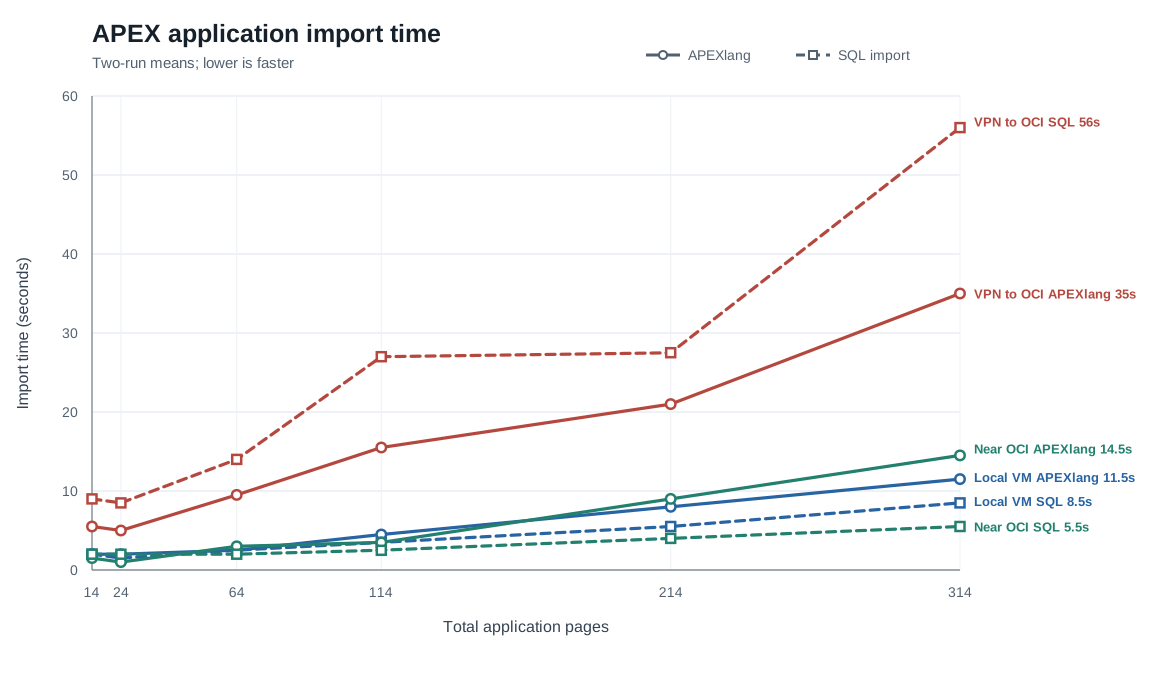
<p>The chart makes the change across application sizes easier to see. Colour identifies the client path; solid lines are APEXlang imports, dashed lines are SQL imports.</p>

<p><img src="/assets/images/2026-09-18/apexlang-vs-sql-import-timings.svg" alt="Line chart of two-run APEXlang and SQL import averages across six application sizes and three client paths" /></p>

<p><em>Average of two measured imports per method and application size. Lower is faster.</em></p>

<h3 id="what-changed-the-winner">What changed the winner</h3>

<p>Over the VPN, <strong>APEXlang was faster at all six application sizes</strong>. At 314 pages, it took <strong>35 seconds</strong>, compared with <strong>56 seconds</strong> for the SQL import. The trace result now makes practical sense: APEXlang’s fewer exchanges give the network fewer opportunities to slow it down.</p>

<blockquote class="callout callout-question">
  <p><strong>And the Oscar goes to…</strong></p>

  <p><strong>Network path.</strong> Both imports slowed when I moved SQLcl from the OCI workstation near the database to my workstation across the VPN. At 314 pages, SQL import went from <strong>5.5 to 56 seconds</strong>; APEXlang went from <strong>14.5 to 35 seconds</strong>. Moving the client made the largest difference I observed.</p>

  <p><strong>Database capacity.</strong> With SQLcl close to each database, my small local VM kept up surprisingly well with the much more powerful OCI database. At 214 pages, APEXlang took <strong>8 seconds on the VM</strong> and <strong>9 near OCI</strong>; SQL took <strong>5.5 and 4 seconds</strong>. Across the application sizes I tested, the difference in database resources had far less impact than the client path.</p>

  <p><strong>APEXlang or SQL?</strong> SQL import sends more separate requests, while APEXlang groups work into fewer, larger requests. Over the VPN, APEXlang won at every size I tested. Its largest saving was <strong>21 seconds at 314 pages</strong>. If SQLcl must deploy over a slow path, APEXlang is the option I would test first.</p>
</blockquote>

<h2 id="finding-the-price-of-apexlang-compilation">Finding the price of APEXlang compilation</h2>

<p>The import timing logs left me with a small mystery. The first APEXlang import at a given application size was often slower than the next two. SQL import sometimes showed a bump too, but it was usually smaller. Here are the 14-page and 314-page cycles from the three client paths, with the first run followed by the two repeats. The 14-page cycle started in a fresh SQLcl session; the 314-page cycle came after all the smaller sizes in that same session. All times are in seconds, and a negative change means the next run was faster.</p>

<p><strong>APEXlang import</strong></p>

<table>
  <thead>
    <tr>
      <th>Client path</th>
      <th style="text-align: right">Pages</th>
      <th style="text-align: right">First</th>
      <th style="text-align: right">Second</th>
      <th style="text-align: right">Third</th>
      <th style="text-align: right">Change 1→2</th>
      <th style="text-align: right">Change 2→3</th>
    </tr>
  </thead>
  <tbody>
    <tr>
      <td>VM</td>
      <td style="text-align: right">14</td>
      <td style="text-align: right">13 s</td>
      <td style="text-align: right">2 s</td>
      <td style="text-align: right">2 s</td>
      <td style="text-align: right">−11 s</td>
      <td style="text-align: right">0 s</td>
    </tr>
    <tr>
      <td>VPN</td>
      <td style="text-align: right">14</td>
      <td style="text-align: right">22 s</td>
      <td style="text-align: right">6 s</td>
      <td style="text-align: right">5 s</td>
      <td style="text-align: right">−16 s</td>
      <td style="text-align: right">−1 s</td>
    </tr>
    <tr>
      <td>Near OCI</td>
      <td style="text-align: right">14</td>
      <td style="text-align: right">18 s</td>
      <td style="text-align: right">2 s</td>
      <td style="text-align: right">1 s</td>
      <td style="text-align: right">−16 s</td>
      <td style="text-align: right">−1 s</td>
    </tr>
    <tr>
      <td>VM</td>
      <td style="text-align: right">314</td>
      <td style="text-align: right">21 s</td>
      <td style="text-align: right">12 s</td>
      <td style="text-align: right">11 s</td>
      <td style="text-align: right">−9 s</td>
      <td style="text-align: right">−1 s</td>
    </tr>
    <tr>
      <td>VPN</td>
      <td style="text-align: right">314</td>
      <td style="text-align: right">38 s</td>
      <td style="text-align: right">35 s</td>
      <td style="text-align: right">35 s</td>
      <td style="text-align: right">−3 s</td>
      <td style="text-align: right">0 s</td>
    </tr>
    <tr>
      <td>Near OCI</td>
      <td style="text-align: right">314</td>
      <td style="text-align: right">21 s</td>
      <td style="text-align: right">18 s</td>
      <td style="text-align: right">11 s</td>
      <td style="text-align: right">−3 s</td>
      <td style="text-align: right">−7 s</td>
    </tr>
  </tbody>
</table>

<p><strong>SQL import</strong></p>

<table>
  <thead>
    <tr>
      <th>Client path</th>
      <th style="text-align: right">Pages</th>
      <th style="text-align: right">First</th>
      <th style="text-align: right">Second</th>
      <th style="text-align: right">Third</th>
      <th style="text-align: right">Change 1→2</th>
      <th style="text-align: right">Change 2→3</th>
    </tr>
  </thead>
  <tbody>
    <tr>
      <td>VM</td>
      <td style="text-align: right">14</td>
      <td style="text-align: right">4 s</td>
      <td style="text-align: right">2 s</td>
      <td style="text-align: right">2 s</td>
      <td style="text-align: right">−2 s</td>
      <td style="text-align: right">0 s</td>
    </tr>
    <tr>
      <td>VPN</td>
      <td style="text-align: right">14</td>
      <td style="text-align: right">13 s</td>
      <td style="text-align: right">10 s</td>
      <td style="text-align: right">8 s</td>
      <td style="text-align: right">−3 s</td>
      <td style="text-align: right">−2 s</td>
    </tr>
    <tr>
      <td>Near OCI</td>
      <td style="text-align: right">14</td>
      <td style="text-align: right">3 s</td>
      <td style="text-align: right">2 s</td>
      <td style="text-align: right">2 s</td>
      <td style="text-align: right">−1 s</td>
      <td style="text-align: right">0 s</td>
    </tr>
    <tr>
      <td>VM</td>
      <td style="text-align: right">314</td>
      <td style="text-align: right">12 s</td>
      <td style="text-align: right">9 s</td>
      <td style="text-align: right">8 s</td>
      <td style="text-align: right">−3 s</td>
      <td style="text-align: right">−1 s</td>
    </tr>
    <tr>
      <td>VPN</td>
      <td style="text-align: right">314</td>
      <td style="text-align: right">50 s</td>
      <td style="text-align: right">52 s</td>
      <td style="text-align: right">60 s</td>
      <td style="text-align: right">+2 s</td>
      <td style="text-align: right">+8 s</td>
    </tr>
    <tr>
      <td>Near OCI</td>
      <td style="text-align: right">314</td>
      <td style="text-align: right">11 s</td>
      <td style="text-align: right">6 s</td>
      <td style="text-align: right">5 s</td>
      <td style="text-align: right">−5 s</td>
      <td style="text-align: right">−1 s</td>
    </tr>
  </tbody>
</table>

<p>Across all six sizes and three client paths, the first APEXlang import was slower than <strong>both</strong> repeats in <strong>16 of 18 cycles</strong>. For SQL import, that happened in <strong>11 of 18</strong>; the 314-page VPN SQL run even got slower on repeat. The size of the bump differed too: SQL’s first-to-second gain was usually only a few seconds and never more than <strong>5 seconds</strong>, while APEXlang’s was <strong>11 to 16 seconds</strong> in the three 14-page rows and still <strong>9 seconds</strong> at 314 pages on the VM. That stronger APEXlang pattern made me suspect work in SQLcl’s compiler, rather than a warm-up cost shared by both imports. But the imports run different database work, so these timings alone could not tell me where the bump occurred.</p>

<p>To investigate that bump, I tried to break the elapsed import time into parts I could reason about: compilation and validation in SQLcl, time across the network, and work in the database. That gave me the rough formula below. It is not a stopwatch breakdown, but the test with <strong>200 cloned pages (214 pages total)</strong> later gave it a surprisingly useful reality check: the two parts I could measure came close to the full import time.</p>

<blockquote class="callout callout-question">
  <p><strong>My very approximate timing formula ©</strong></p>

  <p><span class="timing-formula"><strong>APEXlang import time ≈</strong><br /><strong>SQLcl compilation and validation</strong><br />+ <strong>network time</strong><br />+ <strong>database time</strong></span></p>

  <p>No, it is not <strong>E = mc²</strong>, but for an APEX developer planning a deployment, it might be more useful. 😊</p>
</blockquote>

<p>TKPROF had already given me an approximate database SQL time. Network time was harder to measure independently, so I went after the local SQLcl part. Fortunately, SQLcl has <code class="language-plaintext highlighter-rouge">apex validate</code>. It compiles and checks APEXlang files even when I start SQLcl with <code class="language-plaintext highlighter-rouge">sql -nolog</code>, <strong>without a database connection</strong>. That let me time compilation and validation without database work or network exchanges. It does not isolate compiler CPU time alone, but it makes the comparison much cleaner. The toolkit section above shows the shell timer I used around that command.</p>

<p>I ran two orders in <strong>separate, fresh SQLcl processes</strong>. One went from <strong>14 to 314 to 614 total pages</strong>; the other visited the same sizes in reverse. Within each process, I validated each size three times before moving to the next, keeping SQLcl open for all nine validations. From the extracted test project’s root, these were the commands:</p>

<div class="language-shell highlighter-rouge"><div class="highlight"><pre class="highlight"><code><span class="nv">$ </span>scripts/run_apex_validate_nolog.sh 0 300 600
<span class="nv">$ </span>scripts/run_apex_validate_nolog.sh 600 300 0
</code></pre></div></div>

<p>The arguments are the numbers of cloned pages added to the 14-page base application. The runner captured the <a href="https://github.com/akluev/realSQLclProject/blob/main/apexlang-vs-sql-perftest/var/apex_validate_nolog_test/apex_validate_nolog-0-300-600.log" target="_blank" rel="noopener noreferrer">smallest-first log</a> and <a href="https://github.com/akluev/realSQLclProject/blob/main/apexlang-vs-sql-perftest/var/apex_validate_nolog_test/apex_validate_nolog-600-300-0.log" target="_blank" rel="noopener noreferrer">largest-first log</a>. Here are their elapsed times in seconds:</p>

<table>
  <thead>
    <tr>
      <th>Order</th>
      <th style="text-align: right">Total pages</th>
      <th style="text-align: right">First validation</th>
      <th style="text-align: right">Second</th>
      <th style="text-align: right">Third</th>
      <th style="text-align: right">Three-run total</th>
    </tr>
  </thead>
  <tbody>
    <tr>
      <td>Smallest first</td>
      <td style="text-align: right">14</td>
      <td style="text-align: right">12 s</td>
      <td style="text-align: right">1 s</td>
      <td style="text-align: right">1 s</td>
      <td style="text-align: right">14 s</td>
    </tr>
    <tr>
      <td>Smallest first</td>
      <td style="text-align: right">314</td>
      <td style="text-align: right">14 s</td>
      <td style="text-align: right">9 s</td>
      <td style="text-align: right">9 s</td>
      <td style="text-align: right">32 s</td>
    </tr>
    <tr>
      <td>Smallest first</td>
      <td style="text-align: right">614</td>
      <td style="text-align: right">29 s</td>
      <td style="text-align: right">23 s</td>
      <td style="text-align: right">22 s</td>
      <td style="text-align: right">74 s</td>
    </tr>
    <tr>
      <td><strong>Smallest-first total</strong></td>
      <td style="text-align: right"> </td>
      <td style="text-align: right"> </td>
      <td style="text-align: right"> </td>
      <td style="text-align: right"> </td>
      <td style="text-align: right"><strong>120 s</strong></td>
    </tr>
    <tr>
      <td>Largest first</td>
      <td style="text-align: right">614</td>
      <td style="text-align: right">59 s</td>
      <td style="text-align: right">31 s</td>
      <td style="text-align: right">30 s</td>
      <td style="text-align: right">120 s</td>
    </tr>
    <tr>
      <td>Largest first</td>
      <td style="text-align: right">314</td>
      <td style="text-align: right">11 s</td>
      <td style="text-align: right">10 s</td>
      <td style="text-align: right">11 s</td>
      <td style="text-align: right">32 s</td>
    </tr>
    <tr>
      <td>Largest first</td>
      <td style="text-align: right">14</td>
      <td style="text-align: right">1 s</td>
      <td style="text-align: right">0 s</td>
      <td style="text-align: right">1 s</td>
      <td style="text-align: right">2 s</td>
    </tr>
    <tr>
      <td><strong>Largest-first total</strong></td>
      <td style="text-align: right"> </td>
      <td style="text-align: right"> </td>
      <td style="text-align: right"> </td>
      <td style="text-align: right"> </td>
      <td style="text-align: right"><strong>154 s</strong></td>
    </tr>
  </tbody>
</table>

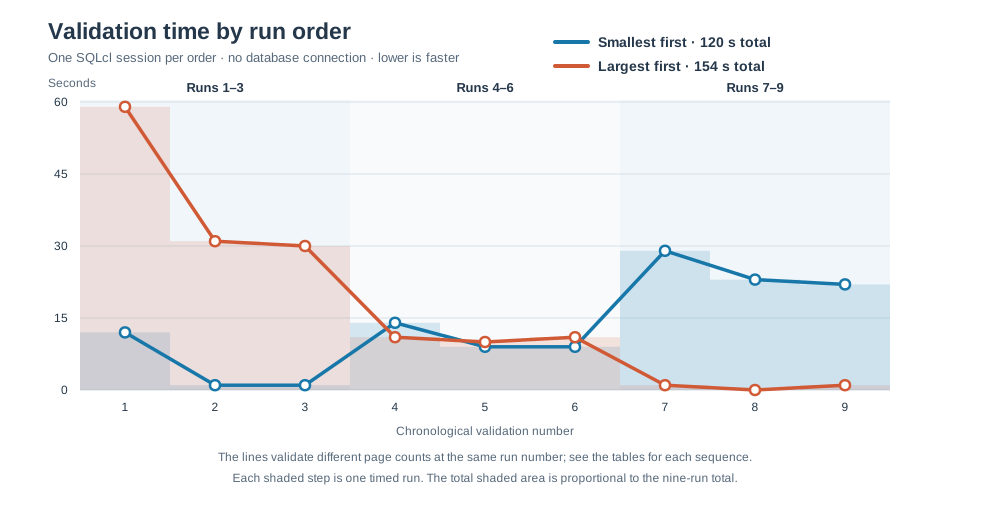
<p>The <code class="language-plaintext highlighter-rouge">0 s</code> entry means two whole-second timestamps fell in the same second, not that validation took no time. The chart plots the nine validations in the order they actually ran, so you can see when each new size arrived:</p>

<p><img src="/assets/images/2026-09-18/apexlang-validation-order-timings.svg" alt="Line chart comparing nine disconnected APEXlang validation times in smallest-first and largest-first order" /></p>

<p><em>Each line covers three validations at each of the same three application sizes. The sizes arrive in opposite orders.</em></p>

<p>The first validation in a fresh process took <strong>12 seconds for 14 pages</strong> or <strong>59 seconds for 614 pages</strong>. Repeats were faster. Growing to the next size brought another bump; shrinking did not. A third run, <a href="https://github.com/akluev/realSQLclProject/blob/main/apexlang-vs-sql-perftest/var/apex_validate_nolog_test/apex_validate_nolog-200-100-300.log" target="_blank" rel="noopener noreferrer">from 214 to 114 to 314 pages</a>, showed the same pattern: <strong>23, 5, and 5 seconds</strong> at 214 pages, then <strong>3, 3, and 2</strong> at 114, then <strong>12, 7, and 7</strong> after growing to 314. SQLcl appears to retain and reuse resources for APEXlang compilation within a process, adding more when it meets a larger application. I did not measure memory allocation directly, so that is an explanation suggested by the timing pattern rather than a measurement of how SQLcl manages memory.</p>

<p>The 214-page run also gives my rough formula a reality check. Its first disconnected validation took <strong>23 seconds</strong>; the database trace of a separate APEXlang import recorded about <strong>15.96 seconds</strong> of database SQL elapsed time; the whole traced import took <strong>37 seconds</strong>. The first two figures add to roughly 39 seconds, close to the observed import time. They come from separate runs, and validation is not pure compiler time, so this is a useful mental model rather than a way to calculate an import down to the second.</p>

<blockquote class="callout callout-question">
  <p><strong>What the compiler test taught me</strong></p>

  <p>My rough formula passed a useful reality check on the local VM, where SQLcl and the database were close. Validation time plus database SQL time came close to the complete import time. It is an approximation, but it shows that work inside SQLcl can be a significant part of an APEXlang import. <strong>If deployment is slow despite a good network and a healthy database, the computer running SQLcl deserves attention.</strong> I have not tested whether CPU, memory, or I/O is the limiting factor.</p>

  <p>The disconnected test made the first-run penalty much clearer. <strong>Every increase in application size we tested brought a bump on its first validation; decreasing the size brought no comparable bump.</strong> SQLcl appears to build up and reuse compiler resources within a process, though I did not measure those allocations directly. Validating the applications smallest first took <strong>120 seconds versus 154 seconds</strong> largest first, a <strong>22% saving</strong>.</p>

  <p>In a <a href="https://docs.oracle.com/en/database/oracle/sql-developer-command-line/26.2/sqcug/project.html" target="_blank" rel="noopener noreferrer">SQLcl Project deployment</a>, <code class="language-plaintext highlighter-rouge">dist/releases/apex/apex.changelog.xml</code> sets the APEX application order within one SQLcl run. I do not know of a parallel-degree setting for APEXlang imports inside that deployment, so I would put the smaller applications first in that file. Outside SQLcl Project, parallel SQLcl sessions can be a good choice for total elapsed time. Each process still has to establish its own compiler state and pay the first-run cost, so weigh that against the reuse you can get in one session.</p>
</blockquote>

<h2 id="acknowledgements">Acknowledgements</h2>

<p>Thank you to my colleague <a href="https://www.linkedin.com/in/fekratelwehedi/" target="_blank" rel="noopener noreferrer">Fekrat El Wehedi</a> for helping with this investigation by arranging access to the OCI workstation I used in these tests.</p>

<h2 id="conclusions-and-recommendations">Conclusions and recommendations</h2>

<p>An APEXlang import has three parts: compilation and validation in SQLcl, network exchanges, and database work. SQL import has two: network exchanges and database work. It runs the SQL export without an APEXlang compilation and validation step. SQL import sends more separate requests, while APEXlang shifts more work into the database. That balance lets the network path change the winner, and it makes the computer running SQLcl an important part of APEXlang deployment time.</p>

<h3 id="recommendations-based-on-the-tests">Recommendations based on the tests</h3>

<ul>
  <li><strong>If SQLcl runs close to the database, consider importing the SQL export file</strong>, especially for a larger application. At 314 pages, the SQL import took 5.5 seconds near the OCI database, versus 14.5 seconds for the APEXlang import.</li>
  <li><strong>If SQLcl must connect over a slower route, try APEXlang.</strong> Across my VPN, it won at every tested size; at 314 pages, it took 35 seconds versus 56 seconds for SQL.</li>
  <li><strong>If database load matters, consider SQL import</strong> for a very large application or several imports running in parallel. In the 214-page trace, APEXlang made about 3.2 times as many database calls and used about 3.3 times as much SQL CPU. Its report shows thousands of ID-generation and reference lookups absent from the SQL import report.</li>
  <li><strong>If SQLcl Project deploys several APEXlang applications, put smaller ones first in <code class="language-plaintext highlighter-rouge">dist/releases/apex/apex.changelog.xml</code>.</strong> The deployment runs in one SQLcl invocation, where compiler work can be reused. Smallest first saved 22% in my validation test. Outside Project, parallel sessions may shorten the batch, but each process pays its own first-run cost.</li>
  <li><strong>If you need the application unavailable through ORDS during deployment, you can stop ORDS.</strong> SQLcl’s APEXlang import still works through its database connection.</li>
</ul>

<blockquote class="callout callout-question">
  <p><strong>Try it with your application</strong></p>

  <p>These are choices to test in your environment; there is no universal network threshold. The test kit lets you repeat the comparison with your application and network path. Please feel free to download it from the links in <a href="#sources">Sources</a> below, use it, and modify it to suit your needs. If you get different results, <a href="/contact/">contact me</a> or share them through the <a href="#post-feedback-heading">discussion link below</a>.</p>
</blockquote>

<h2 id="sources">Sources</h2>

<p><strong>My repository and test material</strong></p>

<ul>
  <li><a href="https://github.com/akluev/realSQLclProject/blob/main/docs/APEXlang/17.-APEXlang-vs-SQL-Deployment-Performance.md" target="_blank" rel="noopener noreferrer">Full APEXlang versus SQL deployment performance investigation</a></li>
  <li><a href="https://github.com/akluev/realSQLclProject/tree/main/apexlang-vs-sql-perftest" target="_blank" rel="noopener noreferrer">APEXlang versus SQL test project, scripts, and logs</a></li>
  <li><a href="https://github.com/akluev/realSQLclProject/blob/main/apexlang-vs-sql-perftest/zip/apexlang-vs-sql-perftest.zip" target="_blank" rel="noopener noreferrer">Downloadable APEXlang versus SQL test kit</a></li>
  <li><a href="https://github.com/akluev/realSQLclProject/blob/main/apexlang-vs-sql-perftest/var/trace/apex106_apexlang.prf" target="_blank" rel="noopener noreferrer">APEXlang import TKPROF report</a></li>
  <li><a href="https://github.com/akluev/realSQLclProject/blob/main/apexlang-vs-sql-perftest/var/trace/apex106_sql.prf" target="_blank" rel="noopener noreferrer">SQL import TKPROF report</a></li>
  <li><a href="https://github.com/akluev/realSQLclProject/blob/main/apexlang-vs-sql-perftest/var/apex_timing_test/apex-import-timing-local-vm.log" target="_blank" rel="noopener noreferrer">Local VM import timing log</a></li>
  <li><a href="https://github.com/akluev/realSQLclProject/blob/main/apexlang-vs-sql-perftest/var/apex_timing_test/apex-import-timing-remote-vpn.log" target="_blank" rel="noopener noreferrer">VPN import timing log</a></li>
  <li><a href="https://github.com/akluev/realSQLclProject/blob/main/apexlang-vs-sql-perftest/var/apex_timing_test/apex_import_timing-remote-oci.log" target="_blank" rel="noopener noreferrer">OCI workstation import timing log</a></li>
  <li><a href="https://github.com/akluev/realSQLclProject/blob/main/apexlang-vs-sql-perftest/var/apex_validate_nolog_test/apex_validate_nolog-0-300-600.log" target="_blank" rel="noopener noreferrer">Smallest-first disconnected validation log</a></li>
  <li><a href="https://github.com/akluev/realSQLclProject/blob/main/apexlang-vs-sql-perftest/var/apex_validate_nolog_test/apex_validate_nolog-600-300-0.log" target="_blank" rel="noopener noreferrer">Largest-first disconnected validation log</a></li>
  <li><a href="https://github.com/akluev/realSQLclProject/blob/main/apexlang-vs-sql-perftest/var/apex_validate_nolog_test/apex_validate_nolog-200-100-300.log" target="_blank" rel="noopener noreferrer">Intermediate-size disconnected validation log</a></li>
</ul>

<p><strong>Oracle documentation</strong></p>

<ul>
  <li><a href="https://docs.oracle.com/en/database/oracle/apex/26.1/htmig/apex-installation-requirements.html" target="_blank" rel="noopener noreferrer">Oracle APEX 26.1 installation requirements</a></li>
  <li><a href="https://www.oracle.com/tools/sqlcl/sqlcl-relnotes-26.2.html" target="_blank" rel="noopener noreferrer">Oracle SQLcl 26.2 release notes</a></li>
  <li><a href="https://docs.oracle.com/en/database/oracle/sql-developer-command-line/26.1/sqcug/commands-overview-apexlang.html" target="_blank" rel="noopener noreferrer">Oracle SQLcl documentation: APEXlang commands overview</a></li>
  <li><a href="https://docs.oracle.com/en/database/oracle/sql-developer-command-line/26.2/sqcug/project.html" target="_blank" rel="noopener noreferrer">Oracle SQLcl 26.2 documentation: PROJECT command and deploy options</a></li>
  <li><a href="https://docs.oracle.com/en/database/oracle/oracle-database/26/tgsql/performing-application-tracing.html" target="_blank" rel="noopener noreferrer">Oracle Database documentation: Performing Application Tracing with TKPROF</a></li>
</ul>]]></content><author><name>Alexander Kluev</name></author><category term="oracle-apex" /><category term="apexlang" /><category term="sqlcl" /><category term="sqlcl-project" /><summary type="html"><![CDATA[APEXlang and SQL imports trade database work for network trips. Tests from a local VM, across a VPN, and near an OCI database show when each is faster.]]></summary></entry><entry><title type="html">SQLcl Project 26.2.2: Two APEXlang Directory Structures, One Migration Blocker</title><link href="https://akluev.github.io/blog/2026/09/11/sqlcl-project-26-2-2-two-apexlang-directory-structures-one-migration-blocker/" rel="alternate" type="text/html" title="SQLcl Project 26.2.2: Two APEXlang Directory Structures, One Migration Blocker" /><published>2026-09-11T00:00:00+00:00</published><updated>2026-09-11T00:00:00+00:00</updated><id>https://akluev.github.io/blog/2026/09/11/sqlcl-project-26-2-2-two-apexlang-directory-structures-one-migration-blocker</id><content type="html" xml:base="https://akluev.github.io/blog/2026/09/11/sqlcl-project-26-2-2-two-apexlang-directory-structures-one-migration-blocker/"><![CDATA[<p><img src="/assets/images/2026-09-11/sleeping-cat.jpg" alt="One of my cats sleeping" /></p>

<blockquote>
  <p>Before getting into SQLcl, I have also made an important editorial decision. Starting with this article, I will try to put a fresh photo of one or both of my beloved cats, Mister and Frisbee, at the top of every post. Why? Because it is my blog, and I can do whatever I want.</p>
</blockquote>

<p>SQLcl 26.2 contains several improvements I genuinely want to adopt: SQLcl 26.2.2 fixes the binary/static-file corruption during APEXlang export, multi-operation DDL scripts are split into separate Liquibase changesets, and SQLcl Project can deploy an application directly from APEXlang source. Unfortunately, SQLcl Project 26.2.2 retains other APEXlang export defects from 26.1, introduces new structural problems, and removes the documented directory arrangement that made those defects manageable with a standalone <code class="language-plaintext highlighter-rouge">apex export</code>. For my existing project, that combination is a migration blocker.</p>

<h2 id="tldr">TL;DR</h2>

<ul>
  <li>SQLcl Project 26.1 and 26.2.2 both have APEXlang export defects. <code class="language-plaintext highlighter-rouge">project export</code> lowercases APEXlang file and directory names and can retain page files deleted from the application. For static files, the case change can make the export fail APEXlang validation because the <code class="language-plaintext highlighter-rouge">.apx</code> reference and physical filename no longer match. For deleted pages, the stale file can remain part of the exported application and bring the deleted page back during a later APEXlang deployment.</li>
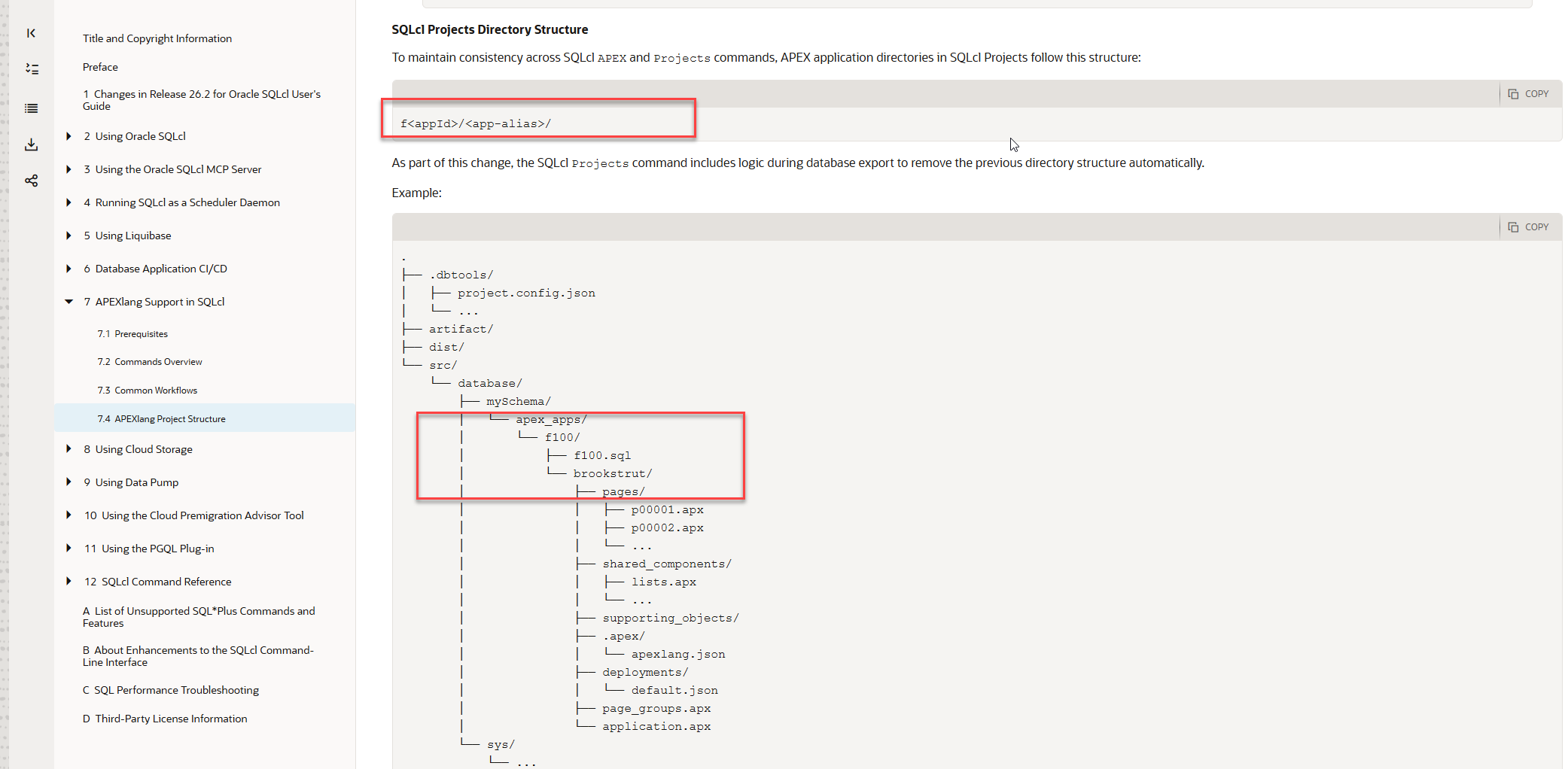
  <li>The documented <code class="language-plaintext highlighter-rouge">f&lt;appId&gt;/&lt;app-alias&gt;/</code> structure used in 26.1 gave me a safe workaround: remove the defective Project-generated APEXlang tree and replace it with a clean standalone <code class="language-plaintext highlighter-rouge">apex export</code>. In 26.2.2, legacy mode flattens the APEXlang files into <code class="language-plaintext highlighter-rouge">f&lt;appId&gt;/</code>, while APEXlang mode makes the mutable application alias the source root. Neither preserves the previous application-ID-scoped workaround.</li>
  <li>Testing also exposed additional problems: a targeted application export unexpectedly attempts <code class="language-plaintext highlighter-rouge">ALL_USERS</code>; staging removes existing APEX deployment properties and can retain both the legacy SQL controller and the new APEXlang controller; the APEXlang export guard can report Git changes when the working tree is clean; and <code class="language-plaintext highlighter-rouge">project config -list</code> does not reveal user-settable options until they have been explicitly set.</li>
  <li>SQLcl 26.2.2 fixes the serious binary/static-file corruption defect, the new <code class="language-plaintext highlighter-rouge">apex.apexlang</code> option is a good idea, and APEXlang deployment can be faster than SQL deployment in some circumstances. It should select what SQLcl Project places in <code class="language-plaintext highlighter-rouge">dist</code>, not reorganise <code class="language-plaintext highlighter-rouge">src</code>, override a requested <code class="language-plaintext highlighter-rouge">export.apex.exptype</code>, or rewrite Git history. SQLcl 26.2 also delivers an important changeset-splitting improvement, but I am staying on 26.1 until the APEX source and deployment structures become predictable again.</li>
</ul>

<h2 id="table-of-contents">Table of Contents</h2>

<ul>
  <li><a href="#tldr">TL;DR</a></li>
  <li><a href="#table-of-contents">Table of Contents</a></li>
  <li><a href="#test-scope-and-the-two-modes">Test scope and the two modes</a></li>
  <li><a href="#what-the-sqlcl-documentation-promises">What the SQLcl documentation promises</a></li>
  <li><a href="#why-the-261-structure-mattered">Why the 26.1 structure mattered</a></li>
  <li><a href="#mode-1-readable-output">Mode 1: readable output</a>
    <ul>
      <li><a href="#a-hybrid-source-layout-replaces-the-documented-structure">A hybrid source layout replaces the documented structure</a></li>
      <li><a href="#the-old-export-defects-remain">The old export defects remain</a></li>
      <li><a href="#staging-changes-the-controller-and-removes-deployment-properties">Staging changes the controller and removes deployment properties</a></li>
      <li><a href="#unexpected-exports-and-undiscoverable-configuration">Unexpected exports and undiscoverable configuration</a></li>
    </ul>
  </li>
  <li><a href="#mode-2-apexlang-enabled">Mode 2: APEXlang enabled</a>
    <ul>
      <li><a href="#a-useful-deployment-option-also-reorganises-the-source">A useful deployment option also reorganises the source</a></li>
      <li><a href="#a-mutable-alias-is-not-a-stable-application-identity">A mutable alias is not a stable application identity</a></li>
      <li><a href="#git-protection-becomes-an-export-blocker">Git protection becomes an export blocker</a></li>
      <li><a href="#apexlang-mode-export-and-stage-deep-dive">APEXlang mode: export and stage deep dive</a></li>
    </ul>
  </li>
  <li><a href="#oracles-clarification-regressions-and-intended-design">Oracle’s clarification: regressions and intended design</a>
    <ul>
      <li><a href="#symes-independent-export-tests">Syme’s independent export tests</a></li>
      <li><a href="#neils-explanation-of-the-intended-modes">Neil’s explanation of the intended modes</a></li>
      <li><a href="#what-the-clarification-resolves">What the clarification resolves</a></li>
      <li><a href="#what-remains-unresolved">What remains unresolved</a></li>
    </ul>
  </li>
  <li><a href="#what-did-we-gain-and-what-did-we-lose">What did we gain, and what did we lose?</a>
    <ul>
      <li><a href="#what-we-gained">What we gained</a></li>
      <li><a href="#what-we-lost">What we lost</a></li>
      <li><a href="#additional-regressions-and-migration-friction">Additional regressions and migration friction</a></li>
    </ul>
  </li>
  <li><a href="#what-i-want-from-sqlcl-project">What I want from SQLcl Project</a>
    <ul>
      <li><a href="#apexlang-source-and-deployment">APEXlang source and deployment</a></li>
      <li><a href="#other-sqlcl-project-fixes">Other SQLcl Project fixes</a></li>
    </ul>
  </li>
  <li><a href="#conclusion">Conclusion</a></li>
  <li><a href="#sources">Sources</a></li>
</ul>

<h2 id="test-scope-and-the-two-modes">Test scope and the two modes</h2>

<p>I tested with SQLcl 26.2.2.0, build 26.2.2.233.1901. This was not a newly generated sample project. I took an existing SQLcl Project repository that had been working with SQLcl 26.1 and tested the upgrade on separate Git branches.</p>

<p>The test application was application 106 in workspace <code class="language-plaintext highlighter-rouge">DEMO1</code>, using parsing schema <code class="language-plaintext highlighter-rouge">DEMO1</code> and application alias <code class="language-plaintext highlighter-rouge">demo1</code>. The existing Project configuration requested both <code class="language-plaintext highlighter-rouge">READABLE_YAML</code> and <code class="language-plaintext highlighter-rouge">APPLICATION_SOURCE</code> through <code class="language-plaintext highlighter-rouge">export.apex.exptype</code>.</p>

<p>SQLcl 26.2.2 effectively gave me two models to test:</p>

<table>
  <thead>
    <tr>
      <th>Mode</th>
      <th>Project setting</th>
      <th>Intended source of truth</th>
      <th>Expected deployment payload</th>
    </tr>
  </thead>
  <tbody>
    <tr>
      <td>Mode 1: readable output</td>
      <td><code class="language-plaintext highlighter-rouge">apex.apexlang</code> is absent or <code class="language-plaintext highlighter-rouge">false</code></td>
      <td><code class="language-plaintext highlighter-rouge">f106.sql</code>, with APEXlang as supplemental readable source</td>
      <td>SQL application export</td>
    </tr>
    <tr>
      <td>Mode 2: APEXlang enabled</td>
      <td><code class="language-plaintext highlighter-rouge">apex.apexlang=true</code></td>
      <td>APEXlang source</td>
      <td>APEXlang application directory</td>
    </tr>
  </tbody>
</table>

<p>I ran the same basic workflow in both modes: export application 106, inspect the resulting tree and Git changes, validate or import the APEXlang source, stage the project, and repeat operations after changing or deleting application components. The test included a static file with mixed-case characters in its name and pages that were subsequently deleted in APEX Builder. Repeating the export was important: an initial export can look correct while still failing to remove files that disappeared from the database later.</p>

<p>This article is about the correctness and operability of those two models, not their relative deployment performance. I have tested SQL and APEXlang deployment performance as well, and each can be faster in different circumstances. That comparison deserves its own article. Here, the important point is that both are useful deployment options, so switching between them should be a normal and inexpensive project operation.</p>

<h2 id="what-the-sqlcl-documentation-promises">What the SQLcl documentation promises</h2>

<p>The starting point is not my preferred directory convention. It is Oracle’s published <a href="https://docs.oracle.com/en/database/oracle/sql-developer-command-line/26.2/sqcug/apexlang-project-structure-apexlang.html" target="_blank" rel="noopener noreferrer">SQLcl 26.2 APEXlang Project Structure documentation</a>.</p>

<p>For an APEX application inside SQLcl Project, the documentation specifies this structure:</p>

<div class="language-text highlighter-rouge"><div class="highlight"><pre class="highlight"><code>src/database/&lt;schema&gt;/apex_apps/
`-- f&lt;appId&gt;/
    |-- f&lt;appId&gt;.sql
    `-- &lt;app-alias&gt;/
        |-- application.apx
        |-- pages/
        |-- shared_components/
        |-- deployments/
        `-- .apex/
</code></pre></div></div>

<p>The documentation explains that this arrangement maintains consistency between the SQLcl <code class="language-plaintext highlighter-rouge">apex</code> and <code class="language-plaintext highlighter-rouge">project</code> commands. It also says that, as part of the change, database export removes the previous directory structure automatically.</p>

<p><img src="/assets/images/2026-09-11/10-oracle-documentation-fappid-app-alias-structure.webp" alt="Oracle SQLcl 26.2 documentation showing the documented f-app-ID and application-alias directory structure" /></p>

<p><em>Oracle’s SQLcl 26.2 documentation specifies <code class="language-plaintext highlighter-rouge">f&lt;appId&gt;/&lt;app-alias&gt;/</code> and describes automatic removal of the previous directory structure during database export.</em></p>

<p>That is a meaningful product contract. Once Oracle documents a filesystem layout, users build export aliases, validation commands, CI/CD jobs, cleanup scripts, Git review practices, and deployment tooling around it. A documented layout cannot reasonably be treated as an internal implementation detail that may change without notice.</p>

<p>The wording about automatic removal is specifically about the previous <em>directory structure</em>; it does not explicitly promise that every obsolete component file will be removed on every export. I will test stale component cleanup separately. The structural promise itself, however, is unambiguous: the application ID is the stable outer directory, the application alias is below it, and the SQL export can coexist beside the APEXlang source.</p>

<blockquote class="callout callout-issue">
  <p><strong>Observed structure mismatch</strong></p>

  <p>Neither directory layout I observed in SQLcl 26.2.2 matches that documented model. In readable mode, the APEXlang files are flattened directly into <code class="language-plaintext highlighter-rouge">f106</code>. With <code class="language-plaintext highlighter-rouge">apex.apexlang=true</code>, the application alias becomes the root and the <code class="language-plaintext highlighter-rouge">f106</code> boundary disappears. The forum discussion later explained an intended distinction between two modes, but that distinction is not present on this documentation page. A forum explanation is useful context; it should not be required to discover the fundamental storage model of a documented product feature.</p>
</blockquote>

<h2 id="why-the-261-structure-mattered">Why the 26.1 structure mattered</h2>

<p>The <code class="language-plaintext highlighter-rouge">f&lt;appId&gt;/&lt;app-alias&gt;/</code> layout was not merely tidy. It gave every application a stable, application-ID-scoped boundary and kept two useful representations together: the <code class="language-plaintext highlighter-rouge">fNNN.sql</code> file used by SQLcl Project for SQL deployment, and the APEXlang source used for review, validation, and development.</p>

<p>That mattered because SQLcl Project 26.1 had several APEXlang export defects. SQLcl 26.2.2 fixes one of the most serious ones: exported binary and static files are no longer corrupted. That is an important fix. Two other defects remain in my tests:</p>

<ol>
  <li>SQLcl Project lowercases APEXlang file and directory names. For a mixed-case static filename, the <code class="language-plaintext highlighter-rouge">.apx</code> source can retain the original case while the physical file is written in lowercase. <code class="language-plaintext highlighter-rouge">apex validate</code> then fails with <code class="language-plaintext highlighter-rouge">REFERENCE_NOT_FOUND</code> because the referenced file does not exist under that exact name.</li>
  <li>Re-exporting can leave obsolete APEXlang files in place. If a page is exported, then deleted in APEX Builder, its page file may survive the next Project export. An APEXlang import or deployment can consequently include the stale file and bring back a page that was deliberately deleted from the application.</li>
</ol>

<p>The documented 26.1 structure gave me a practical way to compensate. My <a href="https://alexonapex.com/blog/2026/08/13/sqlcl-project-aliases/" target="_blank" rel="noopener noreferrer"><code>prj_exp_app</code> SQLcl alias</a> performed two exports for one application:</p>

<ol>
  <li>It ran <code class="language-plaintext highlighter-rouge">project export -o APEX.&lt;appId&gt;</code> so SQLcl Project still generated the <code class="language-plaintext highlighter-rouge">fNNN.sql</code> source required by the normal staging and SQL deployment workflow.</li>
  <li>It then ran a standalone <code class="language-plaintext highlighter-rouge">apex export</code> with <code class="language-plaintext highlighter-rouge">-exptype APEXLANG</code> and <code class="language-plaintext highlighter-rouge">-force</code>, replacing the defective APEXlang subdirectory with a clean export from the database.</li>
</ol>

<p>Conceptually, the result remained simple:</p>

<div class="language-text highlighter-rouge"><div class="highlight"><pre class="highlight"><code>f106/
|-- f106.sql       # generated by project export
`-- demo1/         # replaced by apex export -exptype APEXLANG -force
</code></pre></div></div>

<p>Because <code class="language-plaintext highlighter-rouge">f106</code> was the stable application boundary, the alias knew exactly where application 106 belonged. The mutable alias remained below that boundary. A changed alias or a stale APEXlang tree could be cleaned without confusing one application with another, and the standalone export could repair the readable source without removing the Project-generated SQL file.</p>

<p>This was admittedly a workaround, but it was safe, deterministic, and aligned with the published directory structure. Most importantly, it meant that outstanding APEXlang export bugs did not block the rest of SQLcl Project. I could continue using SQL deployment while retaining clean APEXlang source, and I could change deployment strategy later without reorganising <code class="language-plaintext highlighter-rouge">src</code> or rewriting the application’s Git history.</p>

<p>That is why the 26.2.2 directory change is more than an inconvenience. The old bugs have not all disappeared, but the directory structure that allowed me to work around them has.</p>

<p>The next two sections deliberately stay close to the evidence. I will describe only what I ran and what SQLcl produced in each mode: the directory trees, validation and import results, Git changes, and staging output. I will return to the consequences, design trade-offs, and changes I would like Oracle to make after both sets of observations are on the table. For now, stay with me through the facts.</p>

<h2 id="mode-1-readable-output">Mode 1: readable output</h2>

<p>In the first mode, <code class="language-plaintext highlighter-rouge">apex.apexlang</code> was absent from <code class="language-plaintext highlighter-rouge">project.config.json</code>. According to Oracle’s later clarification in the forum, this is the legacy or readable-output mode: <code class="language-plaintext highlighter-rouge">f106.sql</code> remains the source of truth and APEXlang is supplemental readable source.</p>

<h3 id="a-hybrid-source-layout-replaces-the-documented-structure">A hybrid source layout replaces the documented structure</h3>

<p>Before running the export, I followed the SQLcl Project migration guidance and removed the existing APEX application source directory. This ensured that the test started without files left behind by the 26.1 layout:</p>

<div class="language-shell highlighter-rouge"><div class="highlight"><pre class="highlight"><code><span class="nb">rm</span> <span class="nt">-rf</span> src/database/demo1/apex_apps
</code></pre></div></div>

<p>From inside SQLcl, I exported only application 106:</p>

<div class="language-sql highlighter-rouge"><div class="highlight"><pre class="highlight"><code><span class="n">project</span> <span class="n">export</span> <span class="o">-</span><span class="n">o</span> <span class="n">apex</span><span class="p">.</span><span class="mi">106</span>
</code></pre></div></div>

<p>The new APEXlang files were written directly into <code class="language-plaintext highlighter-rouge">f106</code>, alongside <code class="language-plaintext highlighter-rouge">f106.sql</code>. There was no application-alias directory and no <code class="language-plaintext highlighter-rouge">readable</code> directory:</p>

<div class="language-text highlighter-rouge"><div class="highlight"><pre class="highlight"><code>src/database/demo1/apex_apps/f106/
|-- .apex/
|-- deployments/
|-- pages/
|-- shared-components/
|-- application.apx
|-- f106.sql
`-- page-groups.apx
</code></pre></div></div>

<p>Git consequently saw the files under the previous <code class="language-plaintext highlighter-rouge">f106/demo1/</code> tree as deletions and the flattened files as new, untracked files. An abbreviated <code class="language-plaintext highlighter-rouge">git status</code> captured the structural change:</p>

<div class="language-shell highlighter-rouge"><div class="highlight"><pre class="highlight"><code>git status
</code></pre></div></div>

<p>The relevant output looked like this:</p>

<div class="language-text highlighter-rouge"><div class="highlight"><pre class="highlight"><code>deleted:    src/database/demo1/apex_apps/f106/demo1/application.apx
deleted:    src/database/demo1/apex_apps/f106/demo1/pages/...
deleted:    src/database/demo1/apex_apps/f106/demo1/shared-components/...
modified:   src/database/demo1/apex_apps/f106/f106.sql

Untracked files:
  src/database/demo1/apex_apps/f106/.apex/
  src/database/demo1/apex_apps/f106/application.apx
  src/database/demo1/apex_apps/f106/deployments/
  src/database/demo1/apex_apps/f106/page-groups.apx
  src/database/demo1/apex_apps/f106/pages/
  src/database/demo1/apex_apps/f106/shared-components/
</code></pre></div></div>

<p>This is the hybrid layout Oracle later identified in the forum as a SQLcl 26.2.2 regression.</p>

<h3 id="the-old-export-defects-remain">The old export defects remain</h3>

<p>I then tested two defects already present in SQLcl Project 26.1. In APEX Builder, I created page 5, named <strong>Drop Me Salary Dashboard Copy</strong>, and uploaded a static file named <code class="language-plaintext highlighter-rouge">mixedCaseImageName.webp</code>. I exported the application, deleted page 5 in APEX Builder, and exported it again.</p>

<p>After the second export, the file for page 5 was still present. The physical static filename had also been converted to lowercase:</p>

<div class="language-text highlighter-rouge"><div class="highlight"><pre class="highlight"><code>pages/p00005-dropme-salary-dashboard-copy.apx
shared-components/static-files/mixedcaseimagename.webp
</code></pre></div></div>

<p><img src="/assets/images/2026-09-11/01-no-apexlang-stale-page-and-lowercased-static-file.webp" alt="VS Code Explorer showing a stale page 5 file and a lowercased mixed-case static filename after a readable-mode export" /></p>

<p><em>After page 5 was deleted in APEX Builder and the application was exported again, its <code class="language-plaintext highlighter-rouge">.apx</code> file remained. The physical mixed-case static filename was written entirely in lowercase.</em></p>

<p>The lowercasing is not only cosmetic. The reference inside <code class="language-plaintext highlighter-rouge">shared-components/static-files.apx</code> retained the original filename, <code class="language-plaintext highlighter-rouge">mixedCaseImageName.webp</code>, while the physical file was named <code class="language-plaintext highlighter-rouge">mixedcaseimagename.webp</code>. Validating the flattened application root reproduced the mismatch:</p>

<div class="language-sql highlighter-rouge"><div class="highlight"><pre class="highlight"><code><span class="n">apex</span> <span class="n">validate</span> <span class="o">-</span><span class="k">input</span> <span class="n">src</span><span class="o">/</span><span class="k">database</span><span class="o">/</span><span class="n">demo1</span><span class="o">/</span><span class="n">apex_apps</span><span class="o">/</span><span class="n">f106</span>
</code></pre></div></div>

<p>The result was an APEXlang compiler error:</p>

<div class="language-text highlighter-rouge"><div class="highlight"><pre class="highlight"><code>APEXlang Compile Errors:
File: shared-components/static-files.apx
Line: 26
Column: 0
Type: REFERENCE_NOT_FOUND
Error: referenced file shared-components/static-files/mixedCaseImageName.webp
       in the fileName property is not found
</code></pre></div></div>

<p>The binary contents of the static file were no longer corrupted in SQLcl 26.2.2. That earlier defect is fixed. Filename casing and stale page cleanup are separate defects, and both remained in this mode.</p>

<p>To test the consequence of the stale page independently, I manually removed the mixed-case static file and its reference from the exported source so that the unrelated validation error would no longer block the import. I then imported the flattened APEXlang application:</p>

<div class="language-sql highlighter-rouge"><div class="highlight"><pre class="highlight"><code><span class="n">apex</span> <span class="n">import</span> <span class="o">-</span><span class="k">input</span> <span class="n">src</span><span class="o">/</span><span class="k">database</span><span class="o">/</span><span class="n">demo1</span><span class="o">/</span><span class="n">apex_apps</span><span class="o">/</span><span class="n">f106</span>
</code></pre></div></div>

<p>SQLcl reported a successful import:</p>

<div class="language-text highlighter-rouge"><div class="highlight"><pre class="highlight"><code>Importing application ID: 106 into workspace: DEMO1
Import successful.
</code></pre></div></div>

<p>When I opened application 106 in APEX Builder, page 5 was present again. It had been deleted in APEX Builder before the second export, but its stale <code class="language-plaintext highlighter-rouge">.apx</code> file remained in the source tree and the subsequent <code class="language-plaintext highlighter-rouge">apex import</code> recreated it. This confirms that stale page files are not merely repository noise: they can change the deployed application.</p>

<h3 id="staging-changes-the-controller-and-removes-deployment-properties">Staging changes the controller and removes deployment properties</h3>

<p>The first <code class="language-plaintext highlighter-rouge">project stage</code> run did not overwrite the application controller generated by SQLcl 26.1:</p>

<div class="language-sql highlighter-rouge"><div class="highlight"><pre class="highlight"><code><span class="n">project</span> <span class="n">stage</span>
</code></pre></div></div>

<p>It stopped with this error:</p>

<div class="language-text highlighter-rouge"><div class="highlight"><pre class="highlight"><code>Stage is Comparing:
Old Branch      refs/heads/main
New Branch      refs/heads/26.2-readable

ERROR: An error has occurred processing your request:
The generated APEX install file dist\releases\apex\f106\f106.xml has been
edited and stage will not overwrite it automatically.
Restore the generated file, remove it, or merge your edits manually before
running stage again.
</code></pre></div></div>

<p>The controller had not been manually edited; it was the generated file retained from SQLcl 26.1. I removed that file and ran staging again:</p>

<div class="language-shell highlighter-rouge"><div class="highlight"><pre class="highlight"><code><span class="nb">rm</span> <span class="nt">-f</span> dist/releases/apex/f106/f106.xml
</code></pre></div></div>

<div class="language-sql highlighter-rouge"><div class="highlight"><pre class="highlight"><code><span class="n">project</span> <span class="n">stage</span>
</code></pre></div></div>

<p>This time staging completed and generated a new controller. Compared with the 26.1 file, the new version contained additional offset-handling logic and changed from a numeric checksum to a longer hexadecimal checksum:</p>

<p><img src="/assets/images/2026-09-11/02-sql-deployment-controller-offset-and-checksum-diff.webp" alt="Git diff showing new offset handling and a changed checksum format in the generated f106 XML controller" /></p>

<p><em>SQLcl 26.2.2 regenerated <code class="language-plaintext highlighter-rouge">f106.xml</code> with new offset logic and a different checksum format.</em></p>

<p>The new checksum was deterministic in this test. After rolling back the staged changes and running <code class="language-plaintext highlighter-rouge">project stage</code> again against the same source, SQLcl generated the same value:</p>

<div class="language-text highlighter-rouge"><div class="highlight"><pre class="highlight"><code>-- sqlcl_checksum  a3021add4b68564e09161286a87d58c068df948d
</code></pre></div></div>

<p>The same staging operation also removed four existing APEX properties from <code class="language-plaintext highlighter-rouge">dist/env/default.properties</code>:</p>

<div class="language-diff highlighter-rouge"><div class="highlight"><pre class="highlight"><code> parameter.demo1=demo1
<span class="gd">-parameter.apex.106.workspace=DEMO1
-parameter.apex.106.schema=DEMO1
-parameter.apex.106.alias=DEMO1
-parameter.apex.106.appId=106
</span></code></pre></div></div>

<p><img src="/assets/images/2026-09-11/03-stage-removes-apex-deployment-properties.webp" alt="Git diff showing SQLcl stage removing four APEX deployment properties from default.properties" /></p>

<p><em>After staging, only <code class="language-plaintext highlighter-rouge">parameter.demo1=demo1</code> remained; the application workspace, schema, alias, and application-ID properties were removed.</em></p>

<h3 id="unexpected-exports-and-undiscoverable-configuration">Unexpected exports and undiscoverable configuration</h3>

<p>The targeted application export also attempted to process database users. The command was limited to APEX application 106:</p>

<div class="language-sql highlighter-rouge"><div class="highlight"><pre class="highlight"><code><span class="n">project</span> <span class="n">export</span> <span class="o">-</span><span class="n">o</span> <span class="n">apex</span><span class="p">.</span><span class="mi">106</span>
</code></pre></div></div>

<p>However, the debug output contained <code class="language-plaintext highlighter-rouge">ORA-31603</code> errors for multiple users outside the configured project schema. This is an excerpt:</p>

<div class="language-text highlighter-rouge"><div class="highlight"><pre class="highlight"><code>Errors:
============================================================
ORA-31603: object "CLA_PUBLIC" of type USER not found in schema "DEMO1"
ORA-31603: object "CO" of type USER not found in schema "DEMO1"
ORA-31603: object "HR" of type USER not found in schema "DEMO1"
ORA-31603: object "ORDS_METADATA" of type USER not found in schema "DEMO1"
ORA-31603: object "CLA_UTILITIES" of type USER not found in schema "DEMO1"
ORA-31603: object "CLA_APEX" of type USER not found in schema "DEMO1"
ORA-31603: object "CLA_DEPLOYER" of type USER not found in schema "DEMO1"
ORA-31603: object "HRREST" of type USER not found in schema "DEMO1"
ORA-31603: object "ORDS_PUBLIC_USER" of type USER not found in schema "DEMO1"
ORA-31603: object "PDBADMIN" of type USER not found in schema "DEMO1"
ORA-31603: object "DEMO2" of type USER not found in schema "DEMO1"
ORA-31603: object "DEMO1" of type USER not found in schema "DEMO1"
ORA-31603: object "SH" of type USER not found in schema "DEMO1"
ORA-31603: object "AV" of type USER not found in schema "DEMO1"
============================================================
-------------------------------
APEX_APPLICATION              1
-------------------------------
Exported 1 objects
</code></pre></div></div>

<p>Adding this condition to <code class="language-plaintext highlighter-rouge">.dbtools/filters/project.filters</code> stopped the unwanted user export attempts:</p>

<div class="language-text highlighter-rouge"><div class="highlight"><pre class="highlight"><code>export_type not in ('ALL_USERS'),
</code></pre></div></div>

<p>Finally, <code class="language-plaintext highlighter-rouge">project config -list</code> reported only settings already stored in <code class="language-plaintext highlighter-rouge">project.config.json</code>. Because <code class="language-plaintext highlighter-rouge">apex.apexlang</code> had not yet been set, the command did not show that the setting existed or that its effective value was <code class="language-plaintext highlighter-rouge">false</code>:</p>

<div class="language-sql highlighter-rouge"><div class="highlight"><pre class="highlight"><code><span class="n">project</span> <span class="n">config</span> <span class="o">-</span><span class="n">list</span>
</code></pre></div></div>

<p>The output ended with the explicitly stored staging options and contained no <code class="language-plaintext highlighter-rouge">apex.apexlang</code> row:</p>

<div class="language-text highlighter-rouge"><div class="highlight"><pre class="highlight"><code> +---------------------------------------------------------------------------------+
 | git.defaultBranch                      | main                                   |
 +---------------------------------------------------------------------------------+
 | stage.excludeObjects                   | ["ALL.user"]                           |
 +---------------------------------------------------------------------------------+
 | stage.generatedFormat                  | liquibase                              |
 +---------------------------------------------------------------------------------+
 | stage.softObjectIsolation              | change                                 |
 +---------------------------------------------------------------------------------+
 | stage.substituteSchemas                | true                                   |
 +---------------------------------------------------------------------------------+
SQL&gt;
</code></pre></div></div>

<p>After <code class="language-plaintext highlighter-rouge">apex.apexlang</code> was explicitly added to the configuration, it appeared in this list. That observation belongs to the second mode.</p>

<h2 id="mode-2-apexlang-enabled">Mode 2: APEXlang enabled</h2>

<h3 id="a-useful-deployment-option-also-reorganises-the-source">A useful deployment option also reorganises the source</h3>

<p>For the second mode, I created a separate branch and enabled the new Project setting:</p>

<div class="language-sql highlighter-rouge"><div class="highlight"><pre class="highlight"><code><span class="n">project</span> <span class="n">config</span> <span class="k">set</span> <span class="o">-</span><span class="n">name</span> <span class="n">apex</span><span class="p">.</span><span class="n">apexlang</span> <span class="o">-</span><span class="n">value</span> <span class="k">true</span>
</code></pre></div></div>

<p>The command added this object to <code class="language-plaintext highlighter-rouge">.dbtools/project.config.json</code>:</p>

<div class="language-json highlighter-rouge"><div class="highlight"><pre class="highlight"><code><span class="nl">"apex"</span><span class="w"> </span><span class="p">:</span><span class="w"> </span><span class="p">{</span><span class="w">
  </span><span class="nl">"apexlang"</span><span class="w"> </span><span class="p">:</span><span class="w"> </span><span class="kc">true</span><span class="w">
</span><span class="p">}</span><span class="w">
</span></code></pre></div></div>

<p><img src="/assets/images/2026-09-11/05-enable-apexlang-project-config-diff.webp" alt="Git diff showing apex.apexlang set to true in project.config.json" /></p>

<p><em>The new setting appears in <code class="language-plaintext highlighter-rouge">project.config.json</code> only after it is explicitly enabled.</em></p>

<p>It also became visible at the end of <code class="language-plaintext highlighter-rouge">project config -list</code>:</p>

<div class="language-text highlighter-rouge"><div class="highlight"><pre class="highlight"><code> +---------------------------------------------------------------------------------+
 | stage.substituteSchemas               | true                                   |
 +---------------------------------------------------------------------------------+
 | apex.apexlang                         | true                                   |
 +---------------------------------------------------------------------------------+
</code></pre></div></div>

<p>As in the first mode, I removed the existing APEX source before testing the new layout:</p>

<div class="language-shell highlighter-rouge"><div class="highlight"><pre class="highlight"><code><span class="nb">rm</span> <span class="nt">-rf</span> src/database/demo1/apex_apps
</code></pre></div></div>

<p>I then exported application 106:</p>

<div class="language-sql highlighter-rouge"><div class="highlight"><pre class="highlight"><code><span class="n">project</span> <span class="n">export</span> <span class="o">-</span><span class="n">o</span> <span class="n">apex</span><span class="p">.</span><span class="mi">106</span>
</code></pre></div></div>

<p>SQLcl detected the old staged SQL payload, warned that APEXlang mode was enabled, and completed the export:</p>

<div class="language-text highlighter-rouge"><div class="highlight"><pre class="highlight"><code>*** APEX_APPLICATIONS ***
WARN: apex.apexlang=true, but legacy APEX SQL source or stage content remains.
Remove legacy src/database/&lt;schema&gt;/apex_apps/f&lt;app_id&gt; directories,
remove legacy dist/releases/apex/f&lt;app_id&gt; directories, then run project
export and project stage again.
Found: dist\releases\apex\f106\f106.sql
Exporting Workspace DEMO1 - application 106:EMP &amp; DEPT Mini Hub
-------------------------------
APEX_APPLICATION              1
-------------------------------
Exported 1 objects
Elapsed 16 sec
</code></pre></div></div>

<p>The source layout was now different from both the documented structure and the readable-mode structure. The application alias became the directory root directly below <code class="language-plaintext highlighter-rouge">apex_apps</code>:</p>

<div class="language-text highlighter-rouge"><div class="highlight"><pre class="highlight"><code>src/database/demo1/apex_apps/
`-- demo1/
    |-- .apex/
    |-- deployments/
    |-- pages/
    |-- shared-components/
    |-- application.apx
    `-- page-groups.apx
</code></pre></div></div>

<p>There was no <code class="language-plaintext highlighter-rouge">f106</code> parent and no <code class="language-plaintext highlighter-rouge">f106.sql</code> in the newly generated source. Although <code class="language-plaintext highlighter-rouge">export.apex.exptype</code> still requested <code class="language-plaintext highlighter-rouge">READABLE_YAML</code> and <code class="language-plaintext highlighter-rouge">APPLICATION_SOURCE</code>, enabling <code class="language-plaintext highlighter-rouge">apex.apexlang</code> selected this APEXlang-only source model.</p>

<h3 id="a-mutable-alias-is-not-a-stable-application-identity">A mutable alias is not a stable application identity</h3>

<p>The application ID remained 106 throughout the test, but the application alias was editable in APEX Builder. I first exported the application with alias <code class="language-plaintext highlighter-rouge">demo1</code>. I then changed the alias to <code class="language-plaintext highlighter-rouge">demo1-1</code> in APEX Builder and exported again.</p>

<p>The resulting source tree contained two application roots:</p>

<div class="language-text highlighter-rouge"><div class="highlight"><pre class="highlight"><code>src/database/demo1/apex_apps/
|-- demo1/
|   |-- .apex/
|   |-- deployments/
|   |-- pages/
|   `-- shared-components/
`-- demo1-1/
    |-- .apex/
    |-- deployments/
    |-- pages/
    `-- shared-components/
</code></pre></div></div>

<p>The original <code class="language-plaintext highlighter-rouge">demo1</code> directory remained beside the new <code class="language-plaintext highlighter-rouge">demo1-1</code> directory. Neither path contained the stable application ID in its directory name; the ID was available only inside the application metadata and deployment configuration.</p>

<h3 id="git-protection-becomes-an-export-blocker">Git protection becomes an export blocker</h3>

<p>Next, I changed the application in APEX Builder and tried to refresh its APEXlang source. SQLcl refused to export over a target that it considered changed:</p>

<div class="language-sql highlighter-rouge"><div class="highlight"><pre class="highlight"><code><span class="n">project</span> <span class="n">export</span> <span class="o">-</span><span class="n">o</span> <span class="n">apex</span><span class="p">.</span><span class="mi">106</span>
</code></pre></div></div>

<p>The command reported:</p>

<div class="language-text highlighter-rouge"><div class="highlight"><pre class="highlight"><code>Exporting Workspace DEMO1 - application 106:EMP &amp; DEPT Mini Hub
APEXlang export target has tracked or untracked Git changes:
src\database\demo1\apex_apps\demo1.
Commit, stash, or remove those changes before re-exporting.
Failed to export APEXlang application_id = 106 due to APEXlang export target
has tracked or untracked Git changes:
src\database\demo1\apex_apps\demo1.
-------------------------------
Exported 0 objects
Elapsed 13 sec
</code></pre></div></div>

<p>I committed the generated source and tried again. It failed again, even though <code class="language-plaintext highlighter-rouge">git status</code> reported no changes:</p>

<div class="language-text highlighter-rouge"><div class="highlight"><pre class="highlight"><code>SQL&gt; project export -o apex.106
*** APEX_APPLICATIONS ***
WARN: apex.apexlang=true, but legacy APEX SQL source or stage content remains. Remove legacy src/database/&lt;schema&gt;/apex_apps/f&lt;app_id&gt; directories, remove legacy dist/rele
ases/apex/f&lt;app_id&gt; directories, then run project export and project stage again. Found: dist\releases\apex\f106\f106.sql
Exporting Workspace DEMO1 - application 106:EMP &amp; DEPT Mini Hub
APEXlang export target has tracked or untracked Git changes: src\database\demo1\apex_apps\demo1. Commit, stash, or remove those changes before re-exporting. Failed to expo
rt APEXlang application_id = 106 due to APEXlang export target has tracked or untracked Git changes: src\database\demo1\apex_apps\demo1. Commit, stash, or remove those cha
nges before re-exporting.
-------------------------------
-------------------------------
Exported 0 objects
Elapsed 12 sec


SQL&gt; ! git status
On branch 26.2-apexlang
nothing to commit, working tree clean
</code></pre></div></div>

<blockquote class="callout callout-issue">
  <p><strong>Export blocker</strong></p>

  <p>Despite the clean working tree, the next <code class="language-plaintext highlighter-rouge">project export -o apex.106</code> returned the same tracked-or-untracked-changes error and exported zero objects. Committing the target therefore did not resolve the condition described by the error message in this test.</p>
</blockquote>

<p>The repeatable way I found to continue was to remove the complete alias directory before every refresh and then export again:</p>

<div class="language-shell highlighter-rouge"><div class="highlight"><pre class="highlight"><code><span class="nb">rm</span> <span class="nt">-rf</span> src/database/demo1/apex_apps/demo1
</code></pre></div></div>

<div class="language-sql highlighter-rouge"><div class="highlight"><pre class="highlight"><code><span class="n">project</span> <span class="n">export</span> <span class="o">-</span><span class="n">o</span> <span class="n">apex</span><span class="p">.</span><span class="mi">106</span>
</code></pre></div></div>

<p>With no target directory present, the export completed and recreated the APEXlang application.</p>

<h3 id="apexlang-mode-export-and-stage-deep-dive">APEXlang mode: export and stage deep dive</h3>

<p>The export that followed my manual removal of the complete alias directory cannot demonstrate automatic cleanup: the page files were already gone because I had deleted the whole source tree to get past the Git protection error.</p>

<p>To test deletion handling properly, I first established a normal APEXlang baseline. I exported and staged the APEXlang branch, reviewed and committed its output, and merged it into <code class="language-plaintext highlighter-rouge">main</code>. I then created a new branch for the next application change:</p>

<div class="language-shell highlighter-rouge"><div class="highlight"><pre class="highlight"><code>git checkout <span class="nt">-b</span> 26.2-apexlang-delta
</code></pre></div></div>

<p>At that point, page 100 (<strong>Old Home Backup</strong>) existed in both the committed <code class="language-plaintext highlighter-rouge">src</code> and <code class="language-plaintext highlighter-rouge">dist</code> baselines. I deleted page 100 in APEX Builder and exported application 106 on the delta branch:</p>

<div class="language-sql highlighter-rouge"><div class="highlight"><pre class="highlight"><code><span class="n">project</span> <span class="n">export</span> <span class="o">-</span><span class="n">o</span> <span class="n">apex</span><span class="p">.</span><span class="mi">106</span>
</code></pre></div></div>

<p>This export correctly removed the existing page file from <code class="language-plaintext highlighter-rouge">src</code>:</p>

<p><img src="/assets/images/2026-09-11/06-apexlang-export-removes-deleted-page.webp" alt="Git changes showing page 100 removed from the APEXlang source after it was deleted in APEX Builder" /></p>

<p><em>Starting from an established APEXlang baseline, deleting page 100 in APEX Builder produced the expected deletion from <code class="language-plaintext highlighter-rouge">src</code>.</em></p>

<p>I then staged the delta:</p>

<div class="language-sql highlighter-rouge"><div class="highlight"><pre class="highlight"><code><span class="n">project</span> <span class="n">stage</span>
</code></pre></div></div>

<p>The page was also removed from <code class="language-plaintext highlighter-rouge">dist</code>. I repeated the same baseline-and-delta test with a static file deleted in APEX Builder. Its physical file and source reference were removed from <code class="language-plaintext highlighter-rouge">src</code>, and staging propagated those deletions into <code class="language-plaintext highlighter-rouge">dist</code>. This is the cleanup behaviour I want: a component deleted in APEX Builder disappears from the exported source and then from the deployment payload.</p>

<p>Staging generated an APEXlang payload beneath the application alias:</p>

<div class="language-text highlighter-rouge"><div class="highlight"><pre class="highlight"><code>dist/releases/apex/demo1/
|-- demo1.xml
`-- demo1/
    |-- .apex/
    |-- deployments/
    |-- pages/
    |-- shared-components/
    |-- application.apx
    `-- page-groups.apx
</code></pre></div></div>

<blockquote class="callout callout-issue">
  <p><strong>Staging problem</strong></p>

  <p>The existing legacy <code class="language-plaintext highlighter-rouge">dist/releases/apex/f106/</code> directory remained present and caused warnings, but staging still completed. More importantly, the top-level APEX changelog retained the old SQL controller and added the new APEXlang controller:</p>
</blockquote>

<div class="language-xml highlighter-rouge"><div class="highlight"><pre class="highlight"><code><span class="cp">&lt;?xml version="1.0" encoding="UTF-8"?&gt;</span>
<span class="nt">&lt;databaseChangeLog</span> <span class="na">xmlns:xsi=</span><span class="s">"http://www.w3.org/2001/XMLSchema-instance"</span>
                   <span class="na">xmlns=</span><span class="s">"http://www.liquibase.org/xml/ns/dbchangelog"</span>
                   <span class="na">xsi:schemaLocation=</span><span class="s">"http://www.liquibase.org/xml/ns/dbchangelog
                        http://www.liquibase.org/xml/ns/dbchangelog/dbchangelog-4.3.xsd"</span><span class="nt">&gt;</span>
<span class="nt">&lt;include</span> <span class="na">file=</span><span class="s">"f106/f106.xml"</span> <span class="na">relativeToChangelogFile=</span><span class="s">"true"</span><span class="nt">/&gt;</span>
<span class="nt">&lt;include</span> <span class="na">file=</span><span class="s">"demo1/demo1.xml"</span> <span class="na">relativeToChangelogFile=</span><span class="s">"true"</span><span class="nt">/&gt;</span>
<span class="nt">&lt;/databaseChangeLog&gt;</span>
</code></pre></div></div>

<p>SQLcl warned that legacy APEX SQL stage content remained, but <code class="language-plaintext highlighter-rouge">project stage</code> did not remove that content or its <code class="language-plaintext highlighter-rouge">&lt;include&gt;</code>. The staged changelog therefore referenced both the previous <code class="language-plaintext highlighter-rouge">f106/f106.xml</code> SQL deployment and the new <code class="language-plaintext highlighter-rouge">demo1/demo1.xml</code> APEXlang deployment.</p>

<p>The new APEXlang change controller used the SQLcl <code class="language-plaintext highlighter-rouge">apex import</code> command against the APEXlang payload:</p>

<div class="language-xml highlighter-rouge"><div class="highlight"><pre class="highlight"><code><span class="nt">&lt;changeSet</span> <span class="na">id=</span><span class="s">"INSTALL_demo1"</span>
           <span class="na">author=</span><span class="s">"SQLCL-Generated"</span>
           <span class="na">logicalFilePath=</span><span class="s">"releases/apex/demo1/demo1.xml"</span>
           <span class="na">failOnError=</span><span class="s">"true"</span>
           <span class="na">runOnChange=</span><span class="s">"true"</span><span class="nt">&gt;</span>
  <span class="nt">&lt;n0:runApexScript</span> <span class="na">relativeToChangelogFile=</span><span class="s">"true"</span><span class="nt">&gt;</span>
    <span class="nt">&lt;n0:source&gt;</span><span class="cp">&lt;![CDATA[
-- sqlcl_checksum  11cd5b765726122ea37a4f1028545dcbb4604ae5
-- sqlcl_apexlang_payload_hash 9559ab34930d618b0d57a2ebc655bfd7f2897ca127c0afde2e700a709d6c48e9
declare
  -- sqlcl version       = 26.2.2.0 
  -- override_schema     = ${apex.demo1.schema}
  -- override_alias      = ${apex.demo1.alias}
  -- override_workspace  = ${apex.demo1.workspace}
  -- override_app_id     = ${apex.demo1.appId}

/*
---SKIPPED
*/
end;
/
apex import -input demo1
    ]]&gt;</span><span class="nt">&lt;/n0:source&gt;</span>
  <span class="nt">&lt;/n0:runApexScript&gt;</span>
<span class="nt">&lt;/changeSet&gt;</span>
</code></pre></div></div>

<p>I rolled back the staged changes and ran <code class="language-plaintext highlighter-rouge">project stage</code> again without changing the source. Both generated values were identical across the two runs:</p>

<div class="language-text highlighter-rouge"><div class="highlight"><pre class="highlight"><code>-- sqlcl_checksum  11cd5b765726122ea37a4f1028545dcbb4604ae5
-- sqlcl_apexlang_payload_hash 9559ab34930d618b0d57a2ebc655bfd7f2897ca127c0afde2e700a709d6c48e9
</code></pre></div></div>

<p>In other words, a delta created from an established APEXlang baseline correctly propagated component deletions from APEX Builder through <code class="language-plaintext highlighter-rouge">src</code> and into <code class="language-plaintext highlighter-rouge">dist</code>, produced stable checksums for unchanged source, and generated a deployment controller that imports the APEXlang application directly. At the same time, staging left the legacy SQL controller active beside the new APEXlang controller.</p>

<h2 id="oracles-clarification-regressions-and-intended-design">Oracle’s clarification: regressions and intended design</h2>

<p>The responses in the <a href="https://forums.oracle.com/ords/apexds/post/bug-sqlcl-26-2-2-project-export-apexlang-structure-is-incon-9777" target="_blank" rel="noopener noreferrer">Oracle Forum discussion</a> were helpful. They confirmed that the layouts I observed were not the complete intended design. They also exposed a larger problem: the intended design described in the discussion is materially different from the design described in Oracle’s published documentation.</p>

<h3 id="symes-independent-export-tests">Syme’s independent export tests</h3>

<p>Syme (<code class="language-plaintext highlighter-rouge">skutz-Oracle</code>) first tested the standalone <code class="language-plaintext highlighter-rouge">apex export</code> command with several combinations of <code class="language-plaintext highlighter-rouge">-exptype</code> and <code class="language-plaintext highlighter-rouge">-split</code>. His results confirmed that the requested export type controls the generated layout:</p>

<div class="language-sql highlighter-rouge"><div class="highlight"><pre class="highlight"><code><span class="n">apex</span> <span class="n">export</span> <span class="o">-</span><span class="n">applicationid</span> <span class="mi">101</span> <span class="o">-</span><span class="n">exptype</span> <span class="k">SQL</span> <span class="o">-</span><span class="n">split</span>
<span class="n">apex</span> <span class="n">export</span> <span class="o">-</span><span class="n">applicationid</span> <span class="mi">101</span> <span class="o">-</span><span class="n">exptype</span> <span class="n">APEXLANG</span>
<span class="n">apex</span> <span class="n">export</span> <span class="o">-</span><span class="n">applicationid</span> <span class="mi">101</span> <span class="o">-</span><span class="n">exptype</span> <span class="n">APEXLANG</span><span class="p">,</span><span class="k">SQL</span>
<span class="n">apex</span> <span class="n">export</span> <span class="o">-</span><span class="n">applicationid</span> <span class="mi">101</span> <span class="o">-</span><span class="n">exptype</span> <span class="n">APEXLANG</span><span class="p">,</span><span class="k">SQL</span> <span class="o">-</span><span class="n">split</span>
</code></pre></div></div>

<p>The SQL-only export created an <code class="language-plaintext highlighter-rouge">f101</code> structure. The APEXlang-only export used the application alias, <code class="language-plaintext highlighter-rouge">sample-calendar</code>, as its root. Requesting <code class="language-plaintext highlighter-rouge">APEXLANG,SQL</code> produced both representations, including <code class="language-plaintext highlighter-rouge">f101.sql</code> or the split <code class="language-plaintext highlighter-rouge">f101</code> SQL directory beneath the alias root.</p>

<p>After those tests, Syme confirmed that there were reproducible problems in how the APEX files were being laid out. He also raised the underlying design question: should SQL and APEXlang exports be supported together, or should SQL remain below <code class="language-plaintext highlighter-rouge">f&lt;appId&gt;</code> while APEXlang lives below <code class="language-plaintext highlighter-rouge">&lt;app-alias&gt;</code>?</p>

<p>That independent reproduction is important. It confirms that the disagreement among <code class="language-plaintext highlighter-rouge">project export</code>, standalone <code class="language-plaintext highlighter-rouge">apex export</code>, SQLcl 26.1, and the documentation was real; it was not caused by my existing repository or configuration.</p>

<h3 id="neils-explanation-of-the-intended-modes">Neil’s explanation of the intended modes</h3>

<p>Neil Fernandez then described the intended SQLcl Project model. In compact form, it is this:</p>

<table>
  <thead>
    <tr>
      <th>Project mode</th>
      <th>Source of truth</th>
      <th>Intended source location</th>
      <th>SQL application source</th>
    </tr>
  </thead>
  <tbody>
    <tr>
      <td><code class="language-plaintext highlighter-rouge">apex.apexlang</code> absent or <code class="language-plaintext highlighter-rouge">false</code></td>
      <td><code class="language-plaintext highlighter-rouge">f&lt;appId&gt;.sql</code></td>
      <td>Supplemental APEXlang under <code class="language-plaintext highlighter-rouge">f&lt;appId&gt;/readable/</code></td>
      <td>Generated</td>
    </tr>
    <tr>
      <td><code class="language-plaintext highlighter-rouge">apex.apexlang=true</code></td>
      <td>APEXlang</td>
      <td>Application alias directly below <code class="language-plaintext highlighter-rouge">apex_apps/</code></td>
      <td>Not generated</td>
    </tr>
  </tbody>
</table>

<p>In the first mode, APEXlang is intended to replace the previous <code class="language-plaintext highlighter-rouge">READABLE_YAML</code> output; it is not the deployment source. In the second mode, the application alias becomes the source-directory root, and neither <code class="language-plaintext highlighter-rouge">f&lt;appId&gt;.sql</code> nor <code class="language-plaintext highlighter-rouge">readable/</code> is generated. Neil also clarified that <code class="language-plaintext highlighter-rouge">apex.apexlang</code> completely overrides <code class="language-plaintext highlighter-rouge">export.apex.exptype</code> and that SQL and APEXlang output must not be mixed within the Project model.</p>

<p>The Git protection is also intentional. SQLcl is meant to refuse an export that would overwrite tracked or untracked changes in the APEXlang target. If an application alias changes, a clean export is intended to create the new alias directory and remove the previous one, provided local changes have first been committed or stashed.</p>

<p>Finally, Neil identified two separate layout regressions:</p>

<ol>
  <li>SQLcl 26.1.2 placed supplemental APEXlang output under the application alias instead of under <code class="language-plaintext highlighter-rouge">f&lt;appId&gt;/readable/</code>.</li>
  <li>SQLcl 26.2.2 removed that boundary and flattened the APEXlang files directly into <code class="language-plaintext highlighter-rouge">f&lt;appId&gt;</code>, creating the hybrid layout shown in Mode 1.</li>
</ol>

<p>The binary/static-file corruption was a third, separate issue. Oracle fixed that defect in SQLcl 26.2.2.</p>

<h3 id="what-the-clarification-resolves">What the clarification resolves</h3>

<p>This explanation resolves several factual questions from the test:</p>

<ul>
  <li>The flattened Mode 1 layout is a confirmed SQLcl 26.2.2 regression.</li>
  <li>The <code class="language-plaintext highlighter-rouge">f&lt;appId&gt;/&lt;app-alias&gt;/</code> layout produced in SQLcl 26.1.2 was also not Oracle’s intended readable-output location; Oracle intended <code class="language-plaintext highlighter-rouge">f&lt;appId&gt;/readable/</code>.</li>
  <li>The alias-root layout in Mode 2 is intentional when <code class="language-plaintext highlighter-rouge">apex.apexlang=true</code>.</li>
  <li>Suppressing <code class="language-plaintext highlighter-rouge">f&lt;appId&gt;.sql</code> and disregarding <code class="language-plaintext highlighter-rouge">export.apex.exptype</code> in that mode are intentional design choices.</li>
  <li>Protecting locally modified APEXlang source is intentional, although the error against my clean Git working tree remains a bug.</li>
</ul>

<p>It also makes the mixed controller result more surprising. If SQL and APEXlang output must not be mixed, staging should not leave both <code class="language-plaintext highlighter-rouge">f106/f106.xml</code> and <code class="language-plaintext highlighter-rouge">demo1/demo1.xml</code> active in the top-level changelog after the Project switches modes.</p>

<h3 id="what-remains-unresolved">What remains unresolved</h3>

<blockquote class="callout callout-issue">
  <p><strong>Still unresolved</strong></p>

  <p>The clarification explains Oracle’s intent, but it does not resolve the documentation conflict. The published SQLcl 26.2 directory-structure page says that SQLcl Project uses:</p>
</blockquote>

<div class="language-text highlighter-rouge"><div class="highlight"><pre class="highlight"><code>f&lt;appId&gt;/&lt;app-alias&gt;/
</code></pre></div></div>

<p>Its example places <code class="language-plaintext highlighter-rouge">f&lt;appId&gt;.sql</code> and the application-alias APEXlang directory together below the stable application-ID root. It does not describe <code class="language-plaintext highlighter-rouge">f&lt;appId&gt;/readable/</code>, the <code class="language-plaintext highlighter-rouge">apex.apexlang</code> switch, the alias-root source model, the override of <code class="language-plaintext highlighter-rouge">export.apex.exptype</code>, or the rule that SQL and APEXlang output must not be mixed.</p>

<p>I am surprised that none of those distinctions is documented on the page that defines the SQLcl Project APEXlang structure. The configuration is also not discoverable through <code class="language-plaintext highlighter-rouge">project config -list</code> until the setting has already been added, so a user cannot learn about the second mode there either.</p>

<p>From Oracle’s internal perspective, the 26.1.2 layout may have been a regression. From a user’s perspective, however, it was the behaviour described by Oracle’s documentation, and it provided the stable structure around which working export and deployment tooling could be built. Once a filesystem contract is published, users will depend on it.</p>

<p>A forum response is valuable, especially while bugs are being investigated, but it cannot replace the product documentation. Nor do I think the best resolution is simply to revise the documentation after the implementation has changed. The documented <code class="language-plaintext highlighter-rouge">f&lt;appId&gt;/&lt;app-alias&gt;/</code> model is operationally stronger: it preserves the immutable application-ID boundary, contains the mutable alias beneath it, allows SQL and APEXlang source to coexist, and supports the standalone-export workaround described earlier.</p>

<blockquote class="callout callout-question">
  <p><strong>Central design question</strong></p>

  <p><strong>Why should selecting an APEXlang deployment payload also:</strong></p>

  <ul>
    <li>reorganise the application source under <code class="language-plaintext highlighter-rouge">src</code>;</li>
    <li>stop following Oracle’s published <code class="language-plaintext highlighter-rouge">f&lt;appId&gt;/&lt;app-alias&gt;/</code> structure;</li>
    <li>override the export types requested through <code class="language-plaintext highlighter-rouge">export.apex.exptype</code>;</li>
    <li>remove the easy switch between SQL and APEXlang deployment;</li>
    <li>replace the stable application-ID root with a mutable application alias;</li>
    <li>rewrite the application’s Git history as files move between incompatible layouts;</li>
    <li>remove a practical standalone-export workaround that I built around the documented structure; and</li>
    <li>make APEXlang re-export conditional on SQLcl’s interpretation of <code class="language-plaintext highlighter-rouge">git status</code>?</li>
  </ul>
</blockquote>

<p>These are separate consequences, and each deserves a clear technical justification. I understand now that most of them are intentional. I still do not understand what benefit requires any of them merely to choose the payload placed in <code class="language-plaintext highlighter-rouge">dist</code>.</p>

<p>The Git requirement deserves particular scrutiny because it is specific to APEXlang mode. <code class="language-plaintext highlighter-rouge">project export</code> is synchronising application state from the database into a known filesystem target. Whether the current files have been committed, stashed, copied elsewhere, or intentionally discarded is a source-control decision for the user and the surrounding workflow—not a prerequisite the exporter should silently impose.</p>

<p>Protecting users from accidental loss is a reasonable goal, but the usual interface is an explicit choice: refuse by default if necessary, then provide a documented force option for a deliberate replacement. Standalone <code class="language-plaintext highlighter-rouge">apex export</code> already follows that model with <code class="language-plaintext highlighter-rouge">-force</code>. The APEXlang Project path instead made Git status part of the export operation, offered no equivalent override in this test, and then blocked the export even when Git itself reported a clean working tree. That is not only a false-positive bug; the underlying coupling between database export and Git policy also needs justification.</p>

<h2 id="what-did-we-gain-and-what-did-we-lose">What did we gain, and what did we lose?</h2>

<p>This is not a symmetrical pros-and-cons comparison. The gains are real, intentional improvements that I welcome. The losses interact with one another: a source-layout change removes a workaround, creates Git churn, complicates migration, and makes switching deployment formats harder. Listing them separately makes that distinction clearer.</p>

<h3 id="what-we-gained">What we gained</h3>

<ul>
  <li><strong>Native APEXlang deployment.</strong> SQLcl Project can stage an APEX application as APEXlang and deploy it through <code class="language-plaintext highlighter-rouge">apex import</code>. This is a useful option, not a feature I want removed.</li>
  <li><strong>Correct deletion propagation in the baseline-and-delta test.</strong> After page 100 and a static file were deleted in APEX Builder, <code class="language-plaintext highlighter-rouge">project export</code> removed them from <code class="language-plaintext highlighter-rouge">src</code>, and <code class="language-plaintext highlighter-rouge">project stage</code> removed them from <code class="language-plaintext highlighter-rouge">dist</code>. That is exactly how a database-to-source-to-deployment workflow should behave.</li>
  <li><strong>The binary/static-file corruption fix.</strong> SQLcl 26.2.2 no longer corrupted the exported image tested in this workflow. That was a serious 26.1 defect, and fixing it is important.</li>
  <li><strong>Stable generated hashes.</strong> Repeating <code class="language-plaintext highlighter-rouge">project stage</code> against unchanged APEXlang source produced the same <code class="language-plaintext highlighter-rouge">sqlcl_checksum</code> and <code class="language-plaintext highlighter-rouge">sqlcl_apexlang_payload_hash</code> values.</li>
  <li><strong>A potentially faster deployment path.</strong> My separate performance tests show that APEXlang deployment can be faster in some circumstances, while SQL deployment can be faster in others. Having both choices is valuable; the detailed comparison belongs in another article.</li>
  <li><strong>Safer non-APEX changesets.</strong> SQLcl 26.2 also splits multiple DDL operations from one source file into separate changesets. This is not part of the APEX directory problem, but it is a substantial improvement and one reason I would like to adopt this release.</li>
</ul>

<p>These are worthwhile changes. The problem is not the existence of APEXlang deployment. The problem is how that deployment choice has been coupled to source storage, export configuration, and migration behaviour.</p>

<h3 id="what-we-lost">What we lost</h3>

<ul>
  <li><strong>The documented, stable source structure.</strong> The useful <code class="language-plaintext highlighter-rouge">f&lt;appId&gt;/&lt;app-alias&gt;/</code> boundary is replaced by one layout in readable mode and another in APEXlang mode.</li>
  <li><strong>The working 26.1 export workaround.</strong> My <code class="language-plaintext highlighter-rouge">prj_exp_app</code> alias was my own solution, not an Oracle-documented procedure. It could retain <code class="language-plaintext highlighter-rouge">fNNN.sql</code> and replace the defective APEXlang subdirectory with a forced standalone export because the documented structure provided a safe application boundary. Neither 26.2 layout supports that workflow cleanly.</li>
  <li><strong>The work already built around the documented contract.</strong> Export aliases, cleanup logic, validation paths, Git review practices, and deployment automation all depended on the published structure. Adopting 26.2 would require that work to be redesigned without a corresponding source-management benefit.</li>
  <li><strong>An inexpensive deployment switch.</strong> Choosing SQL or APEXlang deployment now changes the source-of-truth model and reorganises <code class="language-plaintext highlighter-rouge">src</code>. A deployment-format decision therefore becomes a repository migration.</li>
  <li><strong>A stable application identity at the directory boundary.</strong> The application ID no longer contains the APEXlang-mode source. A mutable alias becomes the root, and changing it can leave multiple application directories behind.</li>
  <li><strong>Continuous Git history.</strong> Moving the same application between <code class="language-plaintext highlighter-rouge">f&lt;appId&gt;/&lt;app-alias&gt;/</code>, flattened <code class="language-plaintext highlighter-rouge">f&lt;appId&gt;/</code>, and alias-root layouts appears as large-scale deletions and additions. Meaningful application changes become harder to review among the migration noise.</li>
  <li><strong>An export operation independent of Git policy.</strong> Enabling APEXlang deployment also made re-export conditional on SQLcl’s Git check. The guard blocked the operation even when <code class="language-plaintext highlighter-rouge">git status</code> reported a clean working tree, provided no documented force override, and left manual target removal as the reliable escape.</li>
  <li><strong>Control over requested export types.</strong> <code class="language-plaintext highlighter-rouge">apex.apexlang=true</code> overrides <code class="language-plaintext highlighter-rouge">export.apex.exptype</code> instead of allowing the requested application-source representations to coexist.</li>
  <li><strong>A straightforward upgrade path.</strong> Existing <code class="language-plaintext highlighter-rouge">src</code> and <code class="language-plaintext highlighter-rouge">dist</code> content must be cleaned or migrated, generated controllers may require manual removal, and staging can retain both old and new deployment paths.</li>
</ul>

<p>The largest loss is not one directory level. It is the ability to keep a stable source model, repair known export defects, and choose the deployment mechanism independently.</p>

<h3 id="additional-regressions-and-migration-friction">Additional regressions and migration friction</h3>

<p>Several problems discovered during this test are not benefits or necessary costs of APEXlang deployment. They are additional regressions or unexplained migration behaviour:</p>

<ul>
  <li>A targeted <code class="language-plaintext highlighter-rouge">project export -o apex.106</code> attempted to export <code class="language-plaintext highlighter-rouge">ALL_USERS</code> and produced multiple <code class="language-plaintext highlighter-rouge">ORA-31603</code> errors until I added an exclusion to <code class="language-plaintext highlighter-rouge">project.filters</code>.</li>
  <li>The APEXlang export guard reported tracked or untracked changes when the Git working tree was clean.</li>
  <li>Switching to APEXlang mode left both <code class="language-plaintext highlighter-rouge">f106/f106.xml</code> and <code class="language-plaintext highlighter-rouge">demo1/demo1.xml</code> active in the top-level deployment changelog.</li>
  <li>Staging removed the existing workspace, schema, alias, and application-ID values from <code class="language-plaintext highlighter-rouge">dist/env/default.properties</code>.</li>
  <li>Staging initially refused to replace the SQLcl 26.1-generated <code class="language-plaintext highlighter-rouge">f106.xml</code> controller and required me to remove it manually.</li>
  <li><code class="language-plaintext highlighter-rouge">project config -list</code> did not expose <code class="language-plaintext highlighter-rouge">apex.apexlang</code> or its default until I already knew the parameter name and explicitly set it.</li>
</ul>

<p>Those issues make an already structural migration more difficult to understand and automate. More importantly, they obscure the genuinely useful improvements that SQLcl 26.2 delivers.</p>

<h2 id="what-i-want-from-sqlcl-project">What I want from SQLcl Project</h2>

<p>I do not want SQLcl Project to abandon APEXlang deployment. I want the new deployment option without coupling it to a second source model, a repository migration, or unrelated changes to export and staging behaviour.</p>

<h3 id="apexlang-source-and-deployment">APEXlang source and deployment</h3>

<ol>
  <li>
    <p><strong>Use the documented source structure whenever APEXlang source is requested.</strong> Whether <code class="language-plaintext highlighter-rouge">apex.apexlang</code> is <code class="language-plaintext highlighter-rouge">true</code>, <code class="language-plaintext highlighter-rouge">false</code>, or absent should not change where requested application source is stored:</p>

    <div class="language-text highlighter-rouge"><div class="highlight"><pre class="highlight"><code>src/database/&lt;schema&gt;/apex_apps/f&lt;appId&gt;/
|-- f&lt;appId&gt;.sql       # when APPLICATION_SOURCE is requested
`-- &lt;app-alias&gt;/
    |-- .apex/
    |-- deployments/
    |-- pages/
    |-- shared-components/
    |-- application.apx
    `-- page-groups.apx
</code></pre></div>    </div>

    <p>The application ID remains the stable boundary, and the mutable alias remains beneath it. The source representations written inside that boundary should be controlled by <code class="language-plaintext highlighter-rouge">export.apex.exptype</code>, not by the deployment setting.</p>

    <p>Of course, this does not mean that every project must store APEXlang source. If the user selects SQL deployment with <code class="language-plaintext highlighter-rouge">apex.apexlang=false</code> and does not request APEXlang through the export configuration, SQLcl should write only the requested SQL source. No APEXlang request should mean no APEXlang files. The important requirement is that, when APEXlang source is requested, it uses the documented location rather than a layout selected implicitly by the deployment mode.</p>
  </li>
  <li>
    <p><strong>Replace the complete application root during database export by default.</strong> When exporting application 106, SQLcl Project should normally remove everything below <code class="language-plaintext highlighter-rouge">apex_apps/f106/</code> and recreate that root from the current database state. It should regenerate every requested representation, including <code class="language-plaintext highlighter-rouge">f106.sql</code> and the APEXlang alias directory. This removes deleted pages, deleted static files, renamed components, and obsolete alias directories in one deterministic operation.</p>

    <p>Oracle may also provide an explicit guarded option that exports only when the target is empty, committed, or otherwise considered safe. That can be useful for teams that want the additional protection, but it should be an opt-in policy. Complete replacement should remain the default behaviour for a database export.</p>
  </li>
  <li>
    <p><strong>Preserve filename and directory case.</strong> SQLcl Project should write the filenames and directory names returned by the APEX API, including <code class="language-plaintext highlighter-rouge">APEX_EXPORT.GET_APPLICATION</code>, without converting them to lowercase or otherwise normalising their case.</p>
  </li>
  <li>
    <p><strong>Leave Git policy to the user.</strong> The default database export should not depend on whether SQLcl believes the target contains committed, uncommitted, tracked, or untracked files. Replacing the application root is the requested operation. An optional guarded mode may inspect Git when the user explicitly selects it, but it should be documented and accompanied by a force option equivalent to standalone <code class="language-plaintext highlighter-rouge">apex export -force</code>.</p>
  </li>
  <li>
    <p><strong>Make <code class="language-plaintext highlighter-rouge">apex.apexlang</code> control deployment only.</strong> The setting should decide how <code class="language-plaintext highlighter-rouge">project stage</code> packages and deploys the application. It should not reorganise <code class="language-plaintext highlighter-rouge">src</code>, override <code class="language-plaintext highlighter-rouge">export.apex.exptype</code>, or require a new Git history.</p>
  </li>
  <li>
    <p><strong>Keep one stable deployment structure.</strong> The application should remain below its <code class="language-plaintext highlighter-rouge">f&lt;appId&gt;</code> boundary in <code class="language-plaintext highlighter-rouge">dist</code>, regardless of the selected deployment mechanism:</p>

    <div class="language-text highlighter-rouge"><div class="highlight"><pre class="highlight"><code>dist/releases/apex/f&lt;appId&gt;/
|-- f&lt;appId&gt;.xml
|-- f&lt;appId&gt;.sql       # payload when SQL deployment is selected
`-- &lt;app-alias&gt;/       # payload when APEXlang deployment is selected
</code></pre></div>    </div>

    <p>The top-level APEX changelog should continue to include only <code class="language-plaintext highlighter-rouge">f&lt;appId&gt;/f&lt;appId&gt;.xml</code>. In SQL mode, that controller runs the generated SQL payload. In APEXlang mode, the same controller path runs <code class="language-plaintext highlighter-rouge">apex import</code> against the alias directory.</p>
  </li>
  <li>
    <p><strong>Make switching deployment modes routine.</strong> Changing <code class="language-plaintext highlighter-rouge">apex.apexlang</code> should regenerate <code class="language-plaintext highlighter-rouge">f&lt;appId&gt;.xml</code> and its selected payload beneath the same <code class="language-plaintext highlighter-rouge">dist/releases/apex/f&lt;appId&gt;/</code> root. SQLcl should remove the payload no longer used, replace its own generated controller, and leave <code class="language-plaintext highlighter-rouge">src</code> untouched. Moving from SQL to APEXlang deployment—or back again—should not require a repository migration.</p>
  </li>
</ol>

<p>This retains the useful new APEXlang deployment path while separating three concerns that should remain independent: what is exported into <code class="language-plaintext highlighter-rouge">src</code>, how application source is organised, and which payload is generated into <code class="language-plaintext highlighter-rouge">dist</code>.</p>

<h3 id="other-sqlcl-project-fixes">Other SQLcl Project fixes</h3>

<ol>
  <li>
    <p><strong>Do not export <code class="language-plaintext highlighter-rouge">ALL_USERS</code> unless it is explicitly requested.</strong> A targeted <code class="language-plaintext highlighter-rouge">project export -o apex.106</code> should export application 106. Users should not need a <code class="language-plaintext highlighter-rouge">project.filters</code> exclusion merely to prevent an application export from attempting every database user.</p>
  </li>
  <li>
    <p><strong>Leave existing environment properties alone.</strong> <code class="language-plaintext highlighter-rouge">project stage</code> should not remove workspace, schema, alias, application-ID, or user-defined values from <code class="language-plaintext highlighter-rouge">dist/env/default.properties</code>. Those files are part of the environment-specific deployment contract and may intentionally contain values used by generated controllers or custom changesets.</p>
  </li>
  <li>
    <p><strong>Make Project configuration discoverable.</strong> <code class="language-plaintext highlighter-rouge">project config -list</code> should show every supported, non-hidden user setting—not only settings already written to <code class="language-plaintext highlighter-rouge">project.config.json</code>. For each setting, it should show the effective value, the documented default or that no default exists, and whether the value is explicitly configured. A user should not need to know that <code class="language-plaintext highlighter-rouge">apex.apexlang</code> exists before asking SQLcl to list the available settings.</p>
  </li>
  <li>
    <p><strong>Regenerate SQLcl-generated files without manual cleanup.</strong> A new SQLcl version should be able to replace controllers and payloads generated by an older version. If SQLcl cannot safely distinguish a generated file from a user-maintained file, it should provide a clear, documented override instead of requiring users to discover and remove controllers manually.</p>
  </li>
  <li>
    <p><strong>Keep the deployment changelog internally consistent.</strong> When a project changes deployment modes, staging should remove the obsolete controller and its payload. It must not warn that SQL and APEXlang content cannot coexist while leaving both controllers active in the changelog.</p>
  </li>
</ol>

<p>I think these changes would make SQLcl Project easier to understand, automate, and adopt for everyone. They preserve the improvements in SQLcl 26.2 while restoring a stable contract for existing users.</p>

<p>I deeply appreciate the work the SQLcl team has put into APEXlang support, the binary-export fix, component cleanup, and safer changeset generation. I hope the team hears this feedback in that spirit: keep the valuable new deployment capability, but make it fit the documented source structure and the predictable Project workflow users already depend on.</p>

<h2 id="conclusion">Conclusion</h2>

<p>SQLcl 26.2 is not a release I want to reject. Fixing the binary/static-file corruption during APEXlang export is important and appreciated. Splitting multi-operation DDL into separate changesets is also a substantial improvement to deployment safety, and choosing between SQL and APEXlang application deployment is genuinely useful. My testing suggests that either deployment mechanism can be faster depending on the application and circumstances, which makes an inexpensive switch between them even more valuable.</p>

<p>The blocker is the coupling between deployment format and source layout. Other APEXlang export bugs remain, but the documented 26.1 directory structure made them manageable through my <a href="https://alexonapex.com/blog/2026/08/13/sqlcl-project-aliases/" target="_blank" rel="noopener noreferrer"><code>prj_exp_app</code> SQLcl alias</a>. That workaround retained <code class="language-plaintext highlighter-rouge">project export</code> to generate <code class="language-plaintext highlighter-rouge">fNNN.sql</code>, then used a forced standalone <code class="language-plaintext highlighter-rouge">apex export</code> to replace the defective APEXlang source with a clean, current tree. The two 26.2 structures remove the stable, application-ID-scoped path on which that workaround depends.</p>

<p>Neil Fernandez’s forum explanation is useful, but I am surprised that its central distinctions are absent from the published documentation: <code class="language-plaintext highlighter-rouge">readable/</code> in legacy mode, the alias as the APEXlang source root, <code class="language-plaintext highlighter-rouge">apex.apexlang</code> overriding <code class="language-plaintext highlighter-rouge">export.apex.exptype</code>, and the prohibition on mixed output. The current documentation explicitly specifies <code class="language-plaintext highlighter-rouge">f&lt;appId&gt;/&lt;app-alias&gt;/</code> and automatic cleanup. <strong>A forum clarification should not supersede that public contract.</strong> My preferred resolution is for SQLcl Project to follow the documented structure, not merely to update the documentation after users have already built workflows around it.</p>

<p>For now, I am keeping this project on SQLcl 26.1. I would like Oracle to restore the documented, stable application-ID boundary, preserve the requested source exports, and let <code class="language-plaintext highlighter-rouge">apex.apexlang</code> do one clear job: choose how the application is packaged and deployed. If other SQLcl Project users depend on the same workflow, now is the time to test 26.2.2, compare the generated trees, and add their experience to the discussion.</p>

<h2 id="sources">Sources</h2>

<ul>
  <li><a href="https://forums.oracle.com/ords/apexds/post/bug-sqlcl-26-2-2-project-export-apexlang-structure-is-incon-9777" target="_blank" rel="noopener noreferrer">Oracle Forums: SQLcl 26.2.2 Project export APEXlang structure is inconsistent</a></li>
  <li><a href="https://docs.oracle.com/en/database/oracle/sql-developer-command-line/26.2/sqcug/apexlang-project-structure-apexlang.html" target="_blank" rel="noopener noreferrer">Oracle SQLcl 26.2 documentation: APEXlang Project Structure</a></li>
  <li><a href="https://www.oracle.com/tools/sqlcl/sqlcl-changelog.html" target="_blank" rel="noopener noreferrer">Oracle SQLcl changelog</a></li>
  <li><a href="https://docs.oracle.com/en/database/oracle/apex/26.1/apxdc/using-sqlcl-apexlang.html" target="_blank" rel="noopener noreferrer">Oracle APEX documentation: Using SQLcl with APEXlang</a></li>
  <li><a href="https://forums.oracle.com/ords/apexds/post/sqlcl-project-export-lowercases-apexlang-file-and-folder-na-5571" target="_blank" rel="noopener noreferrer">Oracle Forums: SQLcl Project export lowercases APEXlang file and folder names</a></li>
  <li><a href="https://forums.oracle.com/ords/apexds/post/sqlcl-project-export-should-remove-stale-apex-alias-folders-6627" target="_blank" rel="noopener noreferrer">Oracle Forums: SQLcl Project export should remove stale APEX alias folders</a></li>
  <li><a href="https://alexonapex.com/blog/2026/08/13/sqlcl-project-aliases/" target="_blank" rel="noopener noreferrer">SQLcl Project Aliases: A Practical Toolkit for Daily Development</a></li>
</ul>]]></content><author><name>Alexander Kluev</name></author><category term="oracle-apex" /><category term="apexlang" /><category term="sqlcl" /><category term="sqlcl-project" /><category term="git" /><summary type="html"><![CDATA[SQLcl 26.2.2 adds useful APEXlang deployment support, but its two source layouts preserve old export defects, introduce new regressions, and remove a critical workaround.]]></summary></entry><entry><title type="html">Upgrading Oracle APEX and SQLcl to 26.1 in a Busy Development Environment</title><link href="https://akluev.github.io/blog/2026/08/27/upgrading-oracle-apex-sqlcl-26-1-busy-development-environment/" rel="alternate" type="text/html" title="Upgrading Oracle APEX and SQLcl to 26.1 in a Busy Development Environment" /><published>2026-08-27T00:00:00+00:00</published><updated>2026-08-27T00:00:00+00:00</updated><id>https://akluev.github.io/blog/2026/08/27/upgrading-oracle-apex-sqlcl-26-1-busy-development-environment</id><content type="html" xml:base="https://akluev.github.io/blog/2026/08/27/upgrading-oracle-apex-sqlcl-26-1-busy-development-environment/"><![CDATA[<p>This article is for:</p>

<ul>
  <li><strong>Teams already using SQLcl Project for Oracle APEX applications</strong> and preparing to upgrade APEX and SQLcl to 26.1. This is the primary audience.</li>
  <li><strong>Teams considering a move to SQLcl Project while upgrading to APEX 26.1.</strong> The article shows the practical challenges that such a combined move may present.</li>
  <li><strong>Teams using APEX without SQLcl Project.</strong> The APEX compatibility constraint, environment architecture, severe APEX failure, application validation, regression testing, and cutover sections still apply. You can skip the SQLcl Project-specific export, staging, and release mechanics.</li>
</ul>

<h2 id="tldr">TL;DR</h2>

<ul>
  <li>This is not an academic article or a white paper. It is based on a real client-facing upgrade completed in July 2026.</li>
  <li>Many teams oversimplify an APEX upgrade by starting with DEV. That is safe only when development, fixes, and promotions can stop completely until every environment has been upgraded; otherwise, the team may lose its normal path for delivering application fixes to the older production environment.</li>
  <li>This post concentrates on the architecture of a live upgrade and summarises the challenges we encountered. In addition to the expected and documented post-upgrade application work, we encountered one severe APEX issue, almost a dozen SQLcl Project issues, and one regression affecting our own code. We resolved or worked around all of them and completed the upgrade; none was a roadblock, although some took considerable time and the APEX issue required Oracle’s help to diagnose. I plan to cover individual problems and lessons from this upgrade in more detail in future posts.</li>
  <li>This entire article is itself the TL;DR for a much larger, comprehensive guide. If you are actively planning an upgrade rather than casually exploring the subject, stop reading here and use the <a href="https://github.com/akluev/realSQLclProject/blob/main/docs/16.-APEX-26.1-and-SQLcl-26.1-Upgrade-Guide.md" target="_blank" rel="noopener noreferrer">complete APEX 26.1 and SQLcl 26.1 upgrade guide</a>.</li>
</ul>

<h2 id="table-of-contents">Table of Contents</h2>

<ul>
  <li><a href="#tldr">TL;DR</a></li>
  <li><a href="#table-of-contents">Table of Contents</a></li>
  <li><a href="#the-constraint-that-defines-the-architecture">The constraint that defines the architecture</a></li>
  <li><a href="#can-you-stop-the-universe">Can you stop the universe?</a>
    <ul>
      <li><a href="#the-complete-freeze-model">The complete-freeze model</a></li>
      <li><a href="#the-active-development-model">The active-development model</a></li>
    </ul>
  </li>
  <li><a href="#the-three-additional-upgrade-components">The three additional upgrade components</a></li>
  <li><a href="#the-complete-upgrade-workflow">The complete upgrade workflow</a>
    <ul>
      <li><a href="#phase-1-prepare-three-parallel-upgrade-components">Phase 1: Prepare three parallel upgrade components</a></li>
      <li><a href="#phase-2-establish-and-prove-the-deployable-261-baseline">Phase 2: Establish and prove the deployable 26.1 baseline</a></li>
      <li><a href="#phase-3-test-deeply-while-production-development-continues">Phase 3: Test deeply while production development continues</a></li>
      <li><a href="#phase-4-cut-over">Phase 4: Cut over</a></li>
      <li><a href="#phase-5-clean-up">Phase 5: Clean up</a></li>
    </ul>
  </li>
  <li><a href="#what-a-resettable-validation-environment-actually-means">What a resettable validation environment actually means</a></li>
  <li><a href="#what-the-real-upgrade-exposed">What the real upgrade exposed</a>
    <ul>
      <li><a href="#a-severe-apexlang-export-failure-requiring-oracles-help">A severe APEXlang export failure requiring Oracle’s help</a></li>
      <li><a href="#sqlcl-project-261-required-substantial-workarounds">SQLcl Project 26.1 required substantial workarounds</a></li>
      <li><a href="#moving-to-apexlang-involves-legitimate-migration-work">Moving to APEXlang involves legitimate migration work</a></li>
      <li><a href="#functional-regression-testing-remains-mandatory">Functional regression testing remains mandatory</a></li>
    </ul>
  </li>
  <li><a href="#keeping-production-releases-moving">Keeping production releases moving</a>
    <ul>
      <li><a href="#database-object-and-plsql-changes-are-normally-mechanical">Database object and PL/SQL changes are normally mechanical</a></li>
      <li><a href="#apex-application-changes-require-a-deliberate-merge">APEX application changes require a deliberate merge</a></li>
    </ul>
  </li>
  <li><a href="#why-production-is-upgraded-before-development">Why production is upgraded before development</a></li>
  <li><a href="#acknowledgements">Acknowledgements</a></li>
  <li><a href="#conclusion">Conclusion</a></li>
  <li><a href="#sources">Sources</a></li>
</ul>

<h2 id="the-constraint-that-defines-the-architecture">The constraint that defines the architecture</h2>

<p>The most important fact in this upgrade is not a new APEX feature or SQLcl command. It is the direction in which APEX applications can move:</p>

<table>
  <thead>
    <tr>
      <th>Exported from</th>
      <th>Imported into</th>
      <th>Result</th>
    </tr>
  </thead>
  <tbody>
    <tr>
      <td>APEX 24.2</td>
      <td>APEX 26.1</td>
      <td>Supported forward path</td>
    </tr>
    <tr>
      <td>APEX 26.1</td>
      <td>APEX 24.2</td>
      <td>Not supported</td>
    </tr>
  </tbody>
</table>

<p>There is no compatibility switch that converts a 26.1 application export into a 24.2 deployment artifact. Once an application is edited and exported from APEX 26.1, that export cannot be used to correct a production environment that is still running APEX 24.2.</p>

<p>This makes the order of environment upgrades an application-delivery decision, not merely an infrastructure preference. If DEV is upgraded first, developers can quickly lose the ordinary path for creating and promoting a production fix. Directly editing PROD, manually reconstructing a change on the old version, or maintaining ad hoc application copies are not acceptable substitutes for a controlled delivery process.</p>

<p>The safe architecture must temporarily preserve two capabilities at the same time:</p>

<ul>
  <li>a current APEX line that can still deliver applications to the existing production environment; and</li>
  <li>an APEX 26.1 line where the applications, generated source, deployment history, and platform compatibility can be tested.</li>
</ul>

<p>Everything else in this workflow follows from that requirement.</p>

<h2 id="can-you-stop-the-universe">Can you stop the universe?</h2>

<p>There are two valid ways to organise the upgrade. The right choice depends on whether the organisation can genuinely stop application delivery.</p>

<h3 id="the-complete-freeze-model">The complete-freeze model</h3>

<p>Upgrading DEV first can work when the team can enforce a complete gate:</p>

<ul>
  <li>everything intended for PROD has already been delivered;</li>
  <li>no new feature development begins;</li>
  <li>no production fix needs to pass through the current APEX line; and</li>
  <li>all work can wait until PROD, TEST, and DEV have been upgraded.</li>
</ul>

<p>In that situation, DEV can become the upgrade environment. The workflow still requires application validation, functional regression testing, and a clean deployment test, but the team does not need to reconcile concurrent production releases into a parallel upgrade line.</p>

<p>The important word is <strong>complete</strong>. A nominal freeze with an exception for urgent production defects is not a complete freeze. The first urgent defect recreates the need for the older development environment… unless, of course, you want to take the risky route and develop and apply the fix directly in PROD.</p>

<h3 id="the-active-development-model">The active-development model</h3>

<p>Most application teams do not have the luxury of stopping every feature, fix, promotion, and production responsibility for the duration of a major upgrade. Baseline preparation and regression testing may take days or weeks, and production continues to change during that period.</p>

<p>For those teams, the current DEV/TEST/PROD path must remain available while a separate environment is upgraded and tested. Every release that reaches PROD during the upgrade must later be incorporated into the 26.1 line without losing either the production feature or the corrections already made for APEX 26.1.</p>

<p>That is the more demanding case covered here.</p>

<h2 id="the-three-additional-upgrade-components">The three additional upgrade components</h2>

<p>The active-development model adds three components to the normal environment chain:</p>

<table>
  <thead>
    <tr>
      <th>Component</th>
      <th>Purpose</th>
    </tr>
  </thead>
  <tbody>
    <tr>
      <td>Production-like APEX 26.1 clone</td>
      <td>Proves that the real production applications work after the platform upgrade</td>
    </tr>
    <tr>
      <td>Resettable validation environment</td>
      <td>Proves that Git source, generated artifacts, and Liquibase history can reproduce the upgraded system</td>
    </tr>
    <tr>
      <td>SQLcl 26.1 Git worktree</td>
      <td>Isolates the new SQLcl representation while the normal working directory continues to use the current SQLcl version</td>
    </tr>
  </tbody>
</table>

<p>The production-like clone and the validation environment are not interchangeable.</p>

<p>The clone should contain application and database metadata that is as close to PROD as practical. It is the place to discover that a page no longer opens, a plug-in is incompatible, a packaged application fails, or a business process behaves differently after the APEX upgrade. Production data is not required and may need to be removed or sanitised, but metadata fidelity matters.</p>

<p>The resettable environment answers a different question: can the reviewed project recreate the accepted state from a known starting point? A clone that works after an in-place upgrade does not prove that the SQLcl Project source, generated APEX exports, checksums, staged releases, and historical Liquibase changesets are complete.</p>

<p>The Git worktree keeps the filesystem side equally explicit. The ordinary project directory can remain on the SQLcl version used for current production delivery, while the upgrade directory selects SQLcl 26.1. A directory-aware SQLcl selector makes the version follow the folder automatically; the implementation used for this project is described in <a href="https://alexonapex.com/blog/2026/08/22/sqlcl-version-switching-by-directory/" target="_blank" rel="noopener noreferrer">SQLcl Version Switching by Directory</a>.</p>

<h2 id="the-complete-upgrade-workflow">The complete upgrade workflow</h2>

<p>The following diagram is the centre of the workflow. It shows the mandatory path, the optional drift-detection path, the application-repair loop, the deployment-validation loop, the production-release reconciliation loop, and the production-first cutover.</p>

<p><a href="https://raw.githubusercontent.com/akluev/realSQLclProject/main/docs/images/16/apex-26.1-upgrade-flowchart.svg" target="_blank" rel="noopener noreferrer"><img src="https://raw.githubusercontent.com/akluev/realSQLclProject/main/docs/images/16/apex-26.1-upgrade-flowchart.svg" alt="Complete production-safe workflow for upgrading APEX and SQLcl Project to 26.1" /></a></p>

<p><em>The complete APEX 26.1 and SQLcl 26.1 project-upgrade workflow. Click the diagram to open the full-sized version.</em></p>

<p>The five phases below deliberately match the diagram. Commands, diagnostics, detailed release manipulation, and screenshots are available in the <a href="https://github.com/akluev/realSQLclProject/blob/main/docs/16.-APEX-26.1-and-SQLcl-26.1-Upgrade-Guide.md" target="_blank" rel="noopener noreferrer">complete guide</a>.</p>

<h3 id="phase-1-prepare-three-parallel-upgrade-components">Phase 1: Prepare three parallel upgrade components</h3>

<p>Create the production-like clone, the resettable validation environment, and the SQLcl 26.1 worktree while keeping the current DEV/TEST/PROD line available.</p>

<p>The clone is upgraded to APEX and ORDS 26.1. The validation environment is prepared with a documented restore point. The worktree starts from the stable production branch and records the SQLcl 26.1 project representation separately from normal development.</p>

<p>This phase also establishes the operating rule for the rest of the upgrade: ordinary releases continue to reach PROD through the current line first. Only then are they carried forward into the upgrade line.</p>

<h3 id="phase-2-establish-and-prove-the-deployable-261-baseline">Phase 2: Establish and prove the deployable 26.1 baseline</h3>

<p>Oracle’s <a href="https://docs.oracle.com/en/database/oracle/sql-developer-command-line/26.2/sqcug/upgrading-sqlcl-when-using-sqlcl-projects.html#GUID-DC48C700-4271-4BDB-87E0-DEEB70D93337" target="_blank" rel="noopener noreferrer">SQLcl Project upgrade guidance</a> starts with a dedicated branch, a new configured SQLcl version, deletion of generated database source, and a new export. <a href="https://danmcghan.hashnode.dev/upgrading-sqlcl-when-using-sqlcl-projects" target="_blank" rel="noopener noreferrer">Dan McGhan’s companion article</a> explains the same tool-version upgrade pattern and the advantage of starting during a quiet period.</p>

<p>A combined APEX, SQLcl Project, and APEXlang upgrade has additional work to do. The objective is not merely a refreshed <code class="language-plaintext highlighter-rouge">src</code> folder. It is a reviewed 26.1 baseline that contains valid application exports and checksums and can be installed successfully from the project’s complete deployment history.</p>

<p>At a high level, this phase:</p>

<ol>
  <li>regenerates database-object source with SQLcl 26.1;</li>
  <li>optionally uses the production-like export to detect meaningful production drift;</li>
  <li>exports every APEX application separately;</li>
  <li>validates, corrects, imports, and re-exports every APEXlang application;</li>
  <li>stages and reviews the baseline deployment entries;</li>
  <li>resets the validation environment and installs the complete project; and</li>
  <li>repeats the correction, export, staging, reset, and deployment loop until the installation succeeds.</li>
</ol>

<p>Only then is the state declared the <strong>Baseline</strong> milestone. The exact proven commit is recorded, and its changesets are synchronised to PROD with Liquibase <code class="language-plaintext highlighter-rouge">changelog-sync</code>. Synchronisation tells PROD that these baseline changesets describe state already present there; it does not reinstall the baseline applications or database objects.</p>

<p>This separation is critical. Corrections discovered after the baseline remains pending and will be applied during cutover. Moving synchronisation to the end would blur the difference between state that already exists in PROD and genuine 26.1 upgrade corrections.</p>

<h3 id="phase-3-test-deeply-while-production-development-continues">Phase 3: Test deeply while production development continues</h3>

<p>Structural validation and clean deployment do not prove business behaviour. Run the project’s real functional regression plan against the production-like 26.1 clone, with particular attention to session state, JavaScript, plug-ins, packaged applications, authentication, integrations, and business processes.</p>

<p>Every regression follows the same loop: understand it in the clone, correct it, validate it, refresh the generated deployment artifacts, deploy again to the resettable environment, and repeat the functional test.</p>

<p>Meanwhile, production development may continue. Every release that reaches PROD must also be reconciled into the clone and upgrade branch using its original release history. The reconciliation path depends on what the release changed:</p>

<ul>
  <li><strong>Database objects and PL/SQL are normally straightforward.</strong> We do not independently develop PL/SQL in the upgrade branch. The database change reaches PROD through the current line, the exact same release is installed into the clone, its stable Liquibase history is carried into the upgrade branch, and the related source is refreshed with SQLcl 26.1. This is primarily release-history bookkeeping, not a second semantic code merge.</li>
  <li><strong>APEX applications require a deliberate merge.</strong> The current production line may add a feature to an application while the upgrade line has already added APEXlang corrections, post-upgrade metadata changes, and regression fixes to that same application. Preserve the 26.1-corrected application as a Working Copy, install the production release into the clone, and merge the upgrade corrections back into the updated main application.</li>
</ul>

<p>There is no trustworthy one-click merge for two independently changed APEX applications. Working Copies and APEXlang source comparisons make the differences visible, but a developer must still decide which components belong in the consolidated result. The detailed approach is covered in <a href="https://alexonapex.com/blog/2026/07/24/merging-apex-working-copies-with-apexlang/" target="_blank" rel="noopener noreferrer">Merging APEX Working Copies with APEXlang</a>.</p>

<p>The two paths are described separately below under <a href="#database-object-and-plsql-changes-are-normally-mechanical">Database object and PL/SQL changes are normally mechanical</a> and <a href="#apex-application-changes-require-a-deliberate-merge">APEX application changes require a deliberate merge</a>.</p>

<p>Testing is complete only when:</p>

<ul>
  <li>the agreed functional suite passes;</li>
  <li>all post-baseline corrections are represented in source and deployment history;</li>
  <li>every release already delivered to PROD is present under its original identity;</li>
  <li>consolidated APEX applications contain both business changes and 26.1 corrections; and</li>
  <li>the complete project still installs successfully in the validation environment.</li>
</ul>

<p>The result is a cutover candidate: the synchronised baseline plus the genuine post-baseline corrections that remain pending.</p>

<h3 id="phase-4-cut-over">Phase 4: Cut over</h3>

<p>Upgrade PROD to APEX and ORDS 26.1 first, then inspect the complete Liquibase status before deploying the project. Every pending changeset must be recognised and expected.</p>

<p>PROD should skip the baseline entries recorded through <code class="language-plaintext highlighter-rouge">changelog-sync</code> and the current-line releases it has already executed under their original identities. It should apply only the genuine post-baseline upgrade corrections. If baseline applications, carried-forward releases, representation-only drift, or unexpected objects appear as pending, stop and investigate.</p>

<p>Until the normal DEV and TEST environments are upgraded, the clone can serve briefly as emergency DEV. This is a short transition state, not a permanent environment design.</p>

<p>Upgrade DEV and TEST promptly and refresh every development application to the accepted 26.1 state. Normal feature work should resume only when the complete promotion path is again on one APEX and SQLcl Project generation.</p>

<h3 id="phase-5-clean-up">Phase 5: Clean up</h3>

<p>Once all environments run the new stack and the final upgrade branch has been reviewed and merged:</p>

<ul>
  <li>decommission the production-like clone according to the team’s retention and data-handling rules;</li>
  <li>remove the Git worktree with <code class="language-plaintext highlighter-rouge">git worktree remove</code>, rather than simply deleting its directory;</li>
  <li>remove the merged upgrade branch if repository policy permits; and</li>
  <li>retain the resettable validation environment if it remains useful for deployment testing.</li>
</ul>

<p>The resettable environment is often the component worth keeping. A facility created for the upgrade can become permanent evidence that the project remains deployable.</p>

<h2 id="what-a-resettable-validation-environment-actually-means">What a resettable validation environment actually means</h2>

<p>The validation environment must return reliably to a documented starting point. That starting point depends on the installer model; it does not have to mean an empty database.</p>

<p>With a privileged <strong>nothing-to-everything</strong> installer, the environment may be restored to a backbone installation containing the database platform and deployment user. The project installer can then create application schemas, grant privileges, create the APEX workspace, and deploy the complete application estate.</p>

<p>With a schema-owner installer, the restore point must already contain whatever the project cannot create: application users, workspaces, infrastructure privileges, or other required platform configuration. The project is then deployed from that prepared state.</p>

<p>The invariant is:</p>

<blockquote>
  <p>Restore to a known starting point and prove that the complete project deployment can reproduce the intended state from there.</p>
</blockquote>

<p>In the diagram, <strong>deploy from zero</strong> should be read as deployment from that selected restore point. The clean installation is evidence of reproducibility, not a binary judgement that every project must create its own schemas and workspace.</p>

<h2 id="what-the-real-upgrade-exposed">What the real upgrade exposed</h2>

<p>The architecture was not designed around hypothetical risks. A real production upgrade exercised every part of it: one severe APEX failure, numerous SQLcl Project 26.1 bugs and shortcomings, legitimate APEXlang migration work, and runtime regressions that neither export nor validation could reveal.</p>

<h3 id="a-severe-apexlang-export-failure-requiring-oracles-help">A severe APEXlang export failure requiring Oracle’s help</h3>

<p>One application exposed a severe failure in the APEX 26.1 export tooling. The traditional SQL-format application export still worked, but APEXlang generation failed. That distinction matters: adopting APEXlang was one of the main objectives of moving the project to SQLcl 26.1, so falling back permanently to the old SQL export was not an acceptable resolution.</p>

<p>The first failure came from the normal SQLcl Project application-export task:</p>

<div class="language-sql highlighter-rouge"><div class="highlight"><pre class="highlight"><code><span class="n">project</span> <span class="n">export</span> <span class="o">-</span><span class="n">o</span> <span class="n">APEX</span><span class="p">.</span><span class="mi">1968</span>
</code></pre></div></div>

<p>The task failed while exporting the application as APEXlang. To determine whether the failure came from SQLcl Project orchestration or the underlying APEX export, we then tried the direct APEXlang export command:</p>

<div class="language-sql highlighter-rouge"><div class="highlight"><pre class="highlight"><code><span class="n">apex</span> <span class="n">export</span> <span class="o">-</span><span class="n">api</span> <span class="mi">1968</span> <span class="o">-</span><span class="n">exptype</span> <span class="n">APEXLANG</span>
</code></pre></div></div>

<p>It failed with the same underlying error:</p>

<div class="language-text highlighter-rouge"><div class="highlight"><pre class="highlight"><code>Exporting Workspace **** - application ***:******
ORA-01403: no data found
ORA-06512: at "APEX_260100.WWV_FLOW_EXPORT_INT", line 2691
ORA-06512: at "APEX_260100.WWV_META_META_DATA", line 5240
ORA-06512: at "APEX_260100.WWV_META_META_DATA", line 2179
ORA-06512: at "APEX_260100.WWV_META_META_DATA", line 4505
ORA-06512: at "APEX_260100.WWV_META_META_DATA", line 5187
ORA-06512: at "APEX_260100.WWV_FLOW_EXPORT_INT", line 2634
ORA-06512: at "APEX_260100.WWV_FLOW_EXPORT_INT", line 2825
ORA-06512: at "APEX_260100.WWV_FLOW_EXPORT_API", line 110
ORA-06512: at line 3
</code></pre></div></div>

<p>That was all the diagnostic information we had. The error did not identify an application page, component, plug-in, or property. Both the SQLcl Project task and the direct APEXlang export reached the same failure, and we had no practical indication of what inside the application caused it.</p>

<p>At that point, we asked Oracle for help in the <a href="https://forums.oracle.com/ords/apexds/post/apex-26-1-one-application-fails-to-export-as-apexlang-1776" target="_blank" rel="noopener noreferrer">APEX 26.1 application export forum thread</a>. Steve Muench supplied a diagnostic query. It identified two Dynamic Actions on page 13 that referenced a plug-in which had previously been deleted.</p>

<p>The diagnosis led to a second problem: page 13 could not be opened normally in App Builder on the upgraded APEX 26.1 clone. The export error had not told us what to fix, and once Oracle’s query identified the page, the upgraded environment did not provide a supported graphical route for fixing it.</p>

<p>The same page still opened on the APEX 24.2 line. There, App Builder visibly marked the plug-in references as invalid. The orphaned components were behind a Build Option, so the application had continued to run and the inconsistent metadata had remained hidden until the APEXlang export was attempted on 26.1.</p>

<p>This combination is why I consider the issue severe. If the export error had identified the offending components, or if page 13 had opened normally on APEX 26.1 so we could repair them, this would have been a minor upgrade correction. Instead, the export produced an uninformative stack trace, Oracle’s help was required to discover the cause, and the problem could not be corrected in the upgraded environment alone.</p>

<p>The repair had to start on the still-available APEX 24.2 line:</p>

<ol>
  <li>remove or correct the invalid components in 24.2 DEV;</li>
  <li>promote the application normally through TEST and PROD;</li>
  <li>import the corrected production application into the 26.1 clone; and</li>
  <li>retry the 26.1 export.</li>
</ol>

<p>Fixing only the clone would also have left the production lineage inconsistent. The correction belonged in 24.2 DEV and had to move through the normal delivery path before the clone was refreshed. More importantly, upgrading DEV first would have removed the environment in which the page could still be opened and repaired. This was a direct demonstration of why the current APEX line must remain available during a busy upgrade.</p>

<h3 id="sqlcl-project-261-required-substantial-workarounds">SQLcl Project 26.1 required substantial workarounds</h3>

<p>Moving the project to the SQLcl 26.1 build used for this upgrade exposed a long list of bugs, issues, and representation changes. I want to state clearly that I remain a strong supporter of SQLcl Project. Despite these problems, it is still the best tool currently available for the source-control and deployment workflow I need.</p>

<p>None of the issues below was critical, and none blocked the upgrade. We successfully worked around or mitigated all of them. The purpose of this list is to give other teams a complete picture of what they may encounter and help them recognise the symptoms quickly instead of rediscovering each workaround.</p>

<table>
  <thead>
    <tr>
      <th style="text-align: right">#</th>
      <th>Observed problem</th>
      <th>Severity, consequence and response</th>
      <th>Evidence</th>
    </tr>
  </thead>
  <tbody>
    <tr>
      <td style="text-align: right">1</td>
      <td>SQLcl Project export corrupted binary APEX static files</td>
      <td><strong>Severe.</strong> Images, icons, PDFs, and other binary files became unreadable. Each application required a two-step export: SQLcl Project for the deployable SQL and checksum, followed by direct APEXlang export to replace the corrupted source tree.</td>
      <td><a href="https://forums.oracle.com/ords/apexds/post/sqlcl-corrupts-apex-static-files-during-export-apexlang-7800" target="_blank" rel="noopener noreferrer">Binary corruption report</a></td>
    </tr>
    <tr>
      <td style="text-align: right">2</td>
      <td>SQLcl Project export retained stale APEXlang files</td>
      <td><strong>Severe.</strong> Files for pages or other components deleted in App Builder could remain in the filesystem after re-export, so generated source no longer matched the live application. The direct APEX export workaround used <code class="language-plaintext highlighter-rouge">-f</code> to refresh the application directory and remove stale files.</td>
      <td><a href="https://forums.oracle.com/ords/apexds/post/sqlcl-project-export-should-remove-stale-apex-alias-folders-6627" target="_blank" rel="noopener noreferrer">Stale APEXlang files report</a></td>
    </tr>
    <tr>
      <td style="text-align: right">3</td>
      <td>Supporting Objects blocked <code class="language-plaintext highlighter-rouge">project stage</code></td>
      <td><strong>Severe.</strong> SQLcl reported hard-object hash mismatches that it could not adjust. The affected Supporting Objects had to be removed before the applications were exported and staged again.</td>
      <td><a href="https://forums.oracle.com/ords/apexds/post/export-to-apexlang-ignores-p-with-supporting-objects-and-al-9749" target="_blank" rel="noopener noreferrer">Supporting Objects staging report</a></td>
    </tr>
    <tr>
      <td style="text-align: right">4</td>
      <td>ORDS export ignored the configured application schema and used the connected account</td>
      <td><strong>Moderate.</strong> SQLcl Project should export ORDS metadata for the application schema listed in the project configuration. Instead, it called the current-schema ORDS export API for the account used by the live connection. With a privileged deployment account, SQLcl therefore attempted to export ORDS for the deployer rather than the configured application schema. The resulting “schema not REST enabled” error was only a symptom; the real defect was selecting the wrong schema and API context, which could silently omit the intended ORDS metadata except for a debug message. When no ORDS change must be captured, the straightforward workaround is to add <code class="language-plaintext highlighter-rouge">export_type not in ('ORDS_SCHEMA'),</code> temporarily to <code class="language-plaintext highlighter-rouge">.dbtools/filters/project.filters</code>; when ORDS must be exported, connect as the configured REST-enabled application schema. The impact is serious when triggered, but the rating is moderate because it affects only projects that manage ORDS while exporting through a different privileged deployment account. <strong>Editorial note:</strong> this was reported to the SQLcl team with the first SQLcl Project release in 24.3 and remained unaddressed in SQLcl 26.1.</td>
      <td><a href="https://forums.oracle.com/ords/apexds/post/sqlcl-project-ords-export-should-use-configured-project-sch-9778" target="_blank" rel="noopener noreferrer">ORDS configured-schema report</a></td>
    </tr>
    <tr>
      <td style="text-align: right">5</td>
      <td><code class="language-plaintext highlighter-rouge">project stage</code> regenerated ORDS changes without a semantic change</td>
      <td><strong>Low (high nuisance).</strong> Repeated staging produced noisy ORDS changesets that could conceal a real change and had to be reviewed and removed. It was not destructive, but it repeatedly consumed time and attention.</td>
      <td><a href="https://github.com/akluev/realSQLclProject/blob/main/docs/10.1-sqlcl_project_bugs.md#16-stage-command-always-regenerates-ords-changesets-even-when-ords_schema-export-type-is-disabled" target="_blank" rel="noopener noreferrer">SQLcl Project bug 1.6</a></td>
    </tr>
    <tr>
      <td style="text-align: right">6</td>
      <td>Grant filenames changed</td>
      <td><strong>Awareness — not a bug.</strong> SQLcl 26.1 changed the generated filename structure for object grants. Git therefore saw an old file removed and a newly named file created, and staging could represent that as a revoke followed by a new grant even though the privilege itself had not changed. Be aware of the representation change, compare both definitions, and remove changesets that reflect only the filename transition.</td>
      <td><a href="https://github.com/akluev/realSQLclProject/blob/main/docs/16.-APEX-26.1-and-SQLcl-26.1-Upgrade-Guide.md#36-grant-filename-changes-produce-staging-artifacts" target="_blank" rel="noopener noreferrer">Grant filename analysis</a></td>
    </tr>
    <tr>
      <td style="text-align: right">7</td>
      <td>Targeted <code class="language-plaintext highlighter-rouge">project export -o</code> silently ignored synonyms</td>
      <td><strong>Moderate.</strong> A selective refresh could leave related synonym source stale. Once known, the workaround is straightforward: run <code class="language-plaintext highlighter-rouge">project export</code> without the <code class="language-plaintext highlighter-rouge">-o</code> parameter. If the normal project filters would exclude required related objects, temporarily adjust <code class="language-plaintext highlighter-rouge">.dbtools/filters/project.filters</code>, run the export, and then restore the filters.</td>
      <td><a href="https://github.com/akluev/realSQLclProject/blob/main/docs/10.1-sqlcl_project_bugs.md#18--o-option-of-project-export-does-not-export-synonyms" target="_blank" rel="noopener noreferrer">SQLcl Project bug 1.8</a></td>
    </tr>
    <tr>
      <td style="text-align: right">8</td>
      <td>Agent-driven <code class="language-plaintext highlighter-rouge">apex import</code> could encounter an autocommit failure</td>
      <td><strong>Low (niche).</strong> This affects teams using agent or MCP-driven SQLcl execution. Run the validated APEXlang import directly in SQLcl when the automated path encounters the autocommit failure.</td>
      <td><a href="https://github.com/akluev/realSQLclProject/blob/main/docs/14.-SQLcl-Project-with-APEXlang-First-Impressions.md#146-validating-and-importing-apexlang" target="_blank" rel="noopener noreferrer">APEXlang import workflow and workaround</a></td>
    </tr>
  </tbody>
</table>

<blockquote>
  <p><strong>Review both source and staged releases.</strong> A successful <code class="language-plaintext highlighter-rouge">project export</code> or <code class="language-plaintext highlighter-rouge">project stage</code> is not proof that the resulting deployment is correct. Separate semantic changes from serialization noise, test binary files, inspect ORDS and grants, and confirm that a targeted export really refreshed every related object. Then prove the result by deploying it from the validation environment’s known restore point.</p>
</blockquote>

<h3 id="moving-to-apexlang-involves-legitimate-migration-work">Moving to APEXlang involves legitimate migration work</h3>

<p>Not everything discovered during the upgrade was a product bug. Adopting APEXlang across a real application estate required normal conversion and validation work that had to be planned and performed.</p>

<p>Every exported application—not merely the applications that appeared to have changed—was run through <code class="language-plaintext highlighter-rouge">apex validate</code>. A clean validation result was a required part of establishing the baseline.</p>

<p>The validation experience was mixed. Sometimes the compiler gave us a precise file, line, column, error type, and offending text. Sometimes validation succeeded but still produced warnings worth correcting. In the least helpful cases, malformed source caused a Java exception instead of a normal compiler diagnostic.</p>

<p>The original correction work was not captured as terminal screenshots. The following examples were reproduced afterwards with the same application source and commands, and they demonstrate the three kinds of result encountered during the upgrade. Each example used:</p>

<div class="language-sql highlighter-rouge"><div class="highlight"><pre class="highlight"><code><span class="n">prj_validate</span> <span class="mi">100</span>
</code></pre></div></div>

<p><strong>1. Validation succeeds with actionable warnings.</strong></p>

<p>Output should look something like this:</p>

<div class="language-text highlighter-rouge"><div class="highlight"><pre class="highlight"><code>Validating APEXlang app 100 from src/database/cla_apex/apex_apps/f100/opus -ws CLA_INTERNAL ...
APEXLang Compile Warnings:
File: application.apx
Line: 73
Column: 8
Type: PROPERTY_DEPRECATED
Warning: Property appBuilderIconName is deprecated.

File: pages/p10041-page-help.apx
Line: 3
Column: 4
Type: FILENAME_MISMATCH
Warning: Page alias in the file does not match that in the filename

Validation successful.
</code></pre></div></div>

<p>The application validated, but the deprecated property and filename mismatch still deserved review. A generic “validation successful” check that hid the warnings would have missed useful migration work.</p>

<p><strong>2. Validation returns a precise compiler error.</strong></p>

<p>Output should look something like this:</p>

<div class="language-text highlighter-rouge"><div class="highlight"><pre class="highlight"><code>Validating APEXlang app 100 from src/database/cla_apex/apex_apps/f100/opus -ws CLA_INTERNAL ...
APEXLang Compile Errors:
File: shared-components/plugins/process/ucApexMessageServiceProcess/custom-attributes.apx
Line: 5
Column: 4
Type: SYNTAX
Error: token recognition error at: 'propr : s'

File: shared-components/plugins/process/ucApexMessageServiceProcess/custom-attributes.apx
Line: 5
Column: 16
Type: SYNTAX
Error: token recognition error at: 'erverUrl\n'
</code></pre></div></div>

<p>This was the good failure mode. The diagnostic identified exactly where to begin correcting the APEXlang source.</p>

<p><strong>3. Validation terminates with a Java exception.</strong></p>

<p>Output should look something like this:</p>

<div class="language-text highlighter-rouge"><div class="highlight"><pre class="highlight"><code>Validating APEXlang app 100 from src/database/cla_apex/apex_apps/f100/opus -ws CLA_INTERNAL ...
2026-08-26 17:00:33.643 SEVERE oracle.dbtools.raptor.newscriptrunner.ScriptExecutor run java.base/java.lang.NumberFormatException.forInputString(Unknown Source)
java.lang.NumberFormatException: For input string: "null"
        at java.base/java.lang.NumberFormatException.forInputString(Unknown Source)
        at java.base/java.lang.Integer.parseInt(Unknown Source)
        at java.base/java.lang.Integer.parseInt(Unknown Source)
        at oracle.apexlang.core.ComponentPlugin.getAttributeValueFromComponent(ComponentPlugin.java:658)
        at oracle.apexlang.core.ComponentPlugin.createCustomAttributeFrom
        ...
</code></pre></div></div>

<p>This was harder to interpret because validation crashed instead of returning a compiler error. The stack still narrowed the problem to a value expected to be an integer, and editor diagnostics plus source inspection led us to the malformed property.</p>

<p>Validation was therefore not always easy or consistently informative, but it did not create a major delay. We found the root cause in every application, corrected the <code class="language-plaintext highlighter-rouge">.apx</code> source, and repeated validation until it succeeded. The validated application was then imported into the clone and exported one final time.</p>

<blockquote>
  <p><strong>Please note: the final export and staging steps are mandatory in a SQLcl Project workflow.</strong> Correcting and validating the <code class="language-plaintext highlighter-rouge">.apx</code> files does not automatically update the application’s deployable artifacts. After validation succeeds, import the corrected APEXlang application into the clone, re-export the application so that its generated <code class="language-plaintext highlighter-rouge">fNNN.sql</code> file and checksum reflect the corrected state, and then run <code class="language-plaintext highlighter-rouge">project stage</code> to update the application entry in the staged release. SQLcl Project deploys the generated SQL application export; it does not deploy the edited <code class="language-plaintext highlighter-rouge">.apx</code> files directly. Stopping after APEXlang validation or import would therefore leave the deployable and staged SQL artifacts stale.</p>
</blockquote>

<p>The <a href="https://docs.oracle.com/en/database/oracle/sql-developer-command-line/26.1/sqcug/apexlang.html" target="_blank" rel="noopener noreferrer">Oracle APEXlang documentation</a> explains the language and commands, while <a href="https://github.com/akluev/realSQLclProject/blob/main/docs/14.-SQLcl-Project-with-APEXlang-First-Impressions.md" target="_blank" rel="noopener noreferrer">SQLcl Project with APEXlang: First Impressions</a> covers the export, validation, import, and re-export cycle in more detail.</p>

<p>APEXlang made structural problems searchable and repeatable corrections much easier to review. It also made clear that moving a large application estate to a compiler-backed source format is a real migration activity, not merely a change of export option.</p>

<h3 id="functional-regression-testing-remains-mandatory">Functional regression testing remains mandatory</h3>

<p>After every application exported, validated, imported, and deployed, functional testing still found problems.</p>

<p>The first involved controls backed by native Oracle Database <code class="language-plaintext highlighter-rouge">BOOLEAN</code> columns. On APEX 24.2, the checkboxes and switches worked even though their session-state data type remained at the default <code class="language-plaintext highlighter-rouge">VARCHAR2</code>. After the applications moved to APEX 26.1, the same controls still rendered, but they did not work for either Boolean value. APEX 26.1 allows the session-state data type to be set explicitly to <code class="language-plaintext highlighter-rouge">BOOLEAN</code>, and that setting became essential: without it, the controls could not operate correctly against the native Boolean columns. Correct source typing, Boolean session state, native Boolean defaults, filter metadata, and shared component settings were required before the controls worked again. The complete correction is documented in <a href="https://alexonapex.com/blog/2026/08/12/native-boolean-columns-oracle-apex-apexlang/" target="_blank" rel="noopener noreferrer">Native Boolean Columns in Oracle APEX 26.1 and APEXlang</a>.</p>

<p>The second involved a packaged application. Flows for APEX 22.2 still worked under APEX 24.2 but failed in the APEX 26.1 clone. Upgrading Flows for APEX Community Edition to 25.1 restored operation. Because the newer package also worked on the current APEX line, it could be promoted through all environments before cutover rather than becoming a 26.1-only correction.</p>

<blockquote>
  <p><strong>These examples are not a universal compatibility list. They are a warning against complacency.</strong></p>

  <p>An application that exports, validates, imports, deploys, and renders may still be functionally wrong. Test data entry and persistence, session state, JavaScript, integrations, authentication, plug-ins, packaged applications, and the business workflows that matter. Third-party and community applications deserve the same attention as code developed by your own team.</p>
</blockquote>

<h2 id="keeping-production-releases-moving">Keeping production releases moving</h2>

<p>Regression testing can take long enough for several ordinary releases or urgent fixes to reach PROD. Each one must join the upgrade candidate without changing the Liquibase history that PROD already recorded.</p>

<p>Database/PL/SQL changes and APEX application changes require fundamentally different reconciliation strategies. If a production release contains only database-object or PL/SQL changes, carrying it into the upgrade line is normally mechanical. If an APEX application changed, the current-line feature and the accumulated 26.1 corrections may have modified the same application, and there is no automatic merge that can be trusted without review.</p>

<p>The <a href="https://github.com/akluev/realSQLclProject/blob/main/docs/16.-APEX-26.1-and-SQLcl-26.1-Upgrade-Guide.md#233-incorporate-every-release-that-reaches-production" target="_blank" rel="noopener noreferrer">complete guide’s production-release reconciliation section</a> provides the exact sequence. The architectural distinction is worth making explicit here.</p>

<h3 id="database-object-and-plsql-changes-are-normally-mechanical">Database object and PL/SQL changes are normally mechanical</h3>

<p>The upgrade branch is not a second development line for database objects and PL/SQL. Those changes continue through the ordinary DEV/TEST/PROD path and reach PROD first. The same released change is then delivered to the clone using the current worktree and current SQLcl version.</p>

<p>Once that production release is merged into <code class="language-plaintext highlighter-rouge">main</code>, carry its exact release folder, paths, changeset identifiers, and content into the upgrade branch. Add its include to the upgrade branch’s changelog controller and refresh the related generated source with SQLcl 26.1. Do not stage a second representation of the same logical database change.</p>

<p>Because PROD and the clone have already executed the same stable Liquibase changesets, this is largely release-history bookkeeping rather than a semantic code merge. A new validation environment executes that history during clean installation, while PROD recognises the original changeset identities and skips them at cutover.</p>

<p>There is one SQLcl-specific caution: a targeted <code class="language-plaintext highlighter-rouge">project export -o</code> in SQLcl 26.1 can silently ignore synonyms. When synonyms are involved, or the complete related-object set is uncertain, run <code class="language-plaintext highlighter-rouge">project export</code> without the <code class="language-plaintext highlighter-rouge">-o</code> parameter. If the project’s normal filters would exclude required related objects, temporarily adjust <code class="language-plaintext highlighter-rouge">.dbtools/filters/project.filters</code>, run the export, and then restore the filters.</p>

<h3 id="apex-application-changes-require-a-deliberate-merge">APEX application changes require a deliberate merge</h3>

<p>APEX is different because most upgrade-specific work happens inside the applications: APEXlang corrections, post-upgrade metadata changes, and fixes discovered during regression testing. At the same time, the current production line may deliver a new feature or hot fix to the same application.</p>

<p>Before delivering that production release to the clone, create a Working Copy from the clone’s current APEX 26.1 application. The Working Copy preserves every upgrade correction accumulated so far. Then install the exact application release that reached PROD into the clone’s main application. The main application now contains the new production feature, while the Working Copy retains the 26.1 corrections that the installation overwrote.</p>

<p>Now compare the two and deliberately merge the required upgrade corrections from the Working Copy into the updated main application. Neither complete application is automatically authoritative:</p>

<ul>
  <li>the main application contains the latest production feature; and</li>
  <li>the Working Copy contains the accumulated APEX 26.1 corrections.</li>
</ul>

<p>There is no trustworthy one-click merge for these two independently changed APEX applications. A Working Copy comparison and an APEXlang source diff make the work manageable, but a developer must still review the affected components and decide what belongs in the consolidated application.</p>

<p>After the merge, export and review the consolidated application, validate its APEXlang, import it if source edits were required, perform the mandatory final re-export, and stage the resulting application deployment entry. Then deploy the project to the resettable validation environment and return to functional regression testing.</p>

<blockquote>
  <p><strong>This APEX reconciliation loop—not the database/PL/SQL carry-forward—is the real price of allowing productive work to continue during the upgrade.</strong> It is also why starting during a relatively quiet period remains useful even when a complete freeze is impossible.</p>
</blockquote>

<p>For a detailed Working Copy and APEXlang comparison workflow, see <a href="https://alexonapex.com/blog/2026/07/24/merging-apex-working-copies-with-apexlang/" target="_blank" rel="noopener noreferrer">Merging APEX Working Copies with APEXlang</a>.</p>

<h2 id="why-production-is-upgraded-before-development">Why production is upgraded before development</h2>

<p>The cutover order often feels counterintuitive because teams are accustomed to upgrading DEV first. The forward-only application rule reverses that instinct.</p>

<p>Once PROD runs APEX 26.1, it can accept the tested 26.1 application exports and post-baseline corrections. Upgrading DEV first would create a period in which the primary development environment produces applications that the production platform cannot accept.</p>

<p><strong>This does not mean testing a new version in PROD.</strong> The production-like clone and resettable environment have already carried the upgrade candidate through compatibility testing, source validation, deployment replay, functional regression, and release reconciliation. PROD is first only among the normal DEV/TEST/PROD line during the final cutover.</p>

<p>Based on this upgrade, a practical timeline looks like this:</p>

<ol>
  <li><strong>Prepare the prerequisites.</strong> Provision and upgrade the production-like clone, prepare the resettable validation environment, and create the upgrade worktree. This preparation can take as long as required.</li>
  <li><strong>Build and prove the baseline.</strong> Once the prerequisites are ready, establish the deployable baseline in the clone and prove it through the validation environment. Preferably, concentrate this initial baseline work into the next one or two days.</li>
  <li><strong>Test and reconcile for as long as required.</strong> Run functional regression testing and incorporate every release that reaches PROD. This stage may take weeks or longer; do not shorten it to meet an arbitrary cutover date.</li>
  <li><strong>Upgrade PROD.</strong> Upgrade APEX and ORDS in production, inspect the pending changesets, and deploy the reviewed post-baseline corrections.</li>
  <li><strong>Upgrade DEV and TEST immediately afterwards.</strong> Preferably complete them in the same maintenance window as PROD, or as soon afterwards as operationally possible.</li>
</ol>

<p>The first three stages can be deliberately long. The transition between stages 4 and 5 should be deliberately short. During that gap, the already-tested APEX 26.1 clone provides a trusted temporary development environment for production bug fixes and other emergency deployments. Limit work during this transition to fixes and emergencies; normal feature development should wait until DEV and TEST have joined PROD on the same APEX and SQLcl Project generation.</p>

<h2 id="acknowledgements">Acknowledgements</h2>

<p>Thank you to my colleagues <a href="https://www.linkedin.com/in/fekratelwehedi/" target="_blank" rel="noopener noreferrer">Fekrad El-Wendi</a> and <a href="https://www.linkedin.com/in/plamen-mushkov/" target="_blank" rel="noopener noreferrer">Plamen Mushkov</a>. Fekrad did the excellent infrastructure work that made the clone and supporting upgrade environments possible. Plamen shared the APEX side of the upgrade work with me and helped us work through its application-level challenges.</p>

<h2 id="conclusion">Conclusion</h2>

<p>The defining challenge of this upgrade was not installing APEX 26.1 or changing a SQLcl version number. It was preserving a valid production-delivery path while building and proving its replacement. The one-way movement of APEX application exports made that an architecture problem before it became a command-line problem.</p>

<p>The production-like clone, resettable validation environment, and SQLcl 26.1 worktree protected different capabilities. Together they allowed normal delivery to continue, exposed a severe APEX failure while it could still be repaired on 24.2, isolated numerous SQLcl Project issues, supported the APEXlang migration, and caught runtime regressions before cutover.</p>

<p>If your organisation can stop all work until every environment is upgraded, the workflow can be simplified. If it cannot, preserve the current line, build a parallel upgrade line, test applications rather than only artifacts, and require every production release to be reconciled before cutover.</p>

<p>This article has intentionally stayed at the architectural and lessons-learned level. For the exact commands, aliases, screenshots, diagnostic output, Liquibase baseline procedure, application merge sequence, and production checklist, continue with the <a href="https://github.com/akluev/realSQLclProject/blob/main/docs/16.-APEX-26.1-and-SQLcl-26.1-Upgrade-Guide.md" target="_blank" rel="noopener noreferrer">complete APEX 26.1 and SQLcl 26.1 upgrade guide</a>.</p>

<h2 id="sources">Sources</h2>

<ul>
  <li><a href="https://github.com/akluev/realSQLclProject/blob/main/docs/16.-APEX-26.1-and-SQLcl-26.1-Upgrade-Guide.md" target="_blank" rel="noopener noreferrer">APEX 26.1 and SQLcl 26.1 Upgrade Guide</a></li>
  <li><a href="https://raw.githubusercontent.com/akluev/realSQLclProject/main/docs/images/16/apex-26.1-upgrade-flowchart.svg" target="_blank" rel="noopener noreferrer">Complete APEX 26.1 and SQLcl 26.1 project-upgrade workflow diagram</a></li>
  <li><a href="https://docs.oracle.com/en/database/oracle/sql-developer-command-line/26.2/sqcug/upgrading-sqlcl-when-using-sqlcl-projects.html#GUID-DC48C700-4271-4BDB-87E0-DEEB70D93337" target="_blank" rel="noopener noreferrer">Oracle: Upgrading SQLcl When Using SQLcl Project</a></li>
  <li><a href="https://danmcghan.hashnode.dev/upgrading-sqlcl-when-using-sqlcl-projects" target="_blank" rel="noopener noreferrer">Dan McGhan: Upgrading SQLcl When Using SQLcl Project</a></li>
  <li><a href="https://docs.oracle.com/en/database/oracle/sql-developer-command-line/26.1/sqcug/apexlang.html" target="_blank" rel="noopener noreferrer">Oracle APEXlang documentation</a></li>
  <li><a href="https://forums.oracle.com/ords/apexds/post/apex-26-1-one-application-fails-to-export-as-apexlang-1776" target="_blank" rel="noopener noreferrer">Oracle Forums: APEX 26.1 application fails to export as APEXlang</a></li>
  <li><a href="https://forums.oracle.com/ords/apexds/post/sqlcl-corrupts-apex-static-files-during-export-apexlang-7800" target="_blank" rel="noopener noreferrer">Oracle Forums: SQLcl corrupts APEX static files during export</a></li>
  <li><a href="https://forums.oracle.com/ords/apexds/post/sqlcl-project-export-should-remove-stale-apex-alias-folders-6627" target="_blank" rel="noopener noreferrer">Oracle Forums: SQLcl Project export should remove stale APEXlang files</a></li>
  <li><a href="https://forums.oracle.com/ords/apexds/post/export-to-apexlang-ignores-p-with-supporting-objects-and-al-9749" target="_blank" rel="noopener noreferrer">Oracle Forums: SQLcl Project stage fails when analysing Supporting Objects</a></li>
  <li><a href="https://forums.oracle.com/ords/apexds/post/sqlcl-project-ords-export-should-use-configured-project-sch-9778" target="_blank" rel="noopener noreferrer">Oracle Forums: SQLcl Project ORDS export should use the configured project schema</a></li>
  <li><a href="https://github.com/akluev/realSQLclProject/blob/main/docs/10.1-sqlcl_project_bugs.md" target="_blank" rel="noopener noreferrer">realSQLclProject: SQLcl Project bugs and enhancement requests</a></li>
  <li><a href="https://github.com/akluev/realSQLclProject/blob/main/docs/14.-SQLcl-Project-with-APEXlang-First-Impressions.md" target="_blank" rel="noopener noreferrer">realSQLclProject: SQLcl Project with APEXlang — First Impressions</a></li>
  <li><a href="https://alexonapex.com/blog/2026/08/12/native-boolean-columns-oracle-apex-apexlang/" target="_blank" rel="noopener noreferrer">Native Boolean Columns in Oracle APEX 26.1 and APEXlang</a></li>
  <li><a href="https://alexonapex.com/blog/2026/07/24/merging-apex-working-copies-with-apexlang/" target="_blank" rel="noopener noreferrer">Merging APEX Working Copies with APEXlang</a></li>
  <li><a href="https://alexonapex.com/blog/2026/08/22/sqlcl-version-switching-by-directory/" target="_blank" rel="noopener noreferrer">SQLcl Version Switching by Directory</a></li>
  <li><a href="https://www.linkedin.com/in/fekratelwehedi/" target="_blank" rel="noopener noreferrer">Fekrad El-Wendi on LinkedIn</a></li>
  <li><a href="https://www.linkedin.com/in/plamen-mushkov/" target="_blank" rel="noopener noreferrer">Plamen Mushkov on LinkedIn</a></li>
</ul>]]></content><author><name>Alexander Kluev</name></author><category term="oracle-apex" /><category term="sqlcl" /><category term="sqlcl-project" /><category term="sqlclproject" /><category term="apexlang" /><category term="oracleapex" /><summary type="html"><![CDATA[A real-world architecture for adopting APEX 26.1, SQLcl 26.1, SQLcl Project, and APEXlang while development and production support continue.]]></summary></entry><entry><title type="html">Maintaining Different SQLcl Versions for Different Repositories and Folders</title><link href="https://akluev.github.io/blog/2026/08/22/sqlcl-version-switching-by-directory/" rel="alternate" type="text/html" title="Maintaining Different SQLcl Versions for Different Repositories and Folders" /><published>2026-08-22T00:00:00+00:00</published><updated>2026-08-22T00:00:00+00:00</updated><id>https://akluev.github.io/blog/2026/08/22/sqlcl-version-switching-by-directory</id><content type="html" xml:base="https://akluev.github.io/blog/2026/08/22/sqlcl-version-switching-by-directory/"><![CDATA[<p>When upgrading SQLcl alongside an active project, you often need two versions installed at the same time: the current production version for the main branch, and the new version for the upgrade branch. Git worktrees make the parallel branching easy, but they do not solve the PATH problem — the wrong <code class="language-plaintext highlighter-rouge">sql</code> binary is one forgotten <code class="language-plaintext highlighter-rouge">export</code> away. A small hook in <code class="language-plaintext highlighter-rouge">~/.bashrc</code> can make the right version load itself.</p>

<h2 id="tldr">TL;DR</h2>

<ul>
  <li>A <code class="language-plaintext highlighter-rouge">PROMPT_COMMAND</code> hook calls a function before every shell prompt, which means the SQLcl version on your PATH is recalculated automatically every time you change directory.</li>
  <li>The function matches a substring of <code class="language-plaintext highlighter-rouge">$PWD</code> and swaps PATH entries accordingly — no manual <code class="language-plaintext highlighter-rouge">export</code> needed, and the switch is immediate within the same terminal session.</li>
  <li>The same mechanism applies to any multi-project setup where different folders require different SQLcl releases.</li>
</ul>

<h2 id="the-upgrade-scenario">The upgrade scenario</h2>

<p>Suppose your project runs on SQLcl 26.1 and you need to test an upgrade to 26.2. A Git worktree gives you a separate working directory for the upgrade branch alongside the existing repository:</p>

<div class="language-bash highlighter-rouge"><div class="highlight"><pre class="highlight"><code>git worktree add <span class="nt">-b</span> upgrade-26.2 ../my-project-26.2
</code></pre></div></div>

<p>Output should look something like this:</p>

<div class="language-text highlighter-rouge"><div class="highlight"><pre class="highlight"><code>Preparing worktree (new branch 'upgrade-26.2')
HEAD is now at 1a2b3c4 latest commit
</code></pre></div></div>

<p>You now have two directories in play:</p>

<ul>
  <li><code class="language-plaintext highlighter-rouge">/c/repo/github/my-project</code> — main branch, should use SQLcl 26.1</li>
  <li><code class="language-plaintext highlighter-rouge">/c/repo/github/my-project-26.2</code> — upgrade branch, should use SQLcl 26.2</li>
</ul>

<p>Keeping the right binary on PATH as you switch between them is the problem the hook below solves.</p>

<h2 id="the-prompt_command-hook">The PROMPT_COMMAND hook</h2>

<p>Add the following block to your <code class="language-plaintext highlighter-rouge">~/.bashrc</code>:</p>

<div class="language-bash highlighter-rouge"><div class="highlight"><pre class="highlight"><code><span class="c"># ============================================================================</span>
<span class="c"># Project-specific SQL PATH management</span>
<span class="c"># Automatically switch between sqlcl-26.2 (for upgrade folders) and sqlcl-26.1</span>
<span class="c"># ============================================================================</span>
update_sql_path<span class="o">()</span> <span class="o">{</span>
    <span class="c"># Set upgrade_sql to your new SQLcl version path, latest_sql to your current production version.</span>
    <span class="nb">local </span><span class="nv">upgrade_sql</span><span class="o">=</span><span class="s2">"/c/Install/sqlcl-26.2/sqlcl/bin"</span>
    <span class="nb">local </span><span class="nv">latest_sql</span><span class="o">=</span><span class="s2">"/c/Install/sqlcl-26.1/sqlcl/bin"</span>

    <span class="c"># Remove both versions from PATH first (clean base)</span>
    <span class="nv">PATH</span><span class="o">=</span><span class="si">$(</span><span class="nb">echo</span> <span class="s2">"</span><span class="nv">$PATH</span><span class="s2">"</span> | <span class="nb">sed</span> <span class="nt">-E</span> <span class="s2">"s|</span><span class="k">${</span><span class="nv">upgrade_sql</span><span class="k">}</span><span class="s2">:?||g"</span> | <span class="nb">sed</span> <span class="nt">-E</span> <span class="s2">"s|</span><span class="k">${</span><span class="nv">latest_sql</span><span class="k">}</span><span class="s2">:?||g"</span><span class="si">)</span>

    <span class="k">if</span> <span class="o">[[</span> <span class="s2">"</span><span class="nv">$PWD</span><span class="s2">"</span> <span class="o">==</span> <span class="k">*</span>/<span class="k">*</span>demo<span class="k">*</span> <span class="o">||</span> <span class="s2">"</span><span class="nv">$PWD</span><span class="s2">"</span> <span class="o">==</span> <span class="k">*</span>/<span class="k">*</span>26.2<span class="k">*</span> <span class="o">]]</span><span class="p">;</span> <span class="k">then</span>
        <span class="c"># In the 26.2 upgrade worktree — use the upgrade SQLcl.</span>
        <span class="nb">export </span><span class="nv">PATH</span><span class="o">=</span><span class="s2">"</span><span class="k">${</span><span class="nv">upgrade_sql</span><span class="k">}</span><span class="s2">:</span><span class="k">${</span><span class="nv">PATH</span><span class="k">}</span><span class="s2">"</span>
    <span class="k">else</span>
        <span class="c"># All other folders — use the production SQLcl.</span>
        <span class="nb">export </span><span class="nv">PATH</span><span class="o">=</span><span class="s2">"</span><span class="k">${</span><span class="nv">latest_sql</span><span class="k">}</span><span class="s2">:</span><span class="k">${</span><span class="nv">PATH</span><span class="k">}</span><span class="s2">"</span>
    <span class="k">fi</span>
<span class="o">}</span>

<span class="c"># Hook into prompt — fires before every prompt, so every cd triggers a PATH update.</span>
<span class="nv">PROMPT_COMMAND</span><span class="o">=</span><span class="s2">"update_sql_path</span><span class="k">${</span><span class="nv">PROMPT_COMMAND</span>:+<span class="p">;</span><span class="nv">$PROMPT_COMMAND</span><span class="k">}</span><span class="s2">"</span>

<span class="c"># Run once at shell startup so the right version is active before any cd.</span>
update_sql_path
</code></pre></div></div>

<p>How it works:</p>

<ul>
  <li><code class="language-plaintext highlighter-rouge">PROMPT_COMMAND</code> is a bash variable that holds a command (or semicolon-separated list of commands) executed before every prompt is drawn. Since bash draws a new prompt after every command, the function fires automatically after every <code class="language-plaintext highlighter-rouge">cd</code>.</li>
  <li><code class="language-plaintext highlighter-rouge">update_sql_path</code> strips both SQLcl bin paths from <code class="language-plaintext highlighter-rouge">PATH</code> to produce a clean base, then prepends the correct one based on a glob match against <code class="language-plaintext highlighter-rouge">$PWD</code>.</li>
  <li>The patterns (<code class="language-plaintext highlighter-rouge">*/*demo*</code> and <code class="language-plaintext highlighter-rouge">*/*26.2*</code>) match any directory whose full path contains <code class="language-plaintext highlighter-rouge">demo</code> or <code class="language-plaintext highlighter-rouge">26.2</code>. Adapt these globs to your own directory names.</li>
  <li>The final standalone <code class="language-plaintext highlighter-rouge">update_sql_path</code> call ensures the right version is active when the shell first starts, before any navigation has occurred.</li>
</ul>

<p>A full version of this hook, maintained for real project use, is available in the <a href="https://github.com/akluev/realSQLclProject/blob/main/scripts/bash/tools/.bashrc" target="_blank" rel="noopener noreferrer">realSQLclProject repository</a>.</p>

<blockquote>
  <p><strong>Tip:</strong> To open <code class="language-plaintext highlighter-rouge">~/.bashrc</code> directly in VS Code from any terminal, run <code class="language-plaintext highlighter-rouge">code ~/.bashrc</code>. After saving your changes, reload with <code class="language-plaintext highlighter-rouge">source ~/.bashrc</code>.</p>
</blockquote>

<h2 id="testing-it">Testing it</h2>

<p>After saving and running <code class="language-plaintext highlighter-rouge">source ~/.bashrc</code>, verify the hook in the upgrade directory:</p>

<div class="language-bash highlighter-rouge"><div class="highlight"><pre class="highlight"><code><span class="nb">source</span> ~/.bashrc
<span class="nb">pwd
</span>sql <span class="nt">-version</span>
</code></pre></div></div>

<p>Output should look something like this:</p>

<div class="language-text highlighter-rouge"><div class="highlight"><pre class="highlight"><code>$ source ~/.bashrc
$ pwd
/c/repo/tests/demo1
$ sql -version
SQLcl: Release 26.2.0.0 Production Build: 26.2.0.181.2110
</code></pre></div></div>

<p>From a different directory, the production version is active:</p>

<div class="language-bash highlighter-rouge"><div class="highlight"><pre class="highlight"><code><span class="nb">source</span> ~/.bashrc
<span class="nb">pwd
</span>sql <span class="nt">-version</span>
</code></pre></div></div>

<p>Output should look something like this:</p>

<div class="language-text highlighter-rouge"><div class="highlight"><pre class="highlight"><code>$ .  ~/.bashrc
$ pwd
/c/repo/github/akluev.github.io
$ sql -version
SQLcl: Release 26.1.2.0 Production Build: 26.1.2.132.1334
</code></pre></div></div>

<h3 id="the-switch-happens-within-the-same-session">The switch happens within the same session</h3>

<p>Because <code class="language-plaintext highlighter-rouge">PROMPT_COMMAND</code> fires before every prompt, no re-sourcing or new terminal is needed. The session below is uninterrupted — the only action between the two <code class="language-plaintext highlighter-rouge">sql -version</code> calls is a single <code class="language-plaintext highlighter-rouge">cd</code>:</p>

<div class="language-text highlighter-rouge"><div class="highlight"><pre class="highlight"><code>$ pwd
/c/repo/tests/demo1
$ sql -version
SQLcl: Release 26.2.0.0 Production Build: 26.2.0.181.2110

$ cd ..
$ pwd
/c/repo/tests
$ sql -version
SQLcl: Release 26.1.2.0 Production Build: 26.1.2.132.1334
</code></pre></div></div>

<p>Stepping out of the matched directory reverts the PATH immediately. The developer never has to think about which version is active.</p>

<h2 id="conclusion">Conclusion</h2>

<p>This is a low-cost, zero-dependency trick — a few lines in a file you already have. Once configured, the workstation transparently supports multiple SQLcl versions at the same time, which is particularly valuable during upgrades and for environments where different projects are pinned to different releases.</p>

<p>The key advantage over a static approach — manually exporting PATH or sourcing a project-specific file — is that the PATH recalculation is continuous. Within the same terminal session, moving between directories always brings the correct <code class="language-plaintext highlighter-rouge">sql</code> binary with you. There is no stale state and no risk of running the wrong version because you forgot to re-export after switching branches.</p>

<p>The glob patterns in <code class="language-plaintext highlighter-rouge">update_sql_path</code> are the only thing you need to adjust for a new project or a different upgrade version. Everything else is infrastructure that, once in place, disappears into the background.</p>

<h2 id="sources">Sources</h2>

<ul>
  <li><a href="https://github.com/akluev/realSQLclProject/blob/main/scripts/bash/tools/.bashrc" target="_blank" rel="noopener noreferrer">realSQLclProject: .bashrc with project-specific SQL PATH management</a></li>
</ul>]]></content><author><name>Alexander Kluev</name></author><category term="sqlcl" /><category term="sqlcl-project" /><category term="git" /><category term="bash" /><summary type="html"><![CDATA[A PROMPT_COMMAND hook in ~/.bashrc that switches the SQLcl version on your PATH automatically whenever you change directory — useful during upgrades and when working across projects on different SQLcl releases.]]></summary></entry><entry><title type="html">Substitution Variables in SQLcl Project: An Underused Liquibase Feature</title><link href="https://akluev.github.io/blog/2026/08/21/environment-variables-sqlcl-project/" rel="alternate" type="text/html" title="Substitution Variables in SQLcl Project: An Underused Liquibase Feature" /><published>2026-08-21T00:00:00+00:00</published><updated>2026-08-21T00:00:00+00:00</updated><id>https://akluev.github.io/blog/2026/08/21/environment-variables-sqlcl-project</id><content type="html" xml:base="https://akluev.github.io/blog/2026/08/21/environment-variables-sqlcl-project/"><![CDATA[<p>Substitution variables are a long-standing Liquibase feature that SQLcl Project inherits out of the box — yet they are absent from the official SQLcl Project documentation, which goes a long way to explaining why community forums regularly see questions about customising deployments per environment, enhancement requests for features that already exist, and developers who simply do not know this capability is there. The feature has been available since the first SQLcl Project release (24.3 onward). SQLcl 26.1 put it in the spotlight with schema-agnostic deployments, but that is only one application of a much more broadly useful tool.</p>

<h2 id="table-of-contents">Table of Contents</h2>
<ul>
  <li><a href="#table-of-contents">Table of Contents</a></li>
  <li><a href="#tldr">TL;DR</a></li>
  <li><a href="#setting-up-the-test-project">Setting up the test project</a>
    <ul>
      <li><a href="#create-a-baseline">Create a baseline</a></li>
      <li><a href="#adding-a-substitution-changeset">Adding a substitution changeset</a></li>
      <li><a href="#modify-the-properties-file">Modify The properties file</a></li>
      <li><a href="#first-deployment-variables-from-the-properties-file">First deployment: variables from the properties file</a></li>
      <li><a href="#os-environment-variables-take-precedence">OS environment variables take precedence</a></li>
    </ul>
  </li>
  <li><a href="#real-world-examples">Real-world examples</a>
    <ul>
      <li><a href="#example-1-pre-deployment-environment-check">Example 1: Pre-deployment environment check</a></li>
      <li><a href="#example-2-environment-specific-configuration-with-graceful-skip">Example 2: Environment-specific configuration with graceful skip</a></li>
    </ul>
  </li>
  <li><a href="#conclusion">Conclusion</a></li>
  <li><a href="#sources">Sources</a></li>
</ul>

<h2 id="tldr">TL;DR</h2>

<ul>
  <li>Liquibase has supported <code class="language-plaintext highlighter-rouge">${VAR_NAME}</code> substitution tokens in changeset SQL for years; SQLcl Project inherits this feature without any additional configuration.</li>
  <li>The feature is absent from the official SQLcl Project documentation — which explains why it regularly surfaces as forum questions and why many developers working with SQLcl Project do not know it is there.</li>
  <li>Values are resolved from two sources: a properties file passed to Liquibase at deploy time, or OS-level environment variables set on the deploying machine — both work independently and can be combined.</li>
  <li>Dan McGhan’s excellent post on <code class="language-plaintext highlighter-rouge">stage.substituteSchemas</code> explains how SQLcl 26.1 leverages this mechanism for schema-agnostic deployments; the core substitution feature itself has been available since the first SQLcl Project release (24.3 onward) and has many more use cases.</li>
  <li>Substitution is the cleanest way to make any changeset environment-aware — inject server names, API endpoints, schema names, or any environment-specific value without touching the changeset files.</li>
  <li>If a variable is missing at deploy time, Liquibase silently writes the literal placeholder (e.g. <code class="language-plaintext highlighter-rouge">${AMS_SERVER_FQDN}</code>) into the database; a Liquibase precondition can catch this before it causes silent data corruption.</li>
  <li>This article walks through the feature end-to-end: a minimal test project that confirms the resolution order, followed by two real-world patterns — a pre-deployment variable check and an environment-specific changeset with graceful skip.</li>
</ul>

<h2 id="setting-up-the-test-project">Setting up the test project</h2>

<p>Let’s walk through the feature end-to-end with a minimal test project.</p>

<h3 id="create-a-baseline">Create a baseline</h3>

<p>For this demo I used a schema called <code class="language-plaintext highlighter-rouge">DEMO1</code> — the same name you will see referenced throughout the rest of this post. The only database privileges required are <code class="language-plaintext highlighter-rouge">CREATE SESSION</code> and <code class="language-plaintext highlighter-rouge">CREATE TABLE</code>; Liquibase needs <code class="language-plaintext highlighter-rouge">CREATE TABLE</code> to create its changelog tracking table.</p>

<p>From inside SQLcl, run:</p>

<div class="language-sql highlighter-rouge"><div class="highlight"><pre class="highlight"><code><span class="o">!</span> <span class="n">git</span> <span class="n">init</span>
<span class="n">project</span> <span class="n">init</span> <span class="o">-</span><span class="n">name</span> <span class="n">subst</span>
</code></pre></div></div>

<p>Output should look something like this:</p>

<div class="language-text highlighter-rouge"><div class="highlight"><pre class="highlight"><code>SQL&gt; ! git init
Initialized empty Git repository in C:/repo/tests/subst/.git/

SQL&gt; project init -name subst
PROJECT DETAILS
------------------------
Project name:    subst
Schema(s):
Directory:       C:\repo\tests\subst
Connection name:
Project root:     subst
Your project has been successfully created
</code></pre></div></div>

<p>SQLcl Project creates the standard structure and a <code class="language-plaintext highlighter-rouge">.dbtools/project.config.json</code> file. Open that file and set your schema name — for this walkthrough the schema is <code class="language-plaintext highlighter-rouge">DEMO1</code>:</p>

<div class="language-json highlighter-rouge"><div class="highlight"><pre class="highlight"><code><span class="p">{</span><span class="w">
  </span><span class="nl">"project"</span><span class="w"> </span><span class="p">:</span><span class="w"> </span><span class="s2">"subst"</span><span class="p">,</span><span class="w">
  </span><span class="nl">"sqlcl"</span><span class="w"> </span><span class="p">:</span><span class="w"> </span><span class="p">{</span><span class="w">
    </span><span class="nl">"connectionName"</span><span class="w"> </span><span class="p">:</span><span class="w"> </span><span class="s2">""</span><span class="p">,</span><span class="w">
    </span><span class="nl">"autoConnect"</span><span class="w"> </span><span class="p">:</span><span class="w"> </span><span class="kc">false</span><span class="p">,</span><span class="w">
    </span><span class="nl">"version"</span><span class="w"> </span><span class="p">:</span><span class="w"> </span><span class="s2">"26.1.2.0"</span><span class="w">
  </span><span class="p">},</span><span class="w">
  </span><span class="nl">"schemas"</span><span class="w"> </span><span class="p">:</span><span class="w"> </span><span class="p">[</span><span class="w"> </span><span class="s2">"DEMO1"</span><span class="w"> </span><span class="p">],</span><span class="w">
  </span><span class="err">...</span><span class="w">
</span><span class="p">}</span><span class="w">
</span></code></pre></div></div>

<p>Commit the result. That is your <code class="language-plaintext highlighter-rouge">main</code> baseline.</p>

<h3 id="adding-a-substitution-changeset">Adding a substitution changeset</h3>

<p>From inside SQLcl, check out a feature branch and add a custom changeset:</p>

<div class="language-sql highlighter-rouge"><div class="highlight"><pre class="highlight"><code><span class="o">!</span> <span class="n">git</span> <span class="n">checkout</span> <span class="o">-</span><span class="n">b</span> <span class="n">test1</span>
<span class="n">project</span> <span class="n">stage</span> <span class="k">add</span><span class="o">-</span><span class="n">custom</span> <span class="o">-</span><span class="n">file</span><span class="o">-</span><span class="n">name</span> <span class="n">subst</span><span class="p">.</span><span class="k">sql</span>
</code></pre></div></div>

<p>Output should look something like this:</p>

<div class="language-text highlighter-rouge"><div class="highlight"><pre class="highlight"><code>SQL&gt; ! git checkout -b test1
Switched to a new branch 'test1'

SQL&gt; project stage add-custom -file-name subst.sql
Process completed successfully
</code></pre></div></div>

<p>SQLcl Project creates the staged file at <code class="language-plaintext highlighter-rouge">dist/releases/next/changes/test1/_custom/subst.sql</code>. Open it and replace the placeholder content with a set of <code class="language-plaintext highlighter-rouge">prompt</code> commands that print substitution tokens, plus the <code class="language-plaintext highlighter-rouge">runAlways:true</code> attribute so every deployment reruns it:</p>

<div class="language-sql highlighter-rouge"><div class="highlight"><pre class="highlight"><code><span class="c1">-- liquibase formatted sql</span>
<span class="c1">-- changeset  SqlCl:1787320902732 stripComments:false logicalFilePath:_custom\subst.sql runAlways:true</span>
<span class="c1">-- sqlcl_snapshot dist\releases\next\changes\test1\_custom\subst.sql:null:null:custom</span>

<span class="n">prompt</span> <span class="nv">"TEST1: ${TEST1}"</span>
<span class="n">prompt</span> <span class="nv">"TEST2: ${TEST2}"</span>
<span class="n">prompt</span> <span class="nv">"TEST3: ${TEST3}"</span>
<span class="n">prompt</span> <span class="nv">"TEST4: ${TEST4}"</span>

<span class="c1">-- parameters</span>
<span class="n">prompt</span> <span class="nv">"parameter.demo1: ${parameter.demo1}"</span>
<span class="n">prompt</span> <span class="nv">"demo1: ${demo1}"</span>
</code></pre></div></div>

<p><code class="language-plaintext highlighter-rouge">runAlways:true</code> is essential for this test setup because we want to re-run the changeset every time we change a variable and verify the output. Beyond testing, this matters in production too: most changesets that read substitution variables should carry either <code class="language-plaintext highlighter-rouge">runAlways:true</code> or <code class="language-plaintext highlighter-rouge">runOnChange:true</code>. Configuration values, server endpoints, and schema names can change between deployments — a changeset that only runs once on first install will never pick up those changes.</p>

<blockquote>
  <p><strong>Note:</strong> Use <code class="language-plaintext highlighter-rouge">runAlways:true</code> when the changeset must execute on every deployment regardless of content (for example, a DML that refreshes a configuration table). Use <code class="language-plaintext highlighter-rouge">runOnChange:true</code> when re-execution should be triggered only when the changeset file itself is modified. For substitution-variable-driven changesets, <code class="language-plaintext highlighter-rouge">runOnChange:true</code> is usually the right choice (see the real-world example below).</p>
</blockquote>

<h3 id="modify-the-properties-file">Modify The properties file</h3>

<p>When you ran <code class="language-plaintext highlighter-rouge">project stage</code>, SQLcl Project created <code class="language-plaintext highlighter-rouge">dist/env/default.properties</code>. Initially it contains one line:</p>

<div class="language-properties highlighter-rouge"><div class="highlight"><pre class="highlight"><code><span class="py">parameter.demo1</span><span class="p">=</span><span class="s">demo1</span>
</code></pre></div></div>

<p>This is the schema mapping used by the <code class="language-plaintext highlighter-rouge">stage.substituteSchemas</code> feature Dan McGhan describes. For this walkthrough, add four more variables to it:</p>

<div class="language-properties highlighter-rouge"><div class="highlight"><pre class="highlight"><code><span class="py">parameter.demo1</span><span class="p">=</span><span class="s">demo1</span>

<span class="py">test1</span><span class="p">=</span><span class="s">"TEST1 lowercase"</span>
<span class="py">parameter.TEST2</span><span class="p">=</span><span class="s">"parameter TEST2"</span>
<span class="py">TEST3</span><span class="p">=</span><span class="s">"TEST3"</span>
</code></pre></div></div>

<p>This file is a standard Liquibase defaults file. If you open <code class="language-plaintext highlighter-rouge">dist/install.sql</code> you will see it passed directly to <code class="language-plaintext highlighter-rouge">lb update</code> via the <code class="language-plaintext highlighter-rouge">-def</code> flag:</p>

<div class="language-sql highlighter-rouge"><div class="highlight"><pre class="highlight"><code><span class="n">lb</span> <span class="k">update</span> <span class="o">-</span><span class="n">log</span> <span class="o">-</span><span class="n">changelog</span><span class="o">-</span><span class="n">file</span> <span class="n">releases</span><span class="o">/</span><span class="n">main</span><span class="p">.</span><span class="n">changelog</span><span class="p">.</span><span class="n">xml</span> <span class="err">\</span>
  <span class="o">-</span><span class="k">search</span><span class="o">-</span><span class="n">path</span> <span class="nv">"."</span> <span class="o">-</span><span class="n">def</span> <span class="n">env</span><span class="o">/</span><span class="k">default</span><span class="p">.</span><span class="n">properties</span>
</code></pre></div></div>

<p>That is the connection between the file and the deployment. Any variable defined in it is available to every changeset in the deployment as a <code class="language-plaintext highlighter-rouge">${VAR_NAME}</code> token.</p>

<blockquote>
  <p><strong>Note:</strong> Liquibase documentation mentions two alternative ways to specify the defaults file without the <code class="language-plaintext highlighter-rouge">-def</code> flag: the <code class="language-plaintext highlighter-rouge">LIQUIBASE_DEFAULTS_FILE</code> environment variable and a JVM system property. Neither works with the Liquibase runtime embedded in SQLcl. Always pass the file explicitly via <code class="language-plaintext highlighter-rouge">-def</code> as shown above.</p>
</blockquote>

<h3 id="first-deployment-variables-from-the-properties-file">First deployment: variables from the properties file</h3>

<p>Connect to the schema and run <code class="language-plaintext highlighter-rouge">prj_install</code> — the alias from the <a href="/blog/2026/08/13/sqlcl-project-aliases/" target="_blank" rel="noopener noreferrer">SQLcl Project Aliases</a> post. If you are not familiar with it, run <code class="language-plaintext highlighter-rouge">alias details prj_install</code> to see exactly what it does:</p>

<div class="language-text highlighter-rouge"><div class="highlight"><pre class="highlight"><code>SQL&gt; alias details prj_install
prj_install
-----------
cd dist
prompt Running Project Installer Script...
set define off
@install.sql
cd ..
</code></pre></div></div>

<p>It changes into the <code class="language-plaintext highlighter-rouge">dist</code> folder, runs <code class="language-plaintext highlighter-rouge">install.sql</code>, then returns to the project root.</p>

<blockquote>
  <p><strong>Note:</strong> This is the recommended approach for environments you control directly — developer VMs, integration test databases, and similar. You do not need <code class="language-plaintext highlighter-rouge">project gen-artifact</code> and <code class="language-plaintext highlighter-rouge">project deploy</code> to deploy to your own VM. Those commands exist for producing formal, auditable release artifacts destined for production or shared environments managed by a DBA.</p>
</blockquote>

<p>To run the first deployment:</p>

<div class="language-text highlighter-rouge"><div class="highlight"><pre class="highlight"><code>SQL&gt; conn -n demo_vm26
Connected.
SQL&gt; prj_install
Running Project Installer Script...
Installing/updating schemas
--Starting Liquibase at 2026-08-21T10:12:47 ...
Running Changeset: _custom/subst.sql::1787320902732::SqlCl
TEST1: "TEST1 lowercase"
TEST2: "parameter TEST2"
TEST3: "TEST3"
TEST4: ${TEST4}
parameter.demo1: ${parameter.demo1}
demo1: demo1
</code></pre></div></div>

<p>Four things stand out in this output.</p>

<ol>
  <li>
    <p><strong>Variable names are case-insensitive.</strong> The properties file contains <code class="language-plaintext highlighter-rouge">test1</code> in lowercase. The changeset references <code class="language-plaintext highlighter-rouge">${TEST1}</code> in uppercase. Liquibase still matches them. This is different from OS environment variables on Linux and macOS, where <code class="language-plaintext highlighter-rouge">TEST1</code> and <code class="language-plaintext highlighter-rouge">test1</code> are distinct names.</p>
  </li>
  <li>
    <p><strong>The <code class="language-plaintext highlighter-rouge">parameter.</code> prefix is stripped before substitution.</strong> A line written as <code class="language-plaintext highlighter-rouge">parameter.TEST2="parameter TEST2"</code> is exposed as <code class="language-plaintext highlighter-rouge">${TEST2}</code>, not as <code class="language-plaintext highlighter-rouge">${parameter.TEST2}</code>. You can see this clearly: <code class="language-plaintext highlighter-rouge">${TEST2}</code> resolves to <code class="language-plaintext highlighter-rouge">"parameter TEST2"</code>, while <code class="language-plaintext highlighter-rouge">${parameter.demo1}</code> is not resolved at all — it prints the literal placeholder. The usable name is always the part after <code class="language-plaintext highlighter-rouge">parameter.</code>. This prefix is documented in the SQLcl 26.1 User Reference (section 6.1.4) as part of the schema substitution mechanism: <code class="language-plaintext highlighter-rouge">project stage</code> generates entries like <code class="language-plaintext highlighter-rouge">parameter.demo1=demo1</code> in <code class="language-plaintext highlighter-rouge">dist/env/default.properties</code> so that <code class="language-plaintext highlighter-rouge">${demo1}</code> resolves to the target schema name. The stripping behaviour applies to any variable written with this prefix, but the prefix is intended for schema mappings — for your own substitution variables, write them without it.</p>
  </li>
  <li>
    <p><strong>The schema variable follows the same rule.</strong> The auto-generated line <code class="language-plaintext highlighter-rouge">parameter.demo1=demo1</code> works identically: <code class="language-plaintext highlighter-rouge">${demo1}</code> resolves to <code class="language-plaintext highlighter-rouge">demo1</code>; <code class="language-plaintext highlighter-rouge">${parameter.demo1}</code> does not resolve.</p>
  </li>
  <li>
    <p><strong>Missing variables are silent.</strong> <code class="language-plaintext highlighter-rouge">TEST4</code> was not defined anywhere. Liquibase does not raise an error — it writes the literal text <code class="language-plaintext highlighter-rouge">${TEST4}</code> into the database exactly as written in the changeset. In a <code class="language-plaintext highlighter-rouge">prompt</code> command the consequence is cosmetic; in a DML changeset, the placeholder ends up stored in the table.</p>
  </li>
</ol>

<h3 id="os-environment-variables-take-precedence">OS environment variables take precedence</h3>

<p>Set <code class="language-plaintext highlighter-rouge">TEST1</code> as an OS variable, exit SQLcl, and re-connect:</p>

<div class="language-text highlighter-rouge"><div class="highlight"><pre class="highlight"><code>$ export TEST1="Test1 from OS"
$ sql -nolog
SQL&gt; conn -n demo_vm26
Connected.
SQL&gt; prj_install
Running Project Installer Script...
Running Changeset: _custom/subst.sql::1787320902732::SqlCl
TEST1: Test1 from OS
TEST2: "parameter TEST2"
TEST3: "TEST3"
TEST4: ${TEST4}
parameter.demo1: ${parameter.demo1}
demo1: demo1
</code></pre></div></div>

<p><code class="language-plaintext highlighter-rouge">TEST1</code> now shows <code class="language-plaintext highlighter-rouge">Test1 from OS</code> even though the properties file still contains <code class="language-plaintext highlighter-rouge">test1="TEST1 lowercase"</code>. The OS environment variable wins. All other variables — defined only in the properties file — are unchanged.</p>

<p>This establishes the resolution order: <strong>OS environment variables override the properties file</strong>. The properties file acts as the default; the OS supplies environment-specific overrides without any file changes.</p>

<h2 id="real-world-examples">Real-world examples</h2>

<h3 id="example-1-pre-deployment-environment-check">Example 1: Pre-deployment environment check</h3>

<p>The silent-failure behaviour from the test above becomes a real problem in production deployments. The standard remedy is a dedicated <code class="language-plaintext highlighter-rouge">runAlways:true</code> changeset placed at the very beginning of the deployment that explicitly checks every required variable and halts if anything is missing.</p>

<p>The key challenge is detecting an unresolved placeholder without triggering substitution in the check itself. Writing <code class="language-plaintext highlighter-rouge">'${MY_VAR}'</code> in a SQL comparison would cause Liquibase to substitute it before the query runs. The solution is to split the literal using concatenation so Liquibase never sees the token:</p>

<div class="language-sql highlighter-rouge"><div class="highlight"><pre class="highlight"><code><span class="k">like</span> <span class="s1">'$'</span><span class="o">||</span><span class="s1">'{%}'</span>
</code></pre></div></div>

<p>A full pre-check changeset builds a collection of all required variable values, then loops through looking for any that still match the unresolved pattern:</p>

<div class="language-sql highlighter-rouge"><div class="highlight"><pre class="highlight"><code><span class="c1">-- liquibase formatted sql</span>
<span class="c1">-- changeset ADMIN:1733418388854 stripComments:false runAlways:true logicalFilePath:pre-install/_custom/pre-check-env.sql</span>

<span class="k">declare</span>
  <span class="c1">-- List every required variable. If a variable is not needed in this</span>
  <span class="c1">-- environment, set it to 'NULL' or 'N/A' in the properties file rather</span>
  <span class="c1">-- than leaving it absent.</span>
  <span class="n">l_env_variables</span> <span class="n">apex_t_varchar2</span> <span class="p">:</span><span class="o">=</span> <span class="n">apex_t_varchar2</span><span class="p">(</span>
    <span class="c1">-- passwords</span>
    <span class="n">q</span><span class="s1">'`${APP_PASSWORD}`'</span><span class="p">,</span>
    <span class="n">q</span><span class="s1">'`${APP_PASSWORD_CHANGED}`'</span><span class="p">,</span>
    <span class="c1">-- host ACLs</span>
    <span class="n">q</span><span class="s1">'`${IDCS_HOST}`'</span><span class="p">,</span>
    <span class="n">q</span><span class="s1">'`${OAC_HOST}`'</span><span class="p">,</span>
    <span class="c1">-- OCI config</span>
    <span class="n">q</span><span class="s1">'`${OCI_VAULT_VALUE}`'</span><span class="p">,</span>
    <span class="n">q</span><span class="s1">'`${OCI_REGION_VALUE}`'</span><span class="p">,</span>
    <span class="n">q</span><span class="s1">'`${OCI_TENANCYID_VALUE}`'</span><span class="p">,</span>
    <span class="c1">-- JIRA config</span>
    <span class="n">q</span><span class="s1">'`${JIRA_CREDENTIALS_SECRETNAME_VALUE}`'</span><span class="p">,</span>
    <span class="n">q</span><span class="s1">'`${JIRA_LIST_ARRAY_VALUE}`'</span><span class="p">,</span>
    <span class="c1">-- generic</span>
    <span class="n">q</span><span class="s1">'`${ENV_VALUE}`'</span>
  <span class="p">);</span>
  <span class="n">l_missing</span> <span class="n">apex_t_varchar2</span> <span class="p">:</span><span class="o">=</span> <span class="n">apex_t_varchar2</span><span class="p">();</span>
<span class="k">begin</span>
  <span class="k">for</span> <span class="n">i</span> <span class="k">in</span> <span class="n">l_env_variables</span><span class="p">.</span><span class="k">first</span> <span class="p">..</span> <span class="n">l_env_variables</span><span class="p">.</span><span class="k">last</span> <span class="n">loop</span>
    <span class="n">if</span> <span class="n">l_env_variables</span><span class="p">(</span><span class="n">i</span><span class="p">)</span> <span class="k">like</span> <span class="s1">'$'</span><span class="o">||</span><span class="s1">'{%}'</span> <span class="k">then</span>
      <span class="n">apex_string</span><span class="p">.</span><span class="n">push</span><span class="p">(</span><span class="n">l_missing</span><span class="p">,</span>
        <span class="k">trim</span><span class="p">(</span><span class="k">translate</span><span class="p">(</span><span class="n">l_env_variables</span><span class="p">(</span><span class="n">i</span><span class="p">),</span> <span class="s1">'$'</span><span class="o">||</span><span class="s1">'{}'</span><span class="p">,</span> <span class="s1">'   '</span><span class="p">)));</span>
    <span class="k">end</span> <span class="n">if</span><span class="p">;</span>
  <span class="k">end</span> <span class="n">loop</span><span class="p">;</span>
  <span class="n">if</span> <span class="n">l_missing</span><span class="p">.</span><span class="k">count</span> <span class="o">&gt;</span> <span class="mi">0</span> <span class="k">then</span>
    <span class="n">raise_application_error</span><span class="p">(</span><span class="o">-</span><span class="mi">20000</span><span class="p">,</span>
      <span class="s1">'The following environment variables must be set: '</span>
      <span class="o">||</span> <span class="n">apex_string</span><span class="p">.</span><span class="k">join</span><span class="p">(</span><span class="n">l_missing</span><span class="p">,</span> <span class="s1">', '</span><span class="p">));</span>
  <span class="k">end</span> <span class="n">if</span><span class="p">;</span>
<span class="k">end</span><span class="p">;</span>
<span class="o">/</span>
</code></pre></div></div>

<p>A few things worth noting:</p>

<ul>
  <li><code class="language-plaintext highlighter-rouge">q'</code>…<code class="language-plaintext highlighter-rouge">'</code> is Oracle’s alternative quoting mechanism. It lets variable values contain single quotes, dollar signs, or other special characters without breaking the string literal.</li>
  <li><code class="language-plaintext highlighter-rouge">translate(value, '$'||'{}', '   ')</code> strips the <code class="language-plaintext highlighter-rouge">$</code>, <code class="language-plaintext highlighter-rouge">{</code>, and <code class="language-plaintext highlighter-rouge">}</code> characters to extract the bare variable name for the error message.</li>
  <li><code class="language-plaintext highlighter-rouge">runAlways:true</code> ensures this check runs on every deployment, not just the first. A variable that was set last week may not be set today.</li>
  <li>Place this changeset in an early-release changelog so it executes before any DDL/DML changesets that will use variables. If it raises an error, Liquibase stops the deployment immediately.</li>
</ul>

<h3 id="example-2-environment-specific-configuration-with-graceful-skip">Example 2: Environment-specific configuration with graceful skip</h3>

<p>The second pattern handles a different situation: a changeset that should run in some environments and be silently skipped in others, and that should re-run automatically whenever the variable value changes.</p>

<p>The <code class="language-plaintext highlighter-rouge">ams_config_dml.sql</code> changeset below maintains metadata of a connection to <a href="https://www.united-codes.com/products/apexmessageservice/" target="_blank" rel="noopener noreferrer">AMS (APEX Messaging Service by United Codes)</a> in a configuration table. It uses <code class="language-plaintext highlighter-rouge">runOnChange:true</code> combined with an <code class="language-plaintext highlighter-rouge">onFail:CONTINUE</code> precondition:</p>

<div class="language-sql highlighter-rouge"><div class="highlight"><pre class="highlight"><code><span class="c1">-- changeset SqlCl:1761249915279 stripComments:false logicalFilePath:dev-01\_custom\ams_config_dml.sql runOnChange:true</span>
<span class="c1">--preconditions onFail:CONTINUE</span>
<span class="c1">--precondition-sql-check expectedResult:0 SELECT count(*) FROM dual WHERE '${AMS_SERVER_FQDN}' ='$'||'{'||'AMS_SERVER_FQDN'||'}'</span>

<span class="k">begin</span>
  <span class="n">cla_apex</span><span class="p">.</span><span class="n">cla_configuration_pkg</span><span class="p">.</span><span class="n">upsert</span> <span class="p">(</span>
    <span class="n">p_instance_id</span> <span class="o">=&gt;</span> <span class="mi">1</span><span class="p">,</span>
    <span class="n">p_key_type_id</span> <span class="o">=&gt;</span> <span class="mi">1</span><span class="p">,</span>
    <span class="n">p_key</span>         <span class="o">=&gt;</span> <span class="s1">'ams_server'</span><span class="p">,</span>
    <span class="n">p_description</span> <span class="o">=&gt;</span> <span class="s1">'Local AMS server URL'</span><span class="p">,</span>
    <span class="n">p_value</span>       <span class="o">=&gt;</span> <span class="s1">'https://${AMS_SERVER_FQDN}'</span><span class="p">,</span>
    <span class="n">p_key_group</span>   <span class="o">=&gt;</span> <span class="s1">'ams'</span>
  <span class="p">);</span>
<span class="k">end</span><span class="p">;</span>
<span class="o">/</span>

<span class="k">begin</span>
  <span class="n">cla_apex</span><span class="p">.</span><span class="n">cla_configuration_pkg</span><span class="p">.</span><span class="n">upsert</span> <span class="p">(</span>
    <span class="n">p_instance_id</span> <span class="o">=&gt;</span> <span class="mi">1</span><span class="p">,</span>
    <span class="n">p_key_type_id</span> <span class="o">=&gt;</span> <span class="mi">1</span><span class="p">,</span>
    <span class="n">p_key</span>         <span class="o">=&gt;</span> <span class="s1">'ams_api_key'</span><span class="p">,</span>
    <span class="n">p_description</span> <span class="o">=&gt;</span> <span class="s1">'Local AMS API Key'</span><span class="p">,</span>
    <span class="n">p_value</span>       <span class="o">=&gt;</span> <span class="s1">'${AMS_API_KEY}'</span><span class="p">,</span>
    <span class="n">p_key_group</span>   <span class="o">=&gt;</span> <span class="s1">'ams'</span>
  <span class="p">);</span>
<span class="k">end</span><span class="p">;</span>
<span class="o">/</span>

<span class="k">commit</span>
<span class="o">/</span>
</code></pre></div></div>

<p>The three behaviours this produces:</p>

<p><strong>Variable not set.</strong> Liquibase substitutes <code class="language-plaintext highlighter-rouge">${AMS_SERVER_FQDN}</code> with nothing — the token remains as a literal. The precondition detects this (the string equals its own unresolved form), the count is <code class="language-plaintext highlighter-rouge">1</code>, and <code class="language-plaintext highlighter-rouge">onFail:CONTINUE</code> skips the changeset. The deployment continues. No error, no corrupted data.</p>

<p><strong>Variable set, value unchanged since last run.</strong> Because Liquibase performs substitution before computing the changeset checksum, the resolved changeset has the same checksum as last time. <code class="language-plaintext highlighter-rouge">runOnChange:true</code> does not trigger a re-run. The changeset is skipped efficiently.</p>

<p><strong>Variable set, value has changed.</strong> The resolved SQL is different from last time, so the checksum differs. <code class="language-plaintext highlighter-rouge">runOnChange:true</code> detects the change and re-executes the changeset, upserting the new server address or API key into the configuration table.</p>

<p>In practice this deployment pattern lets the same changelog work cleanly across very different environments. In a controlled environment with containerised deployment, <code class="language-plaintext highlighter-rouge">AMS_SERVER_FQDN</code> and <code class="language-plaintext highlighter-rouge">AMS_API_KEY</code> are always provided by the container — the configuration table stays in sync automatically. When a value needs to change, a DBA updates it in the container configuration and the next deployment picks it up via <code class="language-plaintext highlighter-rouge">runOnChange:true</code>. Local development VMs or environments that do not use AMS simply leave the variables unset — the precondition catches that silently and moves on.</p>

<h2 id="conclusion">Conclusion</h2>

<p>Substitution variables are one of the most practical tools available in a SQLcl Project deployment. They require no additional setup beyond what every project already has, yet they are absent from the official SQLcl Project documentation — which is exactly why they are so often overlooked.</p>

<p>The properties file is not a requirement. <code class="language-plaintext highlighter-rouge">dist/env/default.properties</code> is simply a Liquibase defaults file passed via the <code class="language-plaintext highlighter-rouge">-def</code> flag in <code class="language-plaintext highlighter-rouge">install.sql</code>. You can swap it for a different file per environment, calculate the path at deploy time, or remove the flag entirely and supply all values as OS environment variables. The simplest setup is no properties file at all — just set the variables on the machine before running the deployment.</p>

<blockquote>
  <p><strong>Note:</strong> <code class="language-plaintext highlighter-rouge">dist/env/default.properties</code> does have one unique role: when <code class="language-plaintext highlighter-rouge">stage.substituteSchemas=true</code>, <code class="language-plaintext highlighter-rouge">project stage</code> writes schema mappings directly into this file and <code class="language-plaintext highlighter-rouge">install.sql</code> references it by this exact path. If you rename or replace the file for your own variables, schema substitution will still work as long as you keep the <code class="language-plaintext highlighter-rouge">parameter.&lt;schema&gt;=&lt;value&gt;</code> entries in whatever file you pass to <code class="language-plaintext highlighter-rouge">-def</code>. But the file that <code class="language-plaintext highlighter-rouge">project stage</code> generates and updates is always <code class="language-plaintext highlighter-rouge">dist/env/default.properties</code>.</p>
</blockquote>

<p>A useful practical split:</p>

<ul>
  <li><strong>Non-sensitive configuration</strong> — server names, endpoints, feature flags, schema mappings — belongs in environment-specific properties files managed alongside the deployment.</li>
  <li><strong>Secrets</strong> — passwords, API keys, tokens — should never be written to a file in the repository. Supply them as OS environment variables at runtime; they automatically override any value in the properties file.</li>
</ul>

<p>Two caveats are worth keeping in mind:</p>

<p><strong>Silent failure on a missing variable.</strong> If a variable is not defined, Liquibase does not raise an error — it writes the literal placeholder (e.g. <code class="language-plaintext highlighter-rouge">${MY_VAR}</code>) into the database. This is counterintuitive and easy to miss. The pre-check changeset pattern from Example 1 is the standard remedy: it catches every unset variable before any DML runs.</p>

<p><strong>The <code class="language-plaintext highlighter-rouge">parameter.</code> prefix.</strong> This prefix is documented in the SQLcl 26.1 User Reference (section 6.1.4) as part of the schema substitution mechanism. <code class="language-plaintext highlighter-rouge">project stage</code> generates entries like <code class="language-plaintext highlighter-rouge">parameter.demo1=demo1</code> in <code class="language-plaintext highlighter-rouge">dist/env/default.properties</code> so that <code class="language-plaintext highlighter-rouge">${demo1}</code> resolves to the target schema name at deploy time. Any variable written with this prefix undergoes the same stripping, but the prefix is reserved for schema mappings. For your own substitution variables, write them without the <code class="language-plaintext highlighter-rouge">parameter.</code> prefix — and never reference them as <code class="language-plaintext highlighter-rouge">${parameter.MY_VAR}</code>, which will not resolve.</p>

<h2 id="sources">Sources</h2>

<ul>
  <li><a href="https://github.com/akluev/realSQLclProject/blob/main/docs/12.-Common-Commands-and-Directives.md#8-environment-variables" target="_blank" rel="noopener noreferrer">realSQLclProject: Environment Variables — Common Commands and Directives</a></li>
  <li><a href="https://danmcghan.hashnode.dev/schema-agnostic-staged-changesets-with-stage-substituteschemas" target="_blank" rel="noopener noreferrer">Dan McGhan: Schema-agnostic Staged Changesets with stage.substituteSchemas</a></li>
  <li><a href="https://docs.oracle.com/en/database/oracle/sql-developer-command-line/26.1/sqcug/introduction.html#GUID-1361C582-6A5E-48B7-9CBA-A85973AF0587" target="_blank" rel="noopener noreferrer">Oracle SQLcl 26.1 User Reference: Section 6.1.4 — Support for Schema Substitution</a></li>
  <li><a href="https://docs.liquibase.com/secure/reference-guide-5-1/parameters/defaults-file" target="_blank" rel="noopener noreferrer">Liquibase Docs: defaults-file parameter</a></li>
  <li><a href="https://www.united-codes.com/products/apexmessageservice/" target="_blank" rel="noopener noreferrer">United Codes: APEX Messaging Service (AMS)</a></li>
</ul>]]></content><author><name>Alexander Kluev</name></author><category term="sqlcl" /><category term="sqlcl-project" /><category term="liquibase" /><category term="oracle-database" /><summary type="html"><![CDATA[Liquibase property substitution lets you inject values from a properties file or OS environment variables into any changeset. Available since the first SQLcl Project release (24.3 onward) but absent from the official docs — which explains why it is so often overlooked.]]></summary></entry><entry><title type="html">SQLcl Project Aliases: A Practical Toolkit for Daily Development</title><link href="https://akluev.github.io/blog/2026/08/13/sqlcl-project-aliases/" rel="alternate" type="text/html" title="SQLcl Project Aliases: A Practical Toolkit for Daily Development" /><published>2026-08-13T00:00:00+00:00</published><updated>2026-08-13T00:00:00+00:00</updated><id>https://akluev.github.io/blog/2026/08/13/sqlcl-project-aliases</id><content type="html" xml:base="https://akluev.github.io/blog/2026/08/13/sqlcl-project-aliases/"><![CDATA[<p>Working professionally with SQLcl Project requires more than learning the <code class="language-plaintext highlighter-rouge">project</code> command. The day-to-day workflow sits at the intersection of three tools:</p>

<ul>
  <li>SQLcl Project exports, stages, and packages database changes.</li>
  <li>Liquibase tracks and deploys changesets.</li>
  <li>Git records, reviews, and merges the resulting files.</li>
</ul>

<p>A productive workflow therefore requires a solid command of SQLcl and Git as well as SQLcl Project itself. The commands are powerful, but some of the most useful ones are long, require several arguments, or must be run from a particular directory. Re-entering them by hand creates friction and leaves room for mistakes.</p>

<p>SQLcl aliases are a simple way to turn those multi-step operations into short, consistent commands.</p>

<p>This article focuses on the aliases I use most often. For the broader command reference, including SQLcl Project, Liquibase, Git, SQLcl, and changeset directives, see my <a href="https://github.com/akluev/realSQLclProject/blob/main/docs/12.-Common-Commands-and-Directives.md" target="_blank" rel="noopener noreferrer">SQLcl Project command cheat sheet</a>.</p>

<h2 id="why-sqlcl-aliases-deserve-more-attention">Why SQLcl aliases deserve more attention</h2>

<p>An alias is not limited to replacing one command with a shorter name. It can contain SQL, PL/SQL, SQLcl commands, host commands, bind arguments, prompts, and a sequence of operations. In other words, it can capture a small, repeatable workflow behind one memorable command.</p>

<p>Oracle’s <a href="https://docs.oracle.com/en/database/oracle/sql-developer-command-line/26.1/sqcug/oracle-sqlcl-users-guide.pdf" target="_blank" rel="noopener noreferrer">SQLcl User’s Guide</a> documents aliases as shortcuts for SQL, PL/SQL, or SQL*Plus scripts. Jeff Smith has also demonstrated practical aliases with bind variables in <a href="https://www.thatjeffsmith.com/archive/2015/11/object-search-in-sqlcl/" target="_blank" rel="noopener noreferrer">his SQLcl examples</a>.</p>

<p>Aliases become even more useful in agent-assisted development. In my setup, aliases loaded into the SQLcl environment can also be invoked through the SQLcl MCP server. An agent skill can describe when an alias is appropriate, while the alias itself provides the deterministic implementation. The agent does not need to reconstruct a long command line or remember repository-specific paths every time.</p>

<h2 id="load-the-alias-collection">Load the alias collection</h2>

<p>My aliases are stored in the realSQLclProject repository as <a href="https://github.com/akluev/realSQLclProject/blob/main/scripts/xml/sqlcl-project-aliases.xml" target="_blank" rel="noopener noreferrer"><code>scripts/xml/sqlcl-project-aliases.xml</code></a>. Every public alias starts with <code class="language-plaintext highlighter-rouge">prj_</code>, which makes the collection easy to identify and reduces the chance of colliding with aliases already installed by a user.</p>

<p>You do not need to clone the complete repository. You can <a href="https://raw.githubusercontent.com/akluev/realSQLclProject/refs/heads/main/scripts/xml/sqlcl-project-aliases.xml" target="_blank" rel="noopener noreferrer" download="">download the alias XML file directly</a>, save it anywhere convenient, and load it from that location in SQLcl:</p>

<div class="language-sql highlighter-rouge"><div class="highlight"><pre class="highlight"><code><span class="n">cd</span> <span class="o">&lt;</span><span class="n">download</span><span class="o">-</span><span class="n">directory</span><span class="o">&gt;</span>
<span class="k">alias</span> <span class="k">load</span> <span class="n">sqlcl</span><span class="o">-</span><span class="n">project</span><span class="o">-</span><span class="n">aliases</span><span class="p">.</span><span class="n">xml</span>
</code></pre></div></div>

<p>If you clone realSQLclProject instead, start SQLcl in the repository root and load the version-controlled file in place:</p>

<div class="language-sql highlighter-rouge"><div class="highlight"><pre class="highlight"><code><span class="k">alias</span> <span class="k">load</span> <span class="n">scripts</span><span class="o">/</span><span class="n">xml</span><span class="o">/</span><span class="n">sqlcl</span><span class="o">-</span><span class="n">project</span><span class="o">-</span><span class="n">aliases</span><span class="p">.</span><span class="n">xml</span>
</code></pre></div></div>

<p>Then confirm that the aliases are available:</p>

<div class="language-sql highlighter-rouge"><div class="highlight"><pre class="highlight"><code><span class="k">alias</span> <span class="n">list</span>
</code></pre></div></div>

<p>The command transcripts in this article retain their original environment and object names. Repetitive sections are explicitly marked as skipped, and database connection details are redacted.</p>

<div class="language-text highlighter-rouge"><div class="highlight"><pre class="highlight"><code>SQL&gt; alias list
lbs
prj_compile
prj_drift_cleanup
prj_exp_app
prj_force_apex
prj_install
prj_mr
prj_rm_logs
prj_rm_ords
prj_status
prj_sync
prj_validate
SQL&gt;
</code></pre></div></div>

<p>The aliases fall naturally into three groups:</p>

<ol>
  <li>Workarounds for SQLcl Project behavior that needs additional handling.</li>
  <li>Shortcuts for frequently used Project and Liquibase operations.</li>
  <li>APEXlang validation and import commands.</li>
</ol>

<h2 id="group-1-workarounds-and-cleanup">Group 1: Workarounds and cleanup</h2>

<h3 id="prj_exp_app-a-safer-apex-application-export"><code class="language-plaintext highlighter-rouge">prj_exp_app</code>: a safer APEX application export</h3>

<p>In my SQLcl 26.1.2 workflow, <code class="language-plaintext highlighter-rouge">project export</code> has two serious problems for APEX applications:</p>

<ol>
  <li><strong>It does not clean the existing APEXlang source directory.</strong> Suppose an export contains page 8, and page 8 is later deleted in APEX. The next <code class="language-plaintext highlighter-rouge">project export</code> writes the current application files but leaves the obsolete page 8 file behind. The same problem applies to deleted or renamed components and static files. The directory is no longer a faithful representation of the application, and a later APEXlang import can process source that should have disappeared.</li>
  <li><strong>It corrupts binary files in the APEXlang export.</strong> In SQLcl 26.1.2, exported images, application icons, and attachments are consistently damaged by incorrect binary and CRLF handling in this path. These are not harmless textual differences: the files themselves cannot be trusted or used as a clean source-controlled export.</li>
</ol>

<p>Until those issues are resolved in the version I use, I run <code class="language-plaintext highlighter-rouge">prj_exp_app</code> instead of calling the Project export command directly:</p>

<div class="language-sql highlighter-rouge"><div class="highlight"><pre class="highlight"><code><span class="n">conn</span> <span class="o">-</span><span class="n">name</span> <span class="n">proj_dev</span>
<span class="n">prj_exp_app</span> <span class="mi">110</span>
</code></pre></div></div>

<p>The alias accepts the application ID and first runs:</p>

<div class="language-text highlighter-rouge"><div class="highlight"><pre class="highlight"><code>project export -o APEX.110
</code></pre></div></div>

<p>That first step remains necessary because SQLcl Project generates the <code class="language-plaintext highlighter-rouge">fNNN.sql</code> application script used later for staging and deployment. In this workaround, generating that deployment file is the reason to retain the <code class="language-plaintext highlighter-rouge">project export</code> step.</p>

<p>For SQLcl 26.1.2, the alias then runs a direct APEXlang export with the equivalent of:</p>

<div class="language-text highlighter-rouge"><div class="highlight"><pre class="highlight"><code>apex export -applicationid 110 -exptype APEXLANG -dir &lt;application-directory&gt; -force
</code></pre></div></div>

<p>The alias derives the actual directory from <code class="language-plaintext highlighter-rouge">apex_applications</code> and uses the short <code class="language-plaintext highlighter-rouge">-f</code> form of <code class="language-plaintext highlighter-rouge">-force</code>. That option removes the existing export directory before recreating it. Deleted pages, renamed components, obsolete static files, and other stale source therefore disappear. The clean APEX export also replaces the binary files written by <code class="language-plaintext highlighter-rouge">project export</code>.</p>

<p>The resulting directory contains both things the workflow needs:</p>

<ul>
  <li>the <code class="language-plaintext highlighter-rouge">fNNN.sql</code> deployment script generated by SQLcl Project; and</li>
  <li>a clean, current APEXlang source tree generated by <code class="language-plaintext highlighter-rouge">apex export</code>.</li>
</ul>

<p>On other detected SQLcl versions, the alias keeps the Project export and validates the resulting APEXlang application instead of applying the 26.1.2 re-export workaround.</p>

<div class="language-text highlighter-rouge"><div class="highlight"><pre class="highlight"><code>SQL&gt; conn -n proj_dev
Connected.
SQL&gt; prj_exp_app 100

APP_ID
--------------------------------
100

Exporting APEX Application ID 100..
*** APEX_APPLICATIONS ***
Exporting Workspace DEMO1 - application 100:DEMO_APP
-------------------------------
APEX_APPLICATION              1
-------------------------------
Exported 1 objects
Elapsed 46 sec

Bug in 26.1 -Rexported application 100 to src/database/cla_apex/apex_apps/f100
Exporting Workspace DEMO1 - application 100:DEMO_APP
File src\database\cla_apex\apex_apps\f100\demo_app\application.apx created
</code></pre></div></div>

<p>This is deliberately a version-aware workaround, not a claim that every SQLcl release behaves the same way. Review the alias before using it with a newer release and remove the workaround when it is no longer necessary. The binary-export problem and stale-directory behavior are documented in the Oracle Forum reports listed in the References section.</p>

<h3 id="prj_rm_ords-remove-false-ords-changes"><code class="language-plaintext highlighter-rouge">prj_rm_ords</code>: remove false ORDS changes</h3>

<p>In SQLcl Project 26.1, every <code class="language-plaintext highlighter-rouge">project stage</code> run regenerates files under <code class="language-plaintext highlighter-rouge">dist/releases/ords/&lt;schema&gt;/</code>, even when the ORDS metadata has not changed. In a minimal reproduction, the generated SQL stayed logically identical while its autogenerated Liquibase changeset ID changed. The result is a permanent Git diff that creates unnecessary merge conflicts, pollutes history, and makes a real ORDS change harder to notice. The behavior can occur even when the ORDS export type is disabled.</p>

<p>After I verify that the ORDS differences are spurious, I use:</p>

<div class="language-sql highlighter-rouge"><div class="highlight"><pre class="highlight"><code><span class="n">prj_rm_ords</span>
</code></pre></div></div>

<p>The alias runs <code class="language-plaintext highlighter-rouge">git restore</code> against <code class="language-plaintext highlighter-rouge">dist/releases/ords</code> in both the working tree and the Git index.</p>

<p>This safeguard matters: <code class="language-plaintext highlighter-rouge">prj_rm_ords</code> discards the staged and unstaged ORDS differences in that path. Always inspect the diff first. If the export contains a real ORDS change, do not run the alias.</p>

<div class="language-text highlighter-rouge"><div class="highlight"><pre class="highlight"><code>SQL&gt; project stage

Stage is Comparing:
Old Branch      refs/heads/main
New Branch      refs/heads/demo1

Stage processing completed, please review and commit your changes to repository

SQL&gt; ! git status --short
 M dist/releases/next/changes/demo1/stage.changelog.xml
 M dist/releases/ords/cla_apex/ords.sql
 M dist/releases/ords/cla_public/ords.sql

SQL&gt; prj_rm_ords
Removing fake changes in ORDS schema...

SQL&gt; ! git status --short
 M dist/releases/next/changes/demo1/stage.changelog.xml

SQL&gt;
</code></pre></div></div>

<p>The collection also includes <code class="language-plaintext highlighter-rouge">prj_drift_cleanup</code>, which runs the repository’s broader drift-cleanup script to remove ORDS noise, whitespace differences, and other export artifacts during drift analysis.</p>

<h2 id="group-2-daily-project-and-liquibase-shortcuts">Group 2: Daily Project and Liquibase shortcuts</h2>

<h3 id="prj_install-deploy-directly-from-the-repository"><code class="language-plaintext highlighter-rouge">prj_install</code>: deploy directly from the repository</h3>

<p>SQLcl Project provides <code class="language-plaintext highlighter-rouge">project gen-artifact</code> and <code class="language-plaintext highlighter-rouge">project deploy</code>, and those commands are indispensable when producing a controlled artifact for a DBA, an artifact repository, or a production deployment process.</p>

<p>That is not always the fastest feedback loop for environments controlled by the development team. In a unit-test, integration, or other developer-managed environment, I usually want to deploy the latest repository state, inspect the log, correct a problem, and run the installation again.</p>

<p>For that workflow, <code class="language-plaintext highlighter-rouge">prj_install</code> is the command I use most:</p>

<div class="language-sql highlighter-rouge"><div class="highlight"><pre class="highlight"><code><span class="n">conn</span> <span class="o">-</span><span class="n">name</span> <span class="n">proj_test</span>
<span class="n">prj_install</span>
</code></pre></div></div>

<p>It changes into the <code class="language-plaintext highlighter-rouge">dist</code> directory, runs <code class="language-plaintext highlighter-rouge">@install.sql</code>, and returns to the repository root. The alias captures the ordinary non-production path without pretending that it replaces artifact-based release management.</p>

<div class="language-text highlighter-rouge"><div class="highlight"><pre class="highlight"><code>SQL&gt; prj_install
Running Project Installer Script...
Installing/updating schemas
--Starting Liquibase at 2026-08-14T22:56:58.946607500 using Java 17.0.13 (version 4.33.0 #0 built at 2025-12-09 17:47+0000)
Running Changeset: releases\apex\f106\f106.xml::INSTALL_106::SQLCL-Generated
--application/set_environment
API Last Extended:20260330
Your Current Version:20260330
This import is compatible with version: 20260330
COMPATIBLE (You should be able to run this import without issues.)
ID offset during import: 23175081927095270
New ID offset for application: 0

APPLICATION 106 - EMP &amp; DEPT Mini Hub
[APEX application component output skipped]
--application/end_environment
... elapsed: 5.07 sec

...done
Running Changeset: releases\apex\f120\f120.xml::INSTALL_120::SQLCL-Generated
--application/set_environment
API Last Extended:20260330
Your Current Version:20260330
This import is compatible with version: 20260330
COMPATIBLE (You should be able to run this import without issues.)
ID offset during import: 23178133412095845
New ID offset for application: 0

APPLICATION 120 - Working Copy Test
[APEX application component output skipped]
--application/end_environment
... elapsed: 1.44 sec

...done

UPDATE SUMMARY
Run:                          2
Previously run:              35
Filtered out:                 0
-------------------------------
Total change sets:           37

Liquibase: Update has been successful. Rows affected: 0

Produced logfile: sqlcl-lb-1786762618943.log

Operation completed successfully.

Invalid object counts (INVALID status only):

Compiling invalid objects...

Compiling DEMO1 ...Done!

Invalid object counts after recompilation (INVALID status + synonyms with missing targets):

OWNER                OBJECT_TYPE             OBJECT_COUNT INVALID_COUNT
-------------------- ----------------------- ------------ -------------
DEMO1                INDEX                              6
DEMO1                LOB                                1
DEMO1                SEQUENCE                           2
DEMO1                TABLE                              4

Invalid objects:

0 rows selected.

Compilation errors:

0 rows selected.

Other compilation errors not listed
-----------------------------------
                                  0
SQL&gt;
</code></pre></div></div>

<h3 id="prj_status-preview-the-next-installation"><code class="language-plaintext highlighter-rouge">prj_status</code>: preview the next installation</h3>

<p>Before an installation, I run:</p>

<div class="language-sql highlighter-rouge"><div class="highlight"><pre class="highlight"><code><span class="n">conn</span> <span class="o">-</span><span class="n">name</span> <span class="n">proj_test</span>
<span class="n">prj_status</span>
</code></pre></div></div>

<p>The alias changes into <code class="language-plaintext highlighter-rouge">dist</code> and executes:</p>

<div class="language-text highlighter-rouge"><div class="highlight"><pre class="highlight"><code>lb status -changelog-file releases/main.changelog.xml
</code></pre></div></div>

<p>I think of this as an installation dry run. It shows the pending changesets that Liquibase currently believes it should apply. That simple preview can reveal that I connected to the wrong database, that a changeset belongs to another developer’s unfinished work, or that the target environment’s deployment history does not match my expectations.</p>

<p><code class="language-plaintext highlighter-rouge">prj_status</code> does not prove that an installation will succeed, but it is a valuable last check before changing an environment.</p>

<div class="language-text highlighter-rouge"><div class="highlight"><pre class="highlight"><code>SQL&gt; prj_status
Running the Liquibase Status Command to show pending changesets...
--Starting Liquibase at 2026-08-14T22:30:38.284170600 using Java 17.0.13 (version 4.33.0 #0 built at 2025-12-09 17:47+0000)
17 changesets have not been applied to CLA_DEPLOYER@[connection details redacted]
     aop_upgrade_25.2\_custom\aop_install.xml::SqlCl:1769116579255.1.1::SQLCL-Generated
     tacrep-11/cla_apex/package_specs/erp_emergency_event_util.sql::1784667704068::CLA_APEX
     tacrep-11/cla_apex/tables/erp_app_substitution.sql::1784667702170::CLA_APEX
     [12 additional changesets skipped]
     releases\apex\f1968\f1968.xml::INSTALL_1968::SQLCL-Generated
     _custom/custom_prompt.sql::1786760223440::SqlCl

Operation completed successfully.

SQL&gt;
</code></pre></div></div>

<h3 id="prj_sync-record-a-baseline-without-executing-changes"><code class="language-plaintext highlighter-rouge">prj_sync</code>: record a baseline without executing changes</h3>

<p>Sometimes an environment already contains the state described by the repository. This is common while establishing a baseline, mitigating drift, or reconciling hotfixes. In that situation, running every historical changeset would be unnecessary or harmful, but Liquibase still needs its history table to reflect the accepted baseline.</p>

<p>The command:</p>

<div class="language-sql highlighter-rouge"><div class="highlight"><pre class="highlight"><code><span class="n">prj_sync</span>
</code></pre></div></div>

<p>wraps:</p>

<div class="language-text highlighter-rouge"><div class="highlight"><pre class="highlight"><code>lb changelog-sync -changelog-file releases/main.changelog.xml
</code></pre></div></div>

<p>The important word is <strong>sync</strong>: this marks all pending changesets as executed without running their change logic. It effectively says, “This environment already represents these changes; record them and move forward.”</p>

<p>Because it changes deployment history, <code class="language-plaintext highlighter-rouge">prj_sync</code> should never be a reflexive response to an unexpected status. First confirm the target connection and prove that the database already has the intended state.</p>

<div class="language-text highlighter-rouge"><div class="highlight"><pre class="highlight"><code>SQL&gt; prj_status
Running the Liquibase Status Command to show pending changesets...
--Starting Liquibase at 2026-08-14T22:37:34.495236100 using Java 17.0.13 (version 4.33.0 #0 built at 2025-12-09 17:47+0000)
16 changesets have not been applied to CLA_DEPLOYER@[connection details redacted]
     tacrep-11/cla_apex/package_specs/erp_emergency_event_util.sql::1784667704068::CLA_APEX
     tacrep-11/cla_apex/tables/erp_app_substitution.sql::1784667702170::CLA_APEX
     [12 additional changesets skipped]
     releases\apex\f1968\f1968.xml::INSTALL_1968::SQLCL-Generated
     _custom/custom_prompt.sql::1786760223440::SqlCl

Operation completed successfully.

SQL&gt; prj_sync
Running the Liquibase changelog-sync Command to mark all changesets as executed...
--Starting Liquibase at 2026-08-14T23:00:58.798761600 using Java 17.0.13 (version 4.33.0 #0 built at 2025-12-09 17:47+0000)

Operation completed successfully.

SQL&gt; prj_status
Running the Liquibase Status Command to show pending changesets...
--Starting Liquibase at 2026-08-14T23:01:56.104367100 using Java 17.0.13 (version 4.33.0 #0 built at 2025-12-09 17:47+0000)
CLA_DEPLOYER@[connection details redacted] is up to date

Operation completed successfully.

SQL&gt;
</code></pre></div></div>

<h3 id="prj_mr-skip-one-already-satisfied-changeset"><code class="language-plaintext highlighter-rouge">prj_mr</code>: skip one already-satisfied changeset</h3>

<p><code class="language-plaintext highlighter-rouge">prj_sync</code> handles every pending changeset. Troubleshooting often requires a more precise tool.</p>

<p>Imagine that a deployment stops on an <code class="language-plaintext highlighter-rouge">ALTER TABLE ... ADD</code> statement because the column already exists in one target environment. This can happen after a direct production correction, a deployment that was not rolled back cleanly, or another form of drift. Once I have verified that the existing column really satisfies the intended changeset, I can run:</p>

<div class="language-sql highlighter-rouge"><div class="highlight"><pre class="highlight"><code><span class="n">prj_mr</span>
</code></pre></div></div>

<p>I remember <code class="language-plaintext highlighter-rouge">mr</code> as “make run.” Internally, the alias calls:</p>

<div class="language-text highlighter-rouge"><div class="highlight"><pre class="highlight"><code>lb mark-next-changeset-ran -changelog-file releases/main.changelog.xml
</code></pre></div></div>

<p>Despite the name, it does not execute the changeset. It marks only the next pending changeset as ran so that the following installation can continue with the next one.</p>

<p>This is a troubleshooting operation, not a way to suppress inconvenient errors. Before using it, inspect the next changeset and confirm that the target database already implements the same result.</p>

<p>The before-and-after status below makes the effect explicit. The AOP upgrade is the next pending changeset before <code class="language-plaintext highlighter-rouge">prj_mr</code>; afterward, the pending count falls from 17 to 16 and that first changeset no longer appears.</p>

<div class="language-text highlighter-rouge"><div class="highlight"><pre class="highlight"><code>SQL&gt; prj_status
Running the Liquibase Status Command to show pending changesets...
--Starting Liquibase at 2026-08-14T22:30:38.284170600 using Java 17.0.13 (version 4.33.0 #0 built at 2025-12-09 17:47+0000)
17 changesets have not been applied to CLA_DEPLOYER@[connection details redacted]
     aop_upgrade_25.2\_custom\aop_install.xml::SqlCl:1769116579255.1.1::SQLCL-Generated
     tacrep-11/cla_apex/package_specs/erp_emergency_event_util.sql::1784667704068::CLA_APEX
     tacrep-11/cla_apex/tables/erp_app_substitution.sql::1784667702170::CLA_APEX
     [12 additional changesets skipped]
     releases\apex\f1968\f1968.xml::INSTALL_1968::SQLCL-Generated
     _custom/custom_prompt.sql::1786760223440::SqlCl

Operation completed successfully.

SQL&gt; prj_mr
Running the Liquibase mark-next-changeset-ran Command to mark the next changeset as executed...
--Starting Liquibase at 2026-08-14T22:37:18.078485100 using Java 17.0.13 (version 4.33.0 #0 built at 2025-12-09 17:47+0000)

Operation completed successfully.

SQL&gt; prj_status
Running the Liquibase Status Command to show pending changesets...
--Starting Liquibase at 2026-08-14T22:37:34.495236100 using Java 17.0.13 (version 4.33.0 #0 built at 2025-12-09 17:47+0000)
16 changesets have not been applied to CLA_DEPLOYER@[connection details redacted]
     tacrep-11/cla_apex/package_specs/erp_emergency_event_util.sql::1784667704068::CLA_APEX
     tacrep-11/cla_apex/tables/erp_app_substitution.sql::1784667702170::CLA_APEX
     [12 additional changesets skipped]
     releases\apex\f1968\f1968.xml::INSTALL_1968::SQLCL-Generated
     _custom/custom_prompt.sql::1786760223440::SqlCl

Operation completed successfully.

SQL&gt;
</code></pre></div></div>

<h3 id="small-helpers-that-remove-repeated-work">Small helpers that remove repeated work</h3>

<p>Two additional aliases are useful when maintaining the repository:</p>

<ul>
  <li><code class="language-plaintext highlighter-rouge">prj_force_apex</code> removes the SQLcl-generated APEX deployment records from Liquibase metadata so that the applications can be redeployed by the next <code class="language-plaintext highlighter-rouge">prj_install</code>. It prompts before making the change. Use it only after confirming the connection and understanding why SQLcl Project’s recorded state is wrong.</li>
  <li><code class="language-plaintext highlighter-rouge">prj_rm_logs</code> removes <code class="language-plaintext highlighter-rouge">*.log</code> files throughout the repository. It is convenient when Liquibase leaves logs in generated directories, but review the repository first in case a log is intentionally retained.</li>
</ul>

<p>A before-and-after check makes the log cleanup visible:</p>

<div class="language-text highlighter-rouge"><div class="highlight"><pre class="highlight"><code>SQL&gt; ! find . -name "*.log"
./dist/sqlcl-lb-1776898824169.log
./dist/sqlcl-lb-1776900353388.log
[additional log files skipped]
./dist/sqlcl-lb-error1780358656681.log

SQL&gt; prj_rm_logs
Removing Logs from the repo...

SQL&gt; ! find . -name "*.log"
SQL&gt;
</code></pre></div></div>

<p>After <code class="language-plaintext highlighter-rouge">prj_force_apex</code>, either run <code class="language-plaintext highlighter-rouge">prj_install</code> to redeploy the applications or <code class="language-plaintext highlighter-rouge">prj_sync</code> to record them as current without redeploying.</p>

<h2 id="group-3-apexlang-shortcuts">Group 3: APEXlang shortcuts</h2>

<p>APEXlang development has a tight edit-validate-import loop. The full <code class="language-plaintext highlighter-rouge">apex validate</code> and <code class="language-plaintext highlighter-rouge">apex import</code> commands require a source path and workspace name, even though both values can be derived from the application metadata.</p>

<p>The aliases reduce that interface to one argument: the application ID.</p>

<p>Validate the APEXlang source:</p>

<div class="language-sql highlighter-rouge"><div class="highlight"><pre class="highlight"><code><span class="n">conn</span> <span class="o">-</span><span class="n">name</span> <span class="n">proj_dev</span>
<span class="n">prj_validate</span> <span class="mi">110</span>
</code></pre></div></div>

<p>Import, or “compile,” the validated source back into APEX:</p>

<div class="language-sql highlighter-rouge"><div class="highlight"><pre class="highlight"><code><span class="n">prj_compile</span> <span class="mi">110</span>
</code></pre></div></div>

<p><code class="language-plaintext highlighter-rouge">prj_validate</code> resolves the APEXlang directory and workspace from <code class="language-plaintext highlighter-rouge">apex_applications</code>, then runs <code class="language-plaintext highlighter-rouge">apex validate</code>. <code class="language-plaintext highlighter-rouge">prj_compile</code> resolves the same values and runs <code class="language-plaintext highlighter-rouge">apex import</code>.</p>

<div class="language-text highlighter-rouge"><div class="highlight"><pre class="highlight"><code>SQL&gt; conn -n proj_vm26
Connected.

SQL&gt; prj_validate 120
Validating APEXlang app 120 from src/database/demo1/apex_apps/f120/working-copy-test -ws DEMO1 ...
Validation successful.

SQL&gt;
</code></pre></div></div>

<div class="language-text highlighter-rouge"><div class="highlight"><pre class="highlight"><code>SQL&gt; conn -n proj_vm26
Connected.
SQL&gt; prj_compile 120
Compiling APEXlang app 120 from src/database/demo1/apex_apps/f120/working-copy-test -ws DEMO1 ...
Importing application ID: 120 into workspace: DEMO1
Import successful.

SQL&gt;
</code></pre></div></div>

<p>These aliases are particularly effective with coding agents. A skill can instruct the agent to validate after an edit, correct any reported APEXlang error, and import only after validation succeeds. The agent operates through two stable commands, while the aliases keep workspace names and repository paths out of its prompt.</p>

<h2 id="a-compact-working-routine">A compact working routine</h2>

<p>For a normal change destined for a developer-controlled environment, the core routine becomes the following. The commented blocks show exceptional paths and should be used only when their stated conditions apply.</p>

<div class="language-sql highlighter-rouge"><div class="highlight"><pre class="highlight"><code><span class="c1">-- Connect to the development environment.</span>
<span class="n">conn</span> <span class="o">-</span><span class="n">name</span> <span class="n">proj_dev</span>
<span class="n">prj_exp_app</span> <span class="mi">110</span>

<span class="c1">-- Edit and review the APEXlang source files.</span>

<span class="n">prj_validate</span> <span class="mi">110</span>
<span class="n">prj_compile</span> <span class="mi">110</span>

<span class="c1">-- Edit Oracle Database objects and apply the changes to the development database.</span>

<span class="n">project</span> <span class="n">export</span> <span class="o">-</span><span class="n">o</span> <span class="n">TABLE1</span>

<span class="c1">-- Commit the exported source before staging.</span>
<span class="o">!</span> <span class="n">git</span> <span class="k">add</span> <span class="p">.</span>
<span class="o">!</span> <span class="n">git</span> <span class="k">commit</span> <span class="o">-</span><span class="n">m</span> <span class="nv">"ready to stage"</span>

<span class="c1">-- Stage the changes and remove false ORDS changes.</span>
<span class="n">project</span> <span class="n">stage</span>
<span class="n">prj_rm_ords</span>

<span class="c1">-- Add custom DML after staging, then edit the generated changeset.</span>
<span class="n">project</span> <span class="n">stage</span> <span class="k">add</span><span class="o">-</span><span class="n">custom</span> <span class="o">-</span><span class="n">file</span><span class="o">-</span><span class="n">name</span> <span class="n">changes1</span><span class="p">.</span><span class="k">sql</span>

<span class="c1">-- Deploy to the unit-test environment.</span>
<span class="n">conn</span> <span class="o">-</span><span class="n">name</span> <span class="n">proj_test</span>
<span class="n">prj_status</span>

<span class="cm">/*
-- Optional: force all APEX applications to be included in the next installation.
prj_force_apex
*/</span>

<span class="n">prj_install</span>

<span class="cm">/*
-- Troubleshooting only: if the installation failed because the next
-- changeset is already satisfied, mark that one changeset and retry.
prj_mr
prj_install
*/</span>

<span class="cm">/*
-- Baseline or drift alternative: after verifying that the environment
-- already contains every pending change, use this instead of prj_install.
prj_sync
*/</span>

<span class="c1">-- Clean up the logs after reviewing them.</span>
<span class="n">prj_rm_logs</span>

</code></pre></div></div>

<p>Git remains part of every step: inspect exports, review the diff, commit only intended files, and merge through the team’s normal process. Aliases make important operations shorter; they do not replace source control discipline or deployment review.</p>

<h2 id="keep-aliases-transparent">Keep aliases transparent</h2>

<p>The best aliases are not mysterious automation. Their names are consistent, their implementations are version-controlled, and a developer can inspect the XML to see exactly what each command will do.</p>

<p>That transparency is especially important for commands that restore Git paths, delete logs, or change Liquibase history. A short command should reduce typing, not reduce understanding.</p>

<p>Used that way, SQLcl aliases become more than conveniences. They provide a small, shared command vocabulary for developers, CI-oriented scripts, and coding agents working with the same SQLcl Project repository.</p>

<h2 id="references">References</h2>

<ul>
  <li><a href="https://docs.oracle.com/en/database/oracle/sql-developer-command-line/26.1/sqcug/oracle-sqlcl-users-guide.pdf" target="_blank" rel="noopener noreferrer">Oracle SQLcl User’s Guide, release 26.1</a></li>
  <li><a href="https://docs.oracle.com/en/database/oracle/sql-developer-command-line/26.1/sqcug/apexlang.html" target="_blank" rel="noopener noreferrer">Oracle SQLcl User’s Guide: APEXlang commands</a></li>
  <li><a href="https://www.thatjeffsmith.com/archive/2015/11/object-search-in-sqlcl/" target="_blank" rel="noopener noreferrer">Jeff Smith: Object Search in SQLcl</a></li>
  <li><a href="https://forums.oracle.com/ords/apexds/post/sqlcl-corrupts-apex-static-files-during-export-apexlang-7800" target="_blank" rel="noopener noreferrer">Oracle Forums: SQLcl corrupts APEX static files during APEXlang export</a></li>
  <li><a href="https://forums.oracle.com/ords/apexds/post/sqlcl-project-export-should-remove-stale-apex-alias-folders-6627" target="_blank" rel="noopener noreferrer">Oracle Forums: SQLcl Project export should remove stale APEX alias folders</a></li>
  <li><a href="https://forums.oracle.com/ords/apexds/post/sqlcl-project-stage-command-always-regenerates-ords-changes-1990" target="_blank" rel="noopener noreferrer">Oracle Forums: SQLcl Project stage always regenerates ORDS changesets</a></li>
  <li><a href="https://github.com/akluev/realSQLclProject/blob/main/docs/12.-Common-Commands-and-Directives.md" target="_blank" rel="noopener noreferrer">realSQLclProject: Common Commands and Directives cheat sheet</a></li>
  <li><a href="https://github.com/akluev/realSQLclProject/blob/main/scripts/xml/sqlcl-project-aliases.xml" target="_blank" rel="noopener noreferrer">realSQLclProject: SQLcl Project alias collection</a></li>
</ul>]]></content><author><name>Alexander Kluev</name></author><category term="sqlcl" /><category term="sqlcl-project" /><category term="oracle-apex" /><category term="apexlang" /><summary type="html"><![CDATA[A practical collection of SQLcl aliases for safer SQLcl Project exports, deployments, Liquibase operations, and APEXlang development.]]></summary></entry><entry><title type="html">Native Boolean Columns in Oracle APEX 26.1 and APEXlang</title><link href="https://akluev.github.io/blog/2026/08/12/native-boolean-columns-oracle-apex-apexlang/" rel="alternate" type="text/html" title="Native Boolean Columns in Oracle APEX 26.1 and APEXlang" /><published>2026-08-12T00:00:00+00:00</published><updated>2026-08-12T00:00:00+00:00</updated><id>https://akluev.github.io/blog/2026/08/12/native-boolean-columns-oracle-apex-apexlang</id><content type="html" xml:base="https://akluev.github.io/blog/2026/08/12/native-boolean-columns-oracle-apex-apexlang/"><![CDATA[<p>Oracle Database native <code class="language-plaintext highlighter-rouge">BOOLEAN</code> columns remove the need for older <code class="language-plaintext highlighter-rouge">VARCHAR2(1)</code> or <code class="language-plaintext highlighter-rouge">NUMBER(1)</code> conventions. In APEX, these columns are naturally exposed as checkboxes, switches, hidden items, or editable Interactive Grid columns.</p>

<p>During an APEX 26.1 upgrade, I discovered that using a native Boolean database column requires the data type to remain Boolean throughout the complete path:</p>

<div class="language-text highlighter-rouge"><div class="highlight"><pre class="highlight"><code>database column -&gt; APEX source -&gt; session state -&gt; page control -&gt; database column
</code></pre></div></div>

<p>An application may appear correct visually while one part of that path still treats the value as <code class="language-plaintext highlighter-rouge">VARCHAR2</code>. The result can be a control that renders but does not save, ignores its default, or fails APEXlang validation.</p>

<p>This article summarizes the corrections that made native Boolean items work reliably in APEXlang source maintained and validated with SQLcl.</p>

<h2 id="symptoms-after-the-upgrade">Symptoms after the upgrade</h2>

<p>The application showed several related symptoms:</p>

<ul>
  <li>Checkboxes and switches did not consistently save their values.</li>
  <li>Some controls ignored their default values.</li>
  <li>Boolean Interactive Grid columns failed validation because they had character-only filter operators.</li>
  <li>Correct page-level APEXlang was not enough when application-level checkbox and switch settings still used the old string convention.</li>
</ul>

<p>These issues shared one cause: metadata created around string-based Boolean conventions had survived after the underlying database columns became native <code class="language-plaintext highlighter-rouge">BOOLEAN</code> values.</p>

<h2 id="declare-boolean-session-state">Declare Boolean session state</h2>

<p>Every page item or Interactive Grid column that carries a native Boolean value must declare Boolean session state:</p>

<pre><code class="language-apx">sessionState {
    dataType: boolean
}
</code></pre>

<p>This applies to visible <code class="language-plaintext highlighter-rouge">checkbox</code> and <code class="language-plaintext highlighter-rouge">switch</code> controls as well as hidden items that carry Boolean values. A <code class="language-plaintext highlighter-rouge">sessionState</code> block that declares only its storage behavior is not sufficient; its <code class="language-plaintext highlighter-rouge">dataType</code> must also be <code class="language-plaintext highlighter-rouge">boolean</code>.</p>

<p>Without this declaration, APEX can treat the page value as character data and fail to round-trip it correctly to the native database column.</p>

<h2 id="keep-database-sources-typed-as-boolean">Keep database sources typed as Boolean</h2>

<p>When an item or column is directly backed by a native Boolean database column, its source must also be typed as Boolean:</p>

<pre><code class="language-apx">source {
    dataType: boolean
}
</code></pre>

<p>The other source properties depend on the component and must be checked against compiler-backed APEXlang guidance. The important rule is that a database-backed native Boolean source must not silently fall back to a character type.</p>

<p>Do not add a <code class="language-plaintext highlighter-rouge">source</code> block merely because an item has Boolean session state. Virtual items, local items, and default-value-only items may have no database source at all.</p>

<p>In APEX Page Designer, confirm both settings for a database-backed Boolean item or column: <strong>Source &gt; Data Type</strong> must be <code class="language-plaintext highlighter-rouge">BOOLEAN</code>, and <strong>Session State &gt; Data Type</strong> must also be changed from <code class="language-plaintext highlighter-rouge">VARCHAR2</code> to <code class="language-plaintext highlighter-rouge">BOOLEAN</code>.</p>

<p><img src="https://raw.githubusercontent.com/akluev/realSQLclProject/b7013cb/docs/APEXlang/images/boolean%20session%20state.png" alt="APEX Page Designer showing Boolean Source and Session State data types" /></p>

<p><em>The Source data type is already <code class="language-plaintext highlighter-rouge">BOOLEAN</code>; the crossed-out <code class="language-plaintext highlighter-rouge">VARCHAR2</code> Session State value must be changed to <code class="language-plaintext highlighter-rouge">BOOLEAN</code>.</em></p>

<h2 id="use-native-boolean-default-expressions">Use native Boolean default expressions</h2>

<p>Older applications may convert a Boolean expression to text:</p>

<pre><code class="language-apx">default {
    type: expression
    plsqlExpression: to_char(true)
}
</code></pre>

<p>That expression returns a character value and conflicts with Boolean session state. Use a native Boolean literal instead:</p>

<pre><code class="language-apx">default {
    type: expression
    plsqlExpression: true
}
</code></pre>

<p>Use <code class="language-plaintext highlighter-rouge">false</code> in the same way when the default should be false. Avoid <code class="language-plaintext highlighter-rouge">to_char(true)</code>, <code class="language-plaintext highlighter-rouge">to_char(false)</code>, and quoted Boolean values when the target is a native Boolean.</p>

<h2 id="remove-character-operators-from-boolean-interactive-grid-filters">Remove character operators from Boolean Interactive Grid filters</h2>

<p>Interactive Grid columns may retain filter metadata copied from character columns. For example, <code class="language-plaintext highlighter-rouge">performanceImpactingOperators</code> can include operators such as:</p>

<ul>
  <li><code class="language-plaintext highlighter-rouge">contains</code></li>
  <li><code class="language-plaintext highlighter-rouge">startsWith</code></li>
  <li><code class="language-plaintext highlighter-rouge">caseInsensitive</code></li>
</ul>

<p>These operators apply to character data types such as <code class="language-plaintext highlighter-rouge">VARCHAR2</code> and <code class="language-plaintext highlighter-rouge">CLOB</code>; they are not valid for a Boolean column. If they remain on a Boolean column, <code class="language-plaintext highlighter-rouge">apex validate</code> can report an <code class="language-plaintext highlighter-rouge">INVALID_PROPERTY</code> error.</p>

<p>Remove character-only <code class="language-plaintext highlighter-rouge">performanceImpactingOperators</code> from the Boolean column’s <code class="language-plaintext highlighter-rouge">columnFilter</code> block. Do not replace them with guessed values–use only operators supported by the APEXlang compiler for that component and data type.</p>

<h2 id="correct-application-level-component-settings">Correct application-level component settings</h2>

<p>Page files are only part of the fix. APEX component settings define the values used by checkbox and switch controls throughout the application.</p>

<p>Applications migrated from string-based Boolean conventions may still use uppercase <code class="language-plaintext highlighter-rouge">TRUE</code> and <code class="language-plaintext highlighter-rouge">FALSE</code> values as character strings. With native Boolean columns, define native lowercase Boolean literals in <code class="language-plaintext highlighter-rouge">shared-components/component-settings.apx</code>:</p>

<pre><code class="language-apx">componentSetting (
    type: item
    name: checkbox
    settings {
        checkedValue: true
        uncheckedValue: false
    }
)

componentSetting (
    type: item
    name: switch
    settings {
        onValue: true
        onLabel: Yes
        offValue: false
        offLabel: No
    }
)
</code></pre>

<p>Because these settings are application-wide, correcting them establishes the native Boolean convention for every checkbox and switch that uses the defaults.</p>

<h2 id="audit-and-validation-workflow">Audit and validation workflow</h2>

<p>After upgrading an application or changing database columns to native <code class="language-plaintext highlighter-rouge">BOOLEAN</code>, audit the APEXlang source systematically:</p>

<ol>
  <li>Identify database columns whose data type is <code class="language-plaintext highlighter-rouge">BOOLEAN</code>.</li>
  <li>Find page items, hidden items, and Interactive Grid columns that expose those columns.</li>
  <li>Add <code class="language-plaintext highlighter-rouge">sessionState { dataType: boolean }</code> where it is missing.</li>
  <li>Confirm that database-backed sources declare <code class="language-plaintext highlighter-rouge">dataType: boolean</code>.</li>
  <li>Replace string conversions and quoted defaults with native <code class="language-plaintext highlighter-rouge">true</code> or <code class="language-plaintext highlighter-rouge">false</code> expressions.</li>
  <li>Remove character-only filter operators from Boolean Interactive Grid columns.</li>
  <li>Review checkbox and switch settings in <code class="language-plaintext highlighter-rouge">shared-components/component-settings.apx</code>.</li>
  <li>Run <code class="language-plaintext highlighter-rouge">apex validate</code> against the application source and correct every compiler error.</li>
  <li>Import only after validation succeeds, then test both true-to-false and false-to-true updates in the application.</li>
</ol>

<p>A generic SQLcl validation command is:</p>

<div class="language-sql highlighter-rouge"><div class="highlight"><pre class="highlight"><code><span class="n">apex</span> <span class="n">validate</span> <span class="o">-</span><span class="k">input</span> <span class="o">&lt;</span><span class="n">apexlang</span><span class="o">-</span><span class="n">application</span><span class="o">-</span><span class="n">path</span><span class="o">&gt;</span> <span class="o">-</span><span class="n">ws</span> <span class="o">&lt;</span><span class="n">workspace</span><span class="o">-</span><span class="n">name</span><span class="o">&gt;</span>
</code></pre></div></div>

<p>Validation is the essential compiler gate, but it does not replace runtime testing. Confirm that values render, change, save, and reload correctly for page items and editable grid columns.</p>

<h2 id="lessons-learned">Lessons learned</h2>

<p>Native Boolean support is cleaner than string or numeric workarounds, but an upgrade requires more than changing the database column type. Session state, source metadata, default expressions, Interactive Grid filters, and application-level component settings must agree on the Boolean type.</p>

<p>The most important practical lessons are:</p>

<ul>
  <li>Trace the data type end to end rather than fixing only the visible control.</li>
  <li>Audit hidden items and shared component settings, not only checkboxes and switches on page files.</li>
  <li>Keep native Boolean literals native; do not convert them to strings.</li>
  <li>Use <code class="language-plaintext highlighter-rouge">apex validate</code> after every APEXlang change and test persistence in the running application afterward.</li>
</ul>

<p>Once these rules are applied consistently, the fixes are mechanical and can be reused across APEX applications that adopt native Oracle Database Boolean columns.</p>

<h2 id="references">References</h2>

<ul>
  <li><a href="https://github.com/akluev/realSQLclProject/blob/main/docs/APEXlang/15.-Native-Boolean-Columns-in-Oracle-APEX-26.1-and-APEXlang.md" target="_blank" rel="noopener noreferrer">Original realSQLclProject document: Native Boolean Columns in Oracle APEX 26.1 and APEXlang</a></li>
</ul>]]></content><author><name>Alexander Kluev</name></author><category term="oracle-apex" /><category term="apexlang" /><category term="sqlcl" /><category term="oracle-database" /><summary type="html"><![CDATA[How to keep native Oracle Boolean values correctly typed through APEX sources, session state, controls, and APEXlang validation.]]></summary></entry><entry><title type="html">Merging APEX Working Copies with APEXlang</title><link href="https://akluev.github.io/blog/2026/07/24/merging-apex-working-copies-with-apexlang/" rel="alternate" type="text/html" title="Merging APEX Working Copies with APEXlang" /><published>2026-07-24T00:00:00+00:00</published><updated>2026-07-24T00:00:00+00:00</updated><id>https://akluev.github.io/blog/2026/07/24/merging-apex-working-copies-with-apexlang</id><content type="html" xml:base="https://akluev.github.io/blog/2026/07/24/merging-apex-working-copies-with-apexlang/"><![CDATA[<p>Two developers make different changes to the same Oracle APEX application. One branch is merged into the repository, but another version of the application is still active in the APEX workspace. Both streams contain valuable work, and some of the changes affect the same page.</p>

<p>How do we combine them without losing either developer’s work?</p>

<p>I demonstrated one approach during an APEX Instant Tips broadcast. The technique uses three capabilities together:</p>

<ul>
  <li>APEX working copies preserve and compare application state.</li>
  <li>APEXlang makes conflicting page definitions editable as source.</li>
  <li>SQLcl validates and imports the reconciled application.</li>
</ul>

<p>The result is a practical workflow for resolving application drift and merging parallel development, including cases where both developers changed the same page.</p>

<div class="video-embed">
  <iframe width="1801" height="1013" src="https://www.youtube.com/embed/uqgRy-S8k2k?list=PLCAYBJ7ynpQQQrdwKFBZu8Kx9VTFt-pRP" title="APEX Instant Tips #204: Working copies" frameborder="0" allow="accelerometer; autoplay; clipboard-write; encrypted-media; gyroscope; picture-in-picture; web-share" referrerpolicy="strict-origin-when-cross-origin" allowfullscreen=""></iframe>
</div>

<h2 id="the-demo-application">The demo application</h2>

<p>The demo uses application 120, a deliberately small application that makes each change easy to see.</p>

<p>The original version has a blue region on page 1 containing the text:</p>

<blockquote>
  <p>I am blue like the sky.</p>
</blockquote>

<p>Selecting it opens a picture of the sky on page 2. I will call this the <strong>Blue version</strong>.</p>

<p>Another developer has changed the same application independently. Their version has a yellow region on page 1. Selecting it opens a picture of wheat on page 3. I will call this the <strong>Yellow version</strong>.</p>

<p>The desired result must retain both sets of behavior:</p>

<ul>
  <li>the Blue region, page 2, and <code class="language-plaintext highlighter-rouge">sky.jpg</code>; and</li>
  <li>the Yellow region, page 3, and <code class="language-plaintext highlighter-rouge">wheat.jpg</code>.</li>
</ul>

<p>The separate pages and static files are straightforward. The complication is page 1, because both developers changed it.</p>

<h2 id="step-1-preserve-the-current-application-as-a-working-copy">Step 1: Preserve the current application as a working copy</h2>

<p>Before importing the incoming Yellow version, create a working copy of the current application and name it <strong>Blue</strong>.</p>

<p>At this point, the working copy and the main application are identical. The working copy is a preserved APEX-side snapshot of the Blue stream of work.</p>

<p>This step should happen before replacing the main application. If the current application contains changes that exist nowhere else, verify that the working copy was created successfully before continuing.</p>

<h2 id="step-2-import-the-incoming-version-as-the-main-application">Step 2: Import the incoming version as the main application</h2>

<p>Use SQLcl <code class="language-plaintext highlighter-rouge">apex import</code> to install the incoming application from the repository into the same workspace as the new main application.</p>

<p>In this workflow, importing the application replaces the main application while leaving the existing Blue working copy available. After the import:</p>

<ul>
  <li>the Blue version is preserved as the working copy; and</li>
  <li>the incoming Yellow version is installed as the main application.</li>
</ul>

<p>Run the application and confirm that the incoming behavior is present. In the demo, page 1 is now yellow, and its action opens the wheat image on page 3.</p>

<h2 id="step-3-compare-the-working-copy-with-the-main-application">Step 3: Compare the working copy with the main application</h2>

<p>Open the Blue working copy and select <strong>Compare with Main</strong>.</p>

<p>The comparison identifies the two kinds of changes we need to handle:</p>

<table>
  <thead>
    <tr>
      <th>Component</th>
      <th>Blue working copy</th>
      <th>Yellow main application</th>
      <th>Conflict?</th>
    </tr>
  </thead>
  <tbody>
    <tr>
      <td>Static file</td>
      <td><code class="language-plaintext highlighter-rouge">sky.jpg</code></td>
      <td><code class="language-plaintext highlighter-rouge">wheat.jpg</code></td>
      <td>No</td>
    </tr>
    <tr>
      <td>Separate page</td>
      <td>Page 2</td>
      <td>Page 3</td>
      <td>No</td>
    </tr>
    <tr>
      <td>Shared page</td>
      <td>Blue changes on page 1</td>
      <td>Yellow changes on page 1</td>
      <td>Yes</td>
    </tr>
  </tbody>
</table>

<p>Page 2, page 3, and the two images are independent changes. The normal working-copy merge can preserve them.</p>

<p>Page 1 requires more care. Its comparison shows differences in regions, buttons, dynamic actions, and other page components. Choosing either complete version of the page would discard some of the other developer’s work.</p>

<h2 id="step-4-reconcile-the-conflicting-page-in-apexlang">Step 4: Reconcile the conflicting page in APEXlang</h2>

<p>This is where APEXlang changes the workflow.</p>

<p>Open the page 1 APEXlang source for the incoming Yellow version in Visual Studio Code. Add the required Blue components to that source: in this example, the Blue region, button, and dynamic action.</p>

<p>The Yellow source becomes the base, and the Blue changes are applied deliberately to it. The resulting page definition contains both streams of work.</p>

<p>This is a semantic merge rather than a blind text merge. Review the component structure and relationships carefully. In particular, check that:</p>

<ul>
  <li>component identifiers and names do not collide;</li>
  <li>buttons still target the correct dynamic actions;</li>
  <li>region and item references remain valid;</li>
  <li>page-level processing order is intentional; and</li>
  <li>both developers’ behavior is represented in the combined source.</li>
</ul>

<h2 id="step-5-validate-and-import-the-reconciled-source">Step 5: Validate and import the reconciled source</h2>

<p>Validate the updated APEXlang before importing it:</p>

<div class="language-sql highlighter-rouge"><div class="highlight"><pre class="highlight"><code><span class="n">apex</span> <span class="n">validate</span> <span class="o">-</span><span class="k">input</span> <span class="o">&lt;</span><span class="n">apexlang</span><span class="o">-</span><span class="n">application</span><span class="o">-</span><span class="n">path</span><span class="o">&gt;</span> <span class="o">-</span><span class="n">ws</span> <span class="o">&lt;</span><span class="n">workspace</span><span class="o">-</span><span class="n">name</span><span class="o">&gt;</span>
</code></pre></div></div>

<p>Correct every compiler error, then import the validated application:</p>

<div class="language-sql highlighter-rouge"><div class="highlight"><pre class="highlight"><code><span class="n">apex</span> <span class="n">import</span> <span class="o">-</span><span class="k">input</span> <span class="o">&lt;</span><span class="n">apexlang</span><span class="o">-</span><span class="n">application</span><span class="o">-</span><span class="n">path</span><span class="o">&gt;</span> <span class="o">-</span><span class="n">ws</span> <span class="o">&lt;</span><span class="n">workspace</span><span class="o">-</span><span class="n">name</span><span class="o">&gt;</span>
</code></pre></div></div>

<p>At this stage, the main application contains the Yellow version plus the Blue changes manually reconciled on page 1.</p>

<p>The import does not finish the complete merge. The Blue working copy still contains the independent page 2 and <code class="language-plaintext highlighter-rouge">sky.jpg</code> changes that must be brought into the main application.</p>

<h2 id="step-6-compare-again-before-merging">Step 6: Compare again before merging</h2>

<p>Return to the working-copy screen and compare the Blue working copy with the main application again.</p>

<p>The comparison now tells a different story:</p>

<ul>
  <li>the main application’s page 1 already contains the combined Blue and Yellow behavior;</li>
  <li>the working copy still contains the original Blue version of page 1; and</li>
  <li>page 2 and <code class="language-plaintext highlighter-rouge">sky.jpg</code> still need to be preserved from the working copy.</li>
</ul>

<p>This second comparison is an important checkpoint. It confirms what has already been reconciled and what remains to be merged.</p>

<h2 id="step-7-selectively-merge-the-working-copy">Step 7: Selectively merge the working copy</h2>

<p>Use the normal APEX working-copy merge to bring the remaining Blue changes into the main application, but <strong>exclude page 1</strong>.</p>

<p>Excluding page 1 is essential. Its conflicts were already resolved through APEXlang. Merging the original working-copy version of page 1 could overwrite the combined result and restore the problem we just solved.</p>

<p>Select only the changes that still need to be preserved, including page 2 and the sky image, and then complete the merge.</p>

<p>The final application now contains:</p>

<ul>
  <li>the combined Blue and Yellow regions on page 1;</li>
  <li>the Blue page 2 and sky image; and</li>
  <li>the Yellow page 3 and wheat image.</li>
</ul>

<h2 id="step-8-test-the-combined-application">Step 8: Test the combined application</h2>

<p>Run the application and test both paths.</p>

<p>In the demo, page 1 now resembles the Ukrainian flag: blue on top and yellow below. Selecting blue opens the sky; selecting yellow opens the wheat.</p>

<p>The visual result is memorable, but the important result is technical: neither developer’s work was lost.</p>

<h2 id="why-the-workflow-works">Why the workflow works</h2>

<p>Each tool handles the part of the merge it understands best:</p>

<div class="language-text highlighter-rouge"><div class="highlight"><pre class="highlight"><code>APEX working copy  -&gt; preserve and compare the current application
APEXlang           -&gt; reconcile conflicting component definitions
SQLcl              -&gt; validate and import the combined application
Working-copy merge -&gt; selectively restore non-conflicting changes
</code></pre></div></div>

<p>Working copies provide an application-aware comparison and selective merge. APEXlang gives us a source representation for resolving a page that both developers changed. SQLcl provides the compiler gate and the import path back into APEX.</p>

<p>The technique does not eliminate the need for judgment. It gives us better places to apply that judgment.</p>

<h2 id="safety-rules">Safety rules</h2>

<p>When applying this workflow to a real application:</p>

<ol>
  <li>Commit or otherwise preserve every repository change before starting.</li>
  <li>Confirm the target database, workspace, and application ID before importing.</li>
  <li>Create and verify the working copy before replacing the main application.</li>
  <li>Classify differences as independent or conflicting before merging anything.</li>
  <li>Reconcile shared-page conflicts in APEXlang and validate the complete application.</li>
  <li>Compare the working copy with main again after the import.</li>
  <li>Exclude already-reconciled pages from the later working-copy merge.</li>
  <li>Test every retained behavior, not merely whether the application imports successfully.</li>
  <li>Export the final combined application back to the repository so APEX and Git agree again.</li>
</ol>

<p>That final export closes the loop. The repository should represent the same combined application that was tested in APEX.</p>

<p>APEX working copies, APEXlang, and SQLcl solve different parts of the problem. Used together, they provide a controlled way to resolve application drift and combine parallel development without reducing the decision to “keep my page” or “keep their page.”</p>]]></content><author><name>Alexander Kluev</name></author><category term="oracle-apex" /><category term="apexlang" /><category term="sqlcl" /><category term="git" /><summary type="html"><![CDATA[A practical workflow for combining parallel Oracle APEX development by using working copies, APEXlang, and SQLcl together.]]></summary></entry></feed>