
August 12, 2026
Native Boolean Columns in Oracle APEX 26.1 and APEXlang
How to keep native Oracle Boolean values correctly typed through APEX sources, session state, controls, and APEXlang validation.
Oracle Database native BOOLEAN columns remove the need for older VARCHAR2(1) or NUMBER(1) conventions. In APEX, these columns are naturally exposed as checkboxes, switches, hidden items, or editable Interactive Grid columns.
During an APEX 26.1 upgrade, I discovered that using a native Boolean database column requires the data type to remain Boolean throughout the complete path:
database column -> APEX source -> session state -> page control -> database column
An application may appear correct visually while one part of that path still treats the value as VARCHAR2. The result can be a control that renders but does not save, ignores its default, or fails APEXlang validation.
This article summarizes the corrections that made native Boolean items work reliably in APEXlang source maintained and validated with SQLcl.
Symptoms after the upgrade
The application showed several related symptoms:
- Checkboxes and switches did not consistently save their values.
- Some controls ignored their default values.
- Boolean Interactive Grid columns failed validation because they had character-only filter operators.
- Correct page-level APEXlang was not enough when application-level checkbox and switch settings still used the old string convention.
These issues shared one cause: metadata created around string-based Boolean conventions had survived after the underlying database columns became native BOOLEAN values.
Declare Boolean session state
Every page item or Interactive Grid column that carries a native Boolean value must declare Boolean session state:
sessionState {
    dataType: boolean
}
This applies to visible checkbox and switch controls as well as hidden items that carry Boolean values. A sessionState block that declares only its storage behavior is not sufficient; its dataType must also be boolean.
Without this declaration, APEX can treat the page value as character data and fail to round-trip it correctly to the native database column.
Keep database sources typed as Boolean
When an item or column is directly backed by a native Boolean database column, its source must also be typed as Boolean:
source {
    dataType: boolean
}
The other source properties depend on the component and must be checked against compiler-backed APEXlang guidance. The important rule is that a database-backed native Boolean source must not silently fall back to a character type.
Do not add a source block merely because an item has Boolean session state. Virtual items, local items, and default-value-only items may have no database source at all.
In APEX Page Designer, confirm both settings for a database-backed Boolean item or column: Source > Data Type must be BOOLEAN, and Session State > Data Type must also be changed from VARCHAR2 to BOOLEAN.
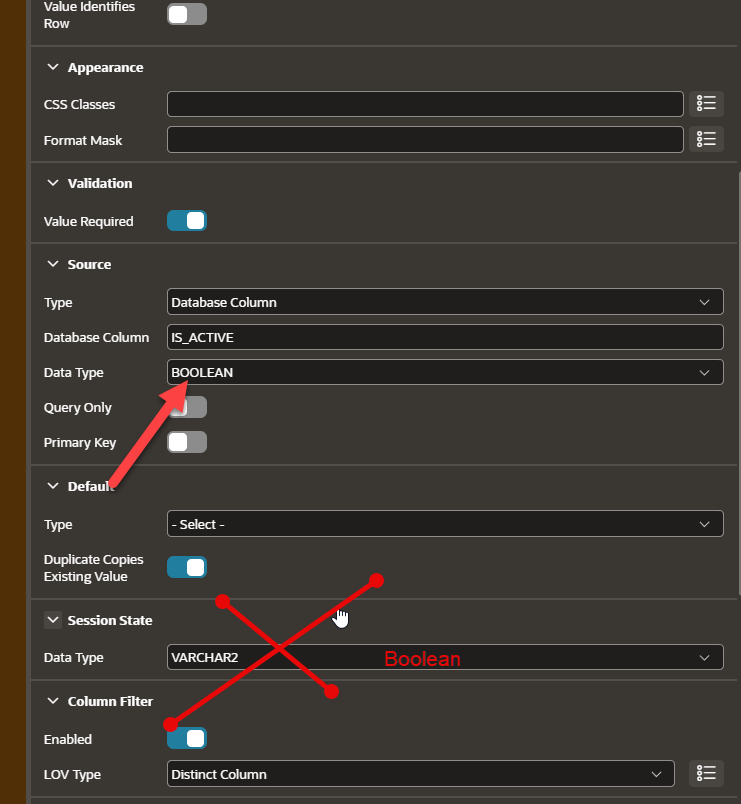
The Source data type is already BOOLEAN; the crossed-out VARCHAR2 Session State value must be changed to BOOLEAN.
Use native Boolean default expressions
Older applications may convert a Boolean expression to text:
default {
    type: expression
    plsqlExpression: to_char(true)
}
That expression returns a character value and conflicts with Boolean session state. Use a native Boolean literal instead:
default {
    type: expression
    plsqlExpression: true
}
Use false in the same way when the default should be false. Avoid to_char(true), to_char(false), and quoted Boolean values when the target is a native Boolean.
Remove character operators from Boolean Interactive Grid filters
Interactive Grid columns may retain filter metadata copied from character columns. For example, performanceImpactingOperators can include operators such as:
containsstartsWithcaseInsensitive
These operators apply to character data types such as VARCHAR2 and CLOB; they are not valid for a Boolean column. If they remain on a Boolean column, apex validate can report an INVALID_PROPERTY error.
Remove character-only performanceImpactingOperators from the Boolean column’s columnFilter block. Do not replace them with guessed values–use only operators supported by the APEXlang compiler for that component and data type.
Correct application-level component settings
Page files are only part of the fix. APEX component settings define the values used by checkbox and switch controls throughout the application.
Applications migrated from string-based Boolean conventions may still use uppercase TRUE and FALSE values as character strings. With native Boolean columns, define native lowercase Boolean literals in shared-components/component-settings.apx:
componentSetting (
    type: item
    name: checkbox
    settings {
        checkedValue: true
        uncheckedValue: false
    }
)

componentSetting (
    type: item
    name: switch
    settings {
        onValue: true
        onLabel: Yes
        offValue: false
        offLabel: No
    }
)
Because these settings are application-wide, correcting them establishes the native Boolean convention for every checkbox and switch that uses the defaults.
Audit and validation workflow
After upgrading an application or changing database columns to native BOOLEAN, audit the APEXlang source systematically:
- Identify database columns whose data type is
BOOLEAN. - Find page items, hidden items, and Interactive Grid columns that expose those columns.
- Add
sessionState { dataType: boolean }where it is missing. - Confirm that database-backed sources declare
dataType: boolean. - Replace string conversions and quoted defaults with native
trueorfalseexpressions. - Remove character-only filter operators from Boolean Interactive Grid columns.
- Review checkbox and switch settings in
shared-components/component-settings.apx. - Run
apex validateagainst the application source and correct every compiler error. - Import only after validation succeeds, then test both true-to-false and false-to-true updates in the application.
A generic SQLcl validation command is:
apex validate -input <apexlang-application-path> -ws <workspace-name>
Validation is the essential compiler gate, but it does not replace runtime testing. Confirm that values render, change, save, and reload correctly for page items and editable grid columns.
Lessons learned
Native Boolean support is cleaner than string or numeric workarounds, but an upgrade requires more than changing the database column type. Session state, source metadata, default expressions, Interactive Grid filters, and application-level component settings must agree on the Boolean type.
The most important practical lessons are:
- Trace the data type end to end rather than fixing only the visible control.
- Audit hidden items and shared component settings, not only checkboxes and switches on page files.
- Keep native Boolean literals native; do not convert them to strings.
- Use
apex validateafter every APEXlang change and test persistence in the running application afterward.
Once these rules are applied consistently, the fixes are mechanical and can be reused across APEX applications that adopt native Oracle Database Boolean columns.