
September 11, 2026
SQLcl Project 26.2.2: Two APEXlang Directory Structures, One Migration Blocker
SQLcl 26.2.2 adds useful APEXlang deployment support, but its two source layouts preserve old export defects, introduce new regressions, and remove a critical workaround.

Before getting into SQLcl, I have also made an important editorial decision. Starting with this article, I will try to put a fresh photo of one or both of my beloved cats, Mister and Frisbee, at the top of every post. Why? Because it is my blog, and I can do whatever I want.
SQLcl 26.2 contains several improvements I genuinely want to adopt: SQLcl 26.2.2 fixes the binary/static-file corruption during APEXlang export, multi-operation DDL scripts are split into separate Liquibase changesets, and SQLcl Project can deploy an application directly from APEXlang source. Unfortunately, SQLcl Project 26.2.2 retains other APEXlang export defects from 26.1, introduces new structural problems, and removes the documented directory arrangement that made those defects manageable with a standalone apex export. For my existing project, that combination is a migration blocker.
TL;DR
- SQLcl Project 26.1 and 26.2.2 both have APEXlang export defects.
project exportlowercases APEXlang file and directory names and can retain page files deleted from the application. For static files, the case change can make the export fail APEXlang validation because the.apxreference and physical filename no longer match. For deleted pages, the stale file can remain part of the exported application and bring the deleted page back during a later APEXlang deployment. - The documented
f<appId>/<app-alias>/structure used in 26.1 gave me a safe workaround: remove the defective Project-generated APEXlang tree and replace it with a clean standaloneapex export. In 26.2.2, legacy mode flattens the APEXlang files intof<appId>/, while APEXlang mode makes the mutable application alias the source root. Neither preserves the previous application-ID-scoped workaround. - Testing also exposed additional problems: a targeted application export unexpectedly attempts
ALL_USERS; staging removes existing APEX deployment properties and can retain both the legacy SQL controller and the new APEXlang controller; the APEXlang export guard can report Git changes when the working tree is clean; andproject config -listdoes not reveal user-settable options until they have been explicitly set. - SQLcl 26.2.2 fixes the serious binary/static-file corruption defect, the new
apex.apexlangoption is a good idea, and APEXlang deployment can be faster than SQL deployment in some circumstances. It should select what SQLcl Project places indist, not reorganisesrc, override a requestedexport.apex.exptype, or rewrite Git history. SQLcl 26.2 also delivers an important changeset-splitting improvement, but I am staying on 26.1 until the APEX source and deployment structures become predictable again.
Table of Contents
- TL;DR
- Table of Contents
- Test scope and the two modes
- What the SQLcl documentation promises
- Why the 26.1 structure mattered
- Mode 1: readable output
- Mode 2: APEXlang enabled
- Oracle’s clarification: regressions and intended design
- What did we gain, and what did we lose?
- What I want from SQLcl Project
- Conclusion
- Sources
Test scope and the two modes
I tested with SQLcl 26.2.2.0, build 26.2.2.233.1901. This was not a newly generated sample project. I took an existing SQLcl Project repository that had been working with SQLcl 26.1 and tested the upgrade on separate Git branches.
The test application was application 106 in workspace DEMO1, using parsing schema DEMO1 and application alias demo1. The existing Project configuration requested both READABLE_YAML and APPLICATION_SOURCE through export.apex.exptype.
SQLcl 26.2.2 effectively gave me two models to test:
| Mode | Project setting | Intended source of truth | Expected deployment payload |
|---|---|---|---|
| Mode 1: readable output | apex.apexlang is absent or false |
f106.sql, with APEXlang as supplemental readable source |
SQL application export |
| Mode 2: APEXlang enabled | apex.apexlang=true |
APEXlang source | APEXlang application directory |
I ran the same basic workflow in both modes: export application 106, inspect the resulting tree and Git changes, validate or import the APEXlang source, stage the project, and repeat operations after changing or deleting application components. The test included a static file with mixed-case characters in its name and pages that were subsequently deleted in APEX Builder. Repeating the export was important: an initial export can look correct while still failing to remove files that disappeared from the database later.
This article is about the correctness and operability of those two models, not their relative deployment performance. I have tested SQL and APEXlang deployment performance as well, and each can be faster in different circumstances. That comparison deserves its own article. Here, the important point is that both are useful deployment options, so switching between them should be a normal and inexpensive project operation.
What the SQLcl documentation promises
The starting point is not my preferred directory convention. It is Oracle’s published SQLcl 26.2 APEXlang Project Structure documentation.
For an APEX application inside SQLcl Project, the documentation specifies this structure:
src/database/<schema>/apex_apps/
`-- f<appId>/
    |-- f<appId>.sql
    `-- <app-alias>/
        |-- application.apx
        |-- pages/
        |-- shared_components/
        |-- deployments/
        `-- .apex/
The documentation explains that this arrangement maintains consistency between the SQLcl apex and project commands. It also says that, as part of the change, database export removes the previous directory structure automatically.
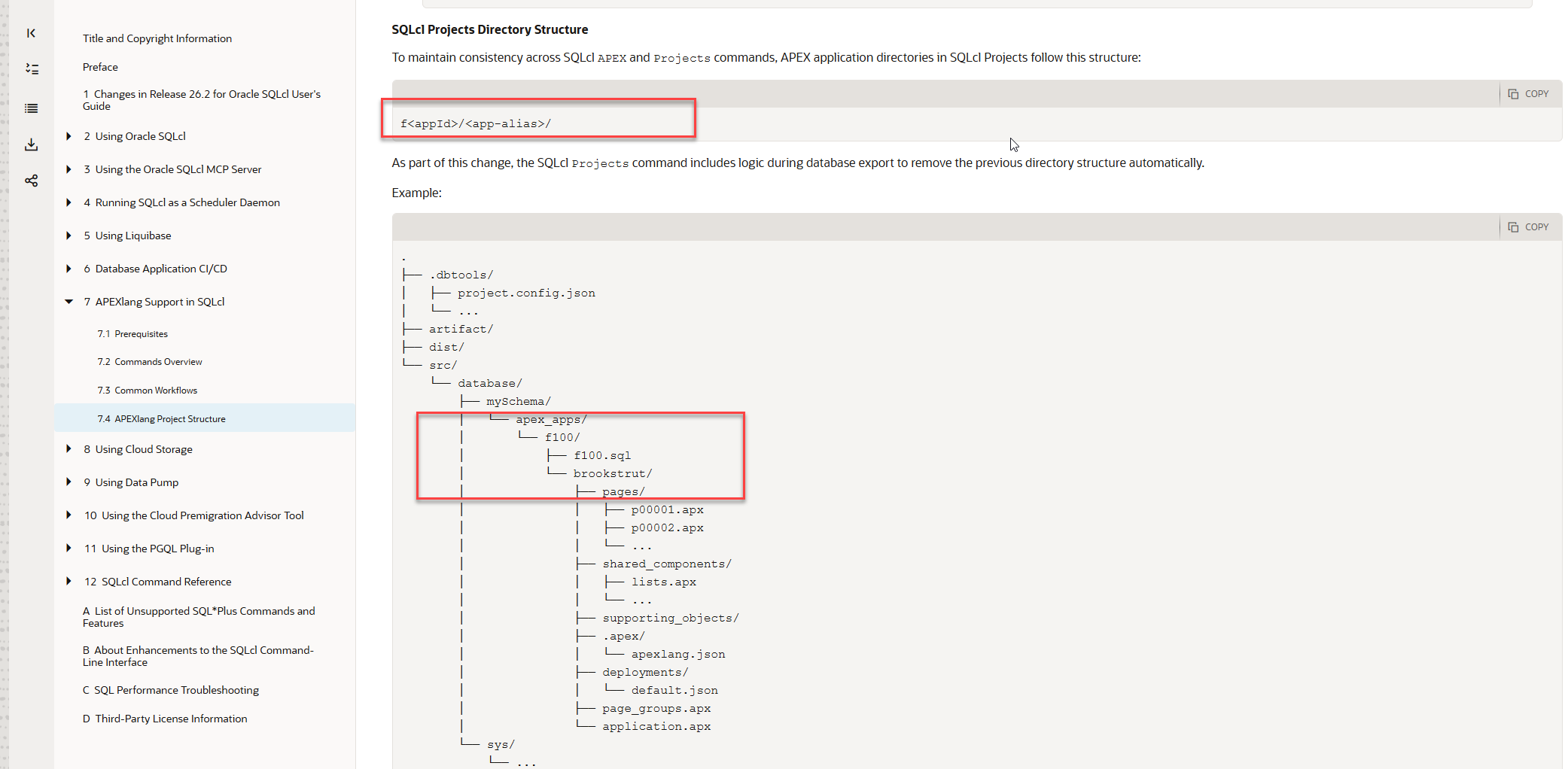
Oracle’s SQLcl 26.2 documentation specifies f<appId>/<app-alias>/ and describes automatic removal of the previous directory structure during database export.
That is a meaningful product contract. Once Oracle documents a filesystem layout, users build export aliases, validation commands, CI/CD jobs, cleanup scripts, Git review practices, and deployment tooling around it. A documented layout cannot reasonably be treated as an internal implementation detail that may change without notice.
The wording about automatic removal is specifically about the previous directory structure; it does not explicitly promise that every obsolete component file will be removed on every export. I will test stale component cleanup separately. The structural promise itself, however, is unambiguous: the application ID is the stable outer directory, the application alias is below it, and the SQL export can coexist beside the APEXlang source.
Observed structure mismatch
Neither directory layout I observed in SQLcl 26.2.2 matches that documented model. In readable mode, the APEXlang files are flattened directly into
f106. Withapex.apexlang=true, the application alias becomes the root and thef106boundary disappears. The forum discussion later explained an intended distinction between two modes, but that distinction is not present on this documentation page. A forum explanation is useful context; it should not be required to discover the fundamental storage model of a documented product feature.
Why the 26.1 structure mattered
The f<appId>/<app-alias>/ layout was not merely tidy. It gave every application a stable, application-ID-scoped boundary and kept two useful representations together: the fNNN.sql file used by SQLcl Project for SQL deployment, and the APEXlang source used for review, validation, and development.
That mattered because SQLcl Project 26.1 had several APEXlang export defects. SQLcl 26.2.2 fixes one of the most serious ones: exported binary and static files are no longer corrupted. That is an important fix. Two other defects remain in my tests:
- SQLcl Project lowercases APEXlang file and directory names. For a mixed-case static filename, the
.apxsource can retain the original case while the physical file is written in lowercase.apex validatethen fails withREFERENCE_NOT_FOUNDbecause the referenced file does not exist under that exact name. - Re-exporting can leave obsolete APEXlang files in place. If a page is exported, then deleted in APEX Builder, its page file may survive the next Project export. An APEXlang import or deployment can consequently include the stale file and bring back a page that was deliberately deleted from the application.
The documented 26.1 structure gave me a practical way to compensate. My prj_exp_app SQLcl alias performed two exports for one application:
- It ran
project export -o APEX.<appId>so SQLcl Project still generated thefNNN.sqlsource required by the normal staging and SQL deployment workflow. - It then ran a standalone
apex exportwith-exptype APEXLANGand-force, replacing the defective APEXlang subdirectory with a clean export from the database.
Conceptually, the result remained simple:
f106/
|-- f106.sql       # generated by project export
`-- demo1/         # replaced by apex export -exptype APEXLANG -force
Because f106 was the stable application boundary, the alias knew exactly where application 106 belonged. The mutable alias remained below that boundary. A changed alias or a stale APEXlang tree could be cleaned without confusing one application with another, and the standalone export could repair the readable source without removing the Project-generated SQL file.
This was admittedly a workaround, but it was safe, deterministic, and aligned with the published directory structure. Most importantly, it meant that outstanding APEXlang export bugs did not block the rest of SQLcl Project. I could continue using SQL deployment while retaining clean APEXlang source, and I could change deployment strategy later without reorganising src or rewriting the application’s Git history.
That is why the 26.2.2 directory change is more than an inconvenience. The old bugs have not all disappeared, but the directory structure that allowed me to work around them has.
The next two sections deliberately stay close to the evidence. I will describe only what I ran and what SQLcl produced in each mode: the directory trees, validation and import results, Git changes, and staging output. I will return to the consequences, design trade-offs, and changes I would like Oracle to make after both sets of observations are on the table. For now, stay with me through the facts.
Mode 1: readable output
In the first mode, apex.apexlang was absent from project.config.json. According to Oracle’s later clarification in the forum, this is the legacy or readable-output mode: f106.sql remains the source of truth and APEXlang is supplemental readable source.
A hybrid source layout replaces the documented structure
Before running the export, I followed the SQLcl Project migration guidance and removed the existing APEX application source directory. This ensured that the test started without files left behind by the 26.1 layout:
rm -rf src/database/demo1/apex_apps
From inside SQLcl, I exported only application 106:
project export -o apex.106
The new APEXlang files were written directly into f106, alongside f106.sql. There was no application-alias directory and no readable directory:
src/database/demo1/apex_apps/f106/
|-- .apex/
|-- deployments/
|-- pages/
|-- shared-components/
|-- application.apx
|-- f106.sql
`-- page-groups.apx
Git consequently saw the files under the previous f106/demo1/ tree as deletions and the flattened files as new, untracked files. An abbreviated git status captured the structural change:
git status
The relevant output looked like this:
deleted:    src/database/demo1/apex_apps/f106/demo1/application.apx
deleted:    src/database/demo1/apex_apps/f106/demo1/pages/...
deleted:    src/database/demo1/apex_apps/f106/demo1/shared-components/...
modified:   src/database/demo1/apex_apps/f106/f106.sql

Untracked files:
  src/database/demo1/apex_apps/f106/.apex/
  src/database/demo1/apex_apps/f106/application.apx
  src/database/demo1/apex_apps/f106/deployments/
  src/database/demo1/apex_apps/f106/page-groups.apx
  src/database/demo1/apex_apps/f106/pages/
  src/database/demo1/apex_apps/f106/shared-components/
This is the hybrid layout Oracle later identified in the forum as a SQLcl 26.2.2 regression.
The old export defects remain
I then tested two defects already present in SQLcl Project 26.1. In APEX Builder, I created page 5, named Drop Me Salary Dashboard Copy, and uploaded a static file named mixedCaseImageName.webp. I exported the application, deleted page 5 in APEX Builder, and exported it again.
After the second export, the file for page 5 was still present. The physical static filename had also been converted to lowercase:
pages/p00005-dropme-salary-dashboard-copy.apx
shared-components/static-files/mixedcaseimagename.webp
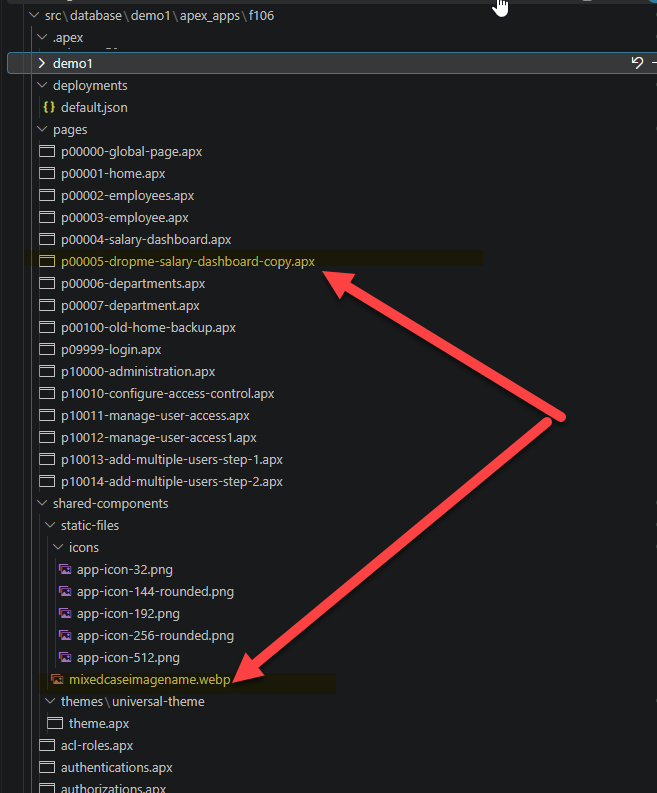
After page 5 was deleted in APEX Builder and the application was exported again, its .apx file remained. The physical mixed-case static filename was written entirely in lowercase.
The lowercasing is not only cosmetic. The reference inside shared-components/static-files.apx retained the original filename, mixedCaseImageName.webp, while the physical file was named mixedcaseimagename.webp. Validating the flattened application root reproduced the mismatch:
apex validate -input src/database/demo1/apex_apps/f106
The result was an APEXlang compiler error:
APEXlang Compile Errors:
File: shared-components/static-files.apx
Line: 26
Column: 0
Type: REFERENCE_NOT_FOUND
Error: referenced file shared-components/static-files/mixedCaseImageName.webp
       in the fileName property is not found
The binary contents of the static file were no longer corrupted in SQLcl 26.2.2. That earlier defect is fixed. Filename casing and stale page cleanup are separate defects, and both remained in this mode.
To test the consequence of the stale page independently, I manually removed the mixed-case static file and its reference from the exported source so that the unrelated validation error would no longer block the import. I then imported the flattened APEXlang application:
apex import -input src/database/demo1/apex_apps/f106
SQLcl reported a successful import:
Importing application ID: 106 into workspace: DEMO1
Import successful.
When I opened application 106 in APEX Builder, page 5 was present again. It had been deleted in APEX Builder before the second export, but its stale .apx file remained in the source tree and the subsequent apex import recreated it. This confirms that stale page files are not merely repository noise: they can change the deployed application.
Staging changes the controller and removes deployment properties
The first project stage run did not overwrite the application controller generated by SQLcl 26.1:
project stage
It stopped with this error:
Stage is Comparing:
Old Branch      refs/heads/main
New Branch      refs/heads/26.2-readable

ERROR: An error has occurred processing your request:
The generated APEX install file dist\releases\apex\f106\f106.xml has been
edited and stage will not overwrite it automatically.
Restore the generated file, remove it, or merge your edits manually before
running stage again.
The controller had not been manually edited; it was the generated file retained from SQLcl 26.1. I removed that file and ran staging again:
rm -f dist/releases/apex/f106/f106.xml
project stage
This time staging completed and generated a new controller. Compared with the 26.1 file, the new version contained additional offset-handling logic and changed from a numeric checksum to a longer hexadecimal checksum:
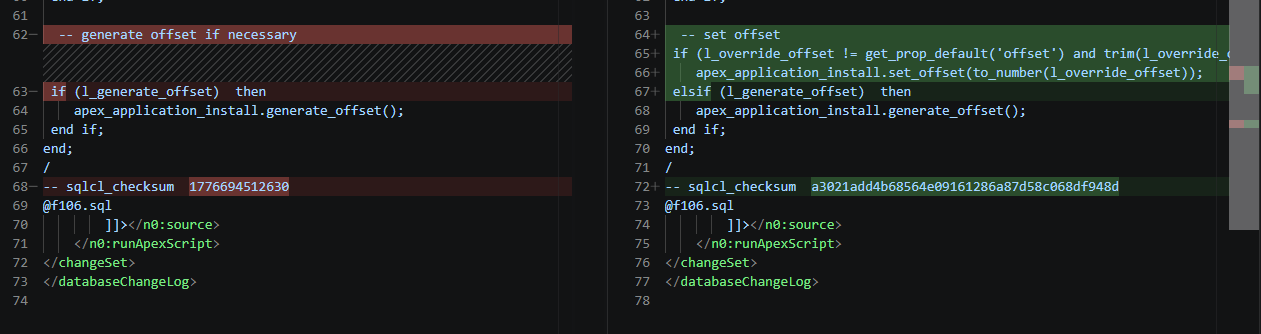
SQLcl 26.2.2 regenerated f106.xml with new offset logic and a different checksum format.
The new checksum was deterministic in this test. After rolling back the staged changes and running project stage again against the same source, SQLcl generated the same value:
-- sqlcl_checksum a3021add4b68564e09161286a87d58c068df948d
The same staging operation also removed four existing APEX properties from dist/env/default.properties:
 parameter.demo1=demo1
-parameter.apex.106.workspace=DEMO1
-parameter.apex.106.schema=DEMO1
-parameter.apex.106.alias=DEMO1
-parameter.apex.106.appId=106

After staging, only parameter.demo1=demo1 remained; the application workspace, schema, alias, and application-ID properties were removed.
Unexpected exports and undiscoverable configuration
The targeted application export also attempted to process database users. The command was limited to APEX application 106:
project export -o apex.106
However, the debug output contained ORA-31603 errors for multiple users outside the configured project schema. This is an excerpt:
Errors:
============================================================
ORA-31603: object "CLA_PUBLIC" of type USER not found in schema "DEMO1"
ORA-31603: object "CO" of type USER not found in schema "DEMO1"
ORA-31603: object "HR" of type USER not found in schema "DEMO1"
ORA-31603: object "ORDS_METADATA" of type USER not found in schema "DEMO1"
ORA-31603: object "CLA_UTILITIES" of type USER not found in schema "DEMO1"
ORA-31603: object "CLA_APEX" of type USER not found in schema "DEMO1"
ORA-31603: object "CLA_DEPLOYER" of type USER not found in schema "DEMO1"
ORA-31603: object "HRREST" of type USER not found in schema "DEMO1"
ORA-31603: object "ORDS_PUBLIC_USER" of type USER not found in schema "DEMO1"
ORA-31603: object "PDBADMIN" of type USER not found in schema "DEMO1"
ORA-31603: object "DEMO2" of type USER not found in schema "DEMO1"
ORA-31603: object "DEMO1" of type USER not found in schema "DEMO1"
ORA-31603: object "SH" of type USER not found in schema "DEMO1"
ORA-31603: object "AV" of type USER not found in schema "DEMO1"
============================================================
-------------------------------
APEX_APPLICATION              1
-------------------------------
Exported 1 objects
Adding this condition to .dbtools/filters/project.filters stopped the unwanted user export attempts:
export_type not in ('ALL_USERS'),
Finally, project config -list reported only settings already stored in project.config.json. Because apex.apexlang had not yet been set, the command did not show that the setting existed or that its effective value was false:
project config -list
The output ended with the explicitly stored staging options and contained no apex.apexlang row:
 +---------------------------------------------------------------------------------+
 | git.defaultBranch                      | main                                   |
 +---------------------------------------------------------------------------------+
 | stage.excludeObjects                   | ["ALL.user"]                           |
 +---------------------------------------------------------------------------------+
 | stage.generatedFormat                  | liquibase                              |
 +---------------------------------------------------------------------------------+
 | stage.softObjectIsolation              | change                                 |
 +---------------------------------------------------------------------------------+
 | stage.substituteSchemas                | true                                   |
 +---------------------------------------------------------------------------------+
SQL>
After apex.apexlang was explicitly added to the configuration, it appeared in this list. That observation belongs to the second mode.
Mode 2: APEXlang enabled
A useful deployment option also reorganises the source
For the second mode, I created a separate branch and enabled the new Project setting:
project config set -name apex.apexlang -value true
The command added this object to .dbtools/project.config.json:
"apex" : {
  "apexlang" : true
}

The new setting appears in project.config.json only after it is explicitly enabled.
It also became visible at the end of project config -list:
 +---------------------------------------------------------------------------------+
 | stage.substituteSchemas               | true                                   |
 +---------------------------------------------------------------------------------+
 | apex.apexlang                         | true                                   |
 +---------------------------------------------------------------------------------+
As in the first mode, I removed the existing APEX source before testing the new layout:
rm -rf src/database/demo1/apex_apps
I then exported application 106:
project export -o apex.106
SQLcl detected the old staged SQL payload, warned that APEXlang mode was enabled, and completed the export:
*** APEX_APPLICATIONS ***
WARN: apex.apexlang=true, but legacy APEX SQL source or stage content remains.
Remove legacy src/database/<schema>/apex_apps/f<app_id> directories,
remove legacy dist/releases/apex/f<app_id> directories, then run project
export and project stage again.
Found: dist\releases\apex\f106\f106.sql
Exporting Workspace DEMO1 - application 106:EMP & DEPT Mini Hub
-------------------------------
APEX_APPLICATION              1
-------------------------------
Exported 1 objects
Elapsed 16 sec
The source layout was now different from both the documented structure and the readable-mode structure. The application alias became the directory root directly below apex_apps:
src/database/demo1/apex_apps/
`-- demo1/
    |-- .apex/
    |-- deployments/
    |-- pages/
    |-- shared-components/
    |-- application.apx
    `-- page-groups.apx
There was no f106 parent and no f106.sql in the newly generated source. Although export.apex.exptype still requested READABLE_YAML and APPLICATION_SOURCE, enabling apex.apexlang selected this APEXlang-only source model.
A mutable alias is not a stable application identity
The application ID remained 106 throughout the test, but the application alias was editable in APEX Builder. I first exported the application with alias demo1. I then changed the alias to demo1-1 in APEX Builder and exported again.
The resulting source tree contained two application roots:
src/database/demo1/apex_apps/
|-- demo1/
|   |-- .apex/
|   |-- deployments/
|   |-- pages/
|   `-- shared-components/
`-- demo1-1/
    |-- .apex/
    |-- deployments/
    |-- pages/
    `-- shared-components/
The original demo1 directory remained beside the new demo1-1 directory. Neither path contained the stable application ID in its directory name; the ID was available only inside the application metadata and deployment configuration.
Git protection becomes an export blocker
Next, I changed the application in APEX Builder and tried to refresh its APEXlang source. SQLcl refused to export over a target that it considered changed:
project export -o apex.106
The command reported:
Exporting Workspace DEMO1 - application 106:EMP & DEPT Mini Hub
APEXlang export target has tracked or untracked Git changes:
src\database\demo1\apex_apps\demo1.
Commit, stash, or remove those changes before re-exporting.
Failed to export APEXlang application_id = 106 due to APEXlang export target
has tracked or untracked Git changes:
src\database\demo1\apex_apps\demo1.
-------------------------------
Exported 0 objects
Elapsed 13 sec
I committed the generated source and tried again. It failed again, even though git status reported no changes:
SQL> project export -o apex.106
*** APEX_APPLICATIONS ***
WARN: apex.apexlang=true, but legacy APEX SQL source or stage content remains. Remove legacy src/database/<schema>/apex_apps/f<app_id> directories, remove legacy dist/rele
ases/apex/f<app_id> directories, then run project export and project stage again. Found: dist\releases\apex\f106\f106.sql
Exporting Workspace DEMO1 - application 106:EMP & DEPT Mini Hub
APEXlang export target has tracked or untracked Git changes: src\database\demo1\apex_apps\demo1. Commit, stash, or remove those changes before re-exporting. Failed to expo
rt APEXlang application_id = 106 due to APEXlang export target has tracked or untracked Git changes: src\database\demo1\apex_apps\demo1. Commit, stash, or remove those cha
nges before re-exporting.
-------------------------------
-------------------------------
Exported 0 objects
Elapsed 12 sec


SQL> ! git status
On branch 26.2-apexlang
nothing to commit, working tree clean
Export blocker
Despite the clean working tree, the next
project export -o apex.106returned the same tracked-or-untracked-changes error and exported zero objects. Committing the target therefore did not resolve the condition described by the error message in this test.
The repeatable way I found to continue was to remove the complete alias directory before every refresh and then export again:
rm -rf src/database/demo1/apex_apps/demo1
project export -o apex.106
With no target directory present, the export completed and recreated the APEXlang application.
APEXlang mode: export and stage deep dive
The export that followed my manual removal of the complete alias directory cannot demonstrate automatic cleanup: the page files were already gone because I had deleted the whole source tree to get past the Git protection error.
To test deletion handling properly, I first established a normal APEXlang baseline. I exported and staged the APEXlang branch, reviewed and committed its output, and merged it into main. I then created a new branch for the next application change:
git checkout -b 26.2-apexlang-delta
At that point, page 100 (Old Home Backup) existed in both the committed src and dist baselines. I deleted page 100 in APEX Builder and exported application 106 on the delta branch:
project export -o apex.106
This export correctly removed the existing page file from src:
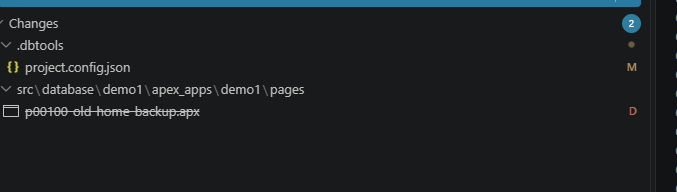
Starting from an established APEXlang baseline, deleting page 100 in APEX Builder produced the expected deletion from src.
I then staged the delta:
project stage
The page was also removed from dist. I repeated the same baseline-and-delta test with a static file deleted in APEX Builder. Its physical file and source reference were removed from src, and staging propagated those deletions into dist. This is the cleanup behaviour I want: a component deleted in APEX Builder disappears from the exported source and then from the deployment payload.
Staging generated an APEXlang payload beneath the application alias:
dist/releases/apex/demo1/
|-- demo1.xml
`-- demo1/
    |-- .apex/
    |-- deployments/
    |-- pages/
    |-- shared-components/
    |-- application.apx
    `-- page-groups.apx
Staging problem
The existing legacy
dist/releases/apex/f106/directory remained present and caused warnings, but staging still completed. More importantly, the top-level APEX changelog retained the old SQL controller and added the new APEXlang controller:
<?xml version="1.0" encoding="UTF-8"?>
<databaseChangeLog xmlns:xsi="http://www.w3.org/2001/XMLSchema-instance"
                   xmlns="http://www.liquibase.org/xml/ns/dbchangelog"
                   xsi:schemaLocation="http://www.liquibase.org/xml/ns/dbchangelog
                        http://www.liquibase.org/xml/ns/dbchangelog/dbchangelog-4.3.xsd">
<include file="f106/f106.xml" relativeToChangelogFile="true"/>
<include file="demo1/demo1.xml" relativeToChangelogFile="true"/>
</databaseChangeLog>
SQLcl warned that legacy APEX SQL stage content remained, but project stage did not remove that content or its <include>. The staged changelog therefore referenced both the previous f106/f106.xml SQL deployment and the new demo1/demo1.xml APEXlang deployment.
The new APEXlang change controller used the SQLcl apex import command against the APEXlang payload:
<changeSet id="INSTALL_demo1"
           author="SQLCL-Generated"
           logicalFilePath="releases/apex/demo1/demo1.xml"
           failOnError="true"
           runOnChange="true">
  <n0:runApexScript relativeToChangelogFile="true">
    <n0:source><![CDATA[
-- sqlcl_checksum  11cd5b765726122ea37a4f1028545dcbb4604ae5
-- sqlcl_apexlang_payload_hash 9559ab34930d618b0d57a2ebc655bfd7f2897ca127c0afde2e700a709d6c48e9
declare
  -- sqlcl version       = 26.2.2.0
  -- override_schema     = ${apex.demo1.schema}
  -- override_alias      = ${apex.demo1.alias}
  -- override_workspace  = ${apex.demo1.workspace}
  -- override_app_id     = ${apex.demo1.appId}

/*
---SKIPPED
*/
end;
/
apex import -input demo1
    ]]></n0:source>
  </n0:runApexScript>
</changeSet>
I rolled back the staged changes and ran project stage again without changing the source. Both generated values were identical across the two runs:
-- sqlcl_checksum  11cd5b765726122ea37a4f1028545dcbb4604ae5
-- sqlcl_apexlang_payload_hash 9559ab34930d618b0d57a2ebc655bfd7f2897ca127c0afde2e700a709d6c48e9
In other words, a delta created from an established APEXlang baseline correctly propagated component deletions from APEX Builder through src and into dist, produced stable checksums for unchanged source, and generated a deployment controller that imports the APEXlang application directly. At the same time, staging left the legacy SQL controller active beside the new APEXlang controller.
Oracle’s clarification: regressions and intended design
The responses in the Oracle Forum discussion were helpful. They confirmed that the layouts I observed were not the complete intended design. They also exposed a larger problem: the intended design described in the discussion is materially different from the design described in Oracle’s published documentation.
Syme’s independent export tests
Syme (skutz-Oracle) first tested the standalone apex export command with several combinations of -exptype and -split. His results confirmed that the requested export type controls the generated layout:
apex export -applicationid 101 -exptype SQL -split
apex export -applicationid 101 -exptype APEXLANG
apex export -applicationid 101 -exptype APEXLANG,SQL
apex export -applicationid 101 -exptype APEXLANG,SQL -split
The SQL-only export created an f101 structure. The APEXlang-only export used the application alias, sample-calendar, as its root. Requesting APEXLANG,SQL produced both representations, including f101.sql or the split f101 SQL directory beneath the alias root.
After those tests, Syme confirmed that there were reproducible problems in how the APEX files were being laid out. He also raised the underlying design question: should SQL and APEXlang exports be supported together, or should SQL remain below f<appId> while APEXlang lives below <app-alias>?
That independent reproduction is important. It confirms that the disagreement among project export, standalone apex export, SQLcl 26.1, and the documentation was real; it was not caused by my existing repository or configuration.
Neil’s explanation of the intended modes
Neil Fernandez then described the intended SQLcl Project model. In compact form, it is this:
| Project mode | Source of truth | Intended source location | SQL application source |
|---|---|---|---|
apex.apexlang absent or false |
f<appId>.sql |
Supplemental APEXlang under f<appId>/readable/ |
Generated |
apex.apexlang=true |
APEXlang | Application alias directly below apex_apps/ |
Not generated |
In the first mode, APEXlang is intended to replace the previous READABLE_YAML output; it is not the deployment source. In the second mode, the application alias becomes the source-directory root, and neither f<appId>.sql nor readable/ is generated. Neil also clarified that apex.apexlang completely overrides export.apex.exptype and that SQL and APEXlang output must not be mixed within the Project model.
The Git protection is also intentional. SQLcl is meant to refuse an export that would overwrite tracked or untracked changes in the APEXlang target. If an application alias changes, a clean export is intended to create the new alias directory and remove the previous one, provided local changes have first been committed or stashed.
Finally, Neil identified two separate layout regressions:
- SQLcl 26.1.2 placed supplemental APEXlang output under the application alias instead of under
f<appId>/readable/. - SQLcl 26.2.2 removed that boundary and flattened the APEXlang files directly into
f<appId>, creating the hybrid layout shown in Mode 1.
The binary/static-file corruption was a third, separate issue. Oracle fixed that defect in SQLcl 26.2.2.
What the clarification resolves
This explanation resolves several factual questions from the test:
- The flattened Mode 1 layout is a confirmed SQLcl 26.2.2 regression.
- The
f<appId>/<app-alias>/layout produced in SQLcl 26.1.2 was also not Oracle’s intended readable-output location; Oracle intendedf<appId>/readable/. - The alias-root layout in Mode 2 is intentional when
apex.apexlang=true. - Suppressing
f<appId>.sqland disregardingexport.apex.exptypein that mode are intentional design choices. - Protecting locally modified APEXlang source is intentional, although the error against my clean Git working tree remains a bug.
It also makes the mixed controller result more surprising. If SQL and APEXlang output must not be mixed, staging should not leave both f106/f106.xml and demo1/demo1.xml active in the top-level changelog after the Project switches modes.
What remains unresolved
Still unresolved
The clarification explains Oracle’s intent, but it does not resolve the documentation conflict. The published SQLcl 26.2 directory-structure page says that SQLcl Project uses:
f<appId>/<app-alias>/
Its example places f<appId>.sql and the application-alias APEXlang directory together below the stable application-ID root. It does not describe f<appId>/readable/, the apex.apexlang switch, the alias-root source model, the override of export.apex.exptype, or the rule that SQL and APEXlang output must not be mixed.
I am surprised that none of those distinctions is documented on the page that defines the SQLcl Project APEXlang structure. The configuration is also not discoverable through project config -list until the setting has already been added, so a user cannot learn about the second mode there either.
From Oracle’s internal perspective, the 26.1.2 layout may have been a regression. From a user’s perspective, however, it was the behaviour described by Oracle’s documentation, and it provided the stable structure around which working export and deployment tooling could be built. Once a filesystem contract is published, users will depend on it.
A forum response is valuable, especially while bugs are being investigated, but it cannot replace the product documentation. Nor do I think the best resolution is simply to revise the documentation after the implementation has changed. The documented f<appId>/<app-alias>/ model is operationally stronger: it preserves the immutable application-ID boundary, contains the mutable alias beneath it, allows SQL and APEXlang source to coexist, and supports the standalone-export workaround described earlier.
Central design question
Why should selecting an APEXlang deployment payload also:
- reorganise the application source under
src;- stop following Oracle’s published
f<appId>/<app-alias>/structure;- override the export types requested through
export.apex.exptype;- remove the easy switch between SQL and APEXlang deployment;
- replace the stable application-ID root with a mutable application alias;
- rewrite the application’s Git history as files move between incompatible layouts;
- remove a practical standalone-export workaround that I built around the documented structure; and
- make APEXlang re-export conditional on SQLcl’s interpretation of
git status?
These are separate consequences, and each deserves a clear technical justification. I understand now that most of them are intentional. I still do not understand what benefit requires any of them merely to choose the payload placed in dist.
The Git requirement deserves particular scrutiny because it is specific to APEXlang mode. project export is synchronising application state from the database into a known filesystem target. Whether the current files have been committed, stashed, copied elsewhere, or intentionally discarded is a source-control decision for the user and the surrounding workflow—not a prerequisite the exporter should silently impose.
Protecting users from accidental loss is a reasonable goal, but the usual interface is an explicit choice: refuse by default if necessary, then provide a documented force option for a deliberate replacement. Standalone apex export already follows that model with -force. The APEXlang Project path instead made Git status part of the export operation, offered no equivalent override in this test, and then blocked the export even when Git itself reported a clean working tree. That is not only a false-positive bug; the underlying coupling between database export and Git policy also needs justification.
What did we gain, and what did we lose?
This is not a symmetrical pros-and-cons comparison. The gains are real, intentional improvements that I welcome. The losses interact with one another: a source-layout change removes a workaround, creates Git churn, complicates migration, and makes switching deployment formats harder. Listing them separately makes that distinction clearer.
What we gained
- Native APEXlang deployment. SQLcl Project can stage an APEX application as APEXlang and deploy it through
apex import. This is a useful option, not a feature I want removed. - Correct deletion propagation in the baseline-and-delta test. After page 100 and a static file were deleted in APEX Builder,
project exportremoved them fromsrc, andproject stageremoved them fromdist. That is exactly how a database-to-source-to-deployment workflow should behave. - The binary/static-file corruption fix. SQLcl 26.2.2 no longer corrupted the exported image tested in this workflow. That was a serious 26.1 defect, and fixing it is important.
- Stable generated hashes. Repeating
project stageagainst unchanged APEXlang source produced the samesqlcl_checksumandsqlcl_apexlang_payload_hashvalues. - A potentially faster deployment path. My separate performance tests show that APEXlang deployment can be faster in some circumstances, while SQL deployment can be faster in others. Having both choices is valuable; the detailed comparison belongs in another article.
- Safer non-APEX changesets. SQLcl 26.2 also splits multiple DDL operations from one source file into separate changesets. This is not part of the APEX directory problem, but it is a substantial improvement and one reason I would like to adopt this release.
These are worthwhile changes. The problem is not the existence of APEXlang deployment. The problem is how that deployment choice has been coupled to source storage, export configuration, and migration behaviour.
What we lost
- The documented, stable source structure. The useful
f<appId>/<app-alias>/boundary is replaced by one layout in readable mode and another in APEXlang mode. - The working 26.1 export workaround. My
prj_exp_appalias was my own solution, not an Oracle-documented procedure. It could retainfNNN.sqland replace the defective APEXlang subdirectory with a forced standalone export because the documented structure provided a safe application boundary. Neither 26.2 layout supports that workflow cleanly. - The work already built around the documented contract. Export aliases, cleanup logic, validation paths, Git review practices, and deployment automation all depended on the published structure. Adopting 26.2 would require that work to be redesigned without a corresponding source-management benefit.
- An inexpensive deployment switch. Choosing SQL or APEXlang deployment now changes the source-of-truth model and reorganises
src. A deployment-format decision therefore becomes a repository migration. - A stable application identity at the directory boundary. The application ID no longer contains the APEXlang-mode source. A mutable alias becomes the root, and changing it can leave multiple application directories behind.
- Continuous Git history. Moving the same application between
f<appId>/<app-alias>/, flattenedf<appId>/, and alias-root layouts appears as large-scale deletions and additions. Meaningful application changes become harder to review among the migration noise. - An export operation independent of Git policy. Enabling APEXlang deployment also made re-export conditional on SQLcl’s Git check. The guard blocked the operation even when
git statusreported a clean working tree, provided no documented force override, and left manual target removal as the reliable escape. - Control over requested export types.
apex.apexlang=trueoverridesexport.apex.exptypeinstead of allowing the requested application-source representations to coexist. - A straightforward upgrade path. Existing
srcanddistcontent must be cleaned or migrated, generated controllers may require manual removal, and staging can retain both old and new deployment paths.
The largest loss is not one directory level. It is the ability to keep a stable source model, repair known export defects, and choose the deployment mechanism independently.
Additional regressions and migration friction
Several problems discovered during this test are not benefits or necessary costs of APEXlang deployment. They are additional regressions or unexplained migration behaviour:
- A targeted
project export -o apex.106attempted to exportALL_USERSand produced multipleORA-31603errors until I added an exclusion toproject.filters. - The APEXlang export guard reported tracked or untracked changes when the Git working tree was clean.
- Switching to APEXlang mode left both
f106/f106.xmlanddemo1/demo1.xmlactive in the top-level deployment changelog. - Staging removed the existing workspace, schema, alias, and application-ID values from
dist/env/default.properties. - Staging initially refused to replace the SQLcl 26.1-generated
f106.xmlcontroller and required me to remove it manually. project config -listdid not exposeapex.apexlangor its default until I already knew the parameter name and explicitly set it.
Those issues make an already structural migration more difficult to understand and automate. More importantly, they obscure the genuinely useful improvements that SQLcl 26.2 delivers.
What I want from SQLcl Project
I do not want SQLcl Project to abandon APEXlang deployment. I want the new deployment option without coupling it to a second source model, a repository migration, or unrelated changes to export and staging behaviour.
APEXlang source and deployment
-
Use the documented source structure whenever APEXlang source is requested. Whether
apex.apexlangistrue,false, or absent should not change where requested application source is stored:src/database/<schema>/apex_apps/f<appId>/ |-- f<appId>.sql # when APPLICATION_SOURCE is requested `-- <app-alias>/ |-- .apex/ |-- deployments/ |-- pages/ |-- shared-components/ |-- application.apx `-- page-groups.apxThe application ID remains the stable boundary, and the mutable alias remains beneath it. The source representations written inside that boundary should be controlled by
export.apex.exptype, not by the deployment setting.Of course, this does not mean that every project must store APEXlang source. If the user selects SQL deployment with
apex.apexlang=falseand does not request APEXlang through the export configuration, SQLcl should write only the requested SQL source. No APEXlang request should mean no APEXlang files. The important requirement is that, when APEXlang source is requested, it uses the documented location rather than a layout selected implicitly by the deployment mode. -
Replace the complete application root during database export by default. When exporting application 106, SQLcl Project should normally remove everything below
apex_apps/f106/and recreate that root from the current database state. It should regenerate every requested representation, includingf106.sqland the APEXlang alias directory. This removes deleted pages, deleted static files, renamed components, and obsolete alias directories in one deterministic operation.Oracle may also provide an explicit guarded option that exports only when the target is empty, committed, or otherwise considered safe. That can be useful for teams that want the additional protection, but it should be an opt-in policy. Complete replacement should remain the default behaviour for a database export.
-
Preserve filename and directory case. SQLcl Project should write the filenames and directory names returned by the APEX API, including
APEX_EXPORT.GET_APPLICATION, without converting them to lowercase or otherwise normalising their case. -
Leave Git policy to the user. The default database export should not depend on whether SQLcl believes the target contains committed, uncommitted, tracked, or untracked files. Replacing the application root is the requested operation. An optional guarded mode may inspect Git when the user explicitly selects it, but it should be documented and accompanied by a force option equivalent to standalone
apex export -force. -
Make
apex.apexlangcontrol deployment only. The setting should decide howproject stagepackages and deploys the application. It should not reorganisesrc, overrideexport.apex.exptype, or require a new Git history. -
Keep one stable deployment structure. The application should remain below its
f<appId>boundary indist, regardless of the selected deployment mechanism:dist/releases/apex/f<appId>/ |-- f<appId>.xml |-- f<appId>.sql # payload when SQL deployment is selected `-- <app-alias>/ # payload when APEXlang deployment is selectedThe top-level APEX changelog should continue to include only
f<appId>/f<appId>.xml. In SQL mode, that controller runs the generated SQL payload. In APEXlang mode, the same controller path runsapex importagainst the alias directory. -
Make switching deployment modes routine. Changing
apex.apexlangshould regeneratef<appId>.xmland its selected payload beneath the samedist/releases/apex/f<appId>/root. SQLcl should remove the payload no longer used, replace its own generated controller, and leavesrcuntouched. Moving from SQL to APEXlang deployment—or back again—should not require a repository migration.
This retains the useful new APEXlang deployment path while separating three concerns that should remain independent: what is exported into src, how application source is organised, and which payload is generated into dist.
Other SQLcl Project fixes
-
Do not export
ALL_USERSunless it is explicitly requested. A targetedproject export -o apex.106should export application 106. Users should not need aproject.filtersexclusion merely to prevent an application export from attempting every database user. -
Leave existing environment properties alone.
project stageshould not remove workspace, schema, alias, application-ID, or user-defined values fromdist/env/default.properties. Those files are part of the environment-specific deployment contract and may intentionally contain values used by generated controllers or custom changesets. -
Make Project configuration discoverable.
project config -listshould show every supported, non-hidden user setting—not only settings already written toproject.config.json. For each setting, it should show the effective value, the documented default or that no default exists, and whether the value is explicitly configured. A user should not need to know thatapex.apexlangexists before asking SQLcl to list the available settings. -
Regenerate SQLcl-generated files without manual cleanup. A new SQLcl version should be able to replace controllers and payloads generated by an older version. If SQLcl cannot safely distinguish a generated file from a user-maintained file, it should provide a clear, documented override instead of requiring users to discover and remove controllers manually.
-
Keep the deployment changelog internally consistent. When a project changes deployment modes, staging should remove the obsolete controller and its payload. It must not warn that SQL and APEXlang content cannot coexist while leaving both controllers active in the changelog.
I think these changes would make SQLcl Project easier to understand, automate, and adopt for everyone. They preserve the improvements in SQLcl 26.2 while restoring a stable contract for existing users.
I deeply appreciate the work the SQLcl team has put into APEXlang support, the binary-export fix, component cleanup, and safer changeset generation. I hope the team hears this feedback in that spirit: keep the valuable new deployment capability, but make it fit the documented source structure and the predictable Project workflow users already depend on.
Conclusion
SQLcl 26.2 is not a release I want to reject. Fixing the binary/static-file corruption during APEXlang export is important and appreciated. Splitting multi-operation DDL into separate changesets is also a substantial improvement to deployment safety, and choosing between SQL and APEXlang application deployment is genuinely useful. My testing suggests that either deployment mechanism can be faster depending on the application and circumstances, which makes an inexpensive switch between them even more valuable.
The blocker is the coupling between deployment format and source layout. Other APEXlang export bugs remain, but the documented 26.1 directory structure made them manageable through my prj_exp_app SQLcl alias. That workaround retained project export to generate fNNN.sql, then used a forced standalone apex export to replace the defective APEXlang source with a clean, current tree. The two 26.2 structures remove the stable, application-ID-scoped path on which that workaround depends.
Neil Fernandez’s forum explanation is useful, but I am surprised that its central distinctions are absent from the published documentation: readable/ in legacy mode, the alias as the APEXlang source root, apex.apexlang overriding export.apex.exptype, and the prohibition on mixed output. The current documentation explicitly specifies f<appId>/<app-alias>/ and automatic cleanup. A forum clarification should not supersede that public contract. My preferred resolution is for SQLcl Project to follow the documented structure, not merely to update the documentation after users have already built workflows around it.
For now, I am keeping this project on SQLcl 26.1. I would like Oracle to restore the documented, stable application-ID boundary, preserve the requested source exports, and let apex.apexlang do one clear job: choose how the application is packaged and deployed. If other SQLcl Project users depend on the same workflow, now is the time to test 26.2.2, compare the generated trees, and add their experience to the discussion.
Sources
- Oracle Forums: SQLcl 26.2.2 Project export APEXlang structure is inconsistent
- Oracle SQLcl 26.2 documentation: APEXlang Project Structure
- Oracle SQLcl changelog
- Oracle APEX documentation: Using SQLcl with APEXlang
- Oracle Forums: SQLcl Project export lowercases APEXlang file and folder names
- Oracle Forums: SQLcl Project export should remove stale APEX alias folders
- SQLcl Project Aliases: A Practical Toolkit for Daily Development