

October 14, 2026
SQL Assertions in SQLcl Project: Plugging In What SQLcl Doesn't Support #JoelKallmanDay
SQLcl Project cannot export or stage Oracle SQL assertions yet. An agent skill plugs that gap, and the same pattern works for anything else SQLcl does not support.

Joel Kallman Day
Today is Joel Kallman Day, when the Oracle community publishes together and remembers Joel. My contribution is about one of the most exciting new features in Oracle AI Database 26ai: SQL assertions. Making them work with SQLcl Project was just as exciting for me, because I am a big fan of that tool.
My colleague Plamen Mushkov has just published Oracle 26ai Assertions, a real use case where a key must exist in one of two parent tables, which no foreign key can enforce. Read it first; I will not repeat it 🙂. Instead, I want to answer the question that came straight after for me: how do I keep assertions in a SQLcl Project repository when SQLcl Project does not support them?
TL;DR
- SQL assertions, available from Oracle AI Database 26ai RU 23.26.1, finally let the database enforce rules across rows and tables. However, SQLcl Project cannot export or stage them yet, and even
DBMS_METADATArefuses to produce their DDL. - I built an agent skill that works like a plug-in for SQLcl Project. It exports assertions to
src/ext/<schema>/assertions. SQLcl Project ownssrc/database, sosrc/ext, an extension next to it, keeps assertions in source control while making clear that SQLcl Project does not manage them. It then stages branch changes as custom changesets, deciding for each assertion whether it needs aCREATE, aDROP, a drop and recreate, or just anALTER. - The lesson I took from building it: whatever can be deterministic, make deterministic. The agent makes the decisions; small scripts inside the skill do the mechanical work the same way every time. We tested it with Claude Code, Codex and GitHub Copilot on Windows, Linux and macOS.
- The skill is on GitHub, and the demo below shows it working through prompts rather than commands. The same pattern can plug in anything else SQLcl Project does not support yet.
Table of Contents
- TL;DR
- Table of Contents
- Assertions in two minutes
- The gap in SQLcl Project
- How the skill is organised
- Make deterministic what can be deterministic
- Demo: try it yourself
- Beyond assertions
- Conclusion
- Sources
Assertions in two minutes
Plamen’s article explains why assertions matter and how to write one, so here is only what you need for the rest of this post. An assertion is a schema object with a CHECK condition that can look at any number of rows and tables. The database re-checks it whenever one of those tables changes and rejects the change with ORA-08601 if the condition becomes false.
I will use one example throughout the article: the good old EMP table, where the company must have exactly one president. This is how that assertion looks:
create assertion company_president
check (
    exists (
        select 'exactly one president'
          from emp first_president
         where first_president.job = 'PRESIDENT'
           and first_president.job is not null
           and not exists (
                   select 'another president'
                     from emp second_president
                    where second_president.job = first_president.job
                      and second_president.job is not null
                      and second_president.empno != first_president.empno
               )
    )
);
The outer EXISTS proves there is a president. For that president, the nested NOT EXISTS proves no other employee has the same job. It took me a couple of attempts to get here. Oracle rejected two top-level conditions joined with AND (ORA-08680) and asked for the explicit IS NOT NULL predicates (ORA-08673). Its second neighbour in the demo, NO_EMPTY_DEPARTMENTS, checks two tables: every row in DEPT must have at least one employee in EMP.
create assertion no_empty_departments
check (
    not exists (
        select 'an empty department'
          from dept d
         where not exists (
                   select 'an employee'
                     from emp e
                    where e.deptno = d.deptno
                      and e.deptno is not null
               )
    )
)
deferrable initially deferred
enable novalidate;
After the CHECK come four state clauses. I left them out of the president assertion, so the defaults apply: ENABLE, VALIDATE, NOT DEFERRABLE and INITIALLY IMMEDIATE. The database always stores all four, and they matter a lot later, when we stage changes:
| Clause | What it means | Can ALTER change it? |
|---|---|---|
ENABLE / DISABLE |
The assertion is enforced, or switched off | Yes |
VALIDATE / NOVALIDATE |
Existing rows were checked, or only new changes are | Yes |
NOT DEFERRABLE / DEFERRABLE |
Checking may, or may not, wait until commit | No, drop and recreate |
INITIALLY IMMEDIATE / INITIALLY DEFERRED |
By default it checks at the statement, or at commit | No, drop and recreate |
The CHECK condition itself |
The rule | No, drop and recreate |
NOVALIDATE is the practical one when existing data already breaks a rule. That is why NO_EMPTY_DEPARTMENTS has it: department 40, OPERATIONS, has no employees in the demo schema. One combination is not allowed: DISABLE VALIDATE fails with ORA-08701.
Deferred is not optional here
NO_EMPTY_DEPARTMENTSis alsoDEFERRABLE INITIALLY DEFERRED.EMP.DEPTNOhas a foreign key toDEPT, so a new department must be inserted before its first employee. An immediate assertion would reject the department on its own, and you could never add a department again. Deferred, the rule is checked at commit, when the department and its first employee are both there.
A deferred assertion lets a transaction pass through an invalid state as long as it is valid at commit. In an earlier version of my experiment, where the president rule was still split into two assertions, a second president was accepted by the UPDATE and rejected only at COMMIT:
SQL> update demo1.emp
  2  set job = 'PRESIDENT'
  3  where ename ='BLAKE'
  4  /

1 row updated.

SQL> commit;

Error starting at line : 1 in command -
commit
Error report -
ORA-02091: transaction rolled back
ORA-08601: SQL assertion (DEMO1.COMPANY_MUST_HAVE_ONLY_ONE_PRESIDENT) violated.
Help: https://docs.oracle.com/error-help/db/ora-02091/
With NOT DEFERRABLE INITIALLY IMMEDIATE, the same kind of violation fails on the DML statement itself.
ALTER ASSERTION changes only the ENABLE/DISABLE and VALIDATE/NOVALIDATE clauses:
alter assertion company_president disable;             -- becomes DISABLE NOVALIDATE
alter assertion company_president enable novalidate;   -- enforce new changes only
alter assertion company_president enable validate;     -- also check existing rows
drop assertion if exists company_president;
Everything else needs a DROP ASSERTION followed by a new CREATE ASSERTION. There is no CREATE OR REPLACE ASSERTION. Remember that, because deciding between ALTER and drop-and-recreate is exactly the work SQLcl Project would normally do for us.
The gap in SQLcl Project
As Plamen also noticed, SQLcl Project does not support assertions yet. project export does not write them to src/database, and project stage does not see them change. SQLcl Project builds its object files and comparisons on DBMS_METADATA, and that is where the trouble starts. When I asked it for the DDL of the assertion above, it refused:
SQL> select dbms_metadata.get_ddl('ASSERTION', 'COMPANY_PRESIDENT') from dual;

Error starting at line : 1 in command -
select dbms_metadata.get_ddl('ASSERTION', 'COMPANY_PRESIDENT') from dual
Error at Command Line : 1 Column : 8
Error report -
SQL Error: ORA-31600: invalid input value ASSERTION for parameter OBJECT_TYPE in function
GET_DDL
ORA-06512: at "SYS.DBMS_METADATA", line 6775
I cut the rest of the ORA-06512 stack. GET_XML fails the same way, so there is no SXML to compare either.
Bug 40080026
This is not how it is supposed to work: the DBMS_METADATA documentation lists
ASSERTIONin its object types table and even shows aGET_DDLexample for a president assertion. I filed it as bug 40080026, “DBMS_METADATA.GET_DDL FAILED WITH ORA-31600 FOR OBJECT TYPE ASSERTION IN 26AI”. The bug is internal and viewable by Oracle employees only.
The good news is that the database does keep the full DDL: [USER|ALL|DBA]_ASSERTIONS.DEFINITION_SQL return the complete CREATE ASSERTION statement, including all four state clauses
Note: These views do not return exact text of the corresponded CREATE ASSERTION command.
The obvious workaround is a custom file. Run project stage add-custom, paste the CREATE ASSERTION into it, and it deploys. That is fine for one assertion, once. However, you lose the part of SQLcl Project I value most: the source directory. Nothing in src/ tells you what your assertions look like today. A pull request shows a new migration script, not a changed rule. Every change means working out by hand whether it needs an ALTER or a drop and recreate. And you cannot just tell your agent “export all my assertions” or “export the assertions on EMP” and trust it to bring over only what changed.
So I decided to copy what SQLcl Project does for its own objects, with an agent skill doing the work:
| Step | SQLcl Project, for a table | The skill, for an assertion |
|---|---|---|
| Source location | src/database/<schema>/tables/ |
src/ext/<schema>/assertions/ |
| Export | project export |
“Export the assertions …” prompt |
| Snapshot line in the file | -- sqlcl_snapshot with a hash and SXML |
-- sqlcl_snapshot with a hash of the assertion text |
| Stage | project stage compares branches |
“Stage the assertion changes” prompt: compares branches with Git, writes project stage add-custom files |
| Release, build and deploy | project release, project gen-artifact, project deploy |
the same commands, unchanged |
src/ext sits next to src/database on purpose. It is still source, reviewed and versioned like everything else, but the name says that SQLcl Project does not manage it, so project export will never overwrite or delete these files. Nothing after staging needs to change: staged assertions are ordinary custom changesets in dist/, so project release, project gen-artifact and project deploy handle them like any other change.
How the skill is organised
A skill is just a folder. The agent reads the description at the top of SKILL.md, and when a prompt mentions assertions, it loads the rest. This is the sql-assertions skill:
sql-assertions/
├── SKILL.md                  decisions the agent makes for list and export
├── references/
│   ├── sql-assertions.md     the Oracle SQL language of assertions, nothing else
│   ├── staging.md            how to stage assertion changes in SQLcl Project
│   └── format.md             source file format, hash and staging rules
└── scripts/
    ├── spool-assertion.sql   spools DEFINITION_SQL of one assertion
    ├── export-assertion.sh   writes one source file with its snapshot line
    ├── stage-assertion.sh    decides and writes one staged change
    └── lib.sh                shared helpers, including the hash
The whole flow, from the database to a release, looks like this:
database (USER_ASSERTIONS / DBA_ASSERTIONS)
        |
        |  "Export ..." prompt
        v
src/ext/<schema>/assertions/<name>.sql        <- committed to Git
        |
        |  "Stage ..." prompt: merge base of main vs HEAD
        v
project stage add-custom
        |
        v
dist/releases/next/changes/<branch>/_custom/<name>.sql
Export and staging are deliberately separate. Export brings files in src/ext up to date with the database. Staging turns committed source changes into migrations. Neither one runs the other.
SKILL.md: the decisions
SKILL.md is a decision tree, and these are the decisions where I want an agent’s judgement, guided by rules:
- Is the database new enough? Assertions need RU 23.26.1 or later. On an older database, the agent stops and says so instead of trying assertion DDL.
- Which connection? Only the SQLcl MCP connection the user names. The agent never guesses one from its name, and never falls back to a local
sqlexecutable. USER_orDBA_views? If the session user owns the requested schema,USER_ASSERTIONS; for another schema or several schemas,DBA_ASSERTIONS.- What is the scope, and what may be cleaned up? Export by name replaces only that file. Export by table finds the assertions through
USER_ASSERTION_DEPENDENCIESand replaces only those. Export by schema empties the schema’sassertionsfolder and mirrors the database exactly. Table scope has one honest limitation: an assertion already dropped from the database has no dependency rows, so its old file cannot be found that way. A schema export cleans it up. - Export never changes the database. If a prompt says “drop and recreate the assertions” during an export, it means the local files. Assertion DDL runs only when the user explicitly asks for a database change.
sql-assertions.md: just SQL
references/sql-assertions.md deserves its own mention, because it has nothing to do with SQLcl. It is a compact reference to the assertion language itself:
- the existential and
ALL … SATISFYforms; - the state clauses and
ALTER; - the long list of restrictions;
- the error codes you are likely to meet;
- what to use instead on databases older than 26ai.
The agent reads it before it writes or reviews an assertion, which is how the president assertion above was eventually accepted by Oracle.
Contributing back
Because it is not specific to SQLcl Project, I have also prepared it as a contribution to Oracle’s shared skills repository. I am now waiting for my Oracle Contributor Agreement to be signed. Until then, it lives in my skill.
staging.md and format.md: the SQLcl Project part
The other two references are about SQLcl Project:
staging.mdtells the agent how to stage: compare the merge base of the default branch withHEAD, ask the script for a decision per file, create the custom file through SQLcl, and let the script fill it.format.mdis the specification the scripts implement. The agent does not even need to read it; it is there for reviewers and for whoever changes the scripts next.
Why no formatting
One thing the skill deliberately does not do is format the exported SQL. It writes
DEFINITION_SQLexactly as the database returns it. I tried formatting first. SQLcl 26.1.2’s formatter cannot parse a fullCREATE ASSERTIONstatement or anALL … SATISFYcondition. SQLcl 26.2.2 formats both, so I decided to wait rather than build a workaround that will soon be unnecessary.
Teamwork with the sqlcl-project skill
The sql-assertions skill does not try to teach the agent SQLcl Project. That is the job of the sqlcl-project skill in the same repository. It already covers what an agent needs for SQLcl Project:
- export and stage;
- custom files with
project stage add-custom; - splitting a custom file into several Liquibase changesets;
- never creating files under
dist/by hand; - deployment.
Assertion staging builds on exactly those rules. The agent runs project stage add-custom -file-name <assertion>.sql through the SQLcl MCP connection, so SQLcl creates the file and registers it in the branch’s stage.changelog.xml. The assertion skill only fills in the body. When a change needs a drop and a create, the body is split into numbered changesets following the sqlcl-project skill’s splitting rules. To use the assertion skill, copy both folders into your repository.
Make deterministic what can be deterministic
My first version of the skill had no scripts. SKILL.md explained in prose how to extract DEFINITION_SQL, format the condition, rebuild the statement and check that nothing had changed. The agent followed it, but in its own way every time. It wrote temporary helper files, then improvised commands to clean them up. It spent a lot of tokens rediscovering the same steps on every export. It worked, but it was slow and expensive, and I could not easily tell whether two runs had done the same thing.
So I split the work into two kinds. The agent decides:
- which connection, which dictionary views and which scope to use;
- which assertions to export and which files may be deleted;
- when to stage, and whether to overwrite an existing custom file;
- how to explain the result to the user.
The scripts do:
- read one
DEFINITION_SQLinto a file; - write the source file, adding
IF NOT EXISTS, the/terminator and the snapshot line; - compare a file on the branch with its baseline and print one decision;
- fill the
add-customplaceholder, splitting it into several changesets when needed.
Each script handles exactly one assertion or file, and the agent drives the loop. Exporting one assertion is always the same two calls. First, one MCP sqlcl_run call spools the definition. That is the only step that touches the database, and it only reads:
@<skill-dir>/scripts/spool-assertion.sql USER DEMO1 COMPANY_PRESIDENT <project-root>
Second, one shell call turns the spooled text into the source file, using the values from the dictionary row:
bash "<skill-dir>/scripts/export-assertion.sh" DEMO1 COMPANY_PRESIDENT ENABLED "NOT DEFERRABLE" IMMEDIATE VALIDATED
It prints either OK <file> <hash> <state> or an error that the agent must show to the user, not work around. The script also checks that the state clauses in DEFINITION_SQL match the dictionary columns, so the file and the database cannot disagree.
The snapshot line and its hash
SQLcl Project ends every exported file with a -- sqlcl_snapshot comment, which it uses to detect changes. The skill writes the same kind of line, with the same keys, at the end of each assertion file:
-- sqlcl_snapshot {"hash":"<40 hex characters>","type":"ASSERTION","name":"COMPANY_PRESIDENT","schemaName":"DEMO1","sxml":""}
sxml is empty because DBMS_METADATA cannot produce one. The hash comes from git hash-object over the lines from CREATE ASSERTION down to the last line containing ), which is the end of the CHECK condition. That is exactly the part ALTER cannot change. The four state clauses sit after it, outside the hash. Whoever has Git can compute the same hash, on any operating system, without Python or anything else to install.
That one design choice makes staging simple. For each changed file, stage-assertion.sh compares the version at the merge base with the current one and prints a single decision:
| Baseline | Current | What changed | Decision |
|---|---|---|---|
| absent | present | new assertion | CREATE |
| present | absent | assertion removed | DROP |
| present | present | hash, name or schema, or DEFERRABLE/INITIALLY |
DROP_CREATE |
| present | present | only ENABLE/DISABLE or VALIDATE/NOVALIDATE |
ALTER with the final state |
| present | present | nothing meaningful | NONE |
It stops with a reason instead of guessing in a few cases:
- a file without a snapshot line;
- a hash that no longer matches the file, meaning someone edited it after export;
- uncommitted changes;
- a final state of
DISABLE VALIDATE, which Oracle rejects anyway.
What the scripts need
The scripts need nothing beyond
bash,git,awk,sed,grepandtr, which means Git Bash on Windows and the standard shell on macOS and Linux.
And yes, most of them were written by AI agents too. The difference is that they were written once, reviewed, and then tested with Claude Code, Codex and GitHub Copilot on Windows, Linux and macOS, instead of being improvised again in every session. Let the agent make decisions; let scripts do the repeatable work.
Demo: try it yourself
Enough theory. To try this yourself, copy both skill folders, sql-assertions and sqlcl-project, into your repository’s skills folder (.github/skills for GitHub Copilot, .claude/skills for Claude Code, or .agents/skills if your agent reads it). You also need a SQLcl MCP connection to an Oracle AI Database 26ai RU 23.26.1 or later.
I use my demo SQLcl Project repository with the classic DEPT and EMP tables in schema DEMO1, and a SQLcl MCP connection called demo_vm26. Before the demo, I cleaned up the earlier experiments: no assertion files on main, no old assertion changesets in dist/, and no assertions in the database.
There are two rounds. In the first, we create both assertions on a feature branch, export them, stage them and merge to main. In the second, we change both on a new branch: one change that only needs an ALTER, and one that needs a drop and recreate.
To show that the skill does not depend on one agent, I used a different one in each round. Round 1 ran in Claude Code with Claude Opus 5.5 at medium effort. Round 2 ran in OpenAI Codex with GPT 6.1 Sol at medium effort. Both read the same skill folder.
Work in progress
I kept fine-tuning the skill while I was writing this article. When an agent’s answer in a screenshot mentions a “skill fix”, that is the agent reporting on a change I had just made to the skill. The version on GitHub includes all of these fixes.
Round 1: create, export and stage
I start a branch:
git checkout -b create_assertions
Prompt
On demo_vm26, create two assertions in schema DEMO1:
- COMPANY_PRESIDENT: the company must have exactly one president (EMP.JOB = ‘PRESIDENT’).
- NO_EMPTY_DEPARTMENTS: every department in DEPT must have at least one employee in EMP. Make it DEFERRABLE INITIALLY DEFERRED, because a new department and its first employee are inserted in separate statements.
Before creating each one, check whether the current data violates it. If it does, tell me which rows, and create that assertion ENABLE NOVALIDATE so that only new changes are checked.
The answer is the textbook case I was hoping for:
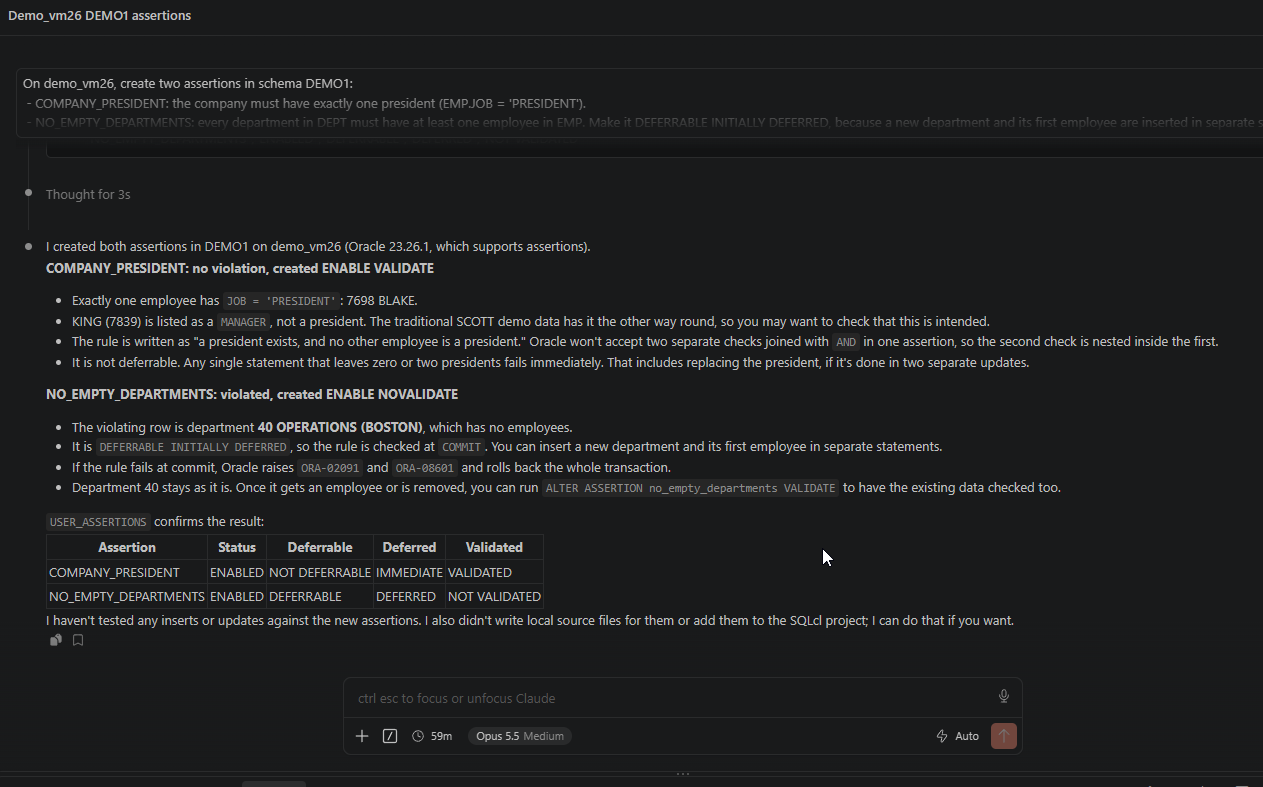
The skill made the agent confirm the database version before anything else. It checked each rule against the current data and then confirmed the result in USER_ASSERTIONS instead of assuming it:
COMPANY_PRESIDENThad no violation and was createdENABLE VALIDATE.NO_EMPTY_DEPARTMENTSfound department 40, OPERATIONS in BOSTON, without employees, so it was createdENABLE NOVALIDATE. The agent even reminded me thatALTER ASSERTION no_empty_departments VALIDATEwill check existing rows once department 40 gets an employee or disappears.
Two more remarks are worth reading:
- My demo data has been through a reorganisation already: BLAKE is the president and KING is a manager. The agent noticed that this differs from the classic SCOTT data and asked whether it was intended. Fair question.
- It pointed out that
COMPANY_PRESIDENTis not deferrable, so replacing the president in two separate updates will fail. Keep that in mind for round 2.
Finally, it did not export anything, because I had not asked it to. Export and staging only happen when you ask for them.
Creating them in the database is only half the job. Now the source:
Prompt
Export all assertions in schema DEMO1 from demo_vm26.
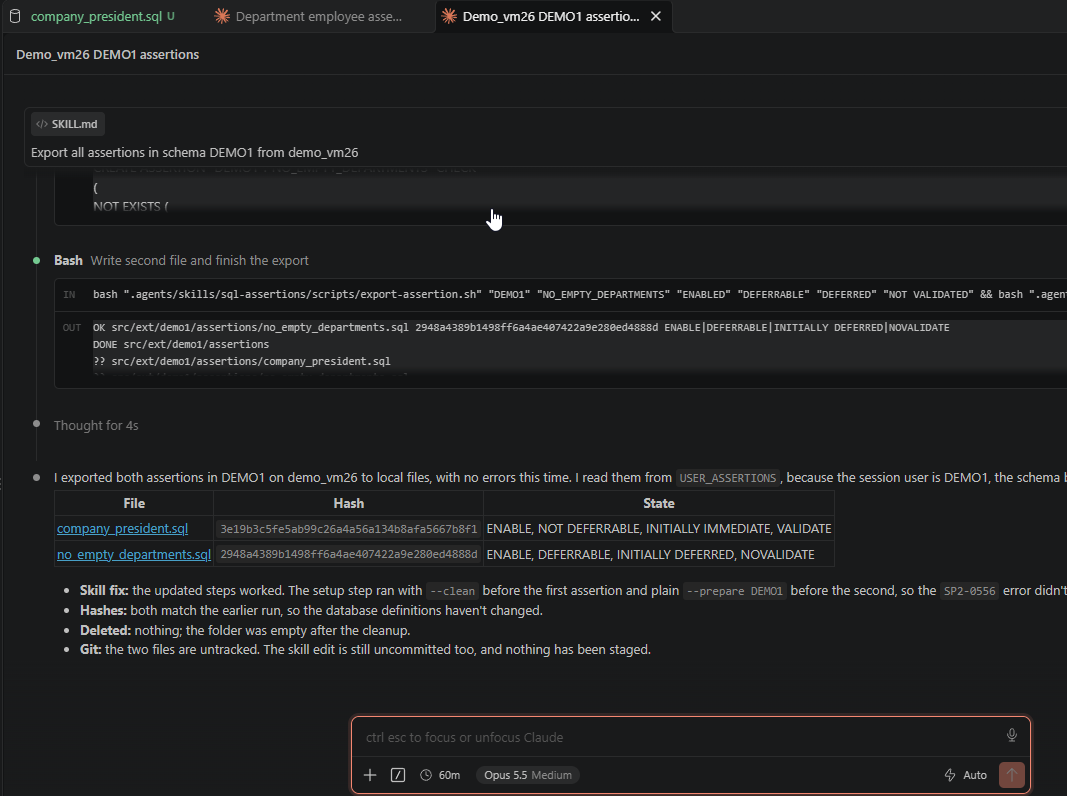
This is the deterministic part at work. The agent made its decisions first:
USER_ASSERTIONS, because the session user isDEMO1, the schema being exported;- a schema-wide scope, so the
assertionsfolder was emptied first.
Then it ran the scripts once per assertion. Each export-assertion.sh call printed one OK line with the file, its hash and its state, and the agent turned those lines into the table. It also noticed that both hashes matched an earlier test export, which tells you the definitions in the database have not changed. That is the kind of comparison staging relies on.
In VS Code, the result is two new, untracked files in src/ext/demo1/assertions, right where SQLcl Project would put its own objects if it knew about assertions:
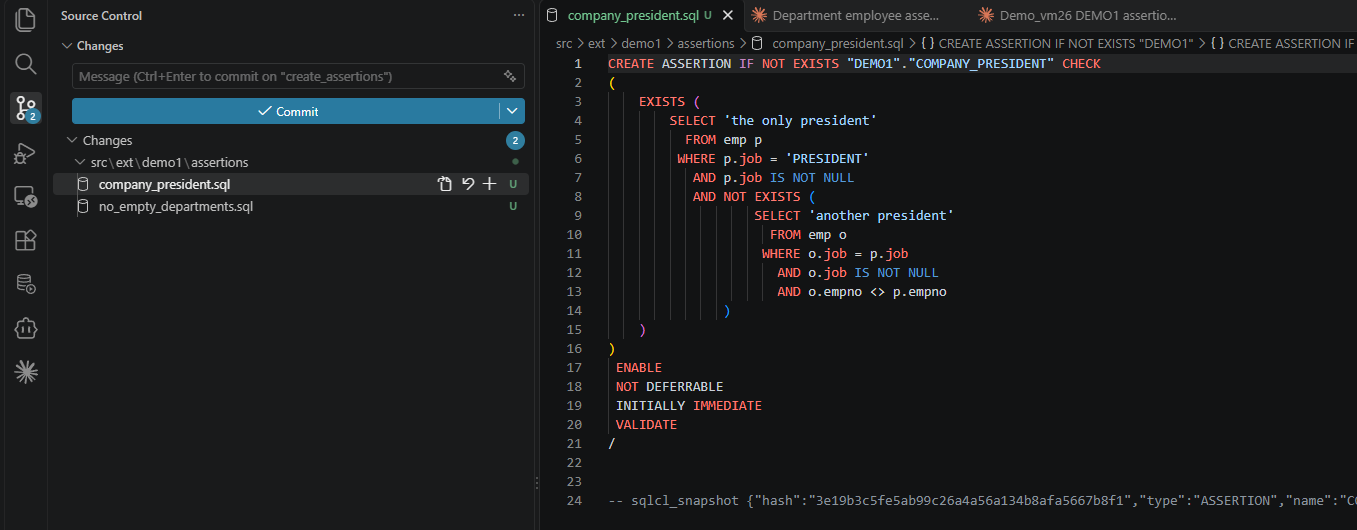
The file is the database’s own DEFINITION_SQL, with three additions:
IF NOT EXISTS, to make it safe to rerun;- a
/terminator; - the
-- sqlcl_snapshotline at the end, carrying the hash.
The four state clauses each sit on their own line, just as Oracle stores them, outside the hash.
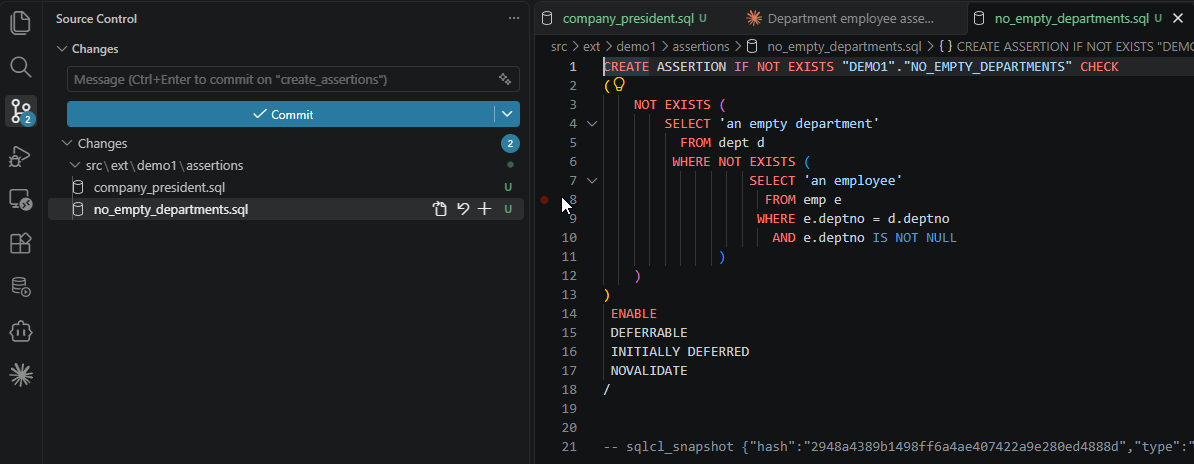
no_empty_departments.sql has the same shape. Its state clauses show what we asked for, DEFERRABLE INITIALLY DEFERRED and NOVALIDATE:
Let’s pretend these two assertions are all the database objects my new feature needs, so the database work on this branch is done. In real life, the branch would usually carry a table change or a package as well, in src/database.
At this point I would normally run project stage. It would stage the tables, the packages and everything else SQLcl Project knows about, and the workflow is the same whether there are two objects or twenty. But it does not know about assertions. To prove it, I committed the two files and ran project stage in SQLcl:
SQL> ! git add .

SQL> ! git commit -m "added two assertions"
[create_assertions 75a40bb] added two assertions
 2 files changed, 45 insertions(+)
 create mode 100644 src/ext/demo1/assertions/company_president.sql
 create mode 100644 src/ext/demo1/assertions/no_empty_departments.sql

SQL> project stage

Stage is Comparing:
Old Branch      refs/heads/main
New Branch      refs/heads/create_assertions


Stage processing completed, please review and commit your changes to repository

 Untracked files:
        src/database/hr
        tmp
        var
        annotations/emp
        dist/releases/next/changes/al-test-1
        src/database/demo1/apex_apps/f106/apex-exports
        src/database/demo1/synonyms
SQL>
The untracked files are leftovers from other experiments in my demo repository. What matters is what is missing: nothing appeared in dist/. project stage compared the branches and saw no change it understands. This is exactly the gap the skill fills, so now the prompt:
Prompt
Stage the committed assertion changes for this branch.
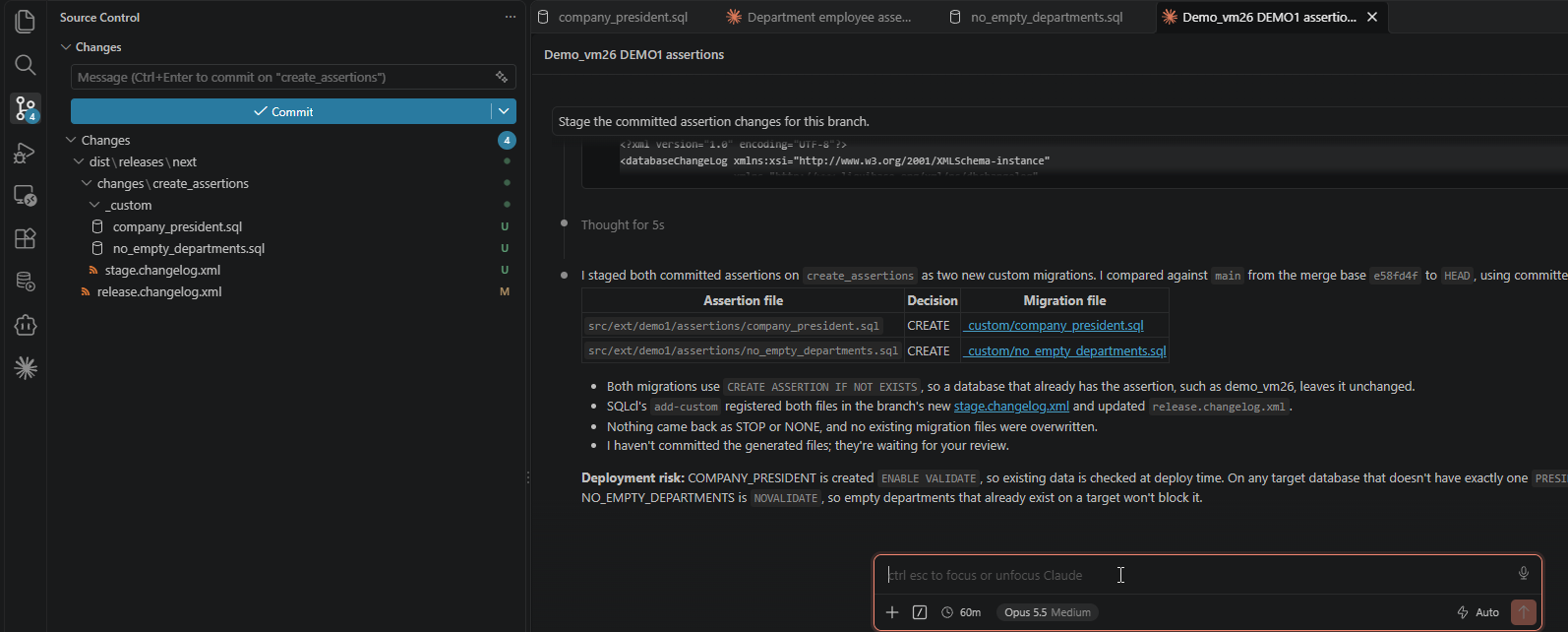
The agent compared the branch with main from their merge base. Both files are new on this branch, so the script decided CREATE for each, with no STOP and no NONE. On the left, Source Control shows what SQLcl itself created:
- two custom files under
_custom; - a new
stage.changelog.xmlfor the branch; - the updated
release.changelog.xml.
The agent also added two remarks I liked:
- The migrations are safe to rerun. They use
CREATE ASSERTION IF NOT EXISTS, so a database that already has the assertion, such as my development database, leaves it unchanged. - Check the target data before you deploy.
COMPANY_PRESIDENTisENABLE VALIDATE, so the deployment fails on any target database that does not have exactly one president.NO_EMPTY_DEPARTMENTSisNOVALIDATEand will not trip over existing empty departments.
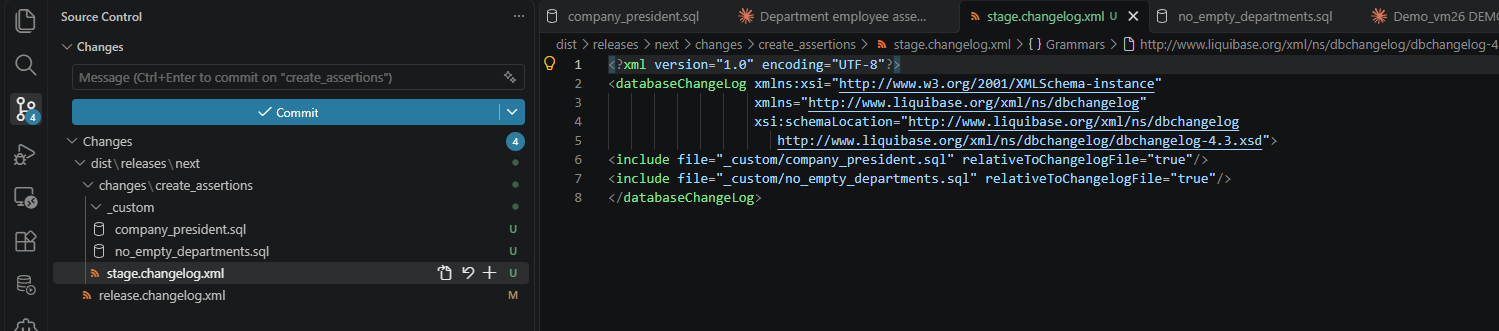
The branch’s stage.changelog.xml includes both files, exactly as it would for any other custom file:
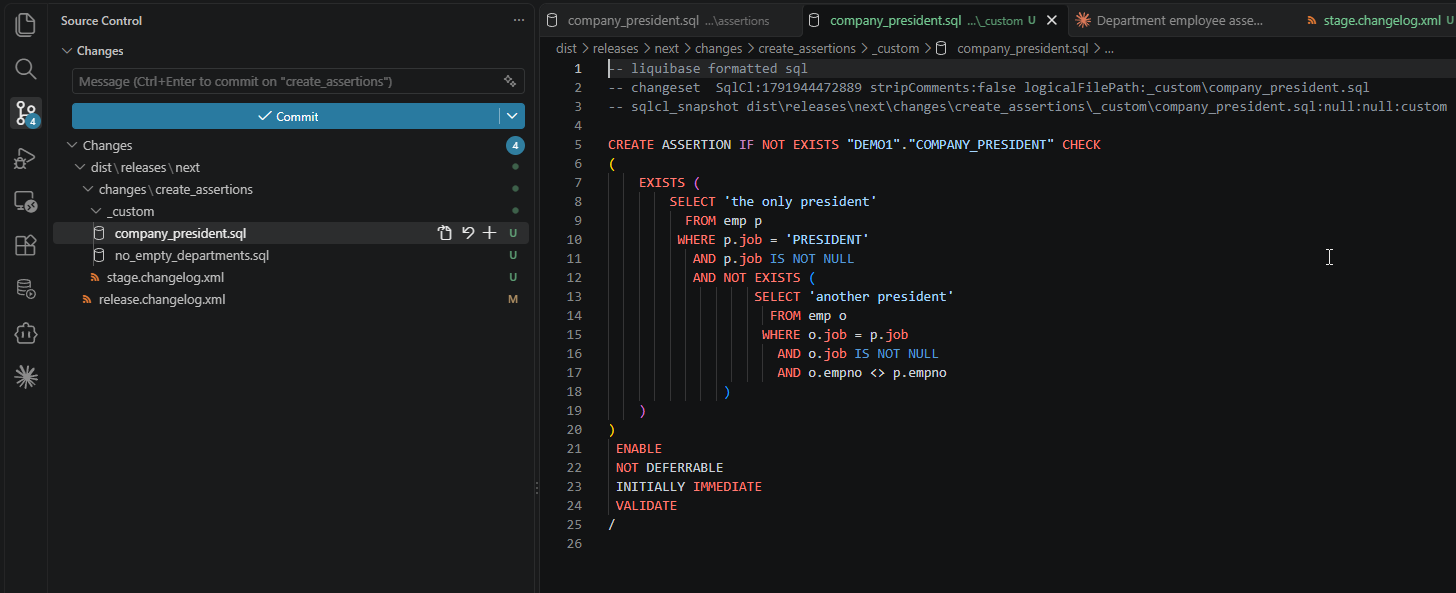
The custom file itself is a standard SQLcl changeset. It keeps the header SQLcl generated:
-- liquibase formatted sql;- the
-- changeset SqlCl:…line; - the
-- sqlcl_snapshot …:customline.
Below the header is the assertion from the source file, ending with /. The source file’s own snapshot line with the hash is deliberately not copied, because it belongs to the source and not to the migration.
Preparing the deployment is done. From here, nothing is assertion-specific. Normally I would commit the generated files, then run project release to cut a release, project gen-artifact to build the artifact, and project deploy against the target database. The order of those steps, and who runs them, may differ in your company. Either way, the changes end up in main. So I commit everything on the branch, assume it went to production successfully, and merge create_assertions into main. Now we are ready for round 2.
Round 2: one ALTER, one drop and recreate
A new branch from main:
git checkout -b modify_assertions
First, a business change. During a reorganisation, the president rule has to be switched off. This time I am in Codex:
Prompt
On demo_vm26, disable assertion DEMO1.COMPANY_PRESIDENT. Then export it.
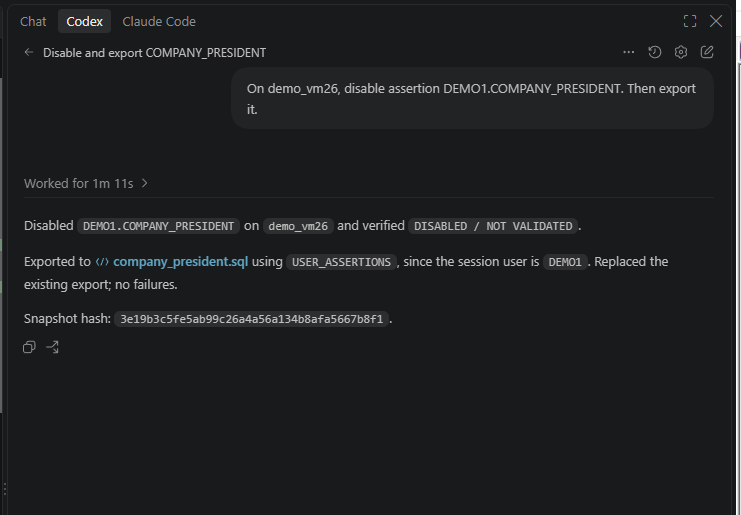
A different agent, a much shorter answer, the same behaviour:
- it disabled the assertion and checked the result in the dictionary:
DISABLEDandNOT VALIDATED, because a plainDISABLEalso meansNOVALIDATE; - it chose
USER_ASSERTIONSfor the same reason as before; - it replaced only the one export file.
Look at the snapshot hash: 3e19b3c5…, the same as in round 1. The diff shows why:
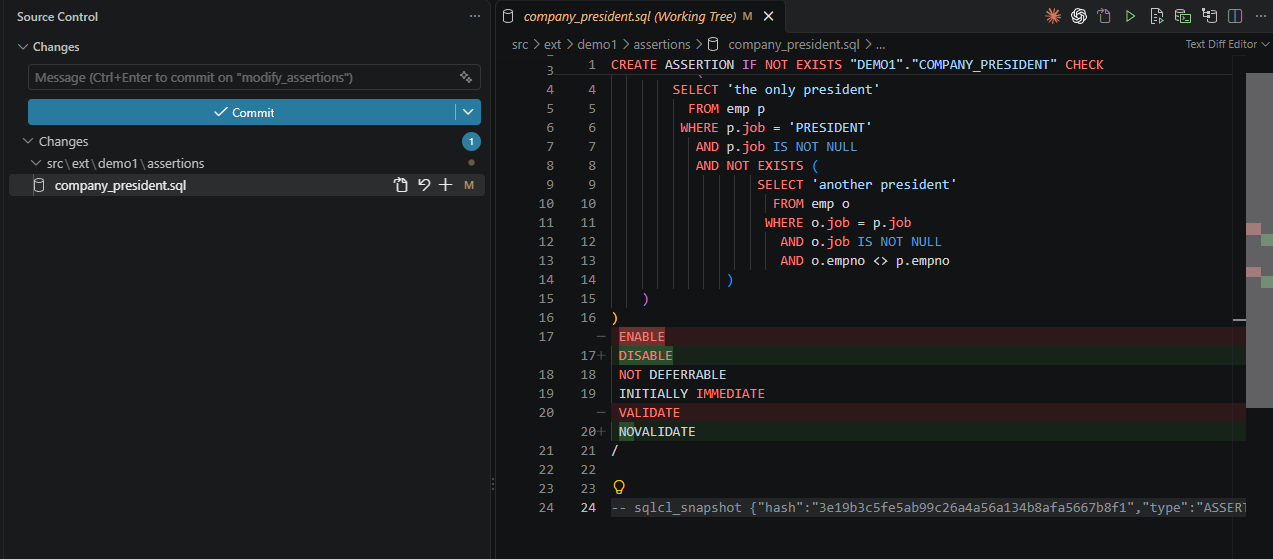
Only two state lines changed, ENABLE to DISABLE and VALIDATE to NOVALIDATE. The CHECK condition, and therefore the hash, did not. That is exactly the signal staging will use to choose an ALTER instead of a drop and recreate.
Second, a change in the condition itself. The rule stays the same, but I want it written in the universal ALL … SATISFY form:
Prompt
On demo_vm26, rewrite DEMO1.NO_EMPTY_DEPARTMENTS using the ALL … SATISFY form, keeping the same rule and the same DEFERRABLE INITIALLY DEFERRED, ENABLE NOVALIDATE state. Then export it.
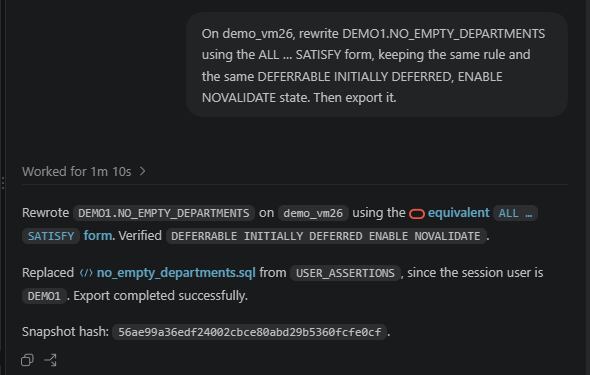
Again short and to the point. Codex rewrote the assertion in the database and verified that its state was still DEFERRABLE INITIALLY DEFERRED ENABLE NOVALIDATE. Since there is no CREATE OR REPLACE ASSERTION, a new condition in the database always means a drop and a create. It then exported the file from USER_ASSERTIONS. This time the snapshot hash is new: 56ae99a3… instead of round 1’s 2948a438…. The diff shows why:
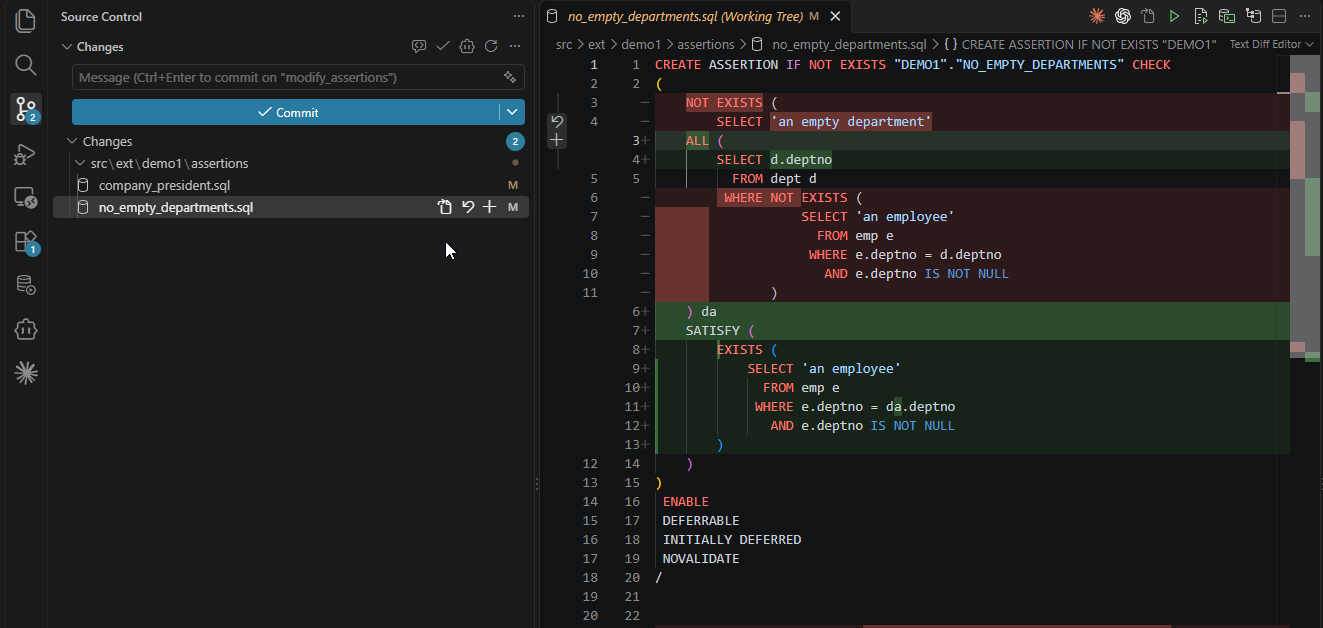
The rule now reads more like the business sentence: for all departments, it must be satisfied that an employee exists in that department. The state clauses did not move, but the CHECK condition, which is inside the hash, is completely different.
I commit both files and ask for the same staging as before. The prompt is identical; only the decisions differ:
Prompt
Stage the committed assertion changes for this branch.
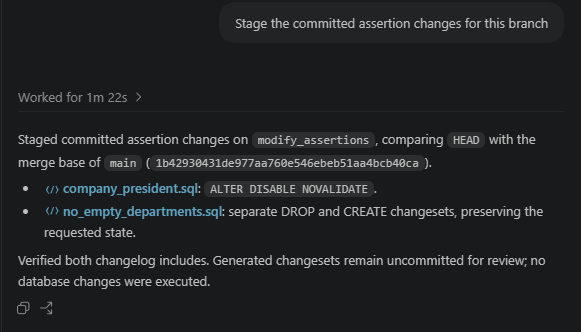
Codex compared HEAD with the merge base of main and found the two decisions we expected:
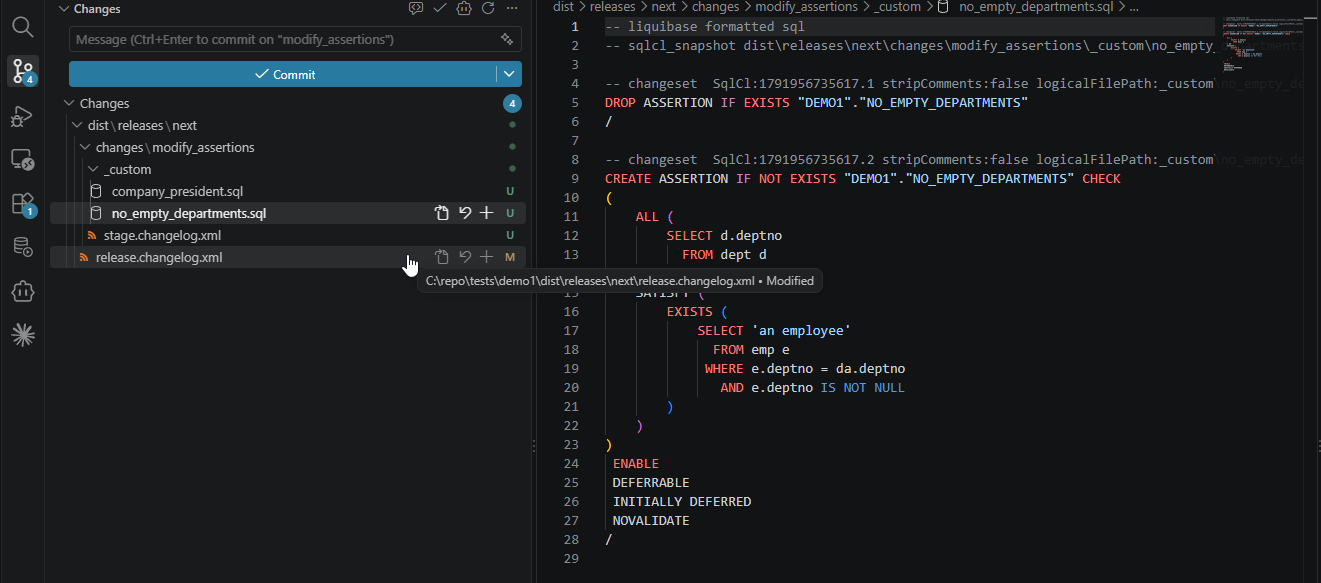
company_president.sqlbecameALTER DISABLE NOVALIDATE;no_empty_departments.sqlbecame separateDROPandCREATEchangesets.
It verified both changelog includes, left the generated files uncommitted for review, and did not touch the database. Staging only writes files.
The president’s custom file is as small as a migration can be. It keeps SQLcl’s header and holds one statement, with the final state:
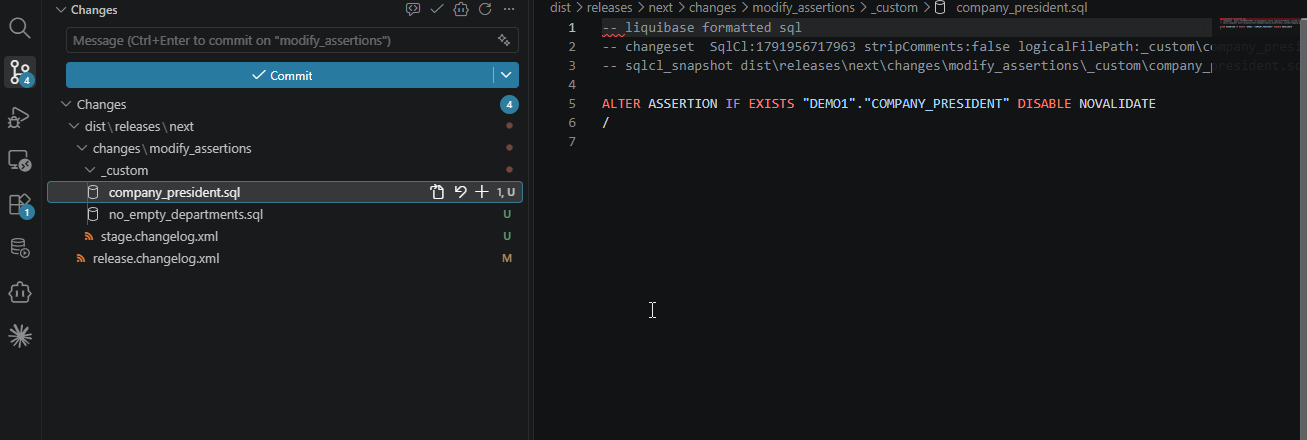
The department’s custom file is the drop and recreate. It has been split into two changesets, following the sqlcl-project skill’s splitting rules:
- the
-- sqlcl_snapshotline moved up under the Liquibase header; .1drops the old assertion;.2creates the newALL … SATISFYversion with its state clauses.
Because they are separate changesets, Liquibase records each one on its own. If the create ever fails, the drop is not repeated on the next run.
That completes the demo. We went through the same full cycle that SQLcl Project gives us for tables, views or packages:
- create the objects in a development database;
- export them to source;
- commit;
- stage the branch;
- change the objects;
- export again;
- stage again, getting the right deployment statement for each kind of change.
The difference is that for assertions, the prompts did the work that project export and project stage do for native objects. Everything from project release onwards stayed exactly the same.
Beyond assertions
Assertions are the example, but the pattern is general. Whenever SQLcl Project does not support something you need in your repository, you can plug it in the same way:
- Give it a home in
src/ext. A folder next tosrc/databasekeeps it in source control and out of SQLcl Project’s way. - Find the database’s own definition. For assertions, that was
DEFINITION_SQLinUSER_ASSERTIONS, becauseDBMS_METADATAcould not help. Export should copy what the database says, not rebuild it. - Write a snapshot line with a hash over the part of the definition that cannot be altered. Then staging can decide between
CREATE,DROP,ALTERand drop-and-recreate by comparing two lines of text. - Stage through
project stage add-customand the sqlcl-project skill’s rules. SQLcl creates and registers the files; your scripts only fill them. Never write intodist/by hand. - Keep decisions in
SKILL.mdand mechanics in scripts. Test both with more than one agent and on more than one operating system.
When SQLcl Project catches up
When SQLcl Project eventually supports assertions natively, and Plamen expects that to happen, this skill has done its job. The source files are ordinary SQL, so moving them into
src/databasewill be easy.
Assertions are really cool, but they are not the only thing SQLcl Project leaves out. These are not in the SQLcl 26.2 list of supported objects, and each has a dictionary view to export from, which makes it a good candidate for the same approach:
- Network ACLs:
DBA_HOST_ACESandDBA_HOST_ACLS, managed withDBMS_NETWORK_ACL_ADMIN. - APEX workspaces:
APEX_WORKSPACESandAPEX_WORKSPACE_SCHEMAS. APEX applications are supported, but the workspaces they live in are not. - Materialized view logs:
USER_MVIEW_LOGS. Materialized views are supported, but their logs are not, and a fast-refresh materialized view needs them. - Usage domains:
USER_DOMAINS, new in 23ai. Like assertions,ALTER DOMAINcan change only some properties. - SQL property graphs:
USER_PROPERTY_GRAPHS, also new in 23ai. - Security policies: Virtual Private Database policies (
USER_POLICIES), Data Redaction policies (REDACTION_POLICIES) and unified audit policies (AUDIT_UNIFIED_POLICIES). The first two are created by callingDBMS_RLSandDBMS_REDACTrather than with DDL, so staging would generate PL/SQL calls instead ofCREATEandDROPstatements. - Directories and database links:
ALL_DIRECTORIESandUSER_DB_LINKS. Their paths and hosts differ per environment, and a database link’s password must never end up in source control. - Oracle Text preferences:
CTX_USER_PREFERENCES. Indexes are supported, but the Text preferences they depend on are not.
The skill also kept improving while I used it, which may be the most useful lesson of all.
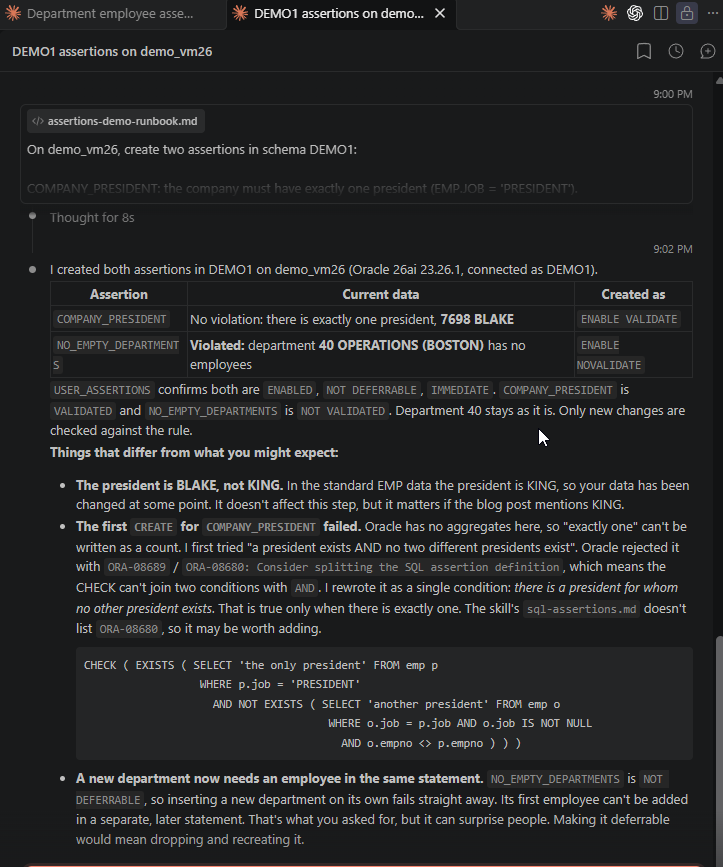 In my first attempt at the demo, the agent hit
 ORA-08680 and pointed out that the skill’s language reference did not mention it. It also warned me that a non-deferrable NO_EMPTY_DEPARTMENTS would make it impossible to add a new department at all. I added the error to sql-assertions.md and changed the demo to a deferred assertion. A skill is not finished when you publish it. Every session that goes wrong is a chance to make the next one go right.
Conclusion
SQLcl Project does a lot for us. It exports objects into a clean source tree, compares branches, and turns the differences into Liquibase changesets. What it does not have is a plug-in architecture. When it does not support an object type, there is no extension point where we could teach it one.
Assertions show that we can work around this with agentic development. Two things SQLcl Project already has turn out to be enough:
- custom files for deployment;
- the freedom to keep a parallel source folder,
src/ext, next tosrc/database.
A skill adds the missing pieces: export from the dictionary, a snapshot line with a hash, and a staging decision for every change. The result is the same everyday workflow we have for tables and packages: export, commit, stage, release and deploy. It worked with Claude Code and with Codex, through plain prompts.
Assertions were a great feature to start with, and well worth adopting on their own. Your project probably has its own objects that SQLcl Project does not support yet, from network ACLs to domains or security policies. Design a skill for them the same way: give the agent the decisions, give scripts the repeatable work, and keep improving both every time a session teaches you something.
Don’t just take my word for it
The skills are on GitHub, so copy them into your repository, run the demo with your own agent, and see whether it works for you. And if you build a skill like this for another object type, I would love to hear about it.
Sources
- Plamen Mushkov: Oracle 26ai Assertions
- Joel Kallman Day 2026 announcement
- sql-assertions skill on GitHub
- sqlcl-project skill on GitHub
- sql-assertions.md prepared for Oracle’s shared skills repository
- Oracle skills repository on GitHub
- Oracle AI Database SQL Language Reference: CREATE ASSERTION
- Oracle AI Database SQL Language Reference: ALTER ASSERTION
- Oracle AI Database SQL Language Reference: DROP ASSERTION
- Oracle AI Database PL/SQL Packages and Types Reference: DBMS_METADATA (object types table and the
GET_DDLassertion example) - ORACLE-BASE: Assertions in Oracle AI Database 26ai
- Oracle SQLcl User’s Guide: Supported Objects and Data Types for SQLcl Projects
- Oracle SQLcl User’s Guide: SQLcl Project