
August 27, 2026
Upgrading Oracle APEX and SQLcl to 26.1 in a Busy Development Environment
A real-world architecture for adopting APEX 26.1, SQLcl 26.1, SQLcl Project, and APEXlang while development and production support continue.
This article is for:
- Teams already using SQLcl Project for Oracle APEX applications and preparing to upgrade APEX and SQLcl to 26.1. This is the primary audience.
- Teams considering a move to SQLcl Project while upgrading to APEX 26.1. The article shows the practical challenges that such a combined move may present.
- Teams using APEX without SQLcl Project. The APEX compatibility constraint, environment architecture, severe APEX failure, application validation, regression testing, and cutover sections still apply. You can skip the SQLcl Project-specific export, staging, and release mechanics.
TL;DR
- This is not an academic article or a white paper. It is based on a real client-facing upgrade completed in July 2026.
- Many teams oversimplify an APEX upgrade by starting with DEV. That is safe only when development, fixes, and promotions can stop completely until every environment has been upgraded; otherwise, the team may lose its normal path for delivering application fixes to the older production environment.
- This post concentrates on the architecture of a live upgrade and summarises the challenges we encountered. In addition to the expected and documented post-upgrade application work, we encountered one severe APEX issue, almost a dozen SQLcl Project issues, and one regression affecting our own code. We resolved or worked around all of them and completed the upgrade; none was a roadblock, although some took considerable time and the APEX issue required Oracle’s help to diagnose. I plan to cover individual problems and lessons from this upgrade in more detail in future posts.
- This entire article is itself the TL;DR for a much larger, comprehensive guide. If you are actively planning an upgrade rather than casually exploring the subject, stop reading here and use the complete APEX 26.1 and SQLcl 26.1 upgrade guide.
Table of Contents
- TL;DR
- Table of Contents
- The constraint that defines the architecture
- Can you stop the universe?
- The three additional upgrade components
- The complete upgrade workflow
- What a resettable validation environment actually means
- What the real upgrade exposed
- Keeping production releases moving
- Why production is upgraded before development
- Acknowledgements
- Conclusion
- Sources
The constraint that defines the architecture
The most important fact in this upgrade is not a new APEX feature or SQLcl command. It is the direction in which APEX applications can move:
| Exported from | Imported into | Result |
|---|---|---|
| APEX 24.2 | APEX 26.1 | Supported forward path |
| APEX 26.1 | APEX 24.2 | Not supported |
There is no compatibility switch that converts a 26.1 application export into a 24.2 deployment artifact. Once an application is edited and exported from APEX 26.1, that export cannot be used to correct a production environment that is still running APEX 24.2.
This makes the order of environment upgrades an application-delivery decision, not merely an infrastructure preference. If DEV is upgraded first, developers can quickly lose the ordinary path for creating and promoting a production fix. Directly editing PROD, manually reconstructing a change on the old version, or maintaining ad hoc application copies are not acceptable substitutes for a controlled delivery process.
The safe architecture must temporarily preserve two capabilities at the same time:
- a current APEX line that can still deliver applications to the existing production environment; and
- an APEX 26.1 line where the applications, generated source, deployment history, and platform compatibility can be tested.
Everything else in this workflow follows from that requirement.
Can you stop the universe?
There are two valid ways to organise the upgrade. The right choice depends on whether the organisation can genuinely stop application delivery.
The complete-freeze model
Upgrading DEV first can work when the team can enforce a complete gate:
- everything intended for PROD has already been delivered;
- no new feature development begins;
- no production fix needs to pass through the current APEX line; and
- all work can wait until PROD, TEST, and DEV have been upgraded.
In that situation, DEV can become the upgrade environment. The workflow still requires application validation, functional regression testing, and a clean deployment test, but the team does not need to reconcile concurrent production releases into a parallel upgrade line.
The important word is complete. A nominal freeze with an exception for urgent production defects is not a complete freeze. The first urgent defect recreates the need for the older development environment… unless, of course, you want to take the risky route and develop and apply the fix directly in PROD.
The active-development model
Most application teams do not have the luxury of stopping every feature, fix, promotion, and production responsibility for the duration of a major upgrade. Baseline preparation and regression testing may take days or weeks, and production continues to change during that period.
For those teams, the current DEV/TEST/PROD path must remain available while a separate environment is upgraded and tested. Every release that reaches PROD during the upgrade must later be incorporated into the 26.1 line without losing either the production feature or the corrections already made for APEX 26.1.
That is the more demanding case covered here.
The three additional upgrade components
The active-development model adds three components to the normal environment chain:
| Component | Purpose |
|---|---|
| Production-like APEX 26.1 clone | Proves that the real production applications work after the platform upgrade |
| Resettable validation environment | Proves that Git source, generated artifacts, and Liquibase history can reproduce the upgraded system |
| SQLcl 26.1 Git worktree | Isolates the new SQLcl representation while the normal working directory continues to use the current SQLcl version |
The production-like clone and the validation environment are not interchangeable.
The clone should contain application and database metadata that is as close to PROD as practical. It is the place to discover that a page no longer opens, a plug-in is incompatible, a packaged application fails, or a business process behaves differently after the APEX upgrade. Production data is not required and may need to be removed or sanitised, but metadata fidelity matters.
The resettable environment answers a different question: can the reviewed project recreate the accepted state from a known starting point? A clone that works after an in-place upgrade does not prove that the SQLcl Project source, generated APEX exports, checksums, staged releases, and historical Liquibase changesets are complete.
The Git worktree keeps the filesystem side equally explicit. The ordinary project directory can remain on the SQLcl version used for current production delivery, while the upgrade directory selects SQLcl 26.1. A directory-aware SQLcl selector makes the version follow the folder automatically; the implementation used for this project is described in SQLcl Version Switching by Directory.
The complete upgrade workflow
The following diagram is the centre of the workflow. It shows the mandatory path, the optional drift-detection path, the application-repair loop, the deployment-validation loop, the production-release reconciliation loop, and the production-first cutover.
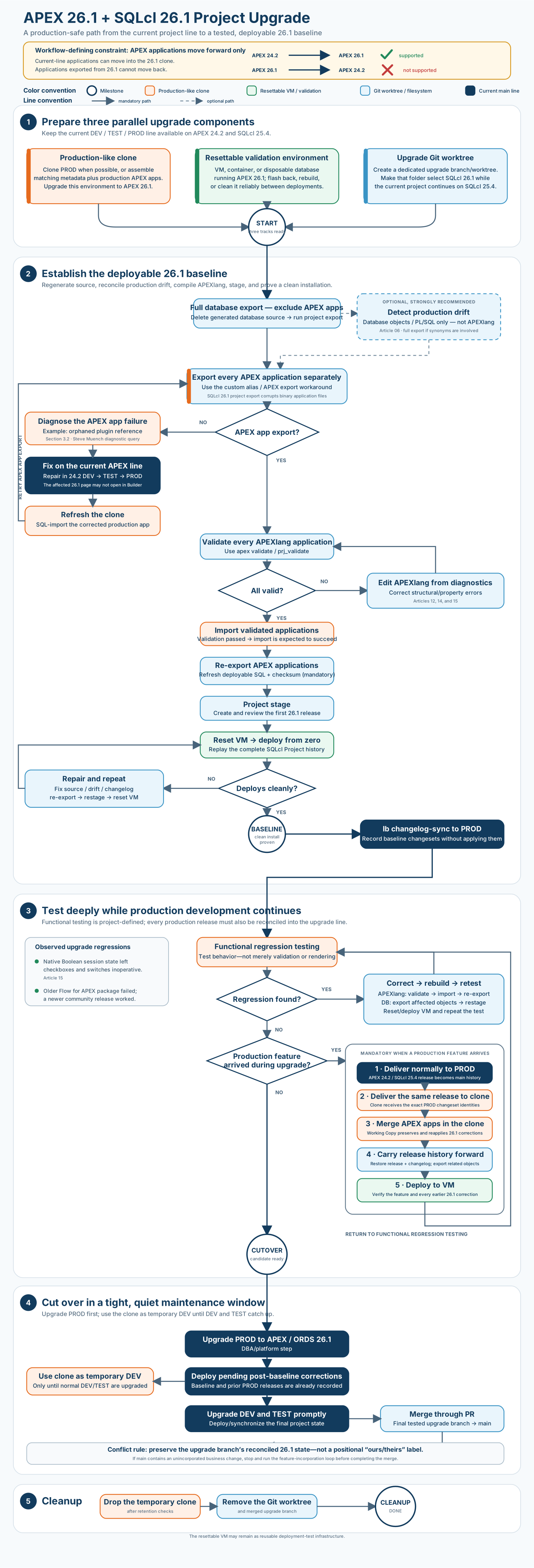
The complete APEX 26.1 and SQLcl 26.1 project-upgrade workflow. Click the diagram to open the full-sized version.
The five phases below deliberately match the diagram. Commands, diagnostics, detailed release manipulation, and screenshots are available in the complete guide.
Phase 1: Prepare three parallel upgrade components
Create the production-like clone, the resettable validation environment, and the SQLcl 26.1 worktree while keeping the current DEV/TEST/PROD line available.
The clone is upgraded to APEX and ORDS 26.1. The validation environment is prepared with a documented restore point. The worktree starts from the stable production branch and records the SQLcl 26.1 project representation separately from normal development.
This phase also establishes the operating rule for the rest of the upgrade: ordinary releases continue to reach PROD through the current line first. Only then are they carried forward into the upgrade line.
Phase 2: Establish and prove the deployable 26.1 baseline
Oracle’s SQLcl Project upgrade guidance starts with a dedicated branch, a new configured SQLcl version, deletion of generated database source, and a new export. Dan McGhan’s companion article explains the same tool-version upgrade pattern and the advantage of starting during a quiet period.
A combined APEX, SQLcl Project, and APEXlang upgrade has additional work to do. The objective is not merely a refreshed src folder. It is a reviewed 26.1 baseline that contains valid application exports and checksums and can be installed successfully from the project’s complete deployment history.
At a high level, this phase:
- regenerates database-object source with SQLcl 26.1;
- optionally uses the production-like export to detect meaningful production drift;
- exports every APEX application separately;
- validates, corrects, imports, and re-exports every APEXlang application;
- stages and reviews the baseline deployment entries;
- resets the validation environment and installs the complete project; and
- repeats the correction, export, staging, reset, and deployment loop until the installation succeeds.
Only then is the state declared the Baseline milestone. The exact proven commit is recorded, and its changesets are synchronised to PROD with Liquibase changelog-sync. Synchronisation tells PROD that these baseline changesets describe state already present there; it does not reinstall the baseline applications or database objects.
This separation is critical. Corrections discovered after the baseline remains pending and will be applied during cutover. Moving synchronisation to the end would blur the difference between state that already exists in PROD and genuine 26.1 upgrade corrections.
Phase 3: Test deeply while production development continues
Structural validation and clean deployment do not prove business behaviour. Run the project’s real functional regression plan against the production-like 26.1 clone, with particular attention to session state, JavaScript, plug-ins, packaged applications, authentication, integrations, and business processes.
Every regression follows the same loop: understand it in the clone, correct it, validate it, refresh the generated deployment artifacts, deploy again to the resettable environment, and repeat the functional test.
Meanwhile, production development may continue. Every release that reaches PROD must also be reconciled into the clone and upgrade branch using its original release history. The reconciliation path depends on what the release changed:
- Database objects and PL/SQL are normally straightforward. We do not independently develop PL/SQL in the upgrade branch. The database change reaches PROD through the current line, the exact same release is installed into the clone, its stable Liquibase history is carried into the upgrade branch, and the related source is refreshed with SQLcl 26.1. This is primarily release-history bookkeeping, not a second semantic code merge.
- APEX applications require a deliberate merge. The current production line may add a feature to an application while the upgrade line has already added APEXlang corrections, post-upgrade metadata changes, and regression fixes to that same application. Preserve the 26.1-corrected application as a Working Copy, install the production release into the clone, and merge the upgrade corrections back into the updated main application.
There is no trustworthy one-click merge for two independently changed APEX applications. Working Copies and APEXlang source comparisons make the differences visible, but a developer must still decide which components belong in the consolidated result. The detailed approach is covered in Merging APEX Working Copies with APEXlang.
The two paths are described separately below under Database object and PL/SQL changes are normally mechanical and APEX application changes require a deliberate merge.
Testing is complete only when:
- the agreed functional suite passes;
- all post-baseline corrections are represented in source and deployment history;
- every release already delivered to PROD is present under its original identity;
- consolidated APEX applications contain both business changes and 26.1 corrections; and
- the complete project still installs successfully in the validation environment.
The result is a cutover candidate: the synchronised baseline plus the genuine post-baseline corrections that remain pending.
Phase 4: Cut over
Upgrade PROD to APEX and ORDS 26.1 first, then inspect the complete Liquibase status before deploying the project. Every pending changeset must be recognised and expected.
PROD should skip the baseline entries recorded through changelog-sync and the current-line releases it has already executed under their original identities. It should apply only the genuine post-baseline upgrade corrections. If baseline applications, carried-forward releases, representation-only drift, or unexpected objects appear as pending, stop and investigate.
Until the normal DEV and TEST environments are upgraded, the clone can serve briefly as emergency DEV. This is a short transition state, not a permanent environment design.
Upgrade DEV and TEST promptly and refresh every development application to the accepted 26.1 state. Normal feature work should resume only when the complete promotion path is again on one APEX and SQLcl Project generation.
Phase 5: Clean up
Once all environments run the new stack and the final upgrade branch has been reviewed and merged:
- decommission the production-like clone according to the team’s retention and data-handling rules;
- remove the Git worktree with
git worktree remove, rather than simply deleting its directory; - remove the merged upgrade branch if repository policy permits; and
- retain the resettable validation environment if it remains useful for deployment testing.
The resettable environment is often the component worth keeping. A facility created for the upgrade can become permanent evidence that the project remains deployable.
What a resettable validation environment actually means
The validation environment must return reliably to a documented starting point. That starting point depends on the installer model; it does not have to mean an empty database.
With a privileged nothing-to-everything installer, the environment may be restored to a backbone installation containing the database platform and deployment user. The project installer can then create application schemas, grant privileges, create the APEX workspace, and deploy the complete application estate.
With a schema-owner installer, the restore point must already contain whatever the project cannot create: application users, workspaces, infrastructure privileges, or other required platform configuration. The project is then deployed from that prepared state.
The invariant is:
Restore to a known starting point and prove that the complete project deployment can reproduce the intended state from there.
In the diagram, deploy from zero should be read as deployment from that selected restore point. The clean installation is evidence of reproducibility, not a binary judgement that every project must create its own schemas and workspace.
What the real upgrade exposed
The architecture was not designed around hypothetical risks. A real production upgrade exercised every part of it: one severe APEX failure, numerous SQLcl Project 26.1 bugs and shortcomings, legitimate APEXlang migration work, and runtime regressions that neither export nor validation could reveal.
A severe APEXlang export failure requiring Oracle’s help
One application exposed a severe failure in the APEX 26.1 export tooling. The traditional SQL-format application export still worked, but APEXlang generation failed. That distinction matters: adopting APEXlang was one of the main objectives of moving the project to SQLcl 26.1, so falling back permanently to the old SQL export was not an acceptable resolution.
The first failure came from the normal SQLcl Project application-export task:
project export -o APEX.1968
The task failed while exporting the application as APEXlang. To determine whether the failure came from SQLcl Project orchestration or the underlying APEX export, we then tried the direct APEXlang export command:
apex export -api 1968 -exptype APEXLANG
It failed with the same underlying error:
Exporting Workspace **** - application ***:******
ORA-01403: no data found
ORA-06512: at "APEX_260100.WWV_FLOW_EXPORT_INT", line 2691
ORA-06512: at "APEX_260100.WWV_META_META_DATA", line 5240
ORA-06512: at "APEX_260100.WWV_META_META_DATA", line 2179
ORA-06512: at "APEX_260100.WWV_META_META_DATA", line 4505
ORA-06512: at "APEX_260100.WWV_META_META_DATA", line 5187
ORA-06512: at "APEX_260100.WWV_FLOW_EXPORT_INT", line 2634
ORA-06512: at "APEX_260100.WWV_FLOW_EXPORT_INT", line 2825
ORA-06512: at "APEX_260100.WWV_FLOW_EXPORT_API", line 110
ORA-06512: at line 3
That was all the diagnostic information we had. The error did not identify an application page, component, plug-in, or property. Both the SQLcl Project task and the direct APEXlang export reached the same failure, and we had no practical indication of what inside the application caused it.
At that point, we asked Oracle for help in the APEX 26.1 application export forum thread. Steve Muench supplied a diagnostic query. It identified two Dynamic Actions on page 13 that referenced a plug-in which had previously been deleted.
The diagnosis led to a second problem: page 13 could not be opened normally in App Builder on the upgraded APEX 26.1 clone. The export error had not told us what to fix, and once Oracle’s query identified the page, the upgraded environment did not provide a supported graphical route for fixing it.
The same page still opened on the APEX 24.2 line. There, App Builder visibly marked the plug-in references as invalid. The orphaned components were behind a Build Option, so the application had continued to run and the inconsistent metadata had remained hidden until the APEXlang export was attempted on 26.1.
This combination is why I consider the issue severe. If the export error had identified the offending components, or if page 13 had opened normally on APEX 26.1 so we could repair them, this would have been a minor upgrade correction. Instead, the export produced an uninformative stack trace, Oracle’s help was required to discover the cause, and the problem could not be corrected in the upgraded environment alone.
The repair had to start on the still-available APEX 24.2 line:
- remove or correct the invalid components in 24.2 DEV;
- promote the application normally through TEST and PROD;
- import the corrected production application into the 26.1 clone; and
- retry the 26.1 export.
Fixing only the clone would also have left the production lineage inconsistent. The correction belonged in 24.2 DEV and had to move through the normal delivery path before the clone was refreshed. More importantly, upgrading DEV first would have removed the environment in which the page could still be opened and repaired. This was a direct demonstration of why the current APEX line must remain available during a busy upgrade.
SQLcl Project 26.1 required substantial workarounds
Moving the project to the SQLcl 26.1 build used for this upgrade exposed a long list of bugs, issues, and representation changes. I want to state clearly that I remain a strong supporter of SQLcl Project. Despite these problems, it is still the best tool currently available for the source-control and deployment workflow I need.
None of the issues below was critical, and none blocked the upgrade. We successfully worked around or mitigated all of them. The purpose of this list is to give other teams a complete picture of what they may encounter and help them recognise the symptoms quickly instead of rediscovering each workaround.
| # | Observed problem | Severity, consequence and response | Evidence |
|---|---|---|---|
| 1 | SQLcl Project export corrupted binary APEX static files | Severe. Images, icons, PDFs, and other binary files became unreadable. Each application required a two-step export: SQLcl Project for the deployable SQL and checksum, followed by direct APEXlang export to replace the corrupted source tree. | Binary corruption report |
| 2 | SQLcl Project export retained stale APEXlang files | Severe. Files for pages or other components deleted in App Builder could remain in the filesystem after re-export, so generated source no longer matched the live application. The direct APEX export workaround used -f to refresh the application directory and remove stale files. |
Stale APEXlang files report |
| 3 | Supporting Objects blocked project stage |
Severe. SQLcl reported hard-object hash mismatches that it could not adjust. The affected Supporting Objects had to be removed before the applications were exported and staged again. | Supporting Objects staging report |
| 4 | ORDS export ignored the configured application schema and used the connected account | Moderate. SQLcl Project should export ORDS metadata for the application schema listed in the project configuration. Instead, it called the current-schema ORDS export API for the account used by the live connection. With a privileged deployment account, SQLcl therefore attempted to export ORDS for the deployer rather than the configured application schema. The resulting “schema not REST enabled” error was only a symptom; the real defect was selecting the wrong schema and API context, which could silently omit the intended ORDS metadata except for a debug message. When no ORDS change must be captured, the straightforward workaround is to add export_type not in ('ORDS_SCHEMA'), temporarily to .dbtools/filters/project.filters; when ORDS must be exported, connect as the configured REST-enabled application schema. The impact is serious when triggered, but the rating is moderate because it affects only projects that manage ORDS while exporting through a different privileged deployment account. Editorial note: this was reported to the SQLcl team with the first SQLcl Project release in 24.3 and remained unaddressed in SQLcl 26.1. |
ORDS configured-schema report |
| 5 | project stage regenerated ORDS changes without a semantic change |
Low (high nuisance). Repeated staging produced noisy ORDS changesets that could conceal a real change and had to be reviewed and removed. It was not destructive, but it repeatedly consumed time and attention. | SQLcl Project bug 1.6 |
| 6 | Grant filenames changed | Awareness — not a bug. SQLcl 26.1 changed the generated filename structure for object grants. Git therefore saw an old file removed and a newly named file created, and staging could represent that as a revoke followed by a new grant even though the privilege itself had not changed. Be aware of the representation change, compare both definitions, and remove changesets that reflect only the filename transition. | Grant filename analysis |
| 7 | Targeted project export -o silently ignored synonyms |
Moderate. A selective refresh could leave related synonym source stale. Once known, the workaround is straightforward: run project export without the -o parameter. If the normal project filters would exclude required related objects, temporarily adjust .dbtools/filters/project.filters, run the export, and then restore the filters. |
SQLcl Project bug 1.8 |
| 8 | Agent-driven apex import could encounter an autocommit failure |
Low (niche). This affects teams using agent or MCP-driven SQLcl execution. Run the validated APEXlang import directly in SQLcl when the automated path encounters the autocommit failure. | APEXlang import workflow and workaround |
Review both source and staged releases. A successful
project exportorproject stageis not proof that the resulting deployment is correct. Separate semantic changes from serialization noise, test binary files, inspect ORDS and grants, and confirm that a targeted export really refreshed every related object. Then prove the result by deploying it from the validation environment’s known restore point.
Moving to APEXlang involves legitimate migration work
Not everything discovered during the upgrade was a product bug. Adopting APEXlang across a real application estate required normal conversion and validation work that had to be planned and performed.
Every exported application—not merely the applications that appeared to have changed—was run through apex validate. A clean validation result was a required part of establishing the baseline.
The validation experience was mixed. Sometimes the compiler gave us a precise file, line, column, error type, and offending text. Sometimes validation succeeded but still produced warnings worth correcting. In the least helpful cases, malformed source caused a Java exception instead of a normal compiler diagnostic.
The original correction work was not captured as terminal screenshots. The following examples were reproduced afterwards with the same application source and commands, and they demonstrate the three kinds of result encountered during the upgrade. Each example used:
prj_validate 100
1. Validation succeeds with actionable warnings.
Output should look something like this:
Validating APEXlang app 100 from src/database/cla_apex/apex_apps/f100/opus -ws CLA_INTERNAL ...
APEXLang Compile Warnings:
File: application.apx
Line: 73
Column: 8
Type: PROPERTY_DEPRECATED
Warning: Property appBuilderIconName is deprecated.

File: pages/p10041-page-help.apx
Line: 3
Column: 4
Type: FILENAME_MISMATCH
Warning: Page alias in the file does not match that in the filename

Validation successful.
The application validated, but the deprecated property and filename mismatch still deserved review. A generic “validation successful” check that hid the warnings would have missed useful migration work.
2. Validation returns a precise compiler error.
Output should look something like this:
Validating APEXlang app 100 from src/database/cla_apex/apex_apps/f100/opus -ws CLA_INTERNAL ...
APEXLang Compile Errors:
File: shared-components/plugins/process/ucApexMessageServiceProcess/custom-attributes.apx
Line: 5
Column: 4
Type: SYNTAX
Error: token recognition error at: 'propr : s'

File: shared-components/plugins/process/ucApexMessageServiceProcess/custom-attributes.apx
Line: 5
Column: 16
Type: SYNTAX
Error: token recognition error at: 'erverUrl\n'
This was the good failure mode. The diagnostic identified exactly where to begin correcting the APEXlang source.
3. Validation terminates with a Java exception.
Output should look something like this:
Validating APEXlang app 100 from src/database/cla_apex/apex_apps/f100/opus -ws CLA_INTERNAL ...
2026-08-26 17:00:33.643 SEVERE oracle.dbtools.raptor.newscriptrunner.ScriptExecutor run java.base/java.lang.NumberFormatException.forInputString(Unknown Source)
java.lang.NumberFormatException: For input string: "null"
        at java.base/java.lang.NumberFormatException.forInputString(Unknown Source)
        at java.base/java.lang.Integer.parseInt(Unknown Source)
        at java.base/java.lang.Integer.parseInt(Unknown Source)
        at oracle.apexlang.core.ComponentPlugin.getAttributeValueFromComponent(ComponentPlugin.java:658)
        at oracle.apexlang.core.ComponentPlugin.createCustomAttributeFrom
        ...
This was harder to interpret because validation crashed instead of returning a compiler error. The stack still narrowed the problem to a value expected to be an integer, and editor diagnostics plus source inspection led us to the malformed property.
Validation was therefore not always easy or consistently informative, but it did not create a major delay. We found the root cause in every application, corrected the .apx source, and repeated validation until it succeeded. The validated application was then imported into the clone and exported one final time.
Please note: the final export and staging steps are mandatory in a SQLcl Project workflow. Correcting and validating the
.apxfiles does not automatically update the application’s deployable artifacts. After validation succeeds, import the corrected APEXlang application into the clone, re-export the application so that its generatedfNNN.sqlfile and checksum reflect the corrected state, and then runproject stageto update the application entry in the staged release. SQLcl Project deploys the generated SQL application export; it does not deploy the edited.apxfiles directly. Stopping after APEXlang validation or import would therefore leave the deployable and staged SQL artifacts stale.
The Oracle APEXlang documentation explains the language and commands, while SQLcl Project with APEXlang: First Impressions covers the export, validation, import, and re-export cycle in more detail.
APEXlang made structural problems searchable and repeatable corrections much easier to review. It also made clear that moving a large application estate to a compiler-backed source format is a real migration activity, not merely a change of export option.
Functional regression testing remains mandatory
After every application exported, validated, imported, and deployed, functional testing still found problems.
The first involved controls backed by native Oracle Database BOOLEAN columns. On APEX 24.2, the checkboxes and switches worked even though their session-state data type remained at the default VARCHAR2. After the applications moved to APEX 26.1, the same controls still rendered, but they did not work for either Boolean value. APEX 26.1 allows the session-state data type to be set explicitly to BOOLEAN, and that setting became essential: without it, the controls could not operate correctly against the native Boolean columns. Correct source typing, Boolean session state, native Boolean defaults, filter metadata, and shared component settings were required before the controls worked again. The complete correction is documented in Native Boolean Columns in Oracle APEX 26.1 and APEXlang.
The second involved a packaged application. Flows for APEX 22.2 still worked under APEX 24.2 but failed in the APEX 26.1 clone. Upgrading Flows for APEX Community Edition to 25.1 restored operation. Because the newer package also worked on the current APEX line, it could be promoted through all environments before cutover rather than becoming a 26.1-only correction.
These examples are not a universal compatibility list. They are a warning against complacency.
An application that exports, validates, imports, deploys, and renders may still be functionally wrong. Test data entry and persistence, session state, JavaScript, integrations, authentication, plug-ins, packaged applications, and the business workflows that matter. Third-party and community applications deserve the same attention as code developed by your own team.
Keeping production releases moving
Regression testing can take long enough for several ordinary releases or urgent fixes to reach PROD. Each one must join the upgrade candidate without changing the Liquibase history that PROD already recorded.
Database/PL/SQL changes and APEX application changes require fundamentally different reconciliation strategies. If a production release contains only database-object or PL/SQL changes, carrying it into the upgrade line is normally mechanical. If an APEX application changed, the current-line feature and the accumulated 26.1 corrections may have modified the same application, and there is no automatic merge that can be trusted without review.
The complete guide’s production-release reconciliation section provides the exact sequence. The architectural distinction is worth making explicit here.
Database object and PL/SQL changes are normally mechanical
The upgrade branch is not a second development line for database objects and PL/SQL. Those changes continue through the ordinary DEV/TEST/PROD path and reach PROD first. The same released change is then delivered to the clone using the current worktree and current SQLcl version.
Once that production release is merged into main, carry its exact release folder, paths, changeset identifiers, and content into the upgrade branch. Add its include to the upgrade branch’s changelog controller and refresh the related generated source with SQLcl 26.1. Do not stage a second representation of the same logical database change.
Because PROD and the clone have already executed the same stable Liquibase changesets, this is largely release-history bookkeeping rather than a semantic code merge. A new validation environment executes that history during clean installation, while PROD recognises the original changeset identities and skips them at cutover.
There is one SQLcl-specific caution: a targeted project export -o in SQLcl 26.1 can silently ignore synonyms. When synonyms are involved, or the complete related-object set is uncertain, run project export without the -o parameter. If the project’s normal filters would exclude required related objects, temporarily adjust .dbtools/filters/project.filters, run the export, and then restore the filters.
APEX application changes require a deliberate merge
APEX is different because most upgrade-specific work happens inside the applications: APEXlang corrections, post-upgrade metadata changes, and fixes discovered during regression testing. At the same time, the current production line may deliver a new feature or hot fix to the same application.
Before delivering that production release to the clone, create a Working Copy from the clone’s current APEX 26.1 application. The Working Copy preserves every upgrade correction accumulated so far. Then install the exact application release that reached PROD into the clone’s main application. The main application now contains the new production feature, while the Working Copy retains the 26.1 corrections that the installation overwrote.
Now compare the two and deliberately merge the required upgrade corrections from the Working Copy into the updated main application. Neither complete application is automatically authoritative:
- the main application contains the latest production feature; and
- the Working Copy contains the accumulated APEX 26.1 corrections.
There is no trustworthy one-click merge for these two independently changed APEX applications. A Working Copy comparison and an APEXlang source diff make the work manageable, but a developer must still review the affected components and decide what belongs in the consolidated application.
After the merge, export and review the consolidated application, validate its APEXlang, import it if source edits were required, perform the mandatory final re-export, and stage the resulting application deployment entry. Then deploy the project to the resettable validation environment and return to functional regression testing.
This APEX reconciliation loop—not the database/PL/SQL carry-forward—is the real price of allowing productive work to continue during the upgrade. It is also why starting during a relatively quiet period remains useful even when a complete freeze is impossible.
For a detailed Working Copy and APEXlang comparison workflow, see Merging APEX Working Copies with APEXlang.
Why production is upgraded before development
The cutover order often feels counterintuitive because teams are accustomed to upgrading DEV first. The forward-only application rule reverses that instinct.
Once PROD runs APEX 26.1, it can accept the tested 26.1 application exports and post-baseline corrections. Upgrading DEV first would create a period in which the primary development environment produces applications that the production platform cannot accept.
This does not mean testing a new version in PROD. The production-like clone and resettable environment have already carried the upgrade candidate through compatibility testing, source validation, deployment replay, functional regression, and release reconciliation. PROD is first only among the normal DEV/TEST/PROD line during the final cutover.
Based on this upgrade, a practical timeline looks like this:
- Prepare the prerequisites. Provision and upgrade the production-like clone, prepare the resettable validation environment, and create the upgrade worktree. This preparation can take as long as required.
- Build and prove the baseline. Once the prerequisites are ready, establish the deployable baseline in the clone and prove it through the validation environment. Preferably, concentrate this initial baseline work into the next one or two days.
- Test and reconcile for as long as required. Run functional regression testing and incorporate every release that reaches PROD. This stage may take weeks or longer; do not shorten it to meet an arbitrary cutover date.
- Upgrade PROD. Upgrade APEX and ORDS in production, inspect the pending changesets, and deploy the reviewed post-baseline corrections.
- Upgrade DEV and TEST immediately afterwards. Preferably complete them in the same maintenance window as PROD, or as soon afterwards as operationally possible.
The first three stages can be deliberately long. The transition between stages 4 and 5 should be deliberately short. During that gap, the already-tested APEX 26.1 clone provides a trusted temporary development environment for production bug fixes and other emergency deployments. Limit work during this transition to fixes and emergencies; normal feature development should wait until DEV and TEST have joined PROD on the same APEX and SQLcl Project generation.
Acknowledgements
Thank you to my colleagues Fekrad El-Wendi and Plamen Mushkov. Fekrad did the excellent infrastructure work that made the clone and supporting upgrade environments possible. Plamen shared the APEX side of the upgrade work with me and helped us work through its application-level challenges.
Conclusion
The defining challenge of this upgrade was not installing APEX 26.1 or changing a SQLcl version number. It was preserving a valid production-delivery path while building and proving its replacement. The one-way movement of APEX application exports made that an architecture problem before it became a command-line problem.
The production-like clone, resettable validation environment, and SQLcl 26.1 worktree protected different capabilities. Together they allowed normal delivery to continue, exposed a severe APEX failure while it could still be repaired on 24.2, isolated numerous SQLcl Project issues, supported the APEXlang migration, and caught runtime regressions before cutover.
If your organisation can stop all work until every environment is upgraded, the workflow can be simplified. If it cannot, preserve the current line, build a parallel upgrade line, test applications rather than only artifacts, and require every production release to be reconciled before cutover.
This article has intentionally stayed at the architectural and lessons-learned level. For the exact commands, aliases, screenshots, diagnostic output, Liquibase baseline procedure, application merge sequence, and production checklist, continue with the complete APEX 26.1 and SQLcl 26.1 upgrade guide.
Sources
- APEX 26.1 and SQLcl 26.1 Upgrade Guide
- Complete APEX 26.1 and SQLcl 26.1 project-upgrade workflow diagram
- Oracle: Upgrading SQLcl When Using SQLcl Project
- Dan McGhan: Upgrading SQLcl When Using SQLcl Project
- Oracle APEXlang documentation
- Oracle Forums: APEX 26.1 application fails to export as APEXlang
- Oracle Forums: SQLcl corrupts APEX static files during export
- Oracle Forums: SQLcl Project export should remove stale APEXlang files
- Oracle Forums: SQLcl Project stage fails when analysing Supporting Objects
- Oracle Forums: SQLcl Project ORDS export should use the configured project schema
- realSQLclProject: SQLcl Project bugs and enhancement requests
- realSQLclProject: SQLcl Project with APEXlang — First Impressions
- Native Boolean Columns in Oracle APEX 26.1 and APEXlang
- Merging APEX Working Copies with APEXlang
- SQLcl Version Switching by Directory
- Fekrad El-Wendi on LinkedIn
- Plamen Mushkov on LinkedIn